 Last updated April 28, 2026
  6 min read
PeopleFinders opt-out guide: 2026 removal instructions
| Removal difficulty: | Low |
| Profile is removed within: | 9 days |
| Manual submission: | around 10 min |
| Removal requirements: | email, CAPTCHA |
What is PeopleFinders.com?
PeopleFinders.com is a data broker that posts online all kinds of personal information, including phone numbers, property history, relatives, work history, and criminal records. The opt-out process requires you to fill out an opt-out form on their website. According to their customer service, the processing of removal requests takes around 3 days. In our experience, the removal may take more than a week to complete.
Step-by-step: how to remove info from PeopleFinders
In short (detailed steps below):
- Navigate to PeopleFinders’ opt-out page peoplefinders.com/opt-out
- Click “Next” under Right to Opt-out
- Submit your name and email
- Click on the verification link sent to the provided email
- Complete the opt-out form with your data and submit your request
Step 1: Navigate to the “Do Not Sell My Personal Information” page
Go to PeopleFinders.com, scroll all the way down, and click on the “Do Not Sell My Personal Information” link.

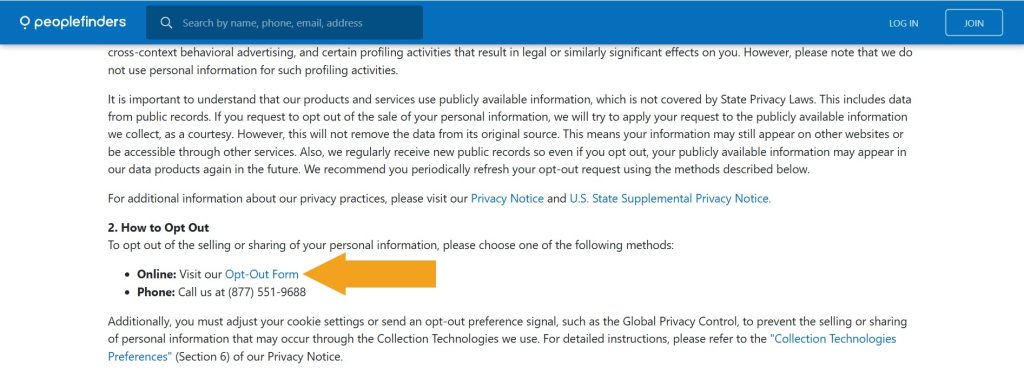
Step 2: Click the “Opt-Out Form” link
Find the “Opt-Out Form” link in the “2. How to Opt Out” section and follow it.
Step 3: Select the “Right to Opt Out” option
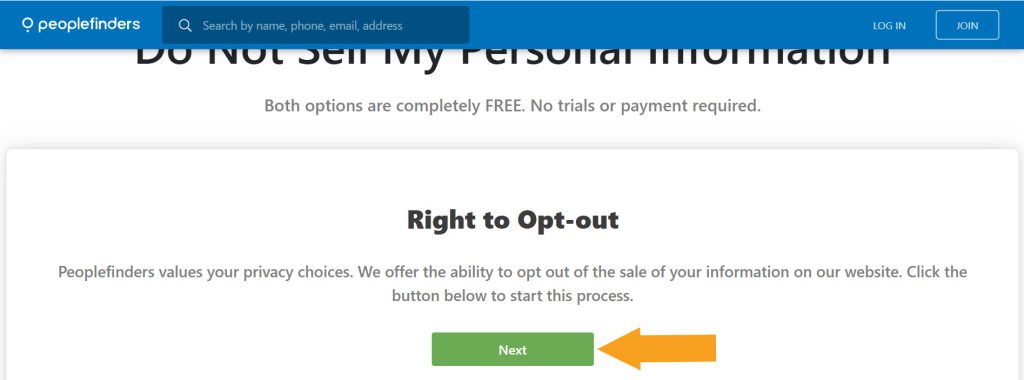
Click the “Next” button in the Right to Opt-out section.
Step 4: Submit your full name and email
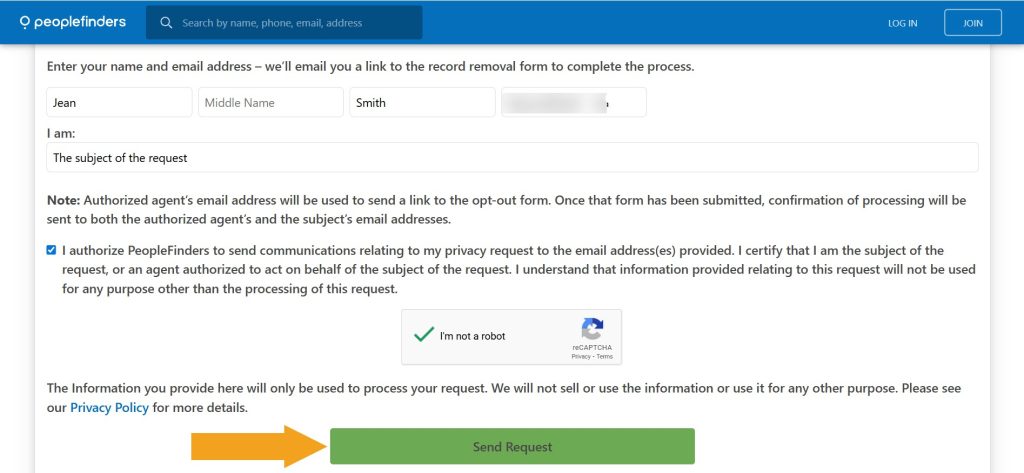
Scroll the appearing page down, then enter your full name and a valid email address. Make sure you have “The subject of the request” selected in the dropdown, check the agreement to receive opt-out communications, solve the CAPTCHA, and click “Send Request.”
Step 5: Confirm your email address
Find a verification email from PeopleFinders customer service in your inbox, open it, and click the “Click here to fill out the form” button.
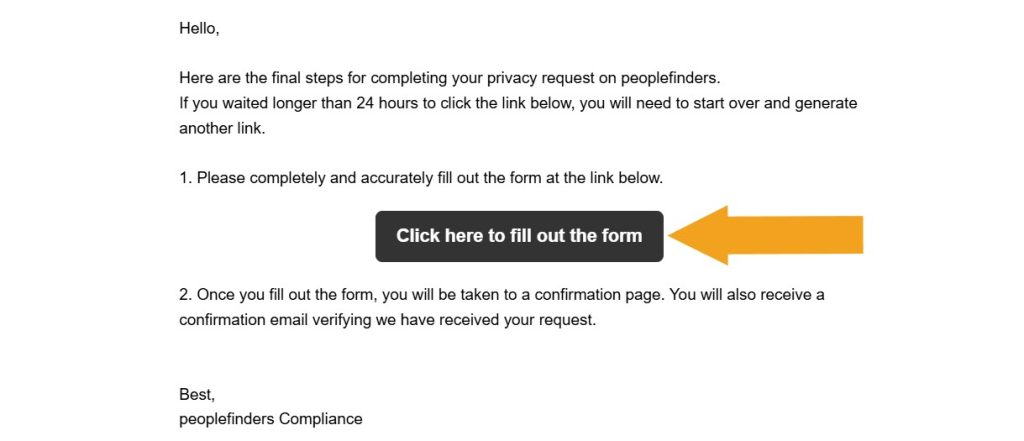
Step 6: Complete the opt-out form and submit it
Fill out the appearing form with your personal details. Note that only the fields marked with an asterisk are obligatory. Then check the box stating the info is correct, complete the CAPTCHA, and click “Submit.”
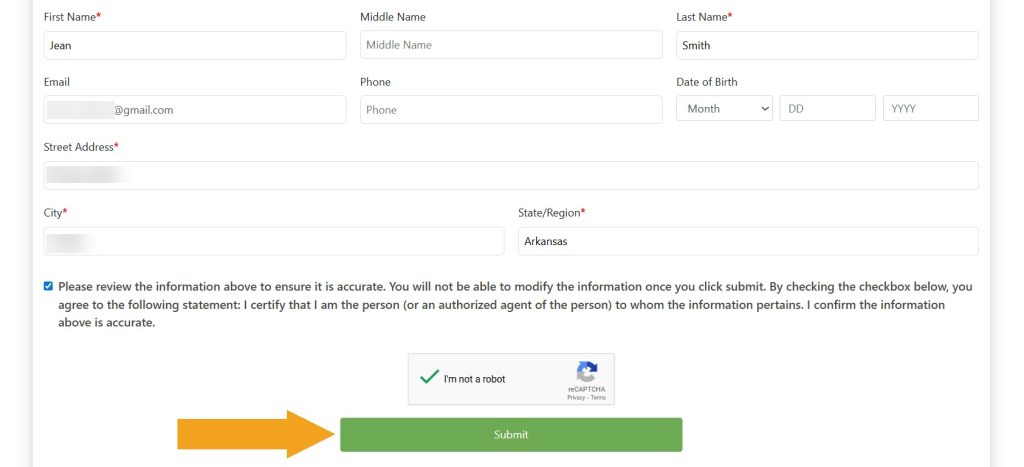
Your PeopleFinders opt-out request has been submitted–you should see an on-screen confirmation above the form. Another confirmation should arrive via email shortly.
Note that removing your profile from people-search sites does not equal immediate removal from Google and other search engines. The links to your removed profiles can remain visible in Google search results for about two weeks after they have been deleted from a data broker site, as it takes time for Google to update its results. You can speed things up by using Google’s outdated content removal tool.
How to delete information from PeopleFinders via phone call
An alternative way to opt out of PeopleFinders is to contact their customer service at (877) 551-9688 Monday to Friday 6 am – 6 pm PST, and Saturday – Sunday 7 am – 3:30 pm PST.
Have your personal information at hand, including your full name, current and past addresses, DOB, and other details needed to locate your record correctly. Note that this opt-out method is verbal, therefore check back with PeopleFinders in a couple of days.
How to delete information from PeopleFinders via mail
PeopleFinders does not accept opt-out requests via mail or fax. To remove your record, you should either use the opt-out page on their website or call them directly at (877) 551-9688.
Your data is still exposed on other brokers
Although you have completed the PeopleFinders opt-out, there are many other people-search sites exposing your data. While removing your name from PeopleFinders takes you in the right direction, it isn’t enough to keep your data private.
We recommend that you do these five first:
- How to remove yourself from MyLife.com
- How to remove yourself from FastPeopleSearch.com
- How to remove yourself from Spokeo.com
- How to remove yourself from SmartBackgroundChecks.com
- How to remove yourself from Truthfinder.com
Go through this list and send opt-out requests manually to each data broker, or subscribe to Onerep to remove records automatically from 317 sites with just a few clicks.
Why opt out of PeopleFinders
We recommend you remove your name from PeopleFinders first-hand as your data’s visibility is at its highest on this site, compromising your online privacy:
- Site visits: PeopleFinders gets around 3.3 million visits each month. (1)
- Massive database: PeopleFinders stands out for its massive database and provides access to more than 6,000 data sources.
- Information exposed:
- PeopleFinders shares names, aliases, age, locations, relatives, and jobs for free.
- A paid report discloses date of birth, current workplace, and position, employment history, education, contact data, address history, online presence (social media profiles, blogs, business profiles), more info about relatives, relationships, property records, liens, evictions, criminal records, traffic violations, and other personal details.
- Exposure on Google: Google has already indexed over 350k PeopleFinders pages making your data easier to find through its search. (2)
Sources:
1 – Silmilarweb
2 – Google
PeopleFinders quick links
About PeopleFinders
- Founded: 1999
- Headquarters: Sacramento, California, United States
- Number of employees: 51 – 200
- Annual revenue: $15M – $25M
- Website URL: peoplefinders.com
- Phone number: (800) 718-8997
FAQs
How to remove info from PeopleFinders?
To remove your personal information from PeopleFinders, open their opt-out page and submit your name and email address. You will receive a confirmation email – open it and click on the confirmation link. Finally, fill out the appearing form with your data and submit your request.
How does PeopleFinders work?
PeopleFinders lets you research people, phone numbers, and addresses by providing name, phone number, email, and home address lookup services. Like most data brokers, PeopleFinders finds personal information in public records and various publicly accessible sources, and compiles the discovered data into comprehensive reports. You can access some details for free, but a full profile is behind a paywall.
What does PeopleFinders cost?
Peoplefinders provides various membership options: $24.95 for a standard membership and $29.95 for a Premium one. A single report costs between $1 to $1.95.
How do I contact PeopleFinders?
PeopleFinders customer service is available Monday to Friday between 6am and 6pm PST and on Saturdays – Sundays between 7am to 3:30pm PST by phone at (800) 718-8997. Alternatively, you can leave a request via the contact form on their site.
How do I cancel PeopleFinders?
PeopleFinders allows you to cancel your own subscription by logging into your account with a registered email and password. Click on the “I would like to cancel my membership” link in the “My Home” section and follow the directions. You can also contact customer care directly to cancel. Make sure to do this in advance of your subscription renewal date.
How accurate is PeopleFinders?
PeopleFinders is one of the biggest and most popular data broker sites on the market, owning and constantly updating one of the largest databases in the US. Like other people-finder sites, they obtain billions of current and historical records from a wide variety of sources. While they claim to offer accurate people search services, they don’t really verify or check for accuracy the information that comes from those sources, so they might pull up incorrect or outdated details. The company does offer a refund on a case-by-case basis.
How to delete a PeopleFinders account?
Currently, PeopleFinders doesn’t have a “delete account” button, but only allows canceling a subscription. To remove your account, call their customer support at (800) 718-8997.




Dimitri is a tech entrepreneur and founder of Onerep, the first fully automated data removal service. Top cybersecurity CEO of 2021 by The Software Report.