 Published January 26, 2026
  read
read
How to make your X (Twitter) account private: protect posts, hide followers, and limit visibility
X’s success largely relies on people sharing their thoughts and ideas freely. That’s why all X posts are public by default, to make it easier to discover others and join conversations.
Public discussions may work well for some people, but they are not ideal for everyone. If you want more control over your posts, it might be a good idea to “lock your Twitter account” by restricting visibility of your posts to approved followers only.
This guide will break down how to make your X account private on desktop and mobile phones, what changes (and what doesn’t) once you do so, and how to enhance your Twitter settings overall. We’ll also tackle a few more ways to protect your privacy well beyond X (Twitter).
Why make your X account private?
Suppose you don’t want to share your thoughts with the entire internet. Instead of deleting your X account altogether, you can make it private and still enjoy the platform. Here is why some people go down this road:
- Audience control. A private account lets you decide who gets to read your tweets and replies. Only people you approve as followers can see what you post or repost.
- Lower chances of harassment. Some people dream of becoming Twitter famous. Yet, that often brings a bunch of negative comments and hate speech. When strangers can’t reply to your posts or share them, you’re less likely to attract unwanted attention on the platform.
- Personal vs professional separation. Are you already in the public eye for your job? Would a public Twitter account put your personal life under scrutiny? If so, you may want to distinguish your personal account from your professional presence. A private X account lets you share your day-to-day moments, personal opinions, and life updates with a select few. You can still maintain a public X profile for work-related content.
- Search visibility implications. Tweets from a private account won’t be indexed by search engines or appear in search results. This makes you harder to track, enhances privacy, and reduces your digital footprint.
How to make your X account private on desktop
There are a few ways to lock your Twitter account so only your followers see your posts. If you like to browse X on your computer, you can easily change your account to private by updating your settings on a web browser.
1. Open X in your web browser and log in to your account.
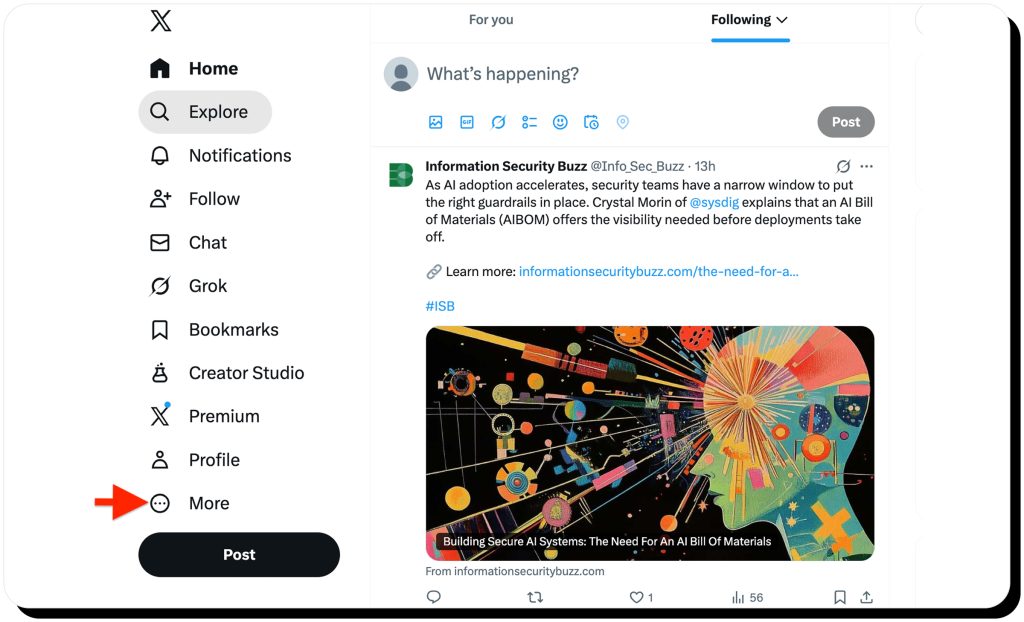
2. Click on More in the left-hand menu (the three dots).
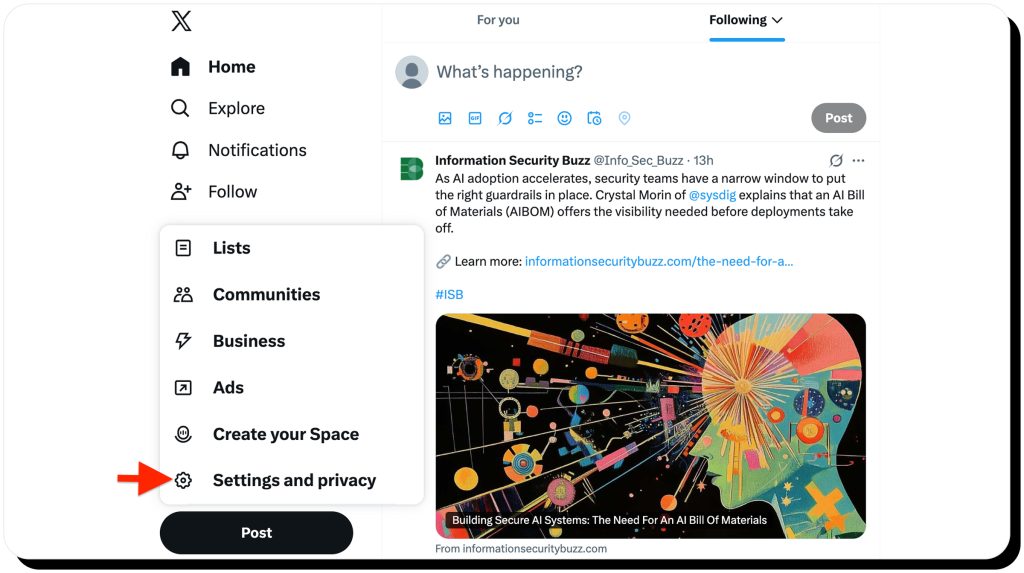
3. Head over to Settings and privacy.
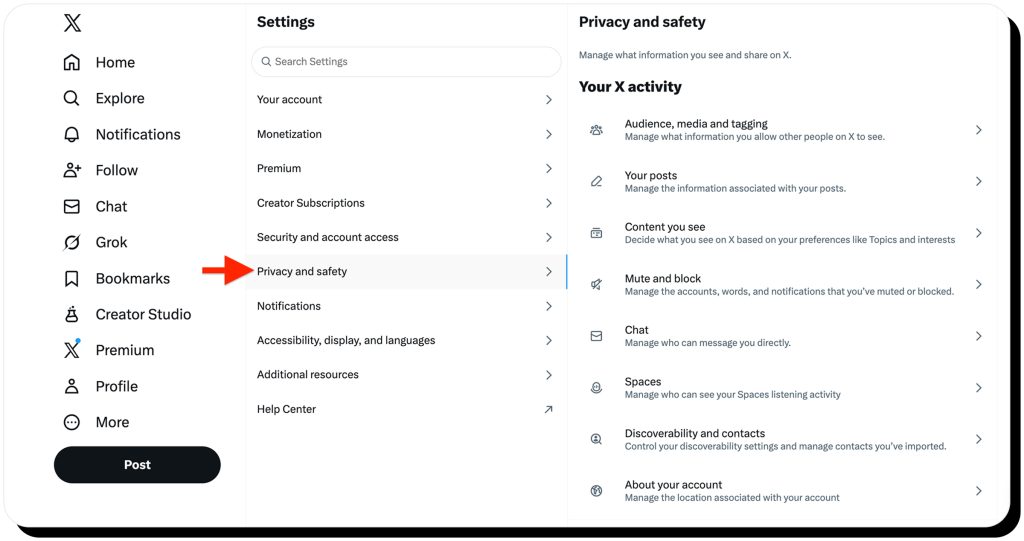
4. Go to Privacy and safety.
5. Click on Audience, media, and tagging.
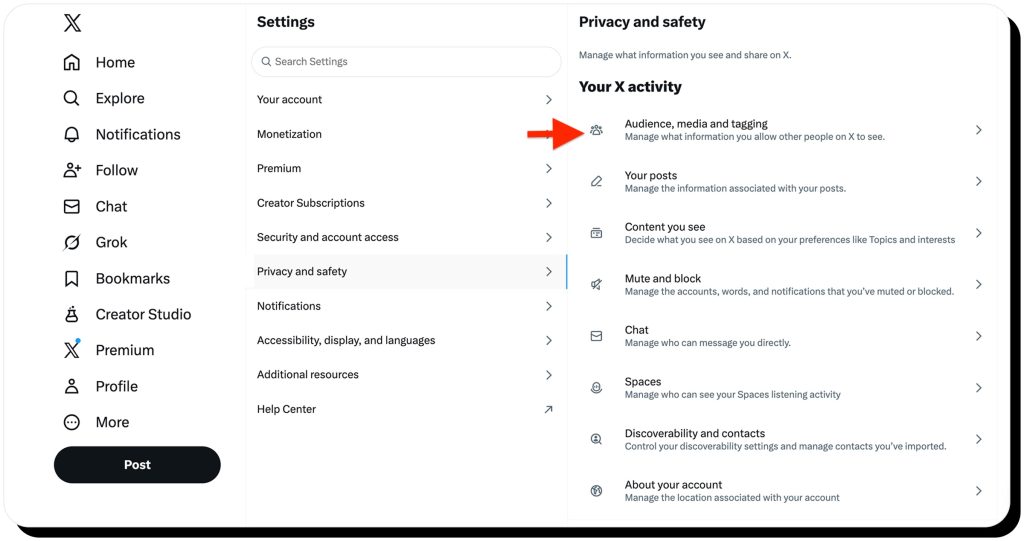
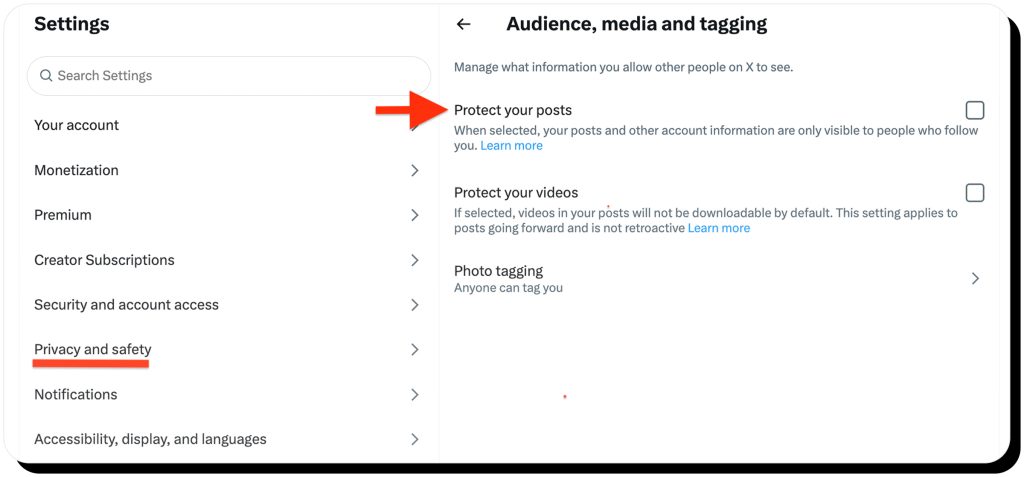
6. Check the box next to Protect your posts.
7. Confirm your choice when prompted.
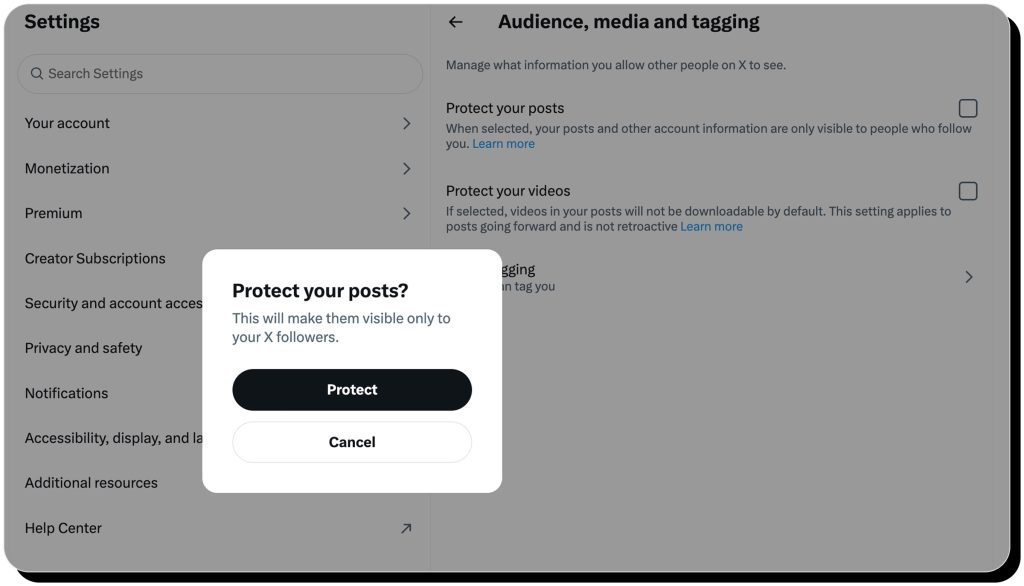
Protecting your posts makes them only visible to your existing followers. New followers will have to send a follow request and be approved. Your posts won’t be publicly visible, can’t be reposted by non-followers, and won’t show up in search results.
How to make your X account private on mobile
Most users, however, use X as a mobile app. Here is how to make your X account private on mobile, both iOS and Android. The steps are quite similar.
Instructions for iOS and Android
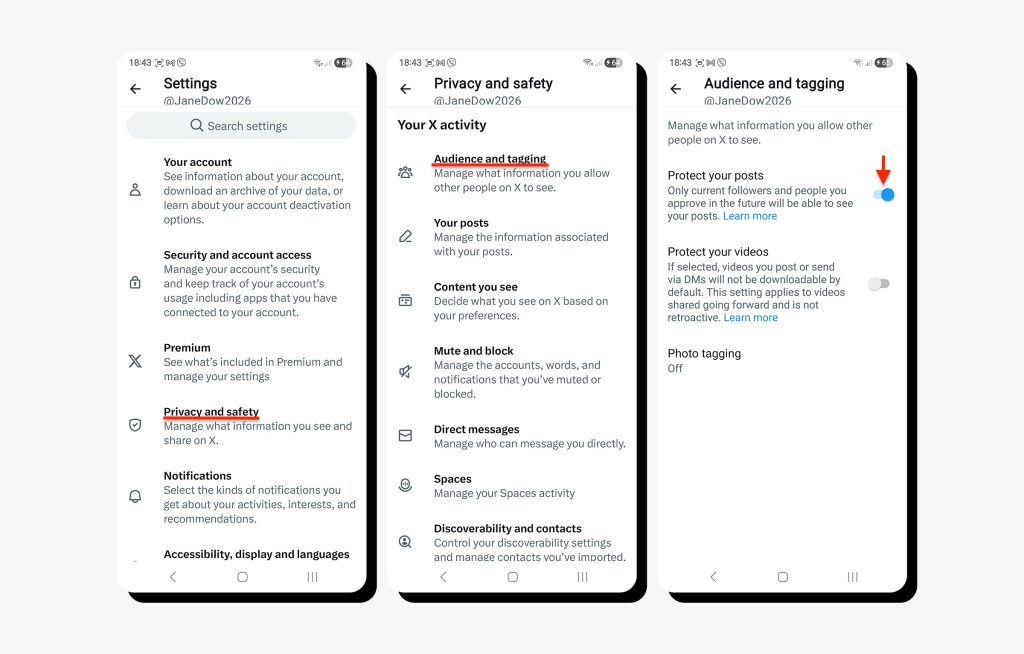
1. Open the X app on your Android device and log in.
2. Tap your profile icon in the top-left corner.
3. Tap Settings and privacy.
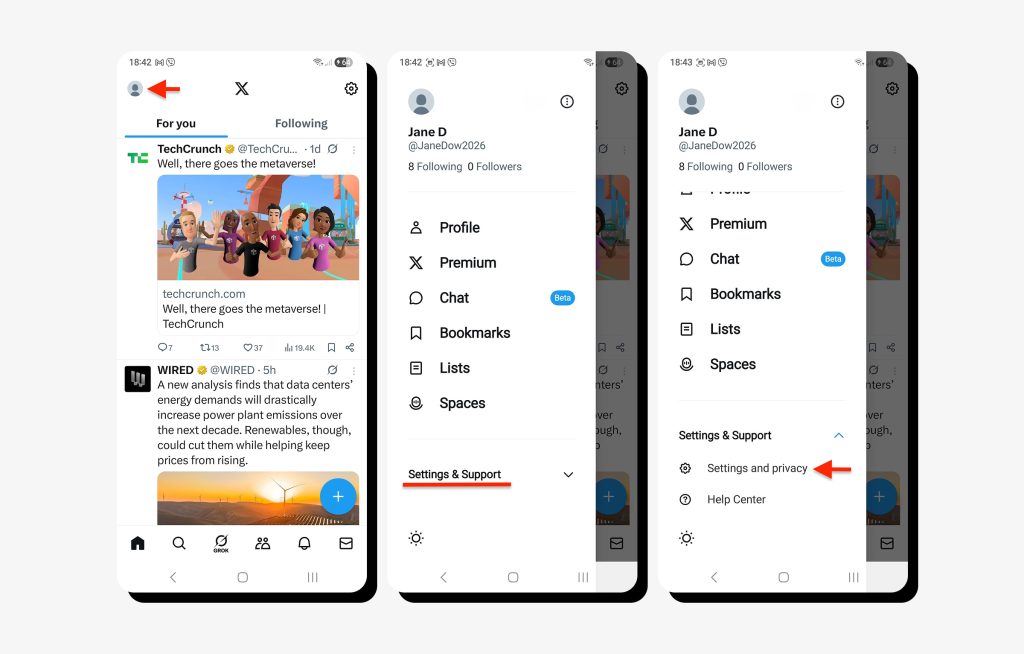
4. Select Privacy and safety.
5. Tap Audience and tagging.
6. Toggle on Protect your posts.
What happens when you make your X account private
Can people see who I follow on X? Can they see my replies to others’ tweets? These and many other questions may come to mind when you decide to lock your twitter account.
The truth is making your account private on X does add some protection, but don’t expect full anonymity. Here is what changes once you protect your posts, and what stays the same.
What changes when you make your Twitter account private:
- New followers must request approval.
- Only the new followers you approve can see your posts.
- Existing followers (the ones that followed your account prior to protecting your posts) will still be able to see your tweets.
- People won’t be able to repost your tweets or quote them.
- Third-party search engines, like Google, won’t display your posts in search results.
- Non-followers won’t see your replies on their posts (in most cases).
What doesn’t change:
- People will still be able to see your profile basics, including your display name, handle, photo, and bio.
- If someone followed you before making your X account private, they will have access unless you remove or block them.
- Followers can still screenshot your posts and expose them.
So, can you hide who you follow on X? A quick overview of what people can and can’t see
Let’s summarize what information is actually hidden.
| Can be hidden from the public | Can’t be hidden from the public |
|---|---|
| Your posts (tweets) | Your profile photo |
| Your replies to other users | Your display name |
| Your reposts and quote-posts | Your username (handle) |
| The names of accounts that follow you | Your bio |
| The names of accounts that you follow | Your follower and following counts (numbers only) |
| Your likes (hidden by default) | Your account’s existence |
How to make your X account private: additional X privacy tips
Now that you know how to make your X account private, you can still go the extra mile to enhance your privacy. After all, no platform is safe, and we already wrote about the multiple Twitter data breaches.
A few tips to safeguard yourself include:
- Review your existing followers and remove the unwanted ones
Head over to your Followers list and remove anyone you no longer want seeing your posts.
- Limit who can send you direct messages
Open Settings and privacy → Privacy and safety → Direct Messages and allow messages only from people you know and follow.
- Control who can tag you in photos
Go to Privacy and safety → Audience, media, and tagging → Photo tagging and set it to Only people you follow or turn it off.
- Make sure people can’t find you by phone number and email
Head over to Privacy and safety → Discoverability and contacts and turn off options that let people find your account via phone number and email.
- Start using two-factor authentication (2FA)
2FA is a must in the era of cybercrime. Go to Settings and privacy → Security and account access → Security → Two-factor authentication and set it up.
More ways to keep your personal data private
Personal cybersecurity goes beyond locking your Twitter account. Think broader. Could your personal information be exposed through other social media?
Reduce what your social media profiles reveal
Small details across social media profiles can add up and make it easier for others to track you.
- Don’t reuse usernames on different platforms. The same username makes it easier to connect your profiles. Come up with a unique one for each platform. Use a private account wherever possible.
- Don’t post identifiable information. What does your bio really say about you? Make sure it doesn’t reveal your address, school, or workplace. Be mindful of what you share about your family and friends, as well as pets.
- Double-check your photos. You’d be surprised at how much experts can learn from a single photo. Does the background show your neighborhood or building? Are there any other sensitive landmarks that can be used to locate you?
Make it hard to find you by minimizing your data exposure online
Data brokers and people-search websites specialize in collecting all your online data in one place and selling it to just about anyone. If your digital presence reveals a lot about you, your real identity could be at risk, too.
The best way to go about this is to keep a low profile and reduce the amount of your personal information online. Onerep can help you take down your profiles from 317 data broker websites and protect you from digital threats spilling over to your real life.
FAQs
Can people see who I follow on X?
If your account is public, anyone can see who you follow. If you lock your Twitter account, only the approved followers will be able to see your following list. Those who don’t follow you will only see the number, not the names.
How do I lock my Twitter account?
Locking your Twitter account, also known as making it private and protecting your posts, is quite intuitive and similar across the X web version and mobile apps on iOS and Android. All you need to do is turn on Protect your posts in your privacy settings.
How do I change my public account to private?
All Twitter accounts are public by default. If you want to make your account private, turn on Protect your posts in your privacy settings.
How to hide following on X?
You can hide the list of accounts you follow on X by making your account private. Simply choose to Protect your posts in your privacy settings. The number of accounts you follow will still be shown on your profile, but people won’t be able to see the names. There’s no separate setting for the followers list only.
Can people see my followers on a private X account?
No, they can’t. Once you lock your X account, people who don’t follow you won’t be able to see who you follow or who follows you. They will only see the number of accounts on your followers list. New followers that you approve and old followers will be displayed the complete list.
How do I know if my X account is private?
The quickest way to check if your account is now private is to go to your account page and look for a lock icon. You’ll also see a notice stating that your posts are protected and only visible to your followers. If you want to be sure, open your account from an incognito/private window and see if any content is shown.
Can people see my posts, mentions, or likes on X?
All X accounts are public by default, so everyone can see your posts and mentions. Likes are hidden by default. If you make your profile private, only approved followers will be able to see your posts and replies. People can still mention your username, but your replies are usually hidden from non-followers.

Mikalai is a Chief Technical Officer at Onerep. With a degree in Computer Science, he headed the developer team that automated the previously manual process of removing personal information from data brokers, making Onerep the industry’s first fully automated tool to bulk-remove unauthorized profiles from the internet.