 Published October 28, 2025
  read
read
Whaling attack (whaling phishing): what it is and how it works
In 2019, a Lithuanian fraudster managed to steal over $100 million from companies including Google and Facebook just by posing as their trusted hardware supplier. This is whaling in action—one of the most financially damaging forms of phishing.
But whaling is no simple phishing attack. It’s a carefully crafted cybercrime aimed at the biggest targets within an organization, often resulting in multimillion-dollar losses. While phishing casts a wide net hoping someone takes the bait, whaling attackers go after the “big fish”—CEOs, CFOs, legal officers, heads of accounting, and other key authority holders—spending months gathering intelligence and waiting for just the right timing to strike a blow.
In this guide, we break down the whaling definition in cybersecurity, how whaling attacks work, and how you can protect yourself if you suspect you’ve become a whaling target.
What is whaling in cybersecurity?
Whaling phishing is a type of social engineering scam targeting high-profile and high-value people at an organization, usually senior managers, C-level executives, finance leaders, or other decision-makers. The name “whaling” comes from hunting the biggest targets (whales) rather than casting a wide net.
The attackers typically conduct deep reconnaissance before crafting highly convincing messages (usually sent as emails) tailored to that specific person. They might impersonate a colleague, a vendor, a partner, or a trusted organization in order to trick the victim into:
- Approving a wire transfer or invoice
- Sharing sensitive credentials, trade secrets, or otherwise confidential business information
- Clicking links and attachments that install malware on their device for further cyberattacks
According to the FBI’s 2024 Internet Crime Report, business email compromise was the second-largest category of cybercrime complaints, with over $2.77 billion in losses. This makes whaling attacks a high-stakes business for scammers and highlights how severe the consequences can be for organizations.
Whaling vs. phishing vs. spear phishing
Phishing, spear phishing, and whaling are all overlapping forms of cyberattacks that use impersonation and fraudulent communication to deceive people into taking an action that benefits the attacker. However, they differ in whom they target as well as in attack scope:
| Phishing | Spear phishing | Whaling | |
|---|---|---|---|
| Target | A large random audience of consumers and businesspeople alike | A specific individual or group at an organization, regardless of the rank | High-profile executives and decision-makers, such as CEOs and CFOs |
| Tactics | Generic messages sent in bulk, impersonating a trusted company | Personalized and convincing messages based on target research | The most customized and personalized type of communication, using extensive research and often impersonating the target’s trusted colleague |
| Motivation | Relies on a numbers game, hoping that at least some percentage of recipients fall for the scam | Aims for a higher-value success with a particular victim by stealing data or committing financial fraud | Aims for the highest-value payoff, such as a multimillion-dollar wire transfer or access to trade secrets |
| Example | A message allegedly sent from a bank urging you to “verify your account” due to suspicious activity | An email to a financial manager that’s apparently sent from the company’s vendor with updated invoice and bank account details | A CEO impersonator contacting the CFO with an urgent request to wire a large transfer for a pending company acquisition |
How whaling attacks work
The first stage of a whaling social engineering attack is reconnaissance. Attackers research and profile their targets using a breadth of information sources with the goal of crafting a convincing message that looks exactly like something they would expect.
Such background information sources include the so-called open source intelligence (OSINT):
- Public sources, like social media, company website, SEC filings, and news.
- Leaked and third-party data breaches featuring company emails and contact lists.
- Org charts with key people approving contracts, vendors, and payments.
- Personal details, including assistants’ names, key people’s vacation dates, and board members’ names.
The second stage is crafting a highly personalized message. Unlike generic phishing emails, whaling messages are bespoke. They use real names, references, internal jargon, and mimic the tone of voice of a real executive. For these, whaling fraudsters use spoofed email display names, look-alike domains, or compromised company accounts.
The third stage is delivery. Attackers time their messages effectively, choosing periods of increased urgency to bypass checks, such as during the end of a fiscal month, mergers, or when executives are travelling. They typically use email, but in some cases, they may also employ voice clones and video deepfakes to gain more trust.
The ultimate stage of a successful whaling attack is exploitation. According to CISA, 84% of employees respond to phishing emails by replying with sensitive information, clicking a link, or downloading an attachment within 10 minutes of receiving a malicious email. Whaling attackers pressure victims to:
- Wire money to the attacker’s account
- Enter company account credentials on a fake login page
- Download an attachment that will install malware
- Change a vendor’s or an employee’s payment details to the attacker’s
- Approve a fraudulent invoice
- Release sensitive documents
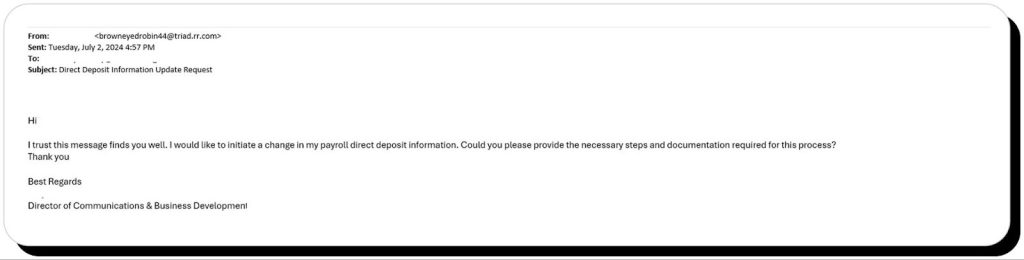
In the example below, the fraudster impersonates a company director to request a change to their payroll direct deposit information. If successful, they could redirect all subsequent payments to their account:
Common whaling tactics to watch out for
Whaling is an advanced form of phishing designed to bypass stringent corporate security controls. However, it’s also about social engineering, exploiting trust, urgency, and authority bias.
The common whaling technical tricks to beware of include:
- Spoofed display names, where the visible sender name says “CEO – Company Name” while the email address is different.
- Email spoofing with forged headers so the sender appears to be from the organization.
- Look-alike domains with a slightly misspelled company name, for example substituting m with rn.
- Hacking an internal account and using it to bypass controls.
- Reply-To and Reply-Path manipulation to make the From: field look legitimate while replies are redirected to the attacker’s account.
- Using malicious links to websites that imitate corporate login pages.
- Using attachments that hide spyware or remote access trojans in PDFs and Office documents.
At the same type, there are also message-specific red flags to spot impersonators in a whaling email:
- Unexpected requests for large payments, wire transfers, or sensitive documents.
- Request to bypass standard payment procedures or business processes.
- Calling for immediacy (“Need this by EOD”) and secrecy, like “Don’t tell the legal dept” or “Don’t copy others.”
- Unusual salutations or overly formal/informal tone that doesn’t match that of the impersonated person.
- Upon inspection, displayed links don’t match destination domains.
How to protect against whaling attacks
Protecting against whaling phishing attacks takes a combination of technical security controls, process standardization, and employee training. Whaling attackers succeed because they exploit a lack of awareness, multi-stage approvals, missing or weak email authentication protocols, poor payment verification processes, and the absence of phishing-resistant multi-factor authentication that could prevent fraudsters from deceiving their targets.
Technical whaling prevention methods:
- Enforcing SPF, DKIM, and DMARC email authentication protocols for all corporate domains.
- Using strong email filtering solutions that flag suspicious and look-alike domains and attachments.
- Using phishing-resistant (hardware-based) MFA for executives when possible.
- Restricting privileged access and using admin approval processes for financial systems.
Process and policy-related prevention methods:
- Requiring dual approval (separation of duties) for large financial transactions.
- Standardizing vendor payment procedures and verification steps.
- Maintaining a list of authorized vendors and their legitimate banking details in a secure internal system.
People-related prevention methods:
- Conducting executive-specific phishing training and whaling simulations.
- Teaching executives to verify unusual requests via trusted contacts in line with corporate approval workflows.
- Setting up an internal channel for reporting and investigating suspicious messages.
- Reducing the attack surface by minimizing the amount of publicly available information as part of digital executive protection. This includes regular social media cleanups and using public data removal services like Onerep to make it harder for whaling attackers to gather intelligence on their targets.
Real examples of whaling attacks
Whaling fraud frequently makes headlines because of the financial damage that such successful attempts can cause.
A $100 million wire fraud targeting Google and Facebook
In one notorious case in 2019, a Lithuanian fraudster was charged with committing wire fraud through a complex business email compromise scheme that convinced representatives of U.S. victim companies, allegedly including Google and Facebook, to wire over $100 million in total. For this, the attacker created fake companies in Latvia and Cyprus and sent forged invoices impersonating a legitimate Asia-based vendor of the victim companies.
What went wrong: Payment teams supposedly accepted invoices and wiring instructions without independent vendor verification or multi-party approvals. The attacker was also able to use realistic paperwork and bank accounts to appear legitimate.
Pune analytics firm’s CEO impersonation
In spring 2025, an analytics firm from Pune, India, lost Rs 2.34 crore ($266,000) as a result of a whale phishing attack impersonating their Canada-based CEO. Fraudsters used phone calls and spoofed messages to ask the staff for account balances, then instructed a series of urgent money transfers to what appeared to be mule accounts.
What went wrong: The fraudsters social-engineered the staff, including exploiting an absent colleague. There were no dual approvals for large transfers, independent phone verification, or engagement of other high-profile stakeholders in the process.
OneDrive whaling campaign targeting executives
A newly discovered whaling phishing campaign targets executives and senior leaders across multiple companies using a spoofed OneDrive file-sharing notification. These highly targeted emails contain malicious links imitating OneDrive file-sharing screens and hosting credential-harvesting login forms.
This campaign enables credential theft and account takeover, opening paths for data theft, lateral movement, and subsequent BEC and wire fraud via compromised accounts.
What went wrong: Falling for this phishing trap becomes possible due to trust in familiar cloud-sharing services, lack of URL and sender email address inspection, and insufficient credentials protection (lack of MFA) that enables credential capture and harvesting.
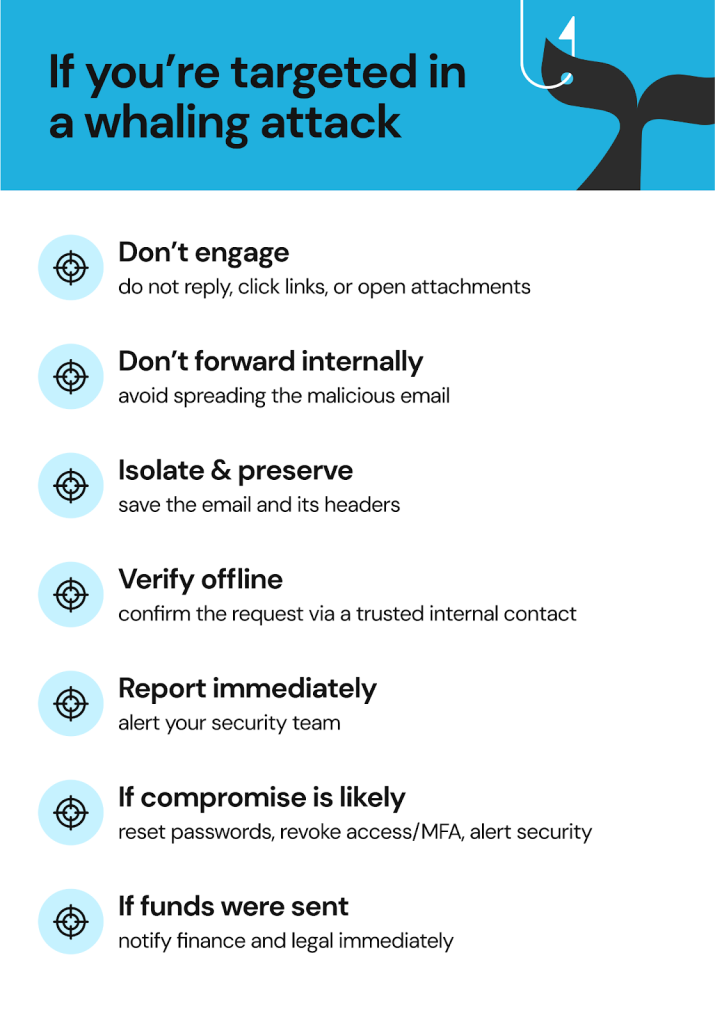
What to do if you’ve been targeted in a whaling attack
If you suspect you’ve been targeted in a whaling attack, take the following safe steps to contain the threat:
- Do not reply, click links, or download attachments.
- Do not forward the email to anyone within your organization.
- Isolate the message and preserve the header (for further forensic investigation).
- Verify the request independently via a trusted work contact in line with the company’s procedures.
- Report the email to an appropriate internal security team.
- If a compromise has likely occurred: change passwords for all affected accounts, revoke sessions and MFA tokens, and notify your security team about the incident.
- If funds were sent, notify your financial and legal departments.
In all cases, remember to never approve a financial transaction by email alone, and raise the alarm as soon as someone asks to bypass a normal procedure or controls “just this time,” regardless of how urgent the matter may seem.
FAQs about whaling attacks
What makes whaling different from regular phishing?
Whaling is a highly targeted form of phishing that aims at high-value executives and senior management (the “big fish”). Unlike regular phishing that uses generic template-based messages sent out at scale, whaling messages are personalized, reference real business details, names, and situations, and appear to come from a trusted source.
Who do whaling attackers usually target?
Whaling attackers typically go after C-suite (CEO, CFO, CIO, etc.), finance and accounting staff, legal and HR leaders, and executive assistants—anyone with authority to make decisions and act independently, especially when it comes to financial transactions and accessing confidential information.
What are common signs of a whaling email?
The warning signs of a whaling email include unusual, out-of-the-blue requests to wire large sums of money or share sensitive information, a slightly off tone of voice, a mismatched sender name and email address, urgency and secrecy, and being sent during out-of-office hours or when travelling.
Can whaling lead to financial fraud?
Yes, financial fraud is often the ultimate goal of whaling attackers. Whaling often leads to unauthorized wire transfers or invoice payments worth millions of dollars, making it a high-loss security incident.
What should I do if I replied to a suspected whaling email?
If you suspect whaling fraud, stop communicating with the attacker immediately and report the incident to your company’s security department. Inform your financial team as well if any transaction has been initiated.




Dimitri is a tech entrepreneur and founder of Onerep, the first fully automated data removal service. Top cybersecurity CEO of 2021 by The Software Report.