 Published February 26, 2026
  read
read
What is vanish mode? A complete guide to how it works on Instagram and Messenger
Vanish mode is a useful feature on Instagram and, previously, on Facebook Messenger that makes it easy to set up disappearing messages with flexible timing. It caters to privacy-conscious users with an appetite for security-first messaging options, such as temporary chats and self-destructing messages, but it doesn’t make the conversations fully secure or encrypted.
Learn what vanish mode is, how to use it on Instagram, and what alternative is there on Facebook Messenger, along with tips on using vanish mode safely.
What is vanish mode, and where is it available?
Vanish mode is a privacy feature available on Instagram and, previously, on Facebook Messenger, two of Meta’s most popular social platforms. Vanish mode allows users to have private conversations by sending messages that are set to automatically disappear after a specified time and once the chat is closed.
Meta’s Instagram still supports this feature, while Facebook Messenger’s vanish mode is no longer supported. Instead, users may opt for disappearing messages in Facebook Messenger’s end-to-end-encrypted chats. However, this feature is still being rolled out and is not available in every region. Likewise, Instagram’s vanish mode may also not be available in your location (currently, it’s not supported in Japan and certain European countries), as its availability depends on local privacy regulations.
Vanish mode, or disappearing messages, is a popular option among digital messaging products today. For example, messengers like WhatsApp, Signal, and Telegram all offer their own disappearing and self-descructing messages, but they work a bit differently:
- They’re not called vanish mode.
- They may offer more flexible disappearing time settings (for example, Telegram allows text and media to disappear seconds after being viewed).
- Screenshot alerts may also differ by platform.
How does vanish mode work?
Vanish mode is designed for conversations meant to be temporary. When you turn on this mode, you can specify how soon you want your message to disappear, and it will be deleted for both you and your contact. The content will also disappear when someone leaves the chat or turns vanish mode off.
You can only use vanish mode in one-on-one conversations with people who have an Instagram account. Not all business accounts can receive messages in vanish mode. It’s also not available when starting a new conversation with someone you haven’t connected with before.
Both participants can see that vanish mode has been turned on, as it’s a shared setting and not something you can enable secretly in the background. Once enabled, you can send all types of media in vanish mode, including text, photos, videos, voice messages, and other content.
Despite their disappearing nature, messages sent in vanish mode can still be reported to Instagram for up to 14 days after they are deleted.
Importantly, if someone in the chat takes a screenshot or makes a screen recording of a message in vanish mode, the other person will be notified. This discourages saving or sharing temporary messages without consent.
Pros and cons of using vanish mode
Vanish mode was introduced in response to users looking to exchange messages safely, without worrying about the sensitivity of the shared content. However, neither Instagram nor Facebook Messenger are privacy-centered platforms, so vanish mode is more of a feature to experiment with than an effective data security protection tool.
Key benefits of vanish mode
One of the biggest advantages of vanish mode is temporary messaging. Messages automatically disappear after the set time, without the need to delete them manually, which is ideal for quick conversations that won’t clutter up the chat.
Vanish mode also helps maintain a lean chat history. Your inbox stays cleaner and you don’t have to worry about old messages piling up.
It can also provide a sense of privacy and ease, but you need to make sure you only share disappearing messages with people you trust. With the rise of Instagram scams and impersonators, it’s important to verify the identity of your contacts, especially if they send you unexpected messages.
Potential drawbacks of vanish mode
The greatest advantage of vanish mode—automatically disappearing messages—can also become its biggest drawback, depending on the situation. Messages can’t be recovered, and you won’t be able to revisit them later, meaning important information can be lost without the option to restore it.
Even though you’ll be able to see when someone takes a screenshot or makes a screen recording of your disappearing messages, there are still workarounds to save these messages without you knowing, such as taking a photo of the screen with another phone. This doesn’t prevent sensitive content from being saved and shared, making vanish mode less suitable for private conversations.
Finally, vanish mode can create a false sense of security. While it deletes messages after some time, it doesn’t provide full privacy and was never intended for this purpose, so you should still be mindful of who you share messages with.
How to use vanish mode on Instagram
Using vanish mode on Instagram is really just a matter of a few taps:
1. Go to your Instagram feed and tap the Messages icon at the very bottom.
2. Choose a chat.
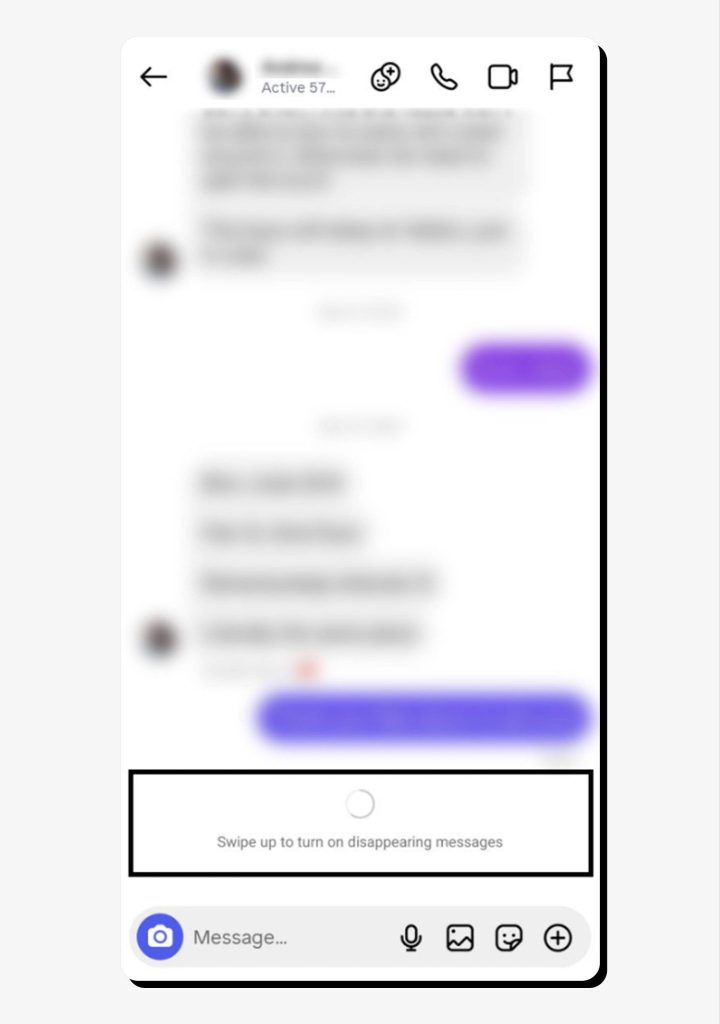
3. When in the chat, swipe up to turn on vanish mode.
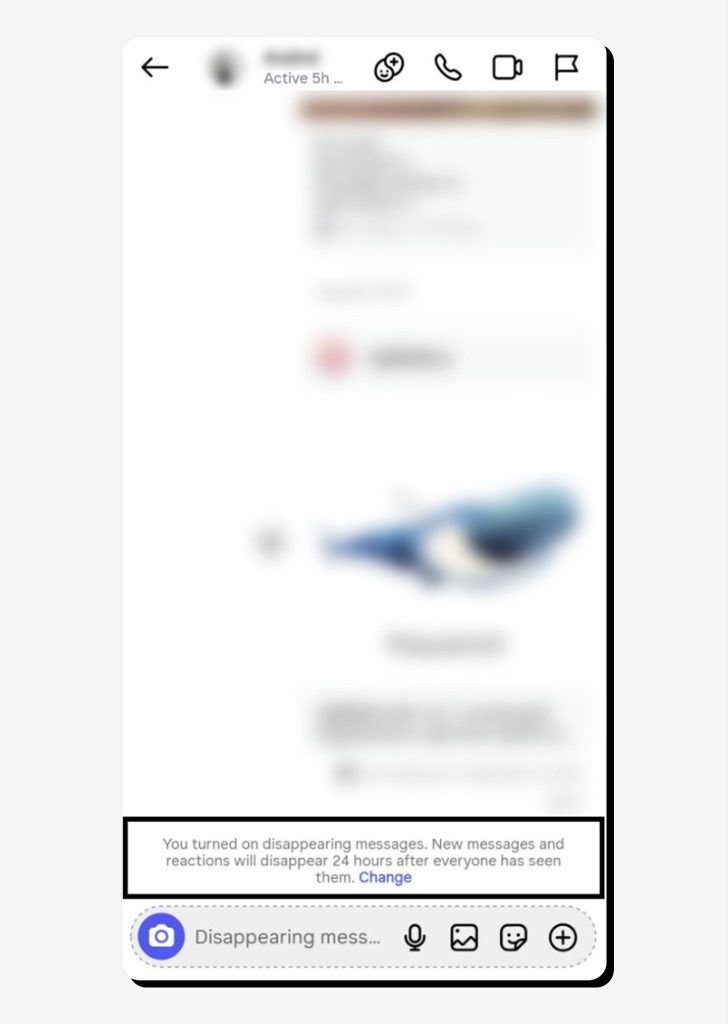
4. Once you do this, you’ll see a notification that says “You turned on disappearing messages. New messages and reactions will disappear 24 hours after everyone has seen them.” This notification will be visible to both you and the other person in the chat.
5. To turn vanish mode off, swipe up again.
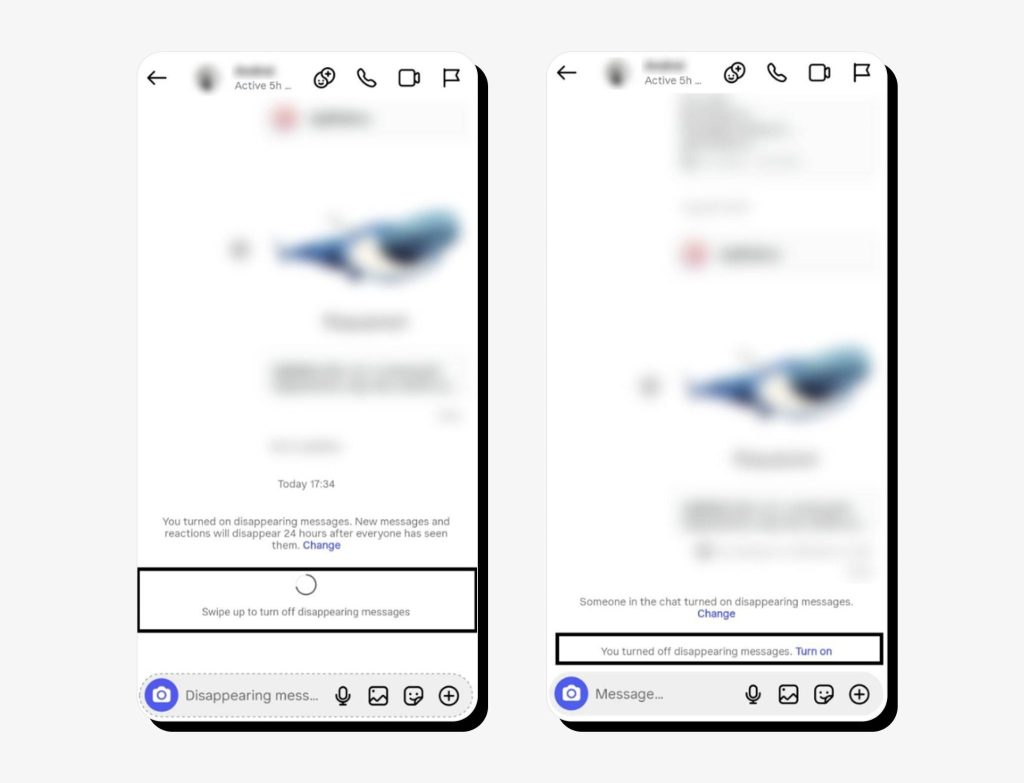
The 24-hour timeframe for disappearing messages is the default setting. You can change it by tapping Change next to the notification and choosing to make your messages disappear:
- Once they’re seen
- After 24 hours
- After 7 days
You can also use this menu to turn off vanish mode.
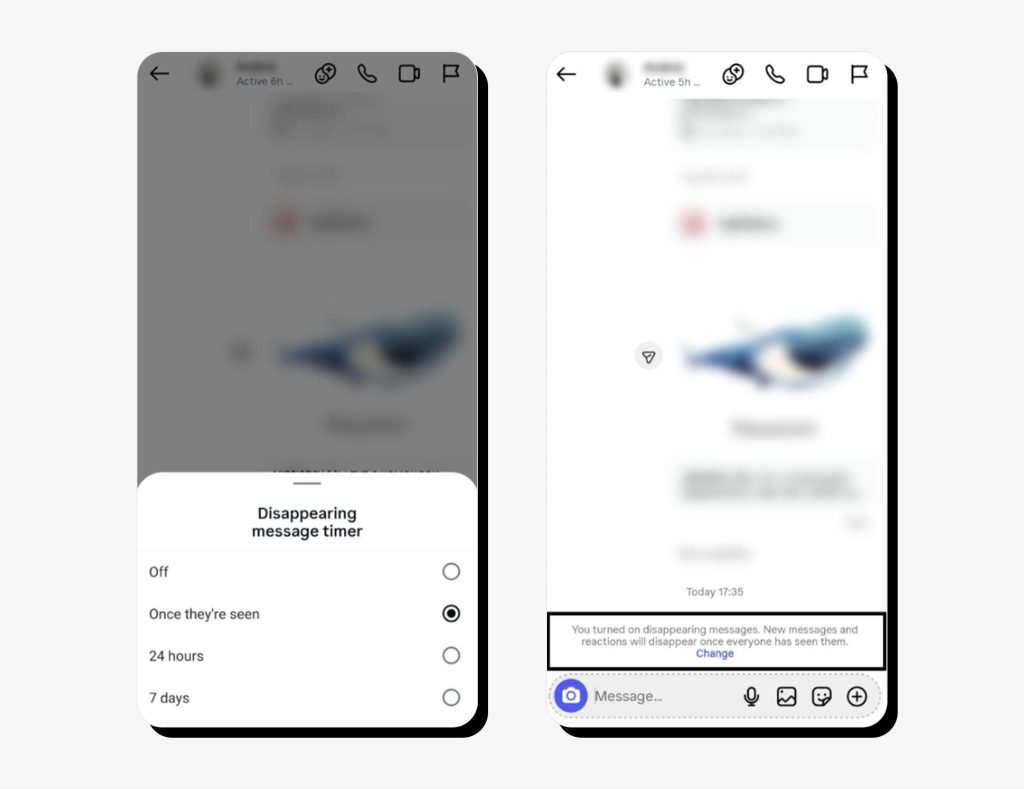
Once you enable vanish mode, keep the following in mind:
- Chats with vanish mode enabled will feature a dotted circle next to them in the chat list.
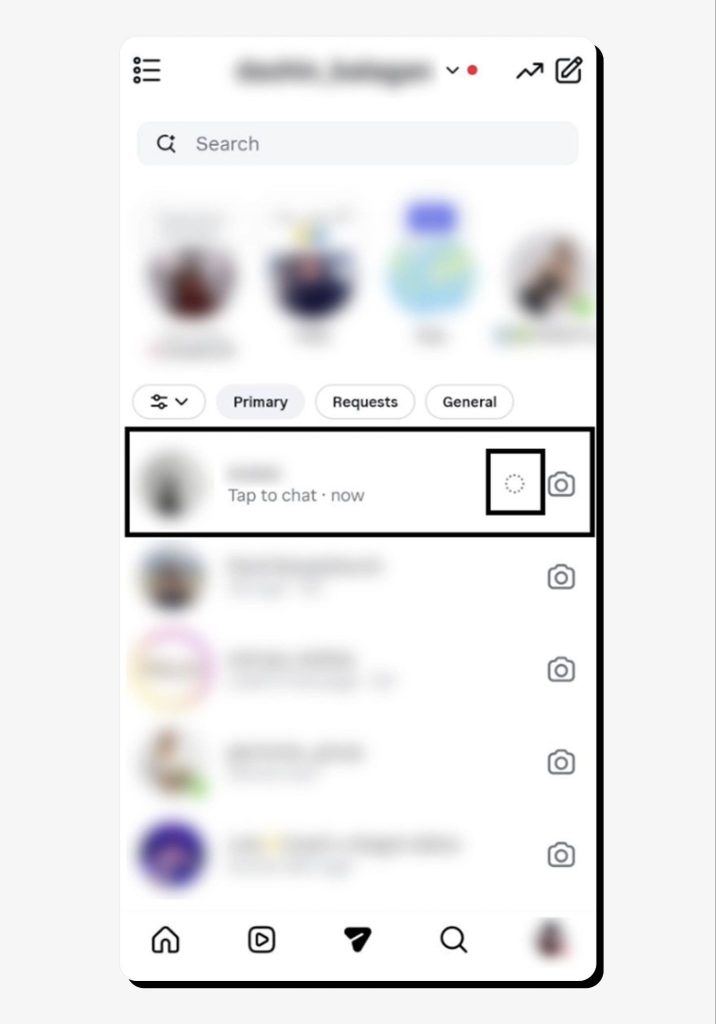
- You can unsend disappearing messages as usual before they’re gone.
- You won’t be able to copy or forward disappearing messages, and every time you take a screenshot or make a screen recording, the other person will be notified about it.
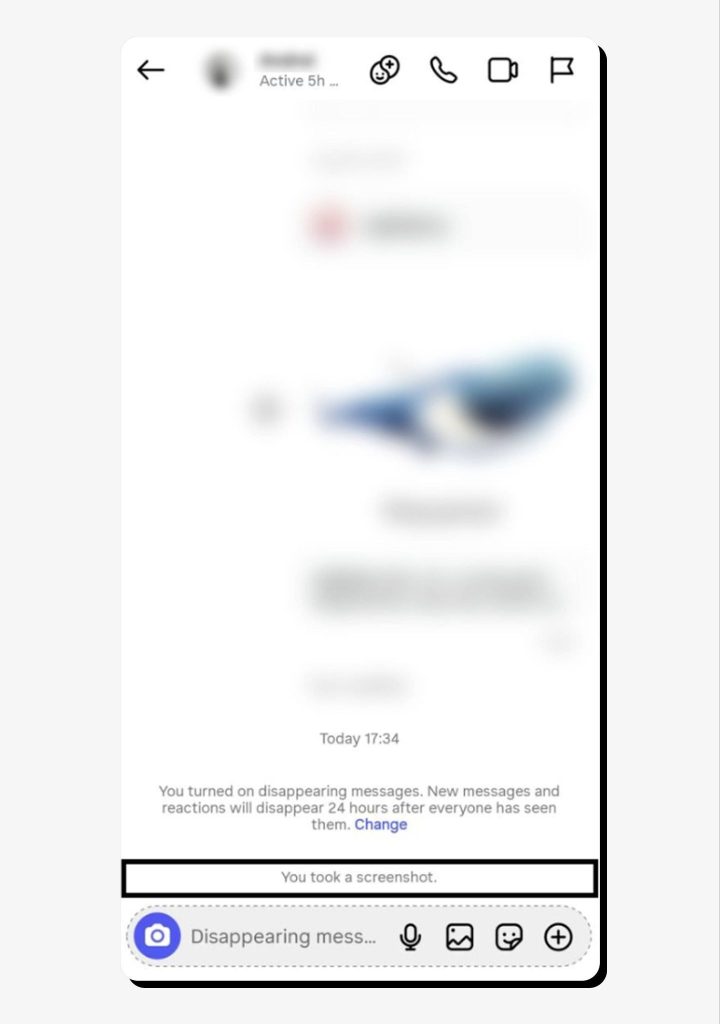
- You’ll be able to report disappearing messages as usual, but not later than 14 days after they’re gone.
How to use vanish mode on Facebook Messenger
As mentioned above, Facebook Messenger no longer supports vanish mode but offers disappearing messages in end-to-end encrypted chats. This feature is being introduced gradually and might not be available in your location.
Since the question of how to turn vanish mode on and off on Messenger is no longer relevant, here’s how to enable disappearing messages, which provide basically the same functionality but with less granular timing control than Instagram’s vanish mode.
1. Choose a chat and go to the Info section in the upper right corner.

2. Check that the chat is end-to-end encrypted. It will feature a corresponding badge under the person’s name.
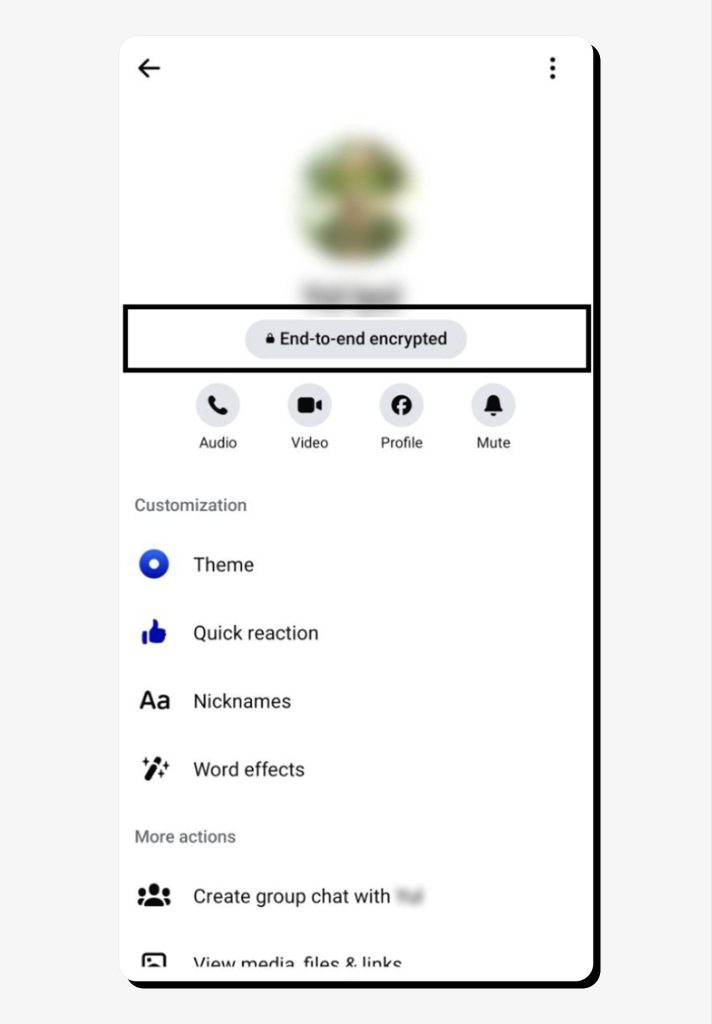
3. Scroll down to Disappearing messages in the Privacy & support section.
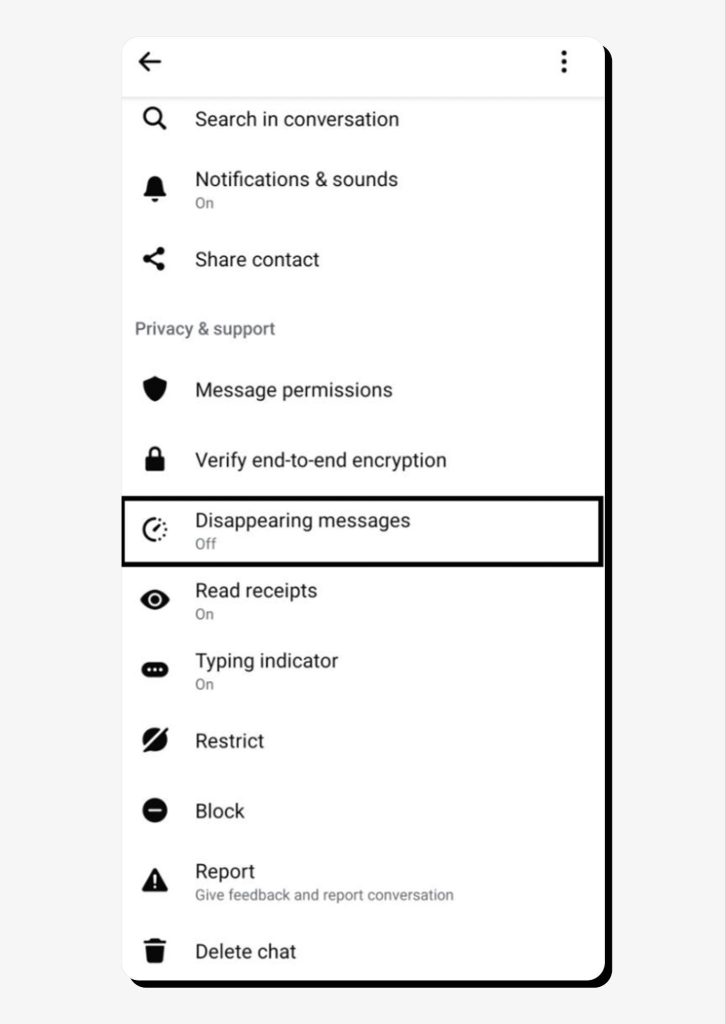
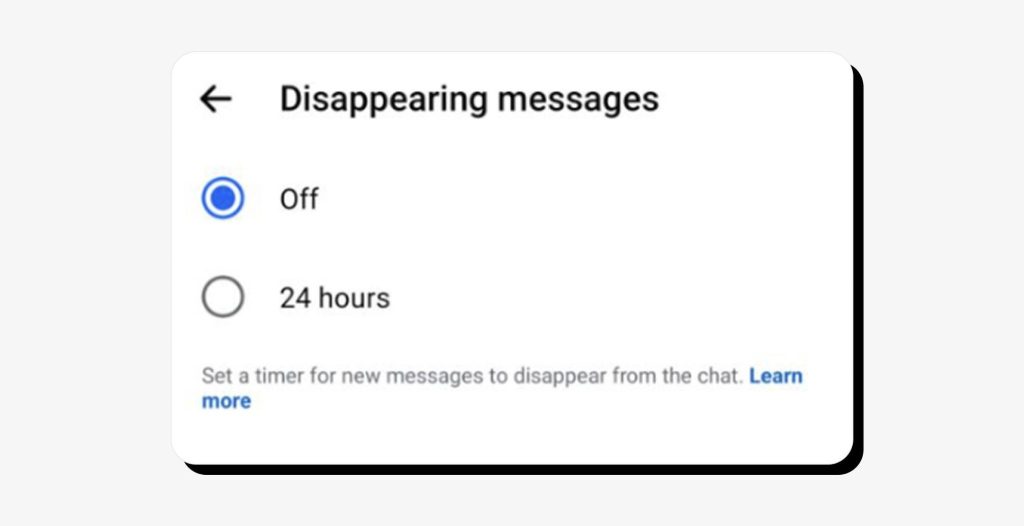
4. Set a 24-hour timer for new messages to disappear from the chat after they’re seen. If a message is not seen within 14 days, it will be automatically deleted.
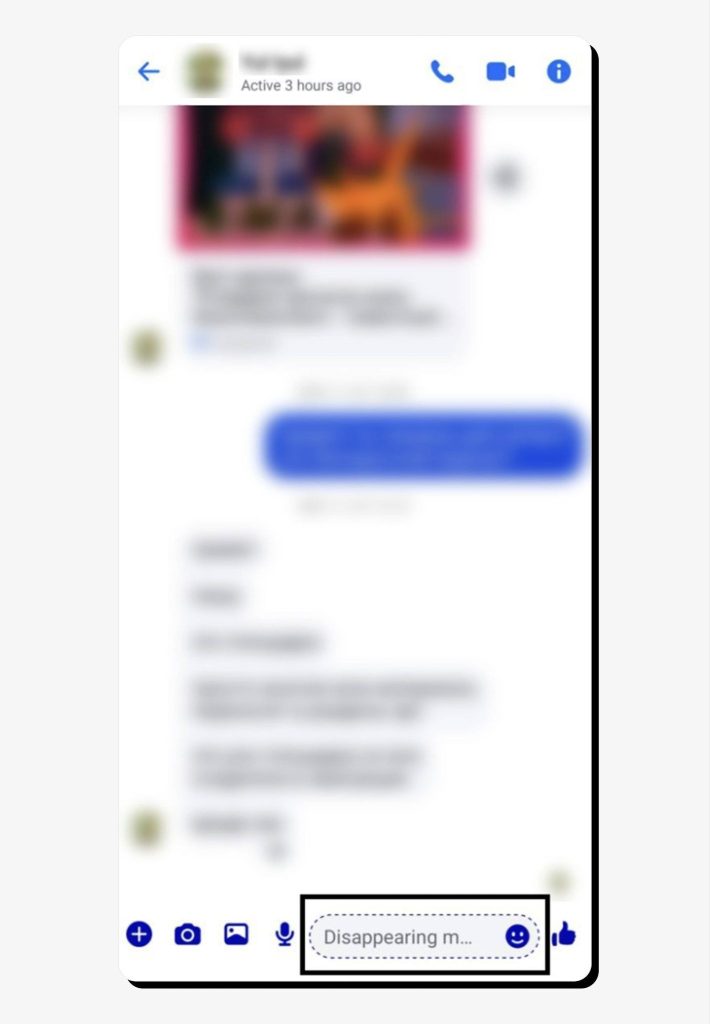
5. You’ll now see that the message box is dotted and features Disappearing message as a placeholder.
As with vanish mode on Instagram, if someone takes a screenshot or makes a screen recording of Facebook Messenger’s disappearing messages, people in the chat will be notified.
You will also be able to report a disappearing message within 6 hours after it’s gone.
If you’re looking for more privacy options on Facebook, consider reading our guide on making your Facebook account private.
Privacy and security basics of vanish mode
It helps to remember that vanish mode was built for temporary conversations, not maximum security protection. In a way, it’s a feature you can enable if you wish, but you can’t rely on it to protect your private conversations from being shared if the other person chooses to do so.
Vanish mode doesn’t block screenshots and screen recordings, even though you receive a notification when one is taken. In addition, it’s still possible to record the conversation in other ways and share it with third parties, so you should keep in mind that vanish mode is only suitable for messaging people you fully trust.
Vanish mode relies on Meta’s default security and doesn’t offer additional protection beyond that. That’s why this mode is only suitable for low-risk, casual conversations. Avoid sharing sensitive or confidential information when using vanish mode on Instagram or disappearing messages on Facebook Messenger.
If privacy is your top priority, consider using security-first messengers such as Signal and Telegram, which come with built-in encryption and secret chats that offer stronger security controls.
FAQs
Is vanish mode really secure?
Vanish mode offers basic privacy, but it’s not a security feature. It’s best used for temporary chats and is not intended for sensitive or confidential information.
Can I retrieve vanished messages?
You can only access messages in vanish mode before they’re set to disappear. Once they’re gone, they can’t be retrieved.
How do I know if someone used vanish mode with me?
Whether on Instagram or Facebook Messenger, you will always get a notification when someone in the chat turns on vanish mode or disappearing messages.
Does vanish mode work in group chats?
No, Instagram’s vanish mode only works for one-on-one chats.



Dimitri is a tech entrepreneur and founder of Onerep, the first fully automated data removal service. Top cybersecurity CEO of 2021 by The Software Report.