 Published November 26, 2025
  read
read
Does your phone listen to you? What’s really happening and how to protect your privacy
The other day, my friend came up to me with a question: Do phones listen to you? He was blatantly concerned for his family’s privacy and online safety. He and his wife went shopping the other day, and talked about getting some hiking gear. He then saw ads for tents on YouTube, and he swears he never searched for them.
When such things happen, it’s easy to connect the dots. Millions of people think their phones are secretly eavesdropping for ads. But does your phone listen to you, really? The answer is yes, but not in a way you might assume.
This article will explain what’s really going on in the world of marketing, why ads feel suspiciously relevant, and how you can protect your privacy.
So, does your phone actually listen to you?
When people wonder, “Is your phone listening to you for ads?”, they mainly worry about social networks like Instagram and Facebook (owned by Meta) and voice assistants, such as Siri, Google Assistant, or Amazon’s Alexa.
For a certain app to listen to your conversations, it must have access to the microphone. Many apps will ask for permission to access the camera or microphone when you install them. Some may really need that access to function properly, while others may not but may still secretly try to obtain it without user knowledge or consent.
How do voice assistants work?
Voice assistants like Siri and Alexa do listen to you on standby. They need to, in order to hear the trigger words like “Hey Siri” or “Ok Google”. But they are not actively recording all ambient conversation and storing it.
Instead, voice assistants just passively screen for commands. What does this mean? They are always capturing a few seconds of audio to look for trigger words, but that audio recording doesn’t get stored or uploaded to a server unless the assistant is activated.
That said, when you activate the voice assistant (like ask Siri to turn on music), this recording may get stored, depending on the assistant.
When things go wrong
You’ve probably had a voice assistant wake up by mistake, although you haven’t said the activation phrase. These are the false wake events, which happen when the assistant “thinks” it heard the wake words and starts recording by mistake.
Google, Apple, and Amazon all faced criticism regarding this. These recordings (or parts of them) were sometimes reviewed by third parties for quality control, in an effort to improve the accuracy of voice recognition systems.
The bottom line: Is my phone listening to me?
In general, voice assistant systems are heavily regulated and bound by policies that govern what data is collected. Companies like Meta and Google state they do not use microphone audio for ad-targeting across major social apps. The truth is that your phone listens for commands, not conversations.
Why it feels like your phone is listening
Some users will not be convinced so easily.

I get it; what else could possibly explain (numerous) situations like this one? It’s easier to buy into the conspiracy of large organizations overstepping their legal rights than to understand a mix of behavioral profiling, confirmation bias, and frequency illusion.
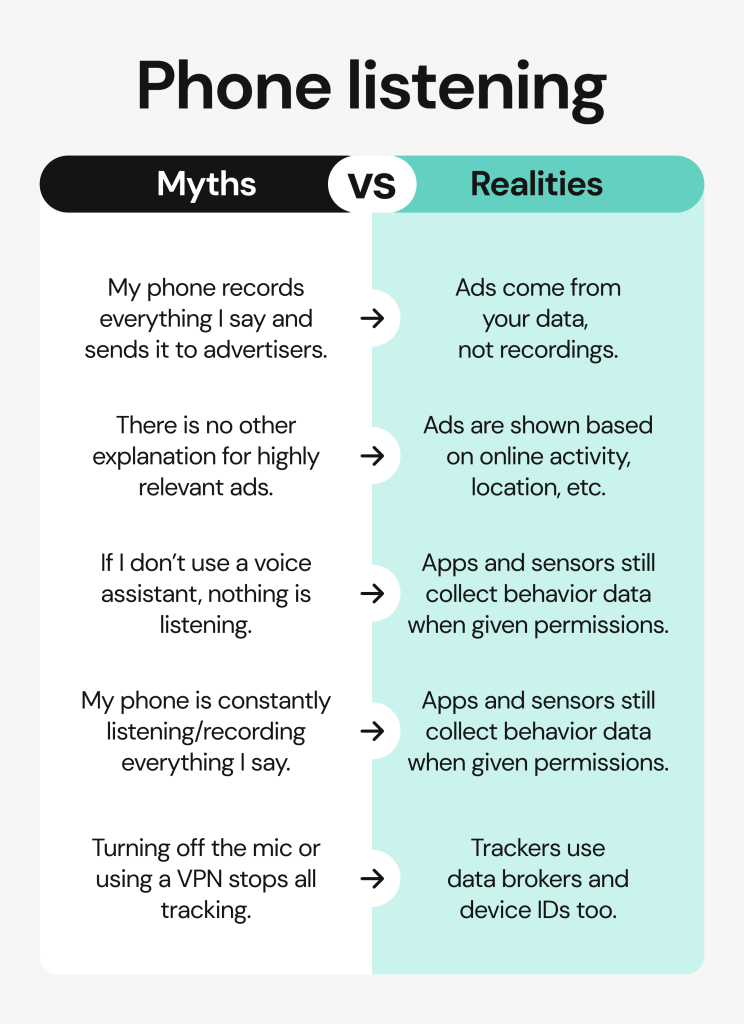
- Behavioral profiling: Advertisers learn about your habits and interests from browsing, location, purchase data, and even social connections. Powerful algorithms can use this information to target you with specific ads.
- Confirmation bias and frequency illusion: You remember each time a conversation resulted in an ad, but what about all the times when you talked about products, and didn’t get targeted advertisements? It’s common to remember the “hits”, but not the “misses”.
The truth is, people are predictable. As CNET put it: “It’s not your mic, it’s the math.” Advertisers analyze your behavior and infer your interests using data shared across apps, social networks, ad partners, and even Wi-Fi networks you share with people around you. It’s driven by statistics and patterns, not secret recordings.
How advertising really works: data, not microphones
The unsettling feeling that your device is spying on you is real — but the culprit isn’t a secret microphone. It’s the data broker industry.
Ever heard the advice: Don’t listen to their words, watch their actions? Advertisers have adopted this quite literally. They don’t even need to listen to your private conversations to understand your behavioral patterns.
As complex as the marketing space is, we’ll divide it into 5 main pillars. What really guides marketing are platforms, advertisers, identity providers, AI models, and data brokers. They plot an invisible web that makes ads feel telepathic.
- Platforms (such as Facebook, Instagram, TikTok, YouTube): Websites, mostly socials, collect the infamous cookies and track your clicks, likes, scroll time, and location.
- Advertisers: Companies looking to sell a product. They provide platforms with information about their customers. Then, the platform can present targeted ads to lookalike users or audiences.
- Identity providers (such as LiveRamp): Can my phone hear me? Or does it just share my IP address with identity providers? ID providers are firms that connect your phone, laptop, and smart TV as “one” user, so advertisers can keep track of you seeing an ad on TV, and searching for the same product on your laptop. They also take note of other users in your immediate surroundings and assume your behavior from theirs.
- Data brokers (such as Acxiom, LiveRamp, TransUnion, and many others): Websites that collect and sell (public) personal information pulled from your social networks, such as your name, birthday, and place of living. They can also build “shadow profiles” that link your email addresses, Wi-Fi data, and offline purchases.
- AI models: Artificial intelligence algorithms can now predict your interests and actions with overwhelming precision, just looking at what you like, where you live, and what you’ve already bought. AI can also group users into specific categories, such as “new parents” or “pet owners”. For example, if you post about going to the gym and belong to the “active lifestyle” category, you’ll be more likely to see chia seeds ads.
When phones really have been caught listening
There have been real-world cases where companies, such as Apple and Google, were caught listening and reviewing users’ local audio. But why is my phone listening to me? Before jumping to conclusions, let’s dissect these incidents. In most cases, the audio was captured by digital assistants, and the purpose was quality control and improvement, not advertising.
- In 2019, reports revealed that outside contractors had access to snippets of Siri recordings. They were meant to evaluate the accuracy of Siri’s responses, but some recordings captured private moments. As a result, Apple suspended the program and made human review optional (you have to opt-in).
- Google and Amazon faced similar criticism for allowing contractors to listen to Assistant and Alexa interactions, in a process they call “grading.”
- Facebook even paid contractors to transcribe voice messages sent via Messenger. They said users had consented to this by using the voice feature; many found this problematic.
- Cox Media Group recently got into a controversy it had to debunk. The company worked on developing its “Active Listening” advertising technology, which would use phone microphones to capture conversations for advertising purposes. The idea faced immense backlash, and the company denied these claims by calling it a misunderstanding. Still, the controversy reinforced the fears of corporations using phones to spy on us.
This is not meant to feed into the myths. Although phones are sometimes misused for listening, these incidents are typically isolated and used for quality improvement. Keep in mind that there’s no proven large-scale ad-targeting based on microphone data.
Read more:
How to know if your phone is hacked: warning signs and ways to check
The real privacy threat: data brokers and your digital dossier
As we coexist on the internet, data brokers are learning about us and building a “ghost profile”. This silent, invisible dossier is built from your location trails, loyalty programs, and purchase data.
Data brokers purchase and collect your data from all sources available, linking your identifiers across apps, websites, and offline records. These datasets include hundreds of personal info titbits, such as phone numbers, addresses, demographics, habits, buying behavior, financial records, etc.
Data brokerage fuels not just ads but also potentially discriminatory profiling, pricing bias, or government surveillance. Think about the FTC vs Kochava case. Kochava collected precise geolocation and device-identifier data from hundreds of millions of phones. This included sensitive locations (such as reproductive-health clinics, places of worship, and shelters) and was packaged for sale. Sensitive info can be used to stigmatize people at work, deny services, or track them down without their consent.
The bottom line is that your phone’s mic may not spy, but data brokers already know your routines.
So, instead of wondering “Does your phone listen to you for ads?, reflect on your own actions. What personal information have you deliberately put out there, for the whole world to see?
How to stop your phone from “listening” & tracking
Turn off or restrict voice assistants if you don’t use them (disable “Hey Siri” / “Ok Google”)
If you are thinking: “how do I turn off phone listening?”, it’s just as easy as disabling the voice assistant’s access to your microphone.
- How to turn off “listening” on iPhone: Go to Settings → Siri & Search → Toggle off “Hey Siri” and “Press side button for Siri.”
- How to turn off “listening” on Android: Go to Settings → Google → Search, Assistant & Voice → “Hey Google & Voice Match” → Turn off.
Review microphone permissions for apps and revoke any unnecessary ones
Other apps may have microphone access, even if they don’t really need it. It’s a good idea to revoke it, especially if you don’t trust some of those apps.
- iPhone: Settings → Privacy → Microphone → toggle off for unused apps.
- Android: Settings → Privacy → Permission Manager → Microphone → “Don’t allow.”
Delete voice history
Voice recordings, particularly your interactions with digital assistants, may be stored in your Google or Apple account. To prevent anyone from reviewing those recordings, you can clear your voice history.
- On iPhone: Go to Settings → Siri → Siri History → Delete Siri & Dictation History.
- On Android: Head over to “My Activity” → Voice & Audio → Delete.
Protect your device
You can protect your information, in the form of voice or text, by keeping your device malware-free.
- Keep all software updated, as new app versions contain important security fixes. Install a trusted antivirus tool to protect you from malware, such as infostealers.
- Only download apps from official stores. Some apps may not be so regulated or may carry malware. Always download verified apps from App Store/Play Store.
- Use a VPN for encrypted traffic. VPNs shield your identity on the internet, especially if you are using a public network.
Control what advertisers can see
Advertising is driven by information: cookies and other online behavior cues. You can now opt out of sharing any information with advertisers or share just the necessary cookies.
- Turn off “Ad Personalization” in your Google or Apple ID settings.
- Regularly review your ad settings on Facebook, Instagram, and TikTok.
Beyond microphones: why privacy is a full-time effort
The question “Do phones listen to you?” might as well be rephrased to “How do I reduce my digital footprint?” Your phone isn’t secretly recording you, but your online presence is being tracked in more sophisticated ways. Modern advertising relies on metadata, device identifiers, and AI-driven predictions. These tools can often reveal more than a raw recording ever could.
Advertisers are tracking your every tap, search, and location ping. Platforms pack your behavior into cookies, while location sharing in the app shows where you go and when. AI models use all of that information to predict your interests and wishes.
That’s why protecting your privacy isn’t as simple as turning off your microphone and voice assistant. You’d need to cut off data sources at the root: by reviewing app permissions, limiting location access, rejecting unnecessary cookies, and being mindful of what you share online.
How Onerep helps protect your privacy
Onerep skims the amount of personal information readily available on data broker networks. Why would that matter? It prevents nosy marketers from targeting you with ads, and lowers your exposure to phishing, scams, and ID theft.
The best part? We’ll do everything for you. Onerep’s process is fully automated: we scan 200+ data broker sites, identify where your personal information appears, send opt-out and removal requests, verify that the listings are deleted, and continuously monitor those sites in case your data reappears.
FAQ
Does your phone listen to you without permission?
No app can listen to you unless you’ve enabled its access to the microphone and agreed to its Terms and Conditions. Of course, some apps may be less trustworthy, and you should only download verified apps from the App Store.
Is your phone listening to you for ads?
No, your phone is not listening to you for ads. Organizations are prohibited from collecting data for advertising this way, and strict regulations are in place. They also don’t even need to listen to your private conversations, as AI algorithms and statistics are enough to tell what you’d be interested in buying.
Why is my phone listening to me?
Your phone, and especially voice assistant tools, might collect recordings for quality checks and improving the tool you are using. Different voice assistants may have different policies on this. In general, even these apps don’t actively listen, just passively scan the surroundings for wake-up phrases.
How do I stop my phone from listening to me?
You can disable microphone access to all apps, and that way prevent your phone from hearing your private conversations.
Why is my microphone always on?
Your microphone might always be on because you’ve allowed apps that work in the background to access it. This mainly applies to voice assistants, but other apps may have access too, even though they don’t really need it.
Final thoughts
We have good news: your phone isn’t secretly listening to you for ads. You shouldn’t worry about hidden microphones or camera use. Instead, think about the digital ecosystem as a whole, and reexamine the data you share every day, through apps, accounts, and your overall online presence.
The best piece of advice is to focus on what you can control. Limit app permissions, tighten your privacy settings, and make sure your personal information can’t be found on data broker sites. Remember that privacy protection isn’t paranoia; it’s protection.
We can help you take back control over your data. First, learn learn more practical ways to stay private online, and reach out for help removing your personal information from data broker websites.




Mikalai is a Chief Technical Officer at Onerep. With a degree in Computer Science, he headed the developer team that automated the previously manual process of removing personal information from data brokers, making Onerep the industry’s first fully automated tool to bulk-remove unauthorized profiles from the internet.