 Published December 26, 2025
  read
read
How to permanently delete your Threads account: a complete step-by-step guide
As a social media user, you might want to limit your time spent on endless scrolling, worry about your data privacy, or simply clean up accounts you no longer use. All these reasons can lead you to delete your account on Threads—the microblogging platform launched by Meta in 2023.
Fortunately, deleting your Threads account has become easier and no longer requires deleting your Instagram account as well.
In the guide below, we’ll walk you step by step through the process of deactivating and deleting your Threads account and show you how to do that safely.
How Threads works and why it’s connected to Instagram
Threads was launched by Meta as a text-based conversation app, as opposed to the image-first Instagram. Yet the two platforms are closely connected, as setting up your Threads account is done through your Instagram profile using the same login details. As such, your Threads account inherits your Instagram handle and profile image, but you can set a unique bio description and start building a completely new network of followers.
This integration means Threads is not a fully standalone social network but operates on Instagram’s authentication system and user data. As a result, in the beginning, Threads and Instagram were treated as a single account for each user, which meant you could only delete Threads by deleting Instagram as well. Luckily, this is no longer a requirement, and you can now manage your Threads and Instagram accounts independently, including deactivating or deleting them separately.
Can you delete a Threads account without deleting Instagram?
Yes, you can delete your Threads account without deleting your Instagram or Facebook accounts, according to Meta’s policy. However, if you delete your Instagram or Facebook account, this will also delete your Threads profile that was created through that account.
A slightly different logic applies when you want to delete your Facebook Messenger account. As another Meta platform, it remains directly tied to Facebook, so deleting your Messenger account requires deleting your Facebook account too.
To sum up, if you delete your Threads account, your Instagram data will remain unaffected, including your posts, messages, username, and followers.
Privacy and data considerations before deleting Threads
Before you delete your Threads account, it’s worth understanding what happens to your data afterward. Meta indicates the following terms for retaining and deleting your personal data, as outlined in their policy:
- Your Threads account, including posts, likes, and followers, will be deleted within 30 days after you submit the deletion request (this timeline may vary based on your region). During this time, your profile won’t be visible to other Threads users. You may cancel your deletion request at any time during this 30-day window by logging back into your Threads profile.
- After deleting your Threads account, you will lose access to all information stored in it. For this reason, you may want to export a copy of your information.
- It may take up to 90 days in total to delete your Threads profile and associated data.
- After this 90-day period, copies of your data may still be retained in Meta’s backup storage for legal compliance, security, or technical reasons, according to Meta’s Privacy Policy.
- If you delete your Threads account but want to set it up again using the same Instagram or Facebook profile, you will have to wait for 90 days after your initial Threads account deletion request.
Alternatives to deleting your Threads account
Deleting your Threads account altogether can be overkill in some cases. If you only want to take a break from social media activities and reduce your screen time, you might want to consider other available options that won’t delete your profile permanently but will support your digital detox efforts:
- You can uninstall the Threads app from your phone. This won’t affect any data associated with your account, and you will be able to log in anytime you feel like resuming your Threads activity. One downside is that you will still see snippets of Threads posts in your Instagram feed, which may tempt you to reinstall the app.
- You can deactivate your Threads account temporarily. This takes just a few clicks and hides your past posts and interactions from public view. This option is ideal if you want to step away from the platform without deleting your profile.
If your primary reason for deleting your Threads account is privacy concerns, you have a few alternatives as well:
- Adjust your privacy settings in the account settings. This will help you control who can see your posts and message you, whether your content is suggested on Instagram and Facebook, and whether it’s shared to the fediverse. You can also switch your profile to private, manage tags and mentions, and restrict or block other users’ profiles.
- Tweak your content preferences to limit your exposure to sensitive and political content, as well as hide likes and shares on your posts.
How to deactivate your Threads account temporarily
If you’d like to deactivate your Threads account temporarily, follow the steps below:
1. Open the Threads app on iOS or Android.
2. Tap the profile icon in the bottom-right corner.
3. Tap the menu icon (two horizontal dashes) in the upper-right corner.
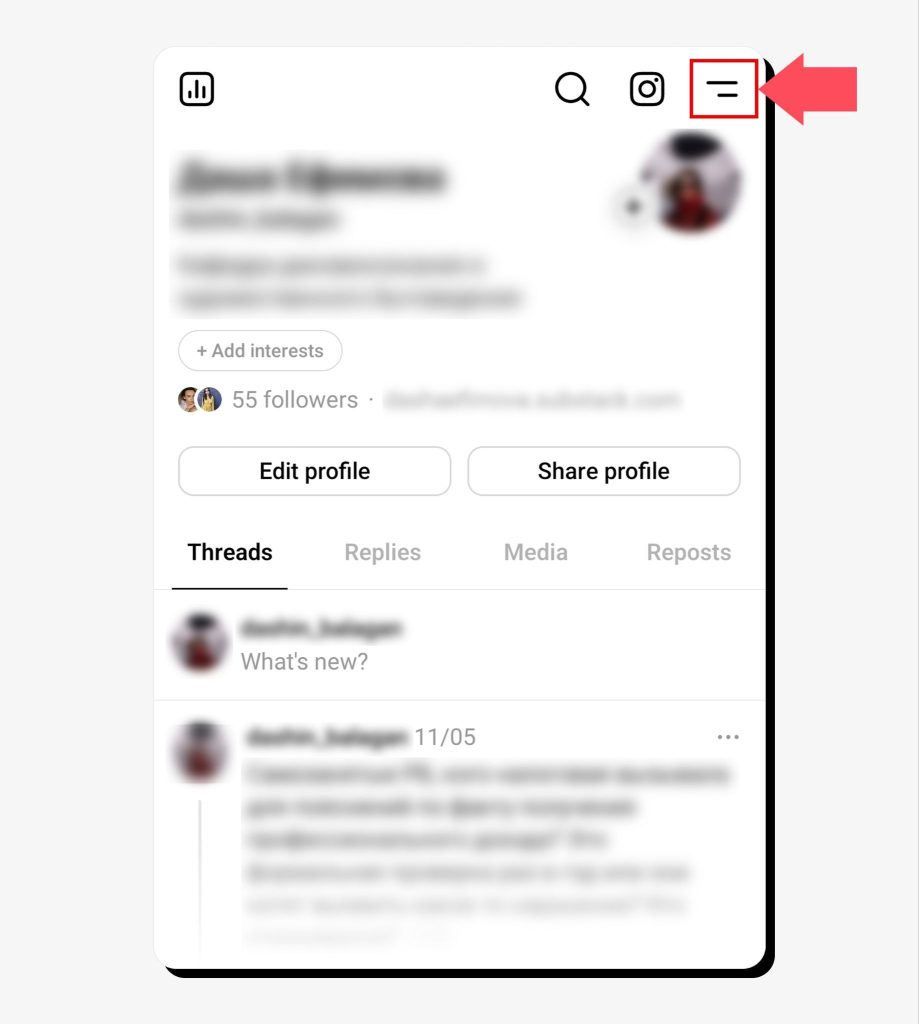
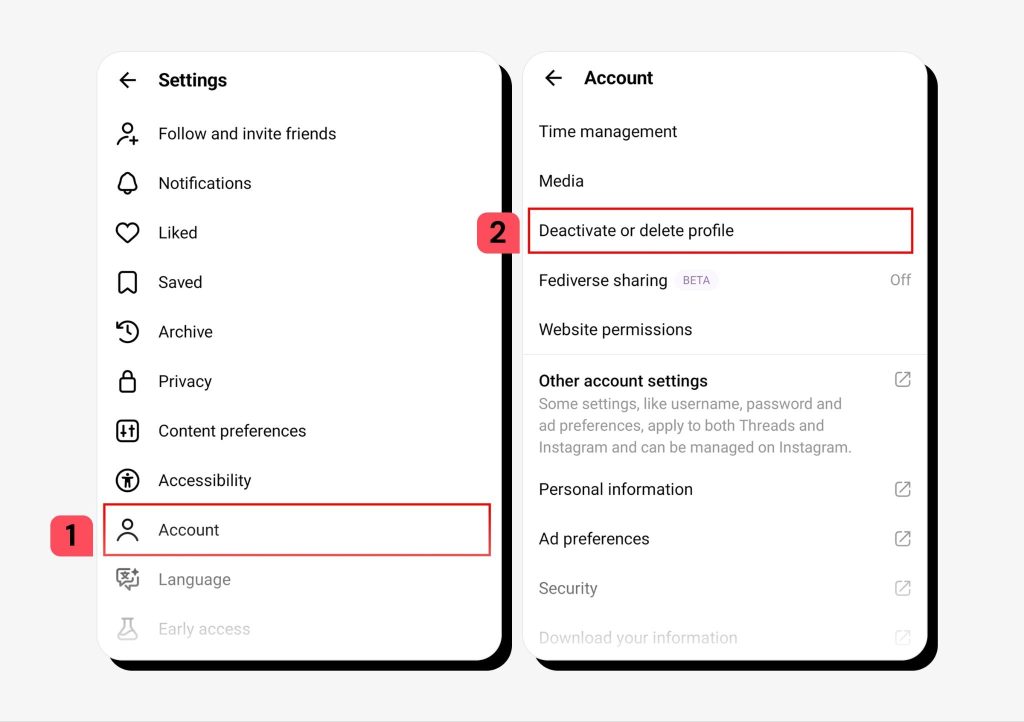
4. Go to Account > Deactivate or delete profile.
5. Tap the Deactivate profile button.
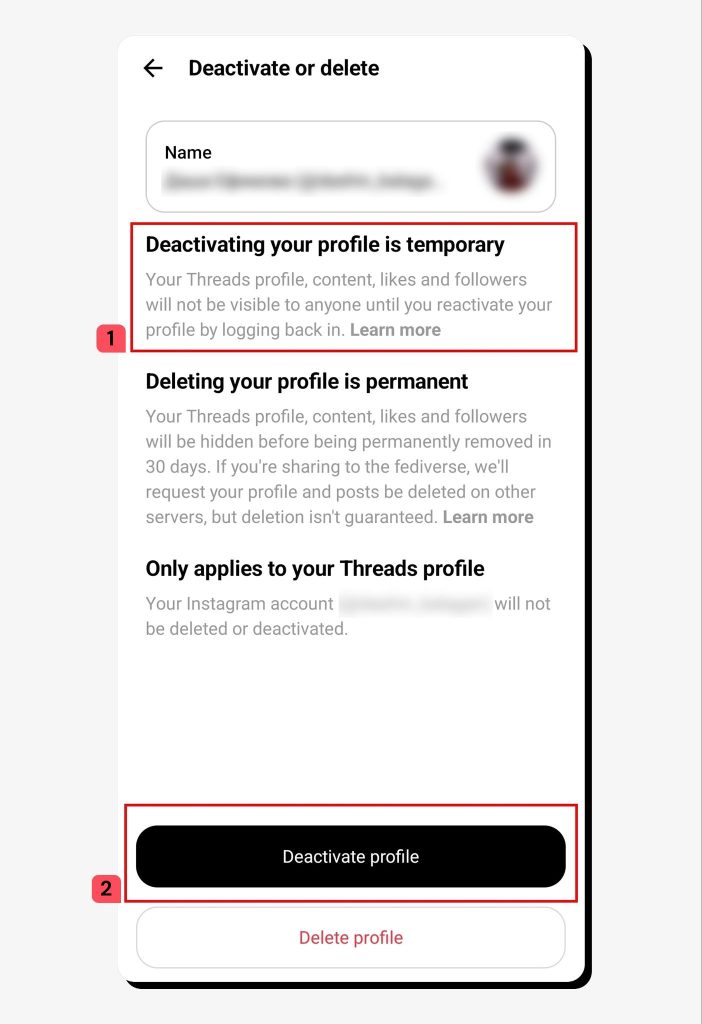
6. Confirm by tapping Deactivate.
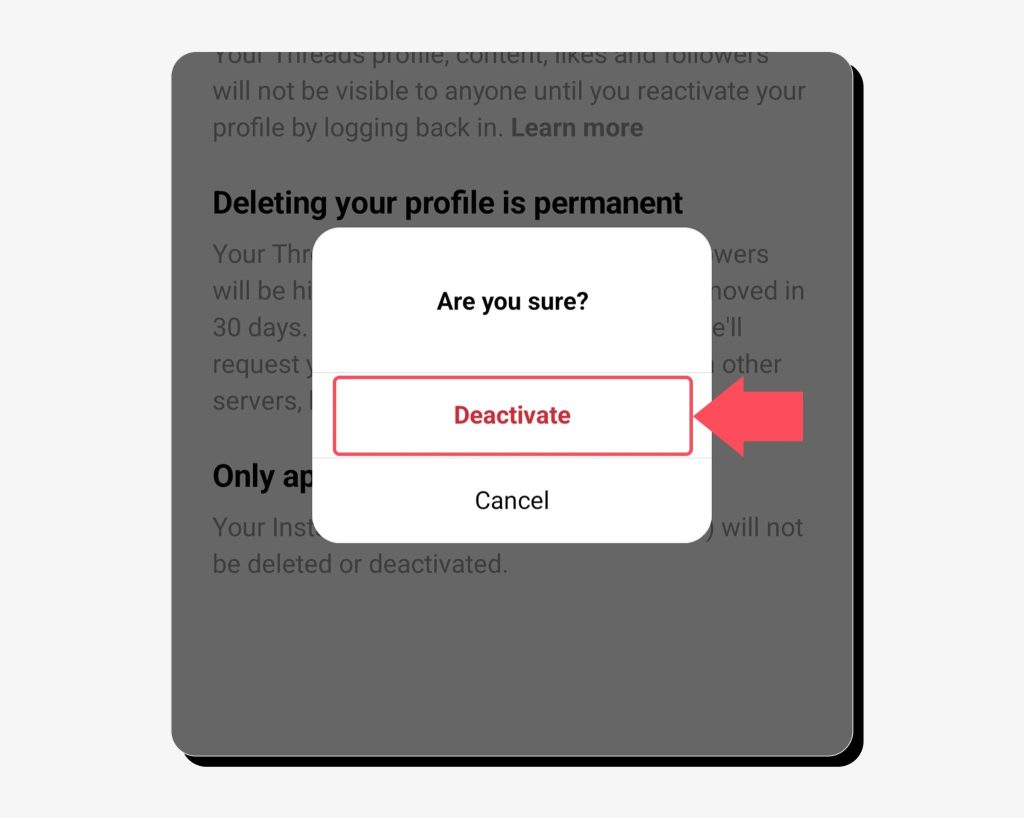
Congrats! You’ve now deactivated your Threads account temporarily. If you ever want to reactivate it, just log into the app at any time and your profile will be restored. Meanwhile, your profile, content, and interactions with other users’ posts will remain hidden but not deleted.
How to delete your Threads account step-by-step
If you’ve decided to remove your Threads account permanently, here’s how to navigate to the deletion option:
1. Repeat the same steps to access your Threads profile > Menu > Account > Deactivate or delete profile.
2. This time, choose to delete your profile.
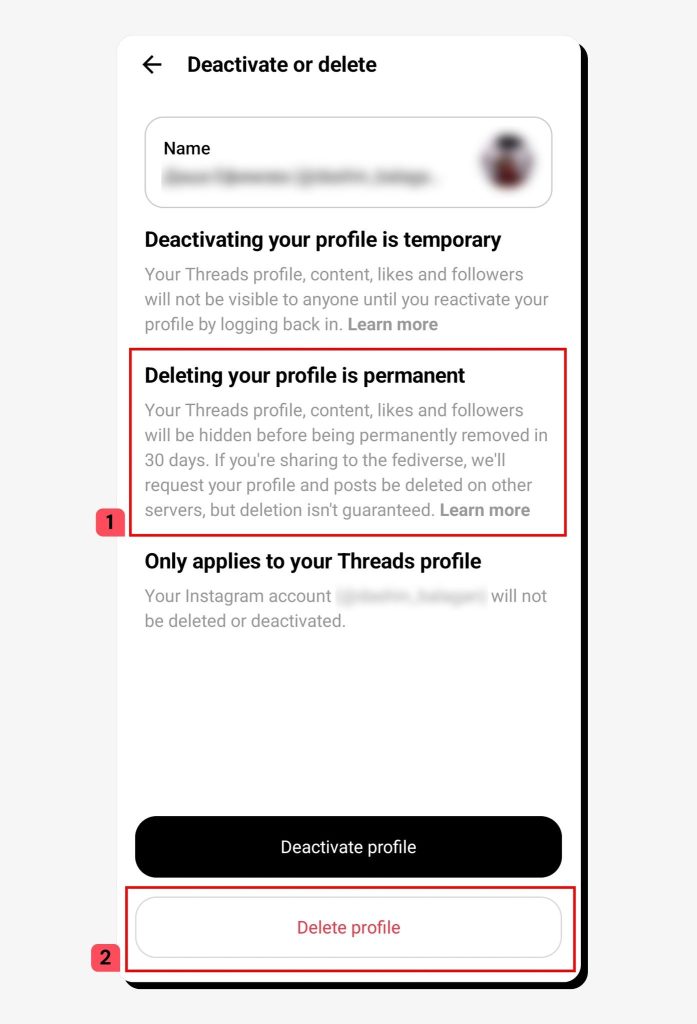
3. Enter your Threads password (the same password you use for your Instagram or Facebook account, depending on which one you used to set up Threads) and tap Delete Threads profile.
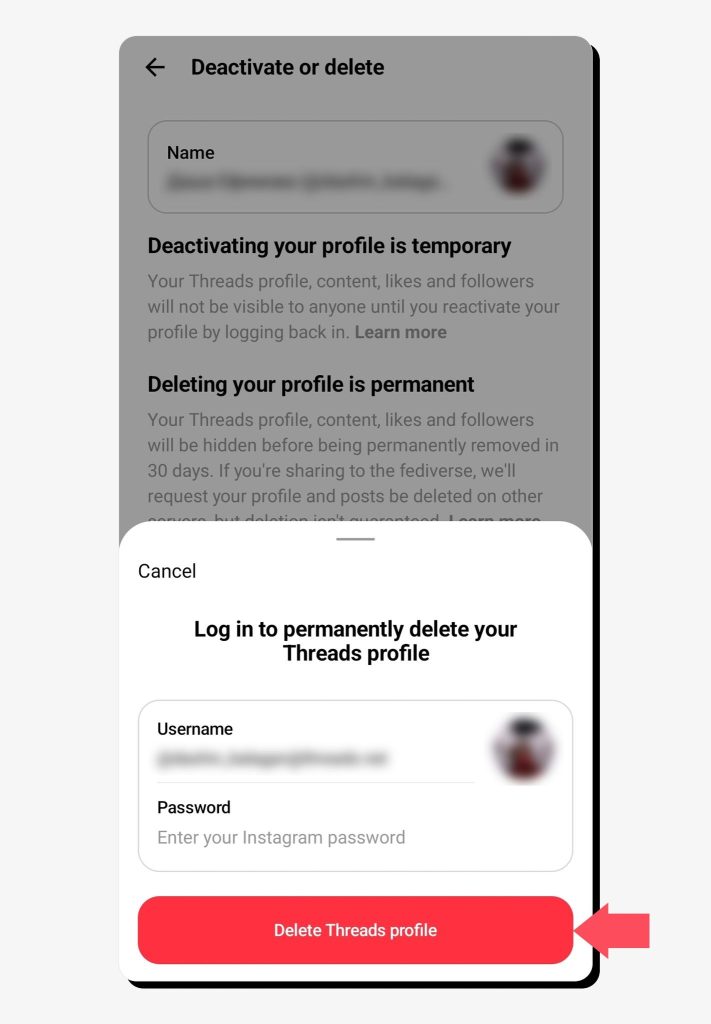
Now you’ve submitted the request to delete your Threads account. Remember that deletion may take up to 90 days in total. You can cancel this request anytime within the 30-day period by logging back into the app.
What to expect after deleting your Threads account
After you request to delete your Threads account, expect the following:
- Your Threads profile, posts, likes, shares, replies, and followers will be scheduled for removal during the next 30 days. Once the process starts, other users won’t be able to see your profile or associated content.
- Internally, Meta may retain copies of your data after the 90-day period for legal, security, or technical reasons, according to their data retention policy.
- After deletion, you won’t be able to log back into your old Threads account. You’ll have the option to either wait 90 days and set up a new Threads account using your current Instagram or Facebook profile or create a new Instagram or Facebook profile with a new username and use that to set up your new Threads account.
FAQs
Can I delete Threads but keep Instagram?
Yes, according to the latest Meta policies, it’s possible to delete your Threads account while keeping Instagram, as these accounts are now decoupled.
How long does Threads deletion take?
Your Threads account should be deleted within 30 days after your deletion request, however, the process can be prolonged to 90 days in some cases. During this time, your profile won’t be visible to other users. Meta may still retain copies of your data internally for legal, security, or technical reasons.
Does deleting Threads erase all my posts and replies?
Yes, once your Threads profile is deleted, your posts, shares, likes, and replies are deleted along with it. You won’t be able to access this information unless you exported a copy before deletion.
Can I recover my Threads account after I delete it?
Yes, but you only have 30 days to do so after you tap the Delete Threads profile button. To resume using your Threads account after submitting the deletion request, log into the app anytime within this 30-day period.



Mikalai is a Chief Technical Officer at Onerep. With a degree in Computer Science, he headed the developer team that automated the previously manual process of removing personal information from data brokers, making Onerep the industry’s first fully automated tool to bulk-remove unauthorized profiles from the internet.