 Published December 10, 2025
  read
read
How to delete or deactivate your Facebook Messenger account
At some point you might want to deactivate or delete your Facebook Messenger account—for privacy reasons, safety concerns, or simply for the sake of a digital detox.
Whatever the reason, if you’re looking to take a temporary break from Messenger or remove it entirely, this article will guide you through the straightforward steps to do it quickly and safely. You’ll also learn the difference between deactivating and deleting, along with tips for choosing the right path.
Deactivating vs. deleting Facebook Messenger—what’s the difference?
Deactivating and deleting Facebook Messenger are two distinct options when it comes to quitting the app.
Deactivating Facebook Messenger is a milder option for those wanting to take only a temporary break without permanently losing access to their chats and stored information.
To deactivate Messenger, you must deactivate your Facebook account first as a necessary preliminary step.
Once your Facebook and Messenger accounts are deactivated:
- You can reactivate them at any time by logging in or reactivating within your Account Center settings (see below).
- You automatically deactivate all other Facebook profiles you might have.
- No one can see your profile.
- People can’t search for you or send you a message.
- People won’t see your messages unless you’ve shared a Messenger chat before.
- Your friends will still see your name on their friends list.
- Your posts and comments in Groups you made in the past will still be visible to Group admins.
On the contrary, deleting Messenger will lead to the permanent deletion of your Facebook account as well, along with all stored data.
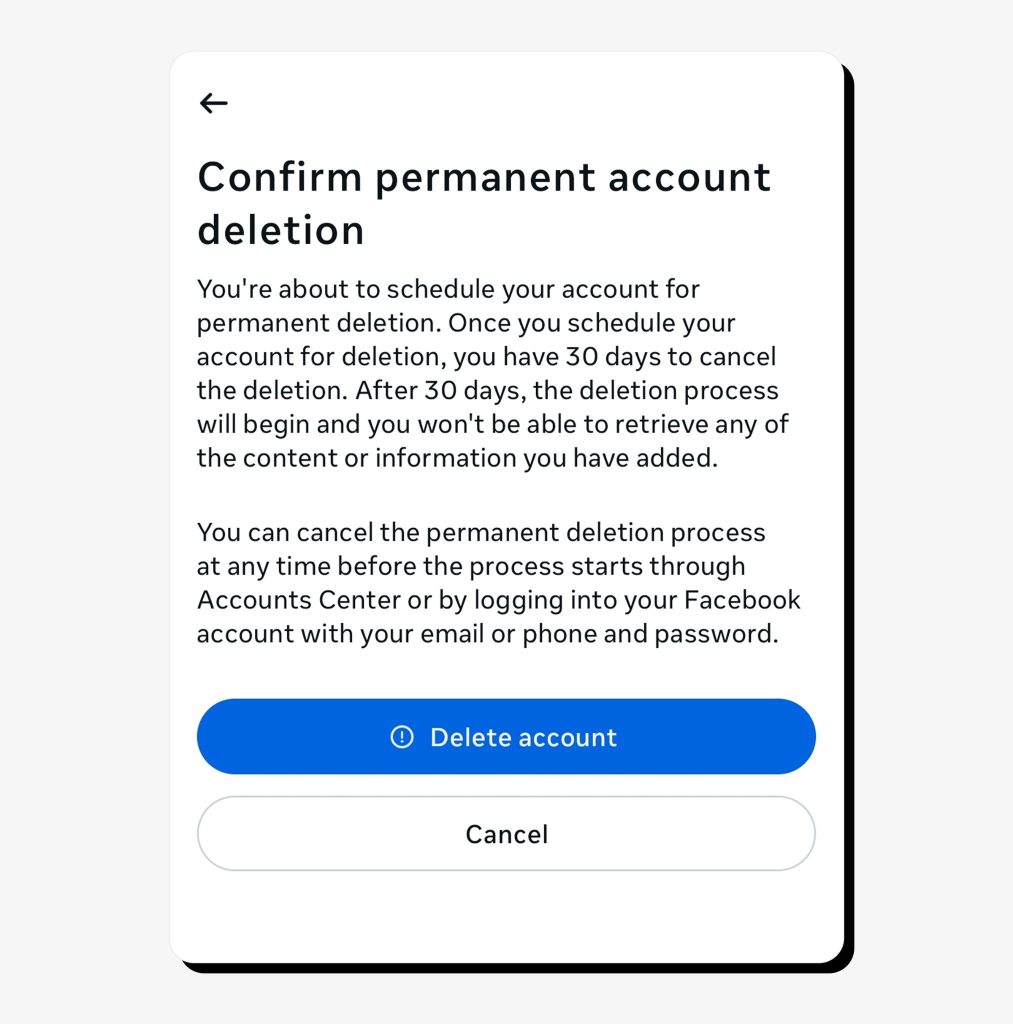
The key difference between deleting and deactivating Messenger is that you can’t regain access once you delete the account. While you can restore access within 30 days of your deletion request by logging back in, you’ll lose access permanently after that window.
After deleting your Messenger and Facebook accounts:
- Your Messenger chat history will still be visible to those you’ve chatted with, as message history is not stored in your account.
- Your additional Facebook profiles and any Pages where you’re the only admin or person with full control will be deleted as well. To avoid deleting your Page(s), you must assign another admin or give someone else full control.
- Your profile information, photos, posts, and all other Facebook-related data will be permanently deleted over the course of 90 days. Facebook makes it clear, though, that copies of some materials, such as log records, may remain in their database but be disassociated from your identity.
- You won’t be able to use Facebook login as an authorization method for other apps and services.
- You can’t recover the account or profiles once the deletion is finalized.
Reasons to delete or deactivate Facebook Messenger
There are many reasons to quit using Facebook Messenger, either temporarily or permanently. Facebook itself lists some of them when a user tries to delete their Facebook account.
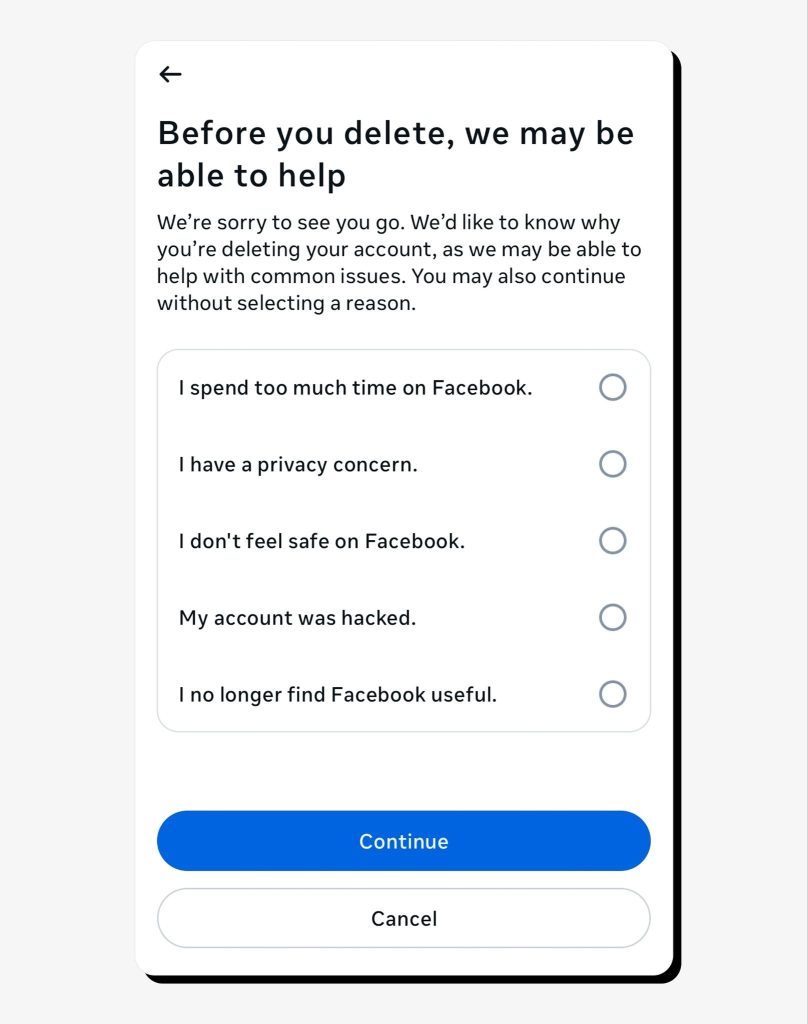
First, there are privacy concerns. From the infamous Cambridge Analytica scandal of 2018 to multiple Facebook data leaks over the past few years, users have every reason to believe that the data stored in Facebook Messenger may be exposed or misused. Additionally, having a Messenger account that anyone can message exposes users to social engineering scams, which can lead to financial loss or the disclosure of sensitive information to fraudsters.
Then, you might want a digital detox, as constant Messenger notifications and pressure to interact can contribute to screen fatigue and simply feel overwhelming. Surely, you can turn off Messenger on Facebook by muting it in the settings, but quitting even a single social media app can result in better nervous regulation and overall well-being due to lower screen time, even if the break is temporary.
You might also want to move to other messaging platforms for security or socializing reasons. For example, Signal and Telegram apps support data encryption and are considered privacy-first messengers. Using a messenger not tied to your social media account may offer a more secure communication experience without excessive personal data exposure.
Finally, you might have had a bad experience connecting with someone on Facebook or Messenger and no longer feel safe staying on the platform, for example, if you fell victim to a Facebook Marketplace scam. In this case, reporting and blocking the associated user(s), post(s), or message(s) can be an alternative to quitting Messenger, but if you feel it’s safer to deactivate or delete your account, follow the instructions below.
How to deactivate Facebook Messenger
To deactivate FB Messenger, you first need to deactivate your Facebook account.
1. On your phone, go to your Messenger Settings by clicking on the hamburger menu at the bottom of the page.
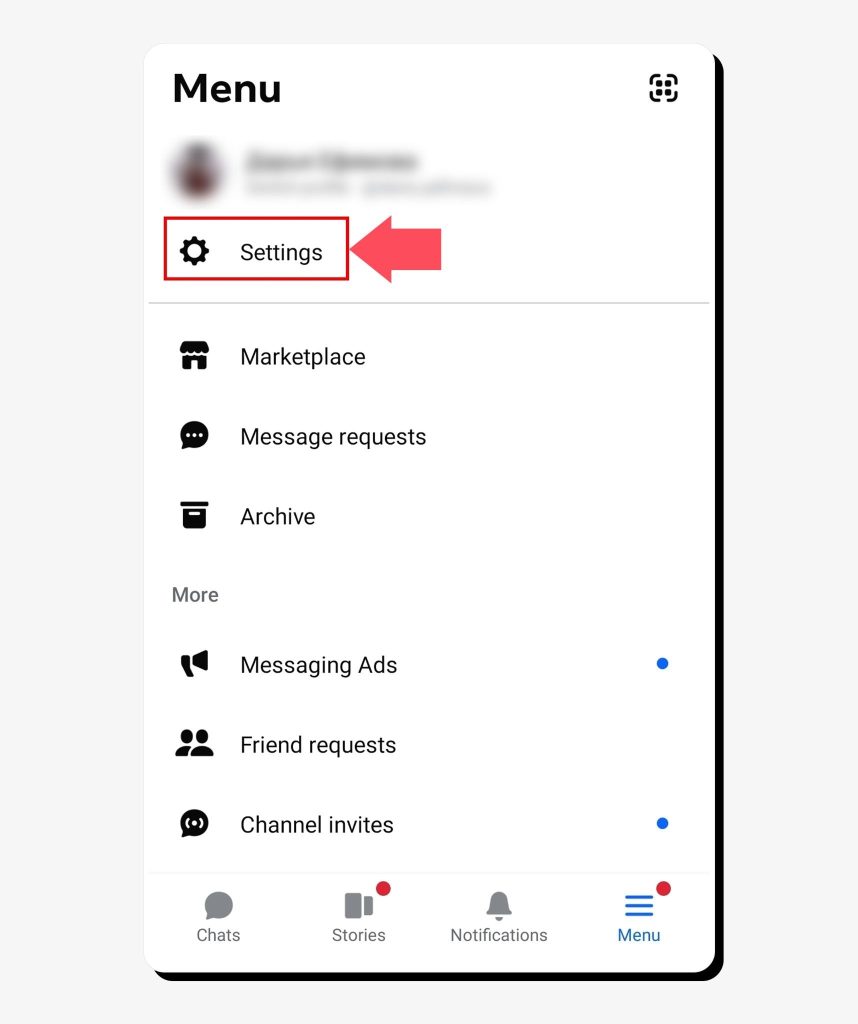
2. Scroll down to Meta Accounts Center and click See more in Accounts Center.
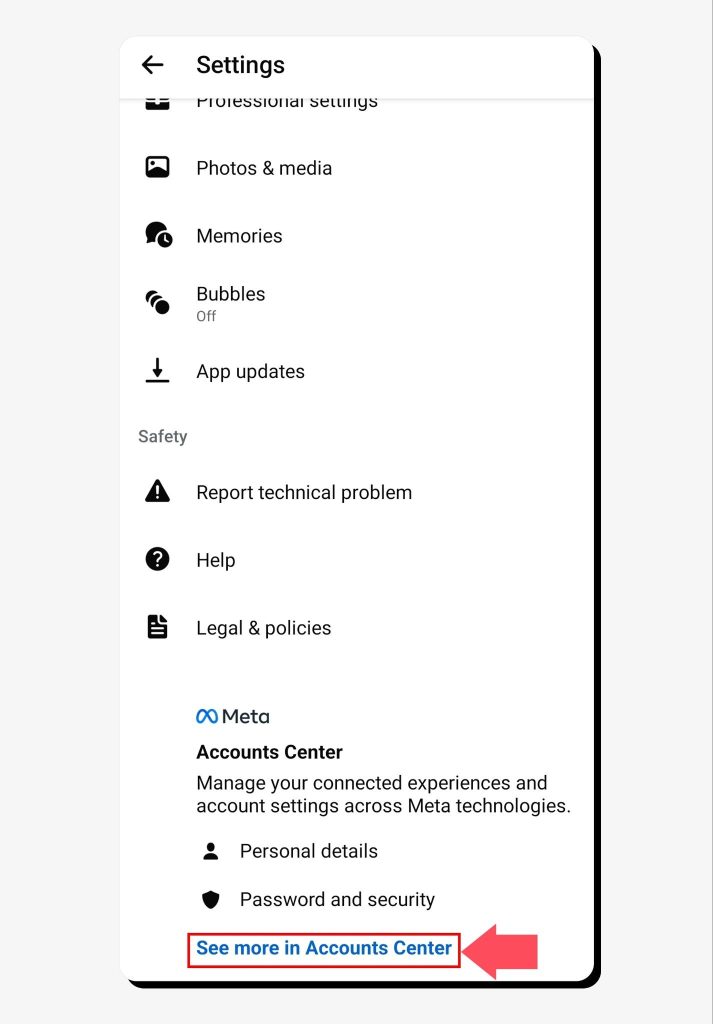
3. In Accounts Center, navigate to Personal details, then click Account ownership and control.
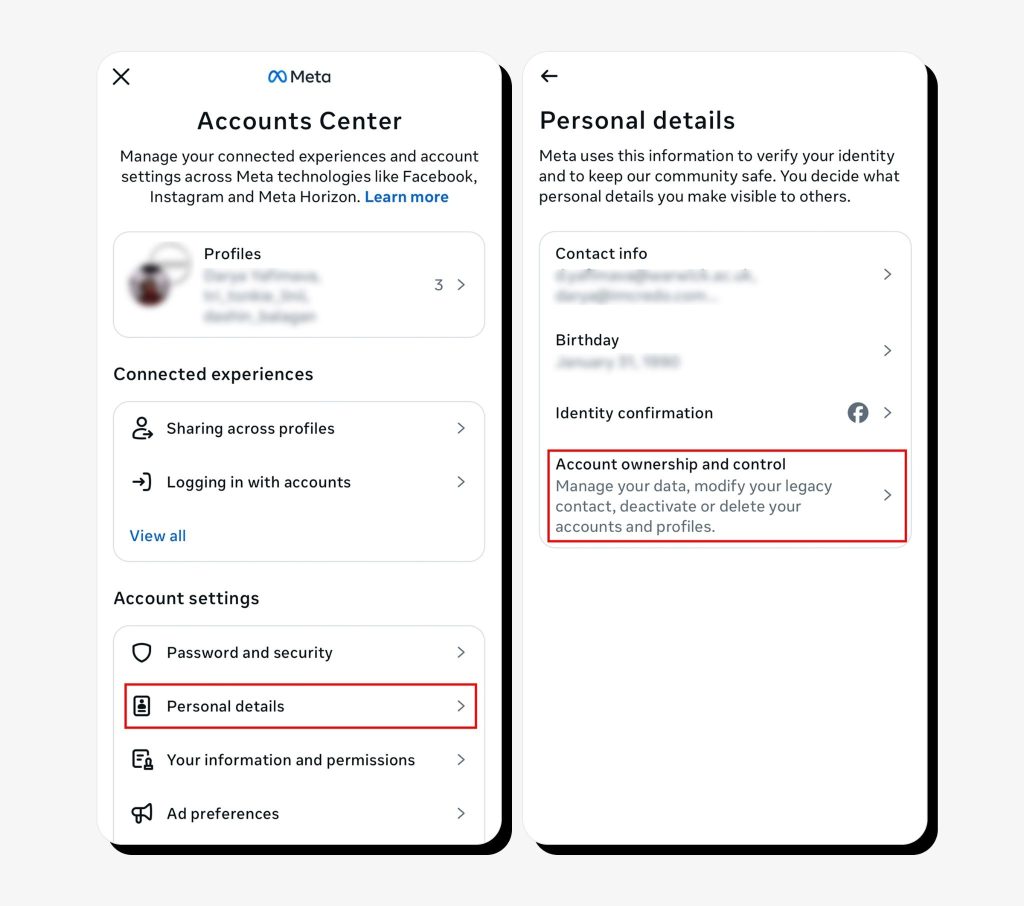
4. Click Deactivation and Deletion and choose the Facebook account to deactivate at the next step.
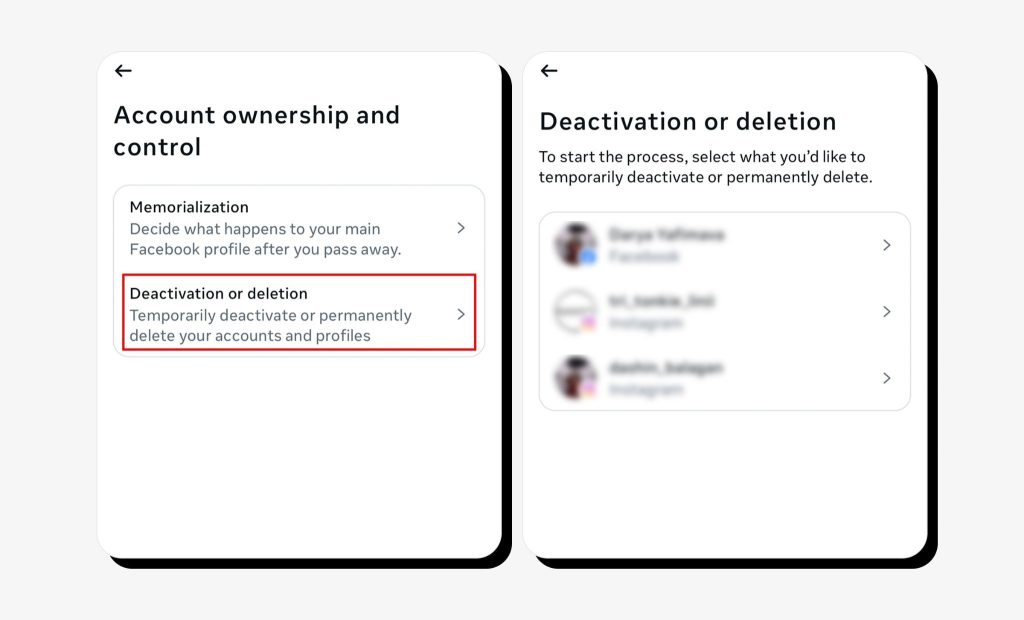
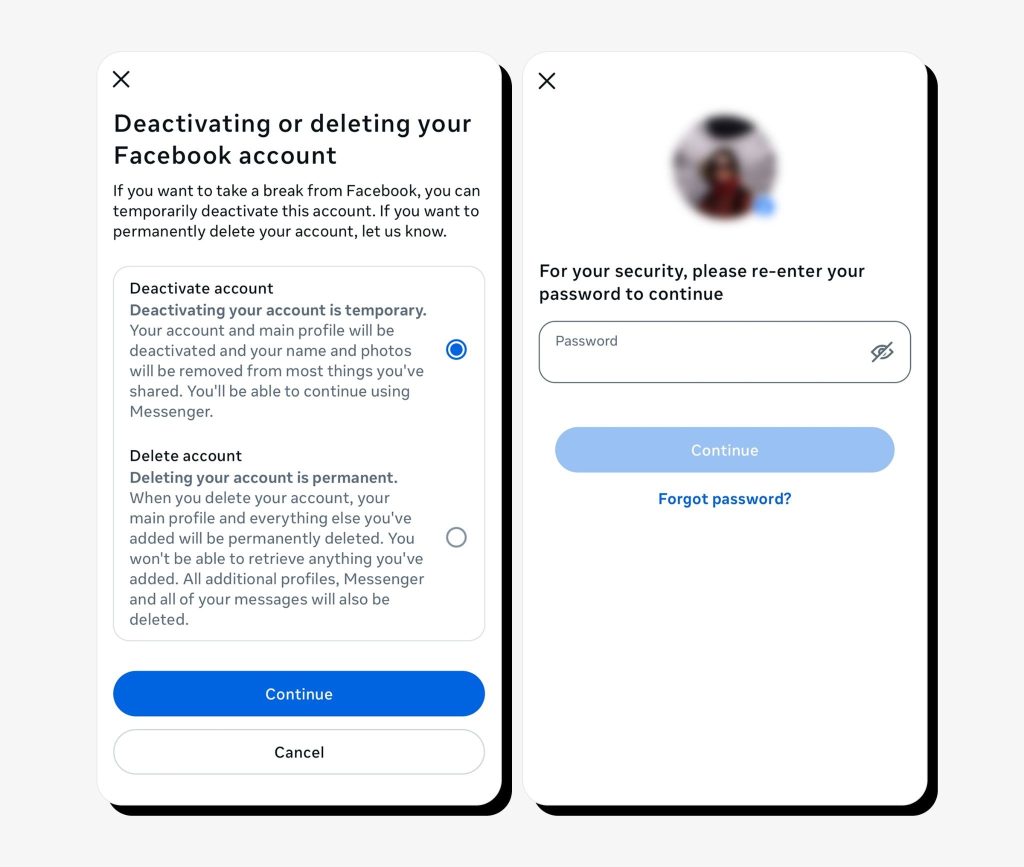
5. Click Deactivate account > Continue and enter your Facebook password.
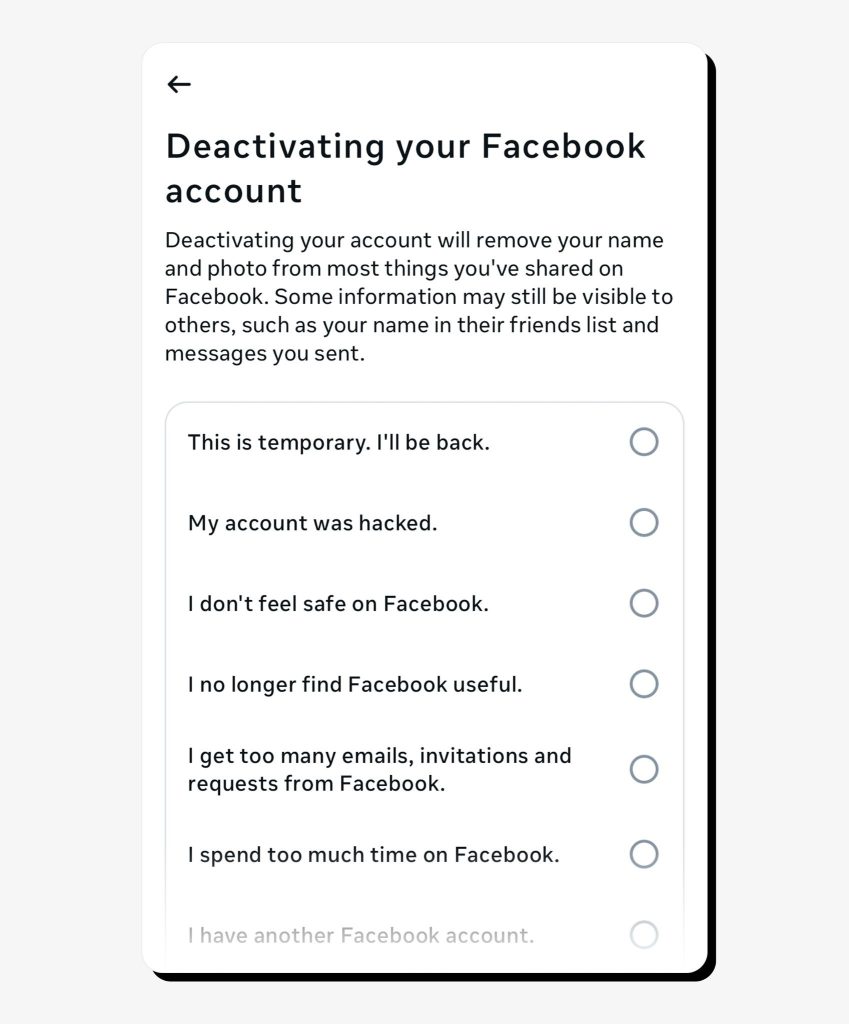
6. You’ll be offered reasons to deactivate your account. Pick one and click Continue.
7. Next, you’ll see an option to set a time for reactivating your Facebook account. Alternatively, you can do it manually by logging back into Facebook at any time.
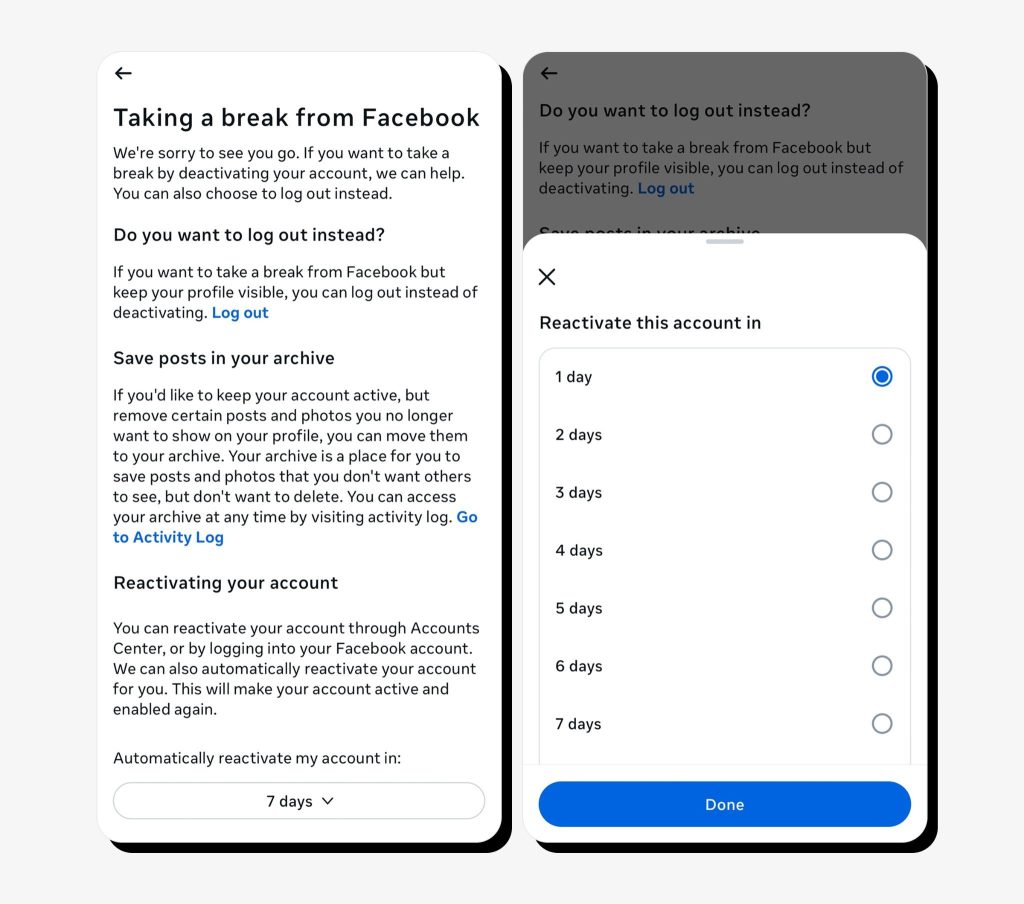
8. You’ll also be given the option to keep your Messenger account active after deactivating your Facebook account. Tick the box and click Deactivate my account.
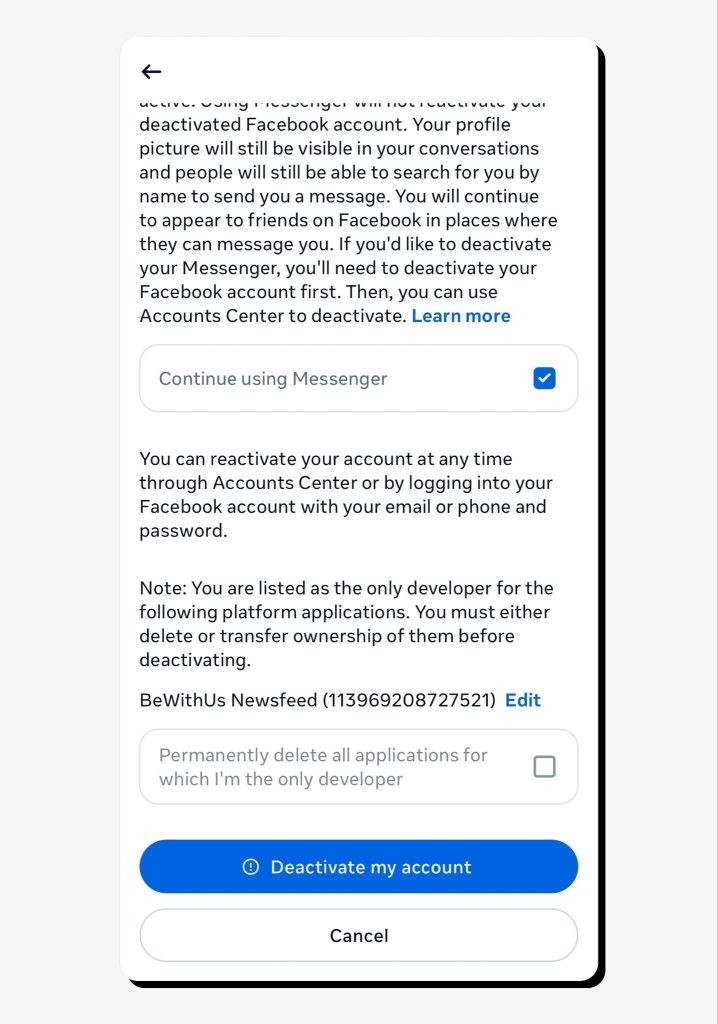
After deactivating your Facebook account, your list of profiles in Accounts Center will show Facebook as Deactivated except Messenger.
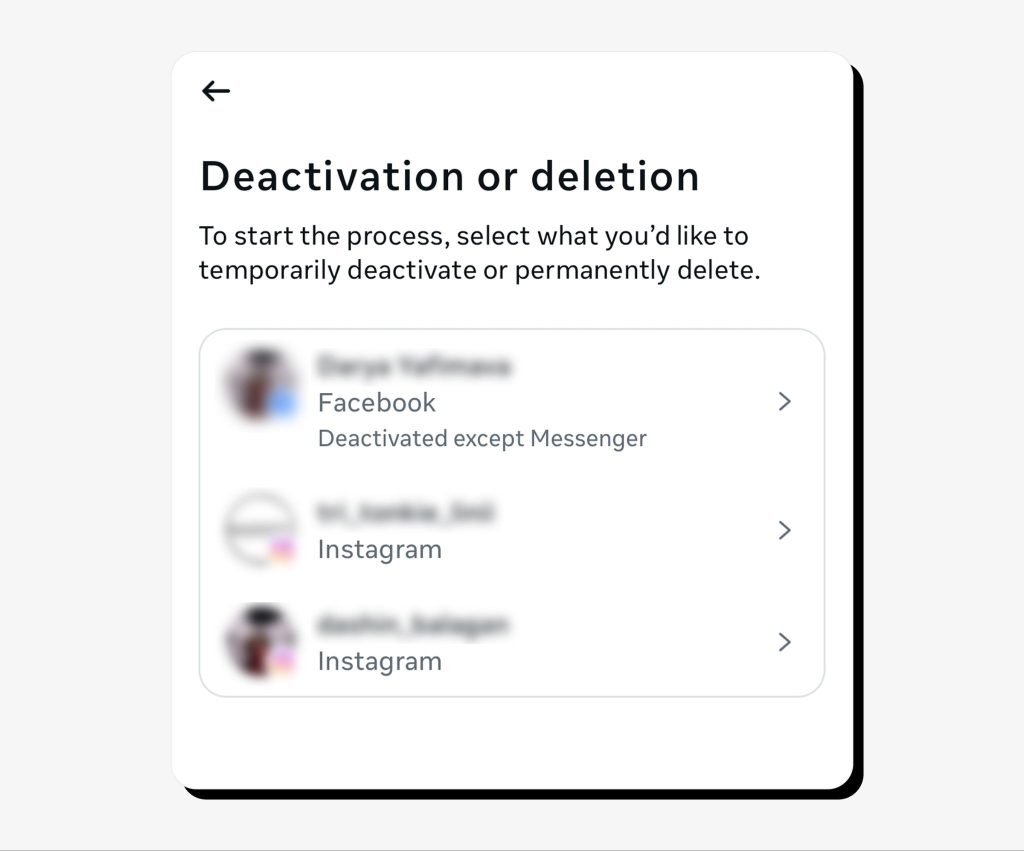
So how do you deactivate Messenger now? Here are the steps to deactivate your Messenger account:
1. Repeat the same process to access Accounts Center > Personal Details > Account ownership and control > Deactivate Messenger.
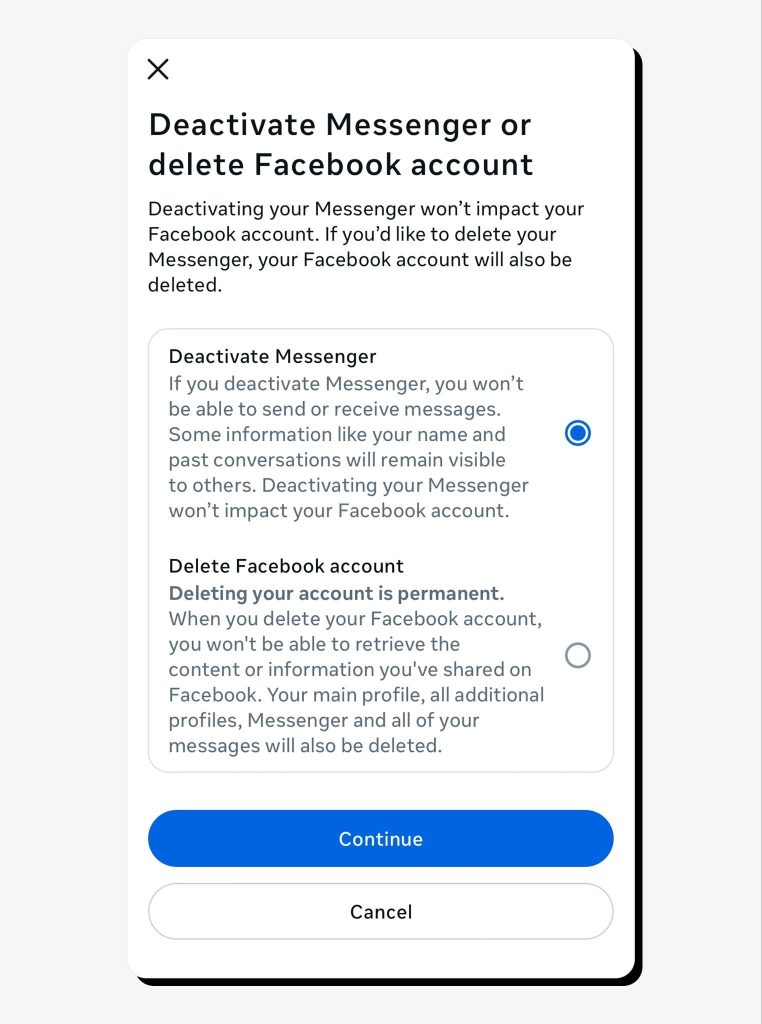
2. Click Deactivate Messenger.
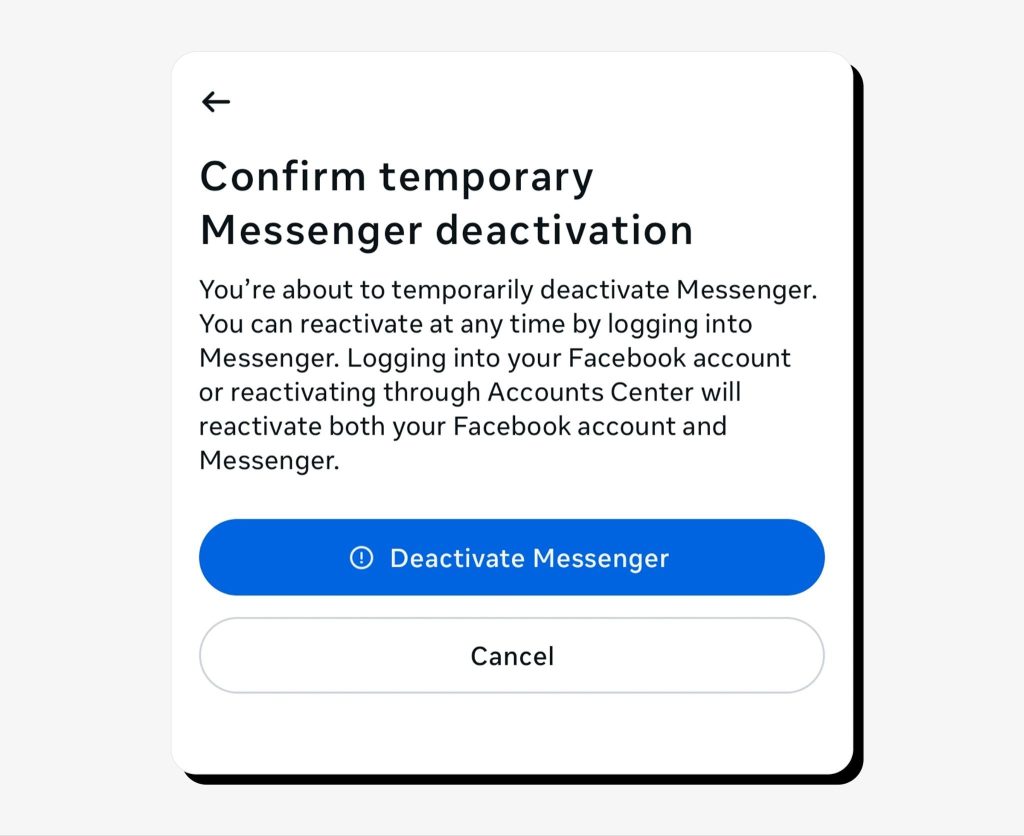
That’s it! You’ve now deactivated Messenger along with your Facebook account.
Once you have a deactivated account in your Accounts Center, you will see an option to reactivate it. You can follow the instructions there or manually log into your deactivated account to reactivate it.
How to delete your Facebook Messenger account permanently
Since you can’t use Facebook Messenger without having a Facebook account, even if it’s deactivated, you must delete your Facebook account to delete Messenger as well.
Remember that deleting a Facebook account will also permanently delete all the information you ever posted or shared, including photos, videos, and messages. You will have the option to download this information before deleting the account.
Here’s how you delete your Facebook account permanently:
1. Go to Accounts Center > Personal Details > Account ownership and control and choose Delete account > Continue.
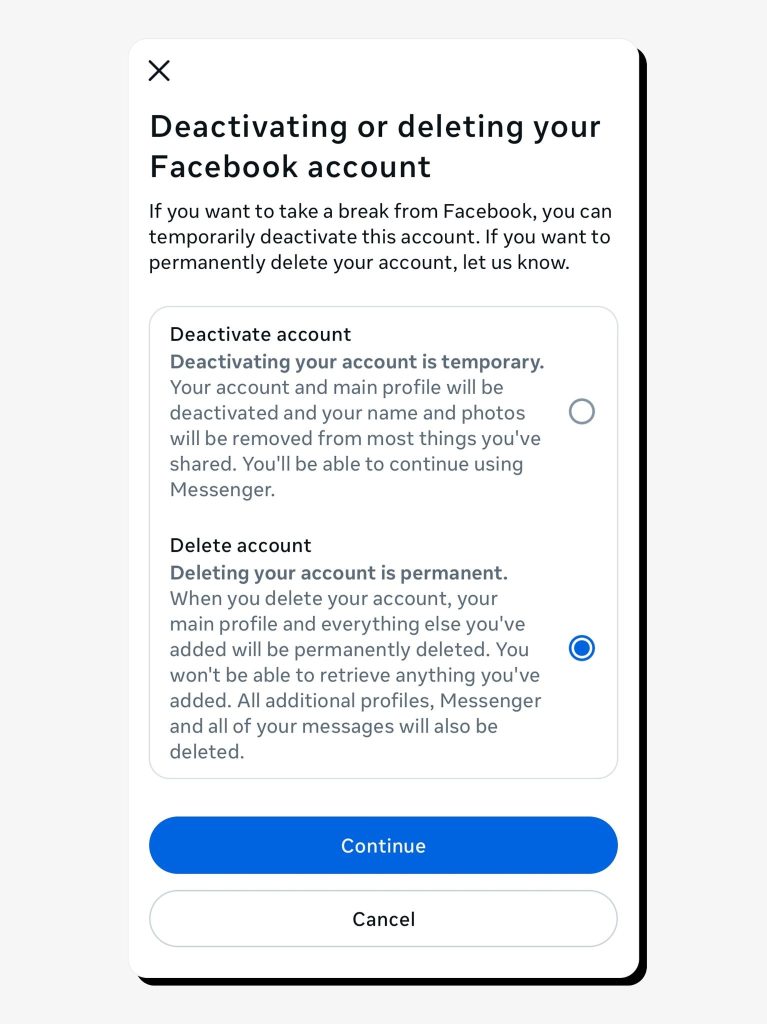
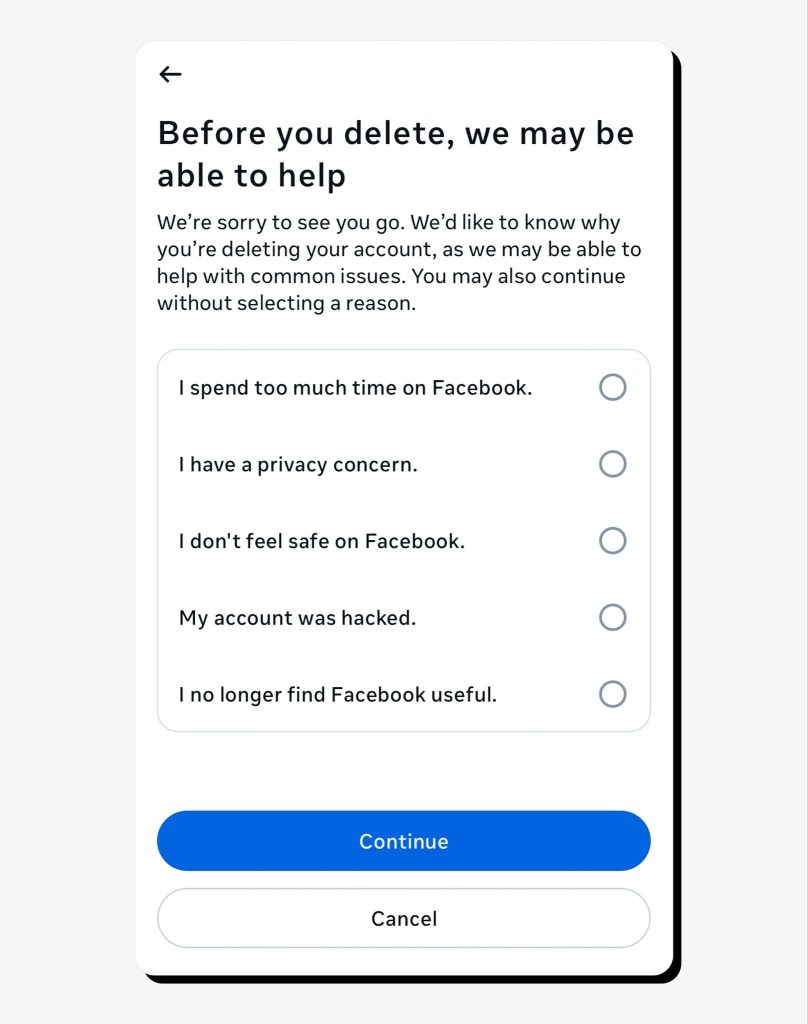
2. You’ll be asked why you want to delete your account, followed by prompts from Facebook suggesting alternatives to permanent deletion. Click Continue.
3. You’ll then be taken through the steps to save your Facebook-stored information before it gets permanently deleted.
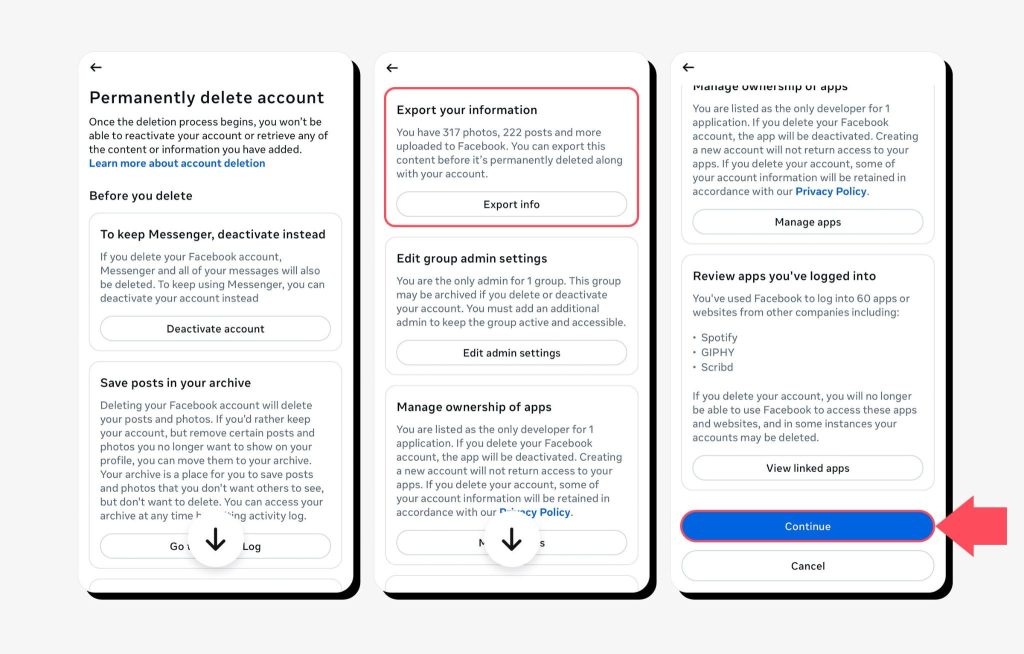
4. Finally, confirm your permanent account deletion.
Is it possible to use Facebook Messenger without a Facebook account
Yes, you can deactivate Facebook but keep Messenger. This is called having a Deactivated Except Messenger account (DEMA), which allows you to use the Messenger app as usual without having an active Facebook account.
However, you still can’t set up a Messenger account without first creating a Facebook account, even if you deactivate it shortly afterward.
In the past, people could use Messenger as a standalone app without tying it to a Facebook account, but this option is no longer available. Those who previously used Messenger-only accounts need to upgrade to a DEMA account to continue using Messenger.
To access Messenger with a deactivated Facebook account, you can simply download the app from your app store or go to messenger.com and enter the same credentials you used to set up your Facebook account.
FAQs
Does deleting the Facebook Messenger app delete the account?
No, uninstalling the Facebook Messenger app from your device doesn’t delete your Facebook or Messenger accounts, it only stops you from using the app on that device.
If you delete Facebook, can you still use Messenger?
No, if you delete your Facebook account permanently, this also deletes your Messenger account, so you won’t be able to use it. Similarly, you can’t delete Messenger without deleting Facebook first, as these accounts depend on each other.
How long does it take for Facebook Messenger to be deleted?
Once you delete your Facebook account along with Messenger, it takes 30 days for the account to be deleted permanently. It can take up to 90 days for all stored data to be deleted.
Can Facebook Messenger be deactivated without deactivating Facebook?
No, you can’t deactivate Messenger without deactivating Facebook first, since these accounts are interrelated.
Do contacts still see messages if Facebook Messenger is deactivated?
Yes, your past contacts will still see your messages in the chat history unless they delete them.
Will my friends know if Facebook Messenger is deactivated?
Your friends won’t be notified about you deactivating your Messenger account, but they will notice other signs, such as you not appearing online, new messages not being delivered to you, and your profile no longer being discoverable on Messenger.




Mikalai is a Chief Technical Officer at Onerep. With a degree in Computer Science, he headed the developer team that automated the previously manual process of removing personal information from data brokers, making Onerep the industry’s first fully automated tool to bulk-remove unauthorized profiles from the internet.