 July 30, 2024
 read
Opt out of Transunion.com
- By Dimitri Shelest Founder and CEO at Onerep

Dimitri is a tech entrepreneur and founder of Onerep, the first fully automated data removal service. Top cybersecurity CEO of 2021 by The Software Report.
Read more - Checked by Alena Shymanskaya Content Manager at Onerep

Alena is an experienced content writer with a specialized focus on data brokers and the intricacies of personal data management.
Read more
- Removal difficulty: High
 Why trust this guide

We know all the ins and outs of the data broker removal:
Founded in 2015, we pioneered automated removal from people-search sites. Our service uses precise opt-out algorithms tailored for each website. When a site changes its algorithm, we detect the change immediately, and our team updates the process. These updates are promptly reflected in the Onerep DIY data broker removal guides. With 16 million records already removed from hundreds of sites for our customers, you are accessing the expertise of the #1 team in the industry with this guide.
Transunion is on of the biggest credit reporting agencies, which supplies marketers, creditors anf insurers with data. To remove your information from Transunion.com, you need to remove yourself from Optoutprescreen.com. To do so,fill out and mail them your opt-out form.
How to remove your information from Transunion.com
1. Go to the online removal form.
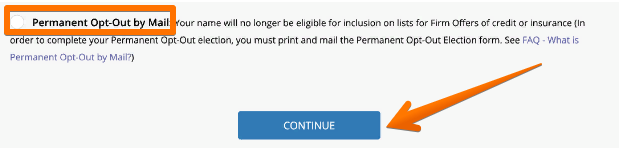
2. Scroll down the page, choose “Permanent Opt-Out by Mail” and click “Continue.”
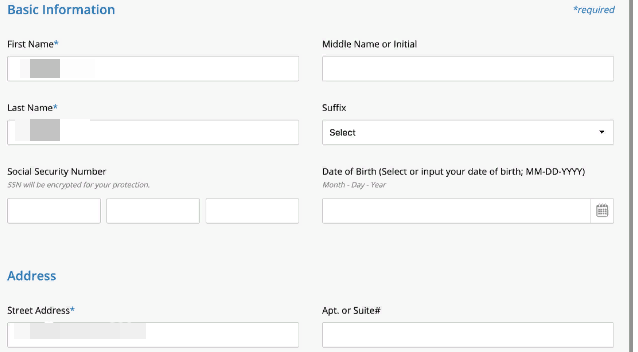
3. Fill out the information about your name and address. Do not give away your social security number and date of birth.
4. Solve CAPTCHA and click “Confirm.”

5. Print out the ‘Permanent Opt-Out Election form’.
6. Mail the opt-out form to: Innovis Consumer Assistance PO Box 495 Pittsburgh, PA 45230-1689.
View Privacy Policy and Terms of Use.
More opt-out guides
- NeighborWho opt out
- SignalHire opt out
- DNB opt out
- ContactOut opt out
- BackgroundCheck.run opt out
- UniCourt opt out
- PeopleLookup opt out
- InfoTracer opt out
- StateRecords.org opt out
- Acxiom opt out
- PrivateReports opt out
- CheckSecrets opt out
- InstantPeopleFinder opt out
- AnyWho opt out
- 411.com opt out
- AbsolutePeopleSearch opt out
- ZoomInfo opt out
- OpenGovUS opt out
- RealtyHop opt out
- NDB opt out