 June 26, 2024
 read
Opt out of ZoomInfo.com
- By Dimitri Shelest Founder and CEO at Onerep

Dimitri is a tech entrepreneur and founder of Onerep, the first fully automated data removal service. Top cybersecurity CEO of 2021 by The Software Report.
Read more - Checked by Alena Shymanskaya Content Manager at Onerep

Alena is an experienced content writer with a specialized focus on data brokers and the intricacies of personal data management.
Read more
- Removal difficulty: Medium
 Why trust this guide

We know all the ins and outs of the data broker removal:
Founded in 2015, we pioneered automated removal from people-search sites. Our service uses precise opt-out algorithms tailored for each website. When a site changes its algorithm, we detect the change immediately, and our team updates the process. These updates are promptly reflected in the Onerep DIY data broker removal guides. With 16 million records already removed from hundreds of sites for our customers, you are accessing the expertise of the #1 team in the industry with this guide.
ZoomInfo.com is a massive database that shares personal and business information online. It posts such details as places of employment, current and previous job titles, contact data, educational background, and more. To remove your information from ZoomInfo, you are required to complete an opt-out form on their website and verify it via email.
How to remove your information from ZoomInfo.com?
Step 1: Access ZoomInfo.com’s opt-out page
Navigate to ZoomInfo’s opt-out page.
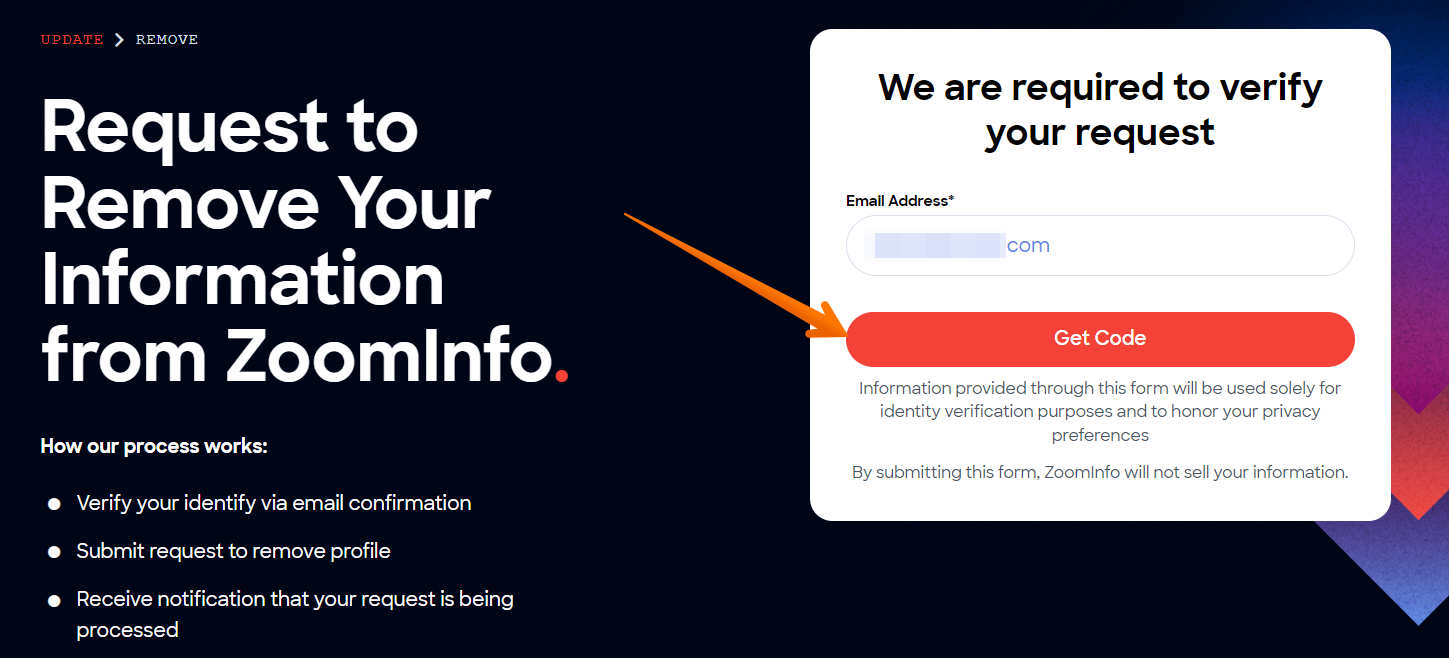
Step 2: Submit your business email
Enter your work email address and click the ‘Get Code’ button.
Step 3: Copy the verification code
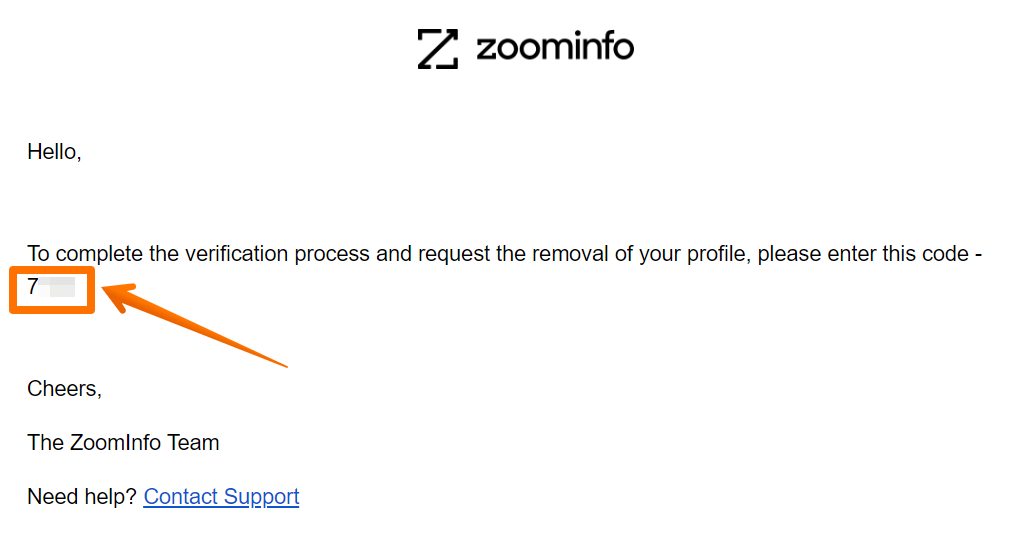
Go to your inbox and open the verification email from ZoomInfo. Copy the 4-digit code you received.
Step 4: Enter the code on ZoomInfo
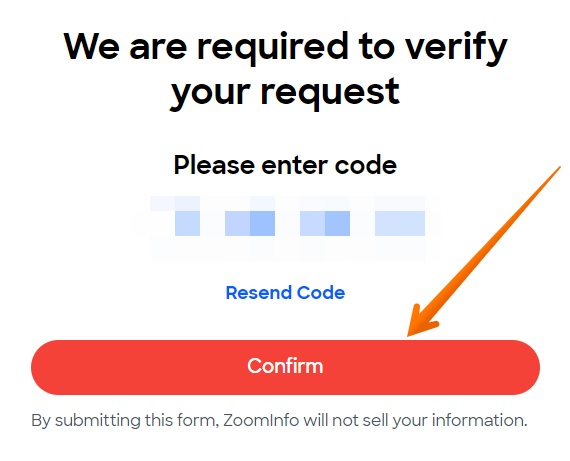
Paste the copied code into the corresponding field on ZoomInfo and click the ‘Confirm’ button.
Step 5: Submit the opt-out form
On the appearing page, check the box that says ‘I would like to delete my information’ and select the reason why you want to delete it. Then, perform the Captcha and click the ‘Remove’ button.
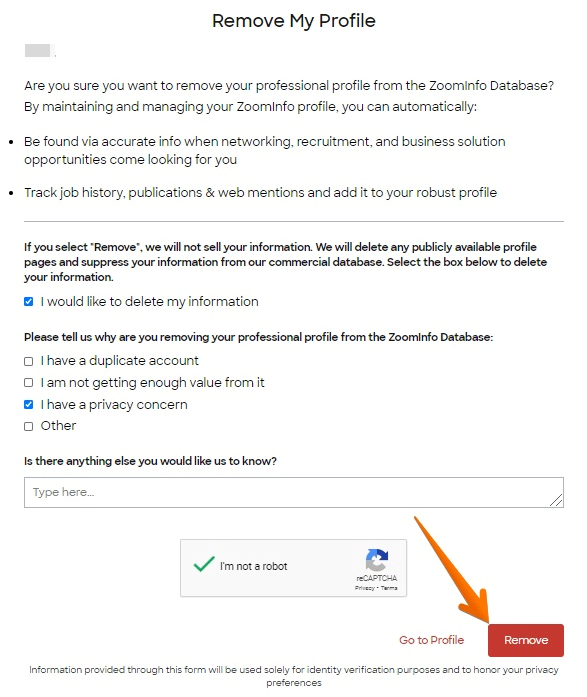
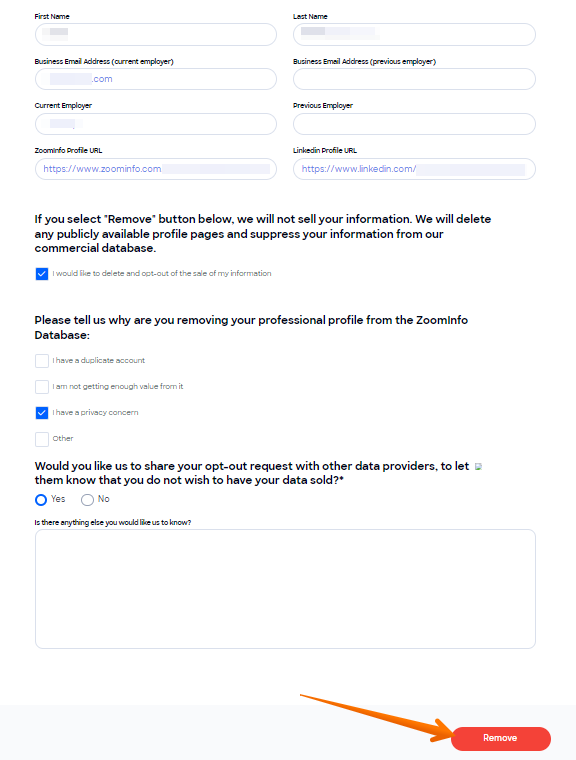
In case ZoomInfo hasn’t matched your work email with your record, a different form will appear. Enter your full name, current and previous business email address, current and previous employer, your ZoomInfo record URL, and LinkedIn record URL. Please note that submitting all these details is optional and you may omit any. Then check the ‘I would like to delete and opt-out of the sale of my information’ box, tick the reason behind your removal, reply to the provided question, and hit the ‘Remove’ button.
Your opt-out request has been received.
How to contact ZoomInfo directly
To contact ZoomInfo.com, submit the contact form on their website or call 1-844-992-3282.
Your data is still exposed on other brokers
Numerous other data broker websites expose your private data. We recommend that you remove yourself from these five next:
- How to remove yourself from MyLife.com
- How to remove yourself from Whitepages.com
- How to remove yourself from Radaris.com
- How to remove yourself from PeopleLooker.com
- How to remove yourself from ClustrMaps.com
Go through this list and send opt-out requests manually to each data broker, or subscribe to Onerep to remove records automatically from 318 sites with just a few clicks.
About ZoomInfo
Founded in: 2007
Approximate number of monthly visitors: 11.8 million
What ZoomInfo.com shares: business emails, contact numbers, place of employment and job title, address, work experience, and more.
Frequently asked questions about ZoomInfo
How do I remove myself from ZoomInfo?
To remove your data from ZoomInfo.com, access their opt-out page and submit your business email address. Copy the verification code you’ve received on the provided email and paste it into ZoomInfo’s page. Then fill out the opt-out form, tick the necessary boxes, and click ‘Remove’.
Why do people use ZoomInfo?
ZoomInfo.com is a B2B data provider that is mainly used for lead generation by marketing, sales and recruitment professionals. The website provides such services as contact and company search, website visitor tracking, sales automation, digital advertising, and more.
More opt-out guides
- NeighborWho opt out
- SignalHire opt out
- DNB opt out
- ContactOut opt out
- BackgroundCheck.run opt out
- UniCourt opt out
- PeopleLookup opt out
- InfoTracer opt out
- StateRecords.org opt out
- Acxiom opt out
- PrivateReports opt out
- CheckSecrets opt out
- InstantPeopleFinder opt out
- AnyWho opt out
- 411.com opt out
- AbsolutePeopleSearch opt out
- ZoomInfo opt out
- OpenGovUS opt out
- RealtyHop opt out
- NDB opt out