 July 23, 2024
 read
Opt out of UpLead.com
- By Dimitri Shelest Founder and CEO at Onerep

Dimitri is a tech entrepreneur and founder of Onerep, the first fully automated data removal service. Top cybersecurity CEO of 2021 by The Software Report.
Read more - Checked by Alena Shymanskaya Content Manager at Onerep

Alena is an experienced content writer with a specialized focus on data brokers and the intricacies of personal data management.
Read more
- Removal difficulty: Low
 Why trust this guide

We know all the ins and outs of the data broker removal:
Founded in 2015, we pioneered automated removal from people-search sites. Our service uses precise opt-out algorithms tailored for each website. When a site changes its algorithm, we detect the change immediately, and our team updates the process. These updates are promptly reflected in the Onerep DIY data broker removal guides. With 16 million records already removed from hundreds of sites for our customers, you are accessing the expertise of the #1 team in the industry with this guide.
UpLead is a lead generation tool for companies selling across the globe. UpLead.com shares +54 million contacts and companies in their database. To remove your information from UpLead.com, fill out an opt-out form on their website and verify your removal request via email.
How to remove your information from UpLead.com?
1. Go to UpLead.com.
2. Scroll down the page and click the “Do Not Sell My Info” link.

3. Fill out the opt-out form to the left of the page. Enter your full name, work email, and phone number. Click the “Remove My Information”.
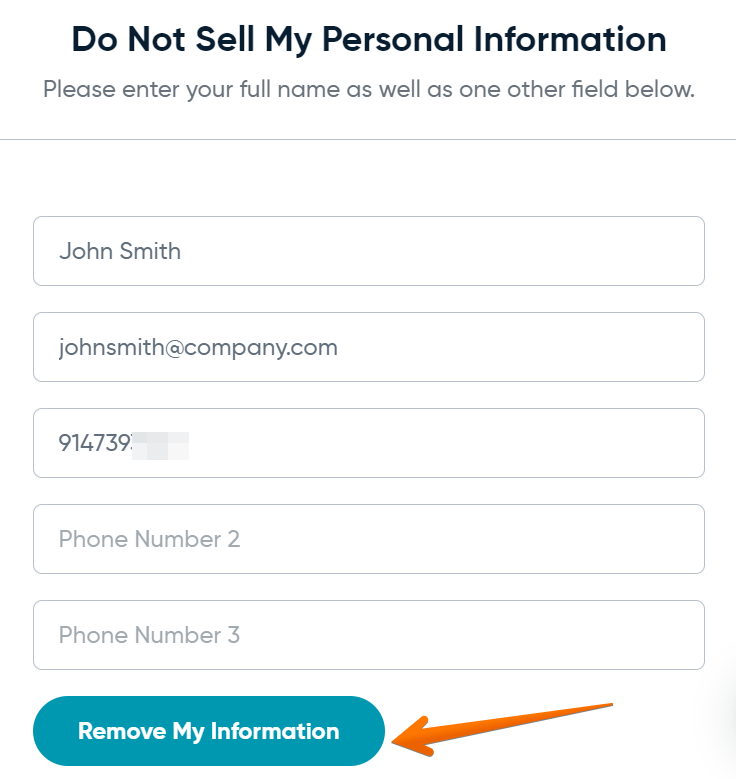
Your opt-out request has been received and will be processed.
You may also request an opt-out by emailing UpLead.com at [email protected] and providing sufficient information so that they may process your opt-out request. UpLead may request additional information to verify your identity on a case-by-case basis.
View Privacy Policy and Terms of Use.
More opt-out guides
- NeighborWho opt out
- SignalHire opt out
- DNB opt out
- ContactOut opt out
- BackgroundCheck.run opt out
- UniCourt opt out
- PeopleLookup opt out
- InfoTracer opt out
- StateRecords.org opt out
- Acxiom opt out
- PrivateReports opt out
- CheckSecrets opt out
- InstantPeopleFinder opt out
- AnyWho opt out
- 411.com opt out
- AbsolutePeopleSearch opt out
- ZoomInfo opt out
- OpenGovUS opt out
- RealtyHop opt out
- NDB opt out