 Published October 31, 2025
  read
read
Clone phishing is one of the most deceptive forms of phishing, and it targets both individuals and business organizations at scale. Building on trust and a familiar context, cloned emails may trick recipients into sharing highly sensitive information, approving multi-million-dollar transactions, and giving away access to internal systems—all through convincing impersonation.
This article details the clone phishing meaning in cybersecurity and beyond, showing how users can protect themselves from clone phishing attacks through a combination of awareness and digital safety practices.
Clone phishing definition and meaning
What is clone phishing? Clone phishing is a type of email-based phishing attack in which the attacker replicates a legitimate email and creates a nearly identical copy to trick the recipient into clicking a malicious link, downloading an attachment with malware, or giving away personal information.
The replicated email is typically either expected or looks very familiar, so recipients lower their guard and interact with the phishing email more willingly. As such, clone phishing is one of the most effective forms of phishing because it exploits ingrained trust in a familiar sender or message format.
Clone phishing may include elements of brand impersonation, CEO fraud, spear phishing, or whale when targeting high-profile company executives. Such malicious emails are sent by knowledgeable attackers and are therefore highly personalized and harder to differentiate from legitimate emails.
Think of fraudulent emails replicating official brand communication and targeting customers who expect to see brand updates and account-related information in their inboxes, for example, fake Best Buy’s Geek Squad emails and Norton LifeLock impersonation. In other cases, they may resemble internal corporate communication and be sent from apparently legitimate accounts but manipulated to disseminate harmful spyware and steal credentials.
Why clone phishing is dangerous
The danger of clone phishing messages lies in how easy it is to fall for them unless you pay attention to certain warning signs. Still, it’s often very difficult to spot a fraudulent email, especially if the sender’s identity is skillfully imitated and the email bypasses security filters.
What makes clone phishing so easy to fall for is that it:
- Looks familiar, using past legitimate communication as a foundation.
- Bypasses suspicion due to a familiar context and known sender.
- Is hard to detect, even enterprise-grade security tools are often unable to block such emails.
- Can target entire organizations to harvest internal system credentials at scale or initiate multi-million dollar transactions.
How clone phishing attacks work
As with any other type of highly targeted social engineering scam, the first stage of preparing a clone phishing attack is reconnaissance, or gathering information. Attackers gain access to and intercept a real email conversation—through leaked data or a compromised account, and study messages to understand the topics, tone, format, and sender identity.
The next step is cloning the email. The attacker copies the content and style of the real message, complete with the logo, header, signature, and attachments. They may spoof the sender’s email or use a lookalike email address, bypassing any built-in anti-spam filters.
The third stage is injecting malicious content into the email. This can include a malicious link to a cloned website that looks like the brand’s legitimate login page, an infected attachment that installs malware on the recipient’s device, a file that launches ransomware, or a payment fraud request (common in business email compromise scenarios).
The fourth stage is sending the cloned email. This is usually done by intercepting a real email thread or by referencing a prior legitimate email, as if resending it with some additional information or recipients in copy. Because the victim recognizes the sender and the format, they’re more likely to trust and act on the email.
The final stage is exploitation. Once the recipient interacts with the email and unwittingly performs the expected action, the attackers can:
- Steal internal system credentials and access confidential data.
- Install malware, including ransomware, and backdoors.
- Divert financial transfers to their accounts.
- Escalate privileges within an organization and compromise its systems.
Real examples of clone phishing attacks
Some high-profile clone phishing attacks have made major headlines as they caused considerable financial and reputational harm.
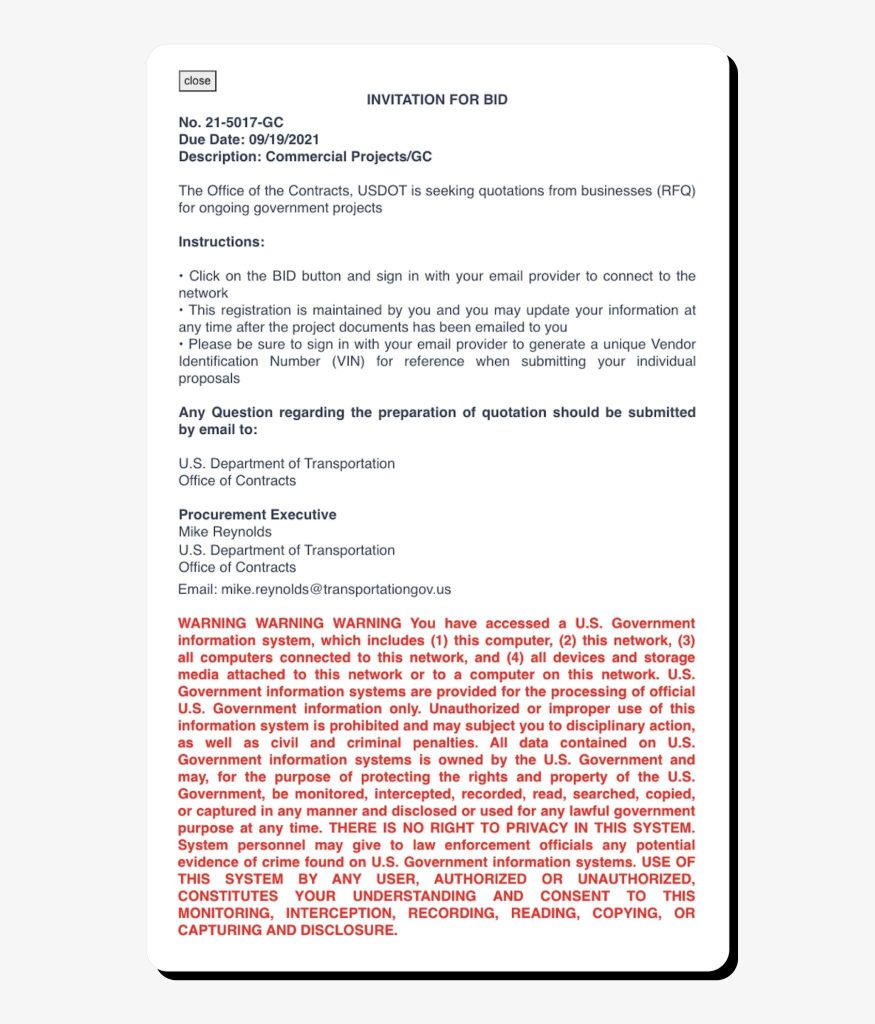
In August 2021, attackers launched a series of clone phishing emails impersonating the U.S. Department of Transportation and targeting organizations in the engineering, architecture, and energy sectors, inviting them to “bid” for government contracts. The threat actors used email templates and spoofed Microsoft SharePoint login pages that replicated shared-file notifications and, in this way, were able to steal real Microsoft login credentials of their victims.
This is the clone email example used in the attack:
In another case, Interpol arrested a leader of an international cybercrime ring responsible for defrauding businesses of over $60 million through business email compromise. One of the attackers’ tactics included hacking into a supplier account and sending fraudulent email to their corporate buyers with payment requests. Attackers were also able to hack into various CEO email accounts using malware and impersonate them to send fraudulent money transfer requests.
Regular consumers become victims of clone phishing too. In April 2025, cybercriminals were able to spoof Google’s legitimate email address and send out a fabricated email requesting compliance with a law enforcement subpoena and access to the materials stored in the recipient’s Google account. In reality, it was a sophisticated trick to steal users’ Google account credentials via a cloned website.
How to recognize a clone phishing attempt
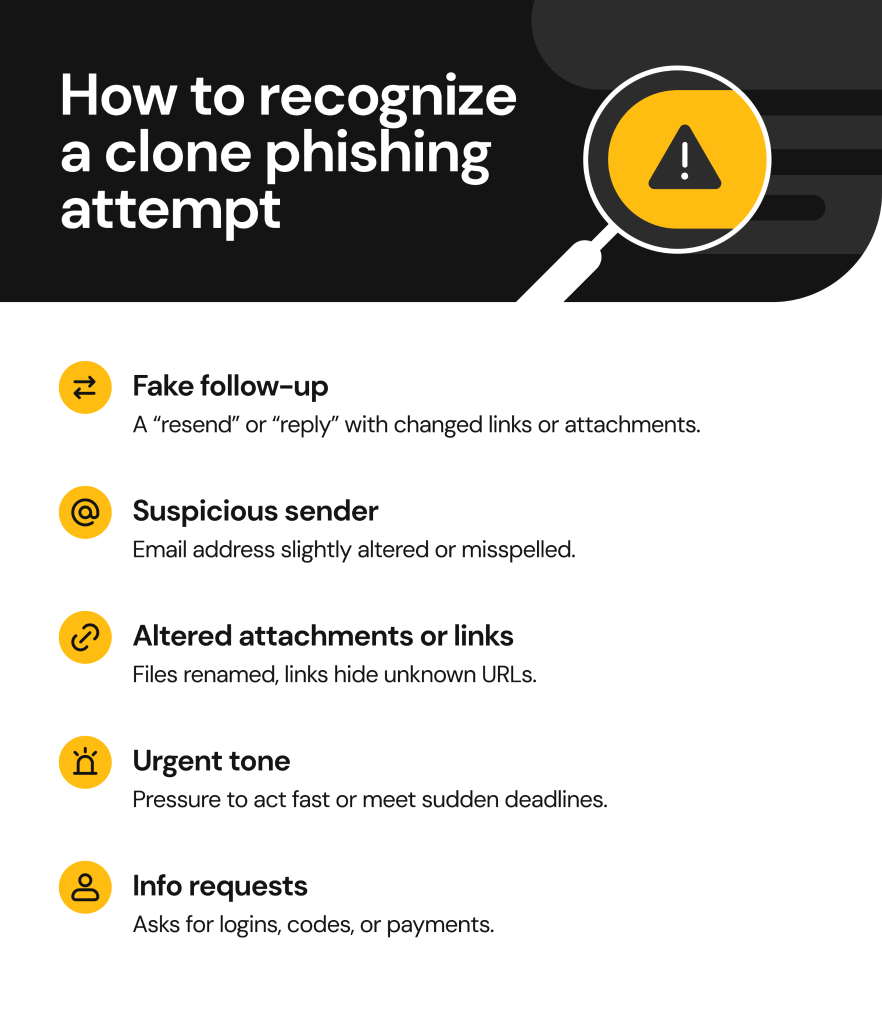
Clone phishing emails are designed to look real and legitimate, so spotting them is tricky but not altogether impossible if you watch out for the following warning signs:
Unexpected follow-ups or re-sent messages
You receive an email that looks like a reply to or a resend of a previously sent email you’ve already seen (“Floating this up” or “Now with the correct attachment”). However, even if the context is familiar, the link or attachment has changed.
Mismatched or suspicious sender details
The display name may look familiar and match the legitimate sender, but on closer inspection, you can see that the sender’s email is altered. For example, there are Cyrillic characters imitating Latin ones, or there are missing or extra characters, as in @company.co versus @company.com.
Altered or odd attachments and links
In a cloned email, attachments might appear differently (for example, “Invoice_updated.pdf” versus “Invoice.pdf”). Hyperlinks might appear normal within text but will display an unknown URL when you hover over them. Sometimes there may be link shorteners to disguise the real destination.
Unusual urgency or pressure
Attackers often use pressure and urgency to make victims act without thinking. Cloned emails may include requests to act immediately (such as to approve an invoice payment or make a money transfer) or certain deadlines for action (“Your access will expire in one hour”). Legitimate organizations rarely or never use such urging, especially for login and payments.
Requests for credentials and other sensitive information
Phishing attackers always have a malicious goal when targeting their victims. They may ask you to log in using a malicious link to a spoofed website, share personal sensitive information, or make a payment. Legitimate companies, on the other hand, never ask for security codes, credentials, or payment card numbers over email.
How to stay safe from clone phishing
While clone phishing emails are sometimes very difficult to spot, there’s one golden rule that can help you stay safe—if a message seems familiar but something feels off, assume it’s a phishing attempt. Don’t click or download anything, and verify the request using a different, official communication channel.
Other safety tips to avoid falling for clone phishing include:
- Employee training and awareness. Since business email compromise can be highly damaging, it’s recommended to train employees to recognize phishing attacks. Sessions should teach them how to recognize malicious messages with real examples, verify contents safely, and report phishing attempts.
- Multi-factor authentication. MFA adds a crucial layer of protection even when email account credentials are compromised. It’s recommended to enable MFA wherever possible and use app-based or hardware-based methods rather than those tied to your phone number.
- Manual verification of unusual requests. Always confirm large or urgent requests (for money transfers, or sharing sensitive information) using a separate communication channel, for example, by calling the sender directly, starting a new email thread using a legitimate email address, or checking with a manager before acting.
- Strong email authentication protocols. The standard security protocols for filtering out fraudulent emails and making email spoofing harder include SPF, DKIM, and DMARC. Confirm that your email provider or workplace has these enabled for added security.
- Staying cautious. As simple as it seems, human vigilance is still the best prevention. Always compare links and attachments, inspect them on hover, expand the sender field to verify the “From:” email address, and above all, trust your instincts when something doesn’t feel right.
What to do if you’re targeted by a clone phishing attack
If you receive a clone phishing email, act quickly and methodically to contain the damage:
- Stop all interaction immediately: do not reply, click any links, or download attachments.
- If you suspect a malware download has started, disconnect your device from the internet or unplug it.
- If you opened a file, do not open it again or enable macros or permissions within it.
- Report the incident right away to your security or IT team so they can isolate the threat as quickly as possible.
- If you use a home computer or your personal mobile phone, report the phishing attempt to your email provider.
- Change your passwords immediately for all affected accounts and enable two-factor authentication if you haven’t yet.
- Run a full malware or antivirus scan using trusted software.
- Check for account or data compromise: review recent logins, email forwarding rules, or unusual account activity.
- If you transferred personal funds, contact your bank or payment provider immediately. They may be able to freeze or revert the transaction.
- If data or money was stolen, file a report with your local law enforcement agency or cybercrime authority.
FAQs about clone phishing
What is clone phishing in cybersecurity?
Clone phishing is a cyberattack where a threat actor clones a legitimate email or message that the recipient has already seen or expects to receive. This type of phishing attack can be highly effective as it relies on established trust and thus requires extra security measures to educate staff and implement technical barriers to block suspicious emails.
Can clone phishing happen via SMS?
Yes. Although most clone phishing appears via email, some attacks also occur via SMS (smishing) or direct messages in WhatsApp, Slack, or Microsoft Teams.
Is clone phishing a form of spear phishing?
Yes, clone phishing is considered a form of spear phishing as it targets particular individuals or small groups using personalized messages.
Is clone phishing common in business email compromise (BEC)?
Yes. Clone phishing is frequently used in business email compromise as a form of CEO and executive impersonation to authorize high-value fraudulent transactions, make employees share confidential information, and approve other harmful actions. Clone phishing is also actively used for corporate credential harvesting by spoofing legitimate internal system login pages, such as Microsoft 365.


Dimitri is a tech entrepreneur and founder of Onerep, the first fully automated data removal service. Top cybersecurity CEO of 2021 by The Software Report.