 July 15, 2024
 read
YellowPagesDirectory opt out
- By Dimitri Shelest Founder and CEO at Onerep

Dimitri is a tech entrepreneur and founder of Onerep, the first fully automated data removal service. Top cybersecurity CEO of 2021 by The Software Report.
Read more - Checked by Alena Shymanskaya Content Manager at Onerep

Alena is an experienced content writer with a specialized focus on data brokers and the intricacies of personal data management.
Read more
- Removal difficulty: Medium
 Why trust this guide

We know all the ins and outs of the data broker removal:
Founded in 2015, we pioneered automated removal from people-search sites. Our service uses precise opt-out algorithms tailored for each website. When a site changes its algorithm, we detect the change immediately, and our team updates the process. These updates are promptly reflected in the Onerep DIY data broker removal guides. With 16 million records already removed from hundreds of sites for our customers, you are accessing the expertise of the #1 team in the industry with this guide.
YellowPagesDirectory.com position themselves as a comprehensive online advertising agency. In reality, it’s more like an internet version of multiple printed Yellow Pages books that used to be delivered via mail. Yellow Pages Directory Inc. provides information about businesses, including their location, contact details, website and social media links, and reviews.
However, some businesses prefer to have control over what websites share their data and personal information and choose to opt out. Removing your listing from Yellow Pages Directory Inc. is free of charge.
How to opt out and remove your data from Yellow Pages Directory Inc.?
Step 1: Open Yellow Pages Directory Inc.
To start the removal process, visit YellowPagesDirectory’s site.
Step 2: Search for your business
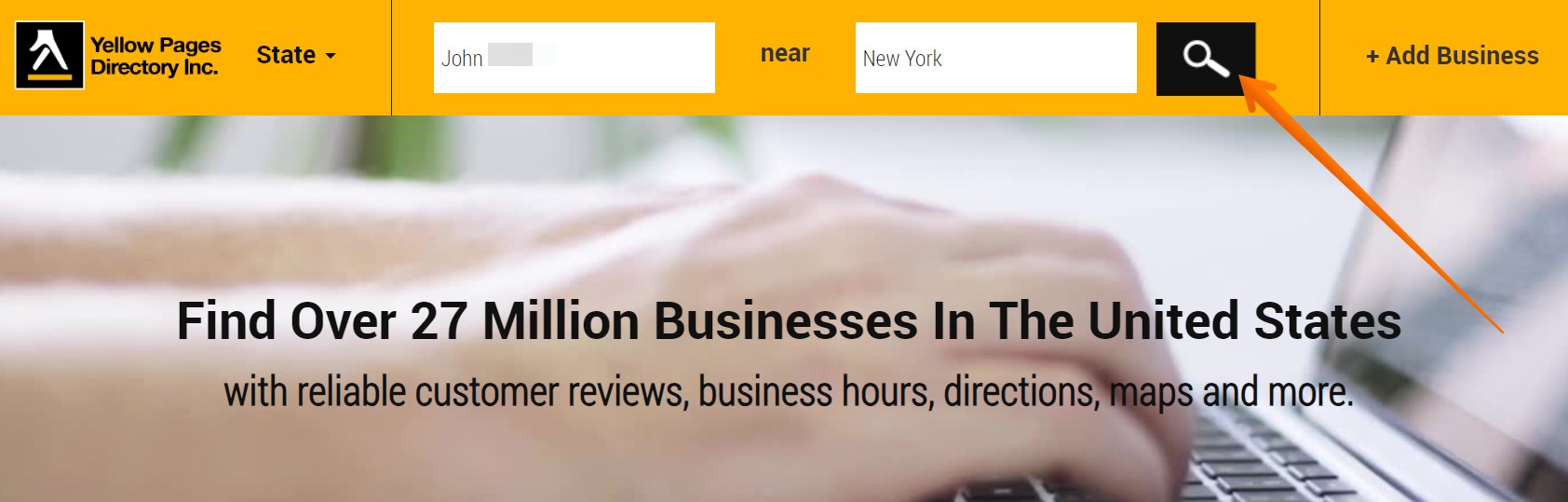
Enter your business name and its location in the respective search fields at the top of the page and press the search icon. Alternatively, you can open the ‘State’ drop-down menu and find your business page through its address.
Step 3: Locate your listing
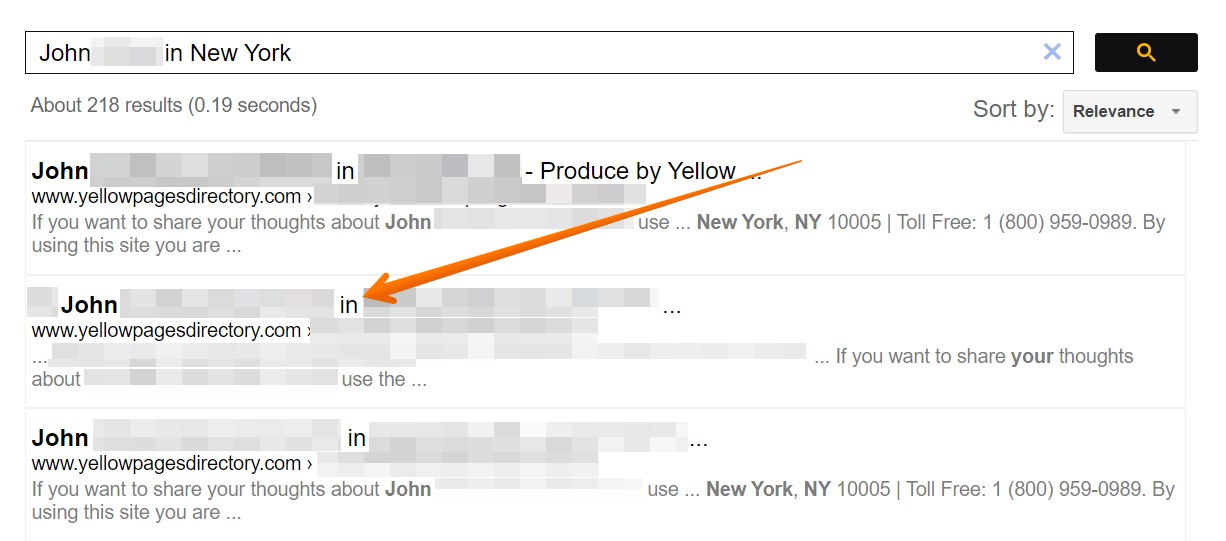
Scroll through the search results to find a matching one. Once you do, click on it.
Step 4: Click on ‘Edit or Delete Listing’
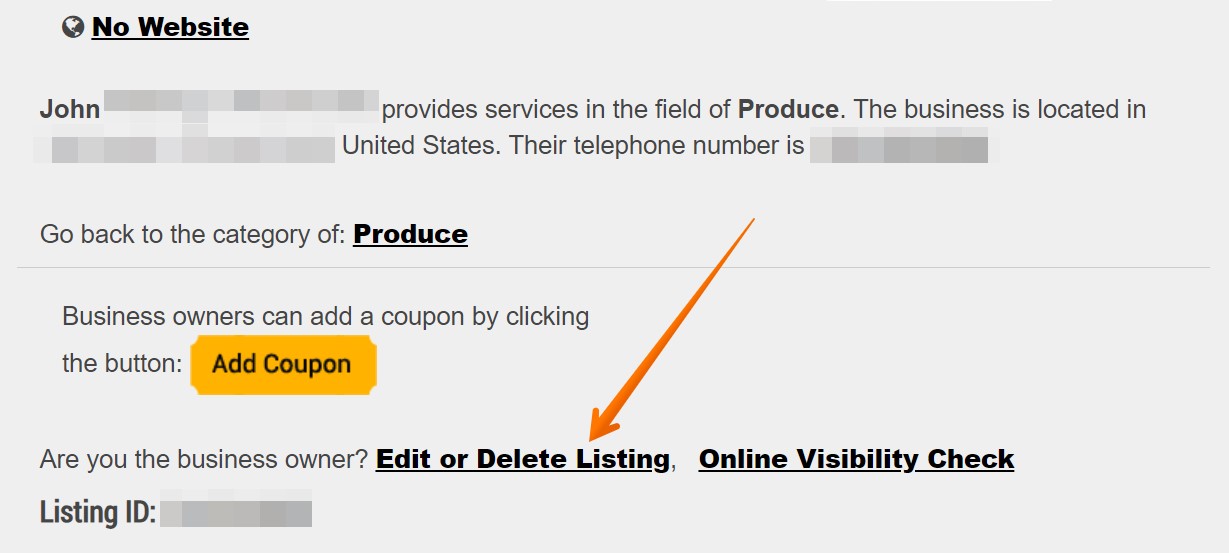
Find the ‘Edit or Delete Listing’ link in the business description and follow it.
Step 5: Select ‘Delete’ and submit the filled-out form
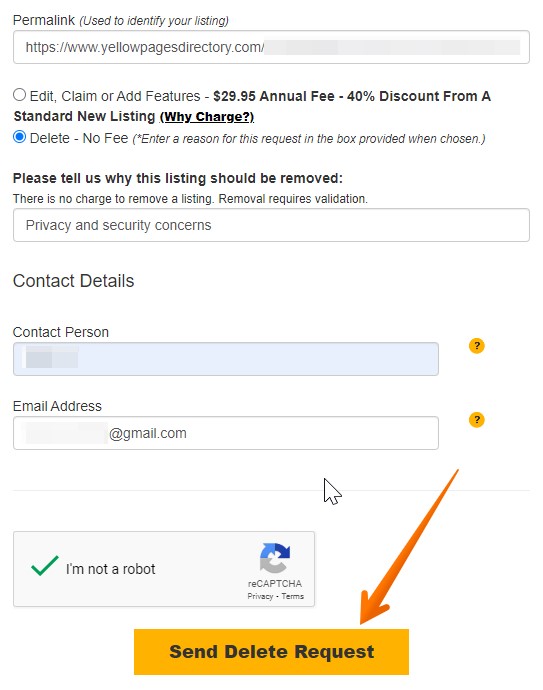
The appearing page allows business owners to update and remove their listings. The URL of your business profile page should already be auto-filled in the Permalink field. In case it’s not, go one step back and copy it. Select the deletion option under the URL field, provide the reason behind your request, and enter your name and email address. Please note that you don’t have to submit your business email address. Then solve the CAPTCHA and hit the yellow button.
A green message will appear on the screen to confirm that your listing removal request has been accepted. Yellow Pages Directory Inc. asks to allow 2 business days for a change to be processed.
How to update your data on Yellow Pages Directory Inc.?
You can change your YellowPagesDirectory.com business listing by following the same steps as to opt out, only choosing the edit option instead. Please note that updating your listing is not free and costs $29.95 at the moment of writing.
Step 1: Find your listing by using the search fields in the header of the website or choosing the state from the drop-down menu.
Step 2: Click on the ‘Edit or Delete Listing’ link in the business description section.
Step 3: Update all the necessary details regarding your business and click the ‘Send Update Request and Pay!’ button.
Step 4: Choose your payment method and complete the transaction.
CCPA
California residents may opt-out and have their business data and personal information permanently removed from YellowPagesDirectory.com’s data systems by sending an email request to [email protected].
How to contact Yellow Pages Directory Inc.?
You can reach out to YellowPagesDirectory.com via phone at 1 (800) 959-0989 (toll-free). You can also send mail to 48 Wall Street, 11th Floor, New York, NY 10005. In case you’d like to talk to a sales representative, find the necessary person on the Yellow Pages Directory’s contact page.
More opt-out guides
- NeighborWho opt out
- SignalHire opt out
- DNB opt out
- ContactOut opt out
- BackgroundCheck.run opt out
- UniCourt opt out
- PeopleLookup opt out
- InfoTracer opt out
- StateRecords.org opt out
- Acxiom opt out
- PrivateReports opt out
- CheckSecrets opt out
- InstantPeopleFinder opt out
- AnyWho opt out
- 411.com opt out
- AbsolutePeopleSearch opt out
- ZoomInfo opt out
- OpenGovUS opt out
- RealtyHop opt out
- NDB opt out