 Last updated January 30, 2026
  4 min read
How to opt out of BlockShopper.com [2026]
| Removal difficulty: | High |
What is BlockShopper?
BlockShopper.com positions itself as one part community newspaper, one part ultimate hyper-local real estate research tool. The website publishes various details about properties including home sale prices, owner records, foreclosures, and comps and taxes. BlockShopper.com doesn’t remove listings unless you fall under certain categories such as law enforcement or individuals under court protection orders.
How to remove your information from BlockShopper.com?
BlockShopper.com doesn’t remove personal information unless you fall under specific categories. As per US laws, public records are considered public business and they are open for access. This makes it absolutely legal for BlockShopper.com to republish property records on their website.
As BlockShopper state on their FAQ page, “In the spirit of fairness, we report public records as they are reported to us. We do not eliminate records on BlockShopper.com, as doing so compromises the integrity of our data.”
However, the website will remove your information from its database if you fall under any of these categories:
- government officials
- public safety workers
- law enforcement
- individuals under a court protection order
- individuals with an officially documented stalker
- Individuals under other threats
If you are eligible, you can take the following steps to complete the BlockShopper opt-out:
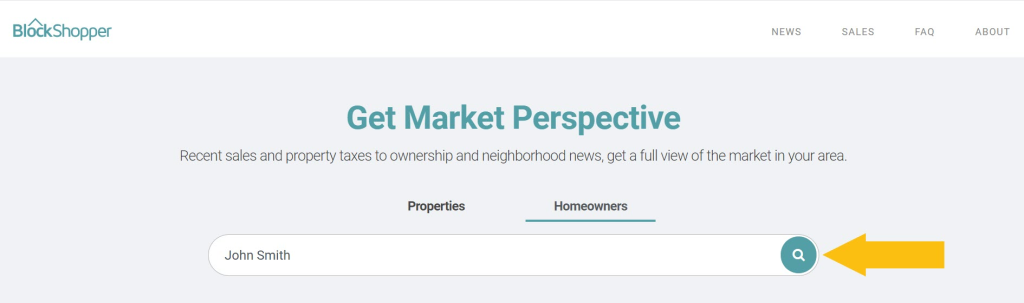
Step 1: Look up your listing on BlockShopper.com
Navigate to BlockShopper’s site. Enter either your address in the Properties tab or your full name in the Homeowners tab and click the search icon.
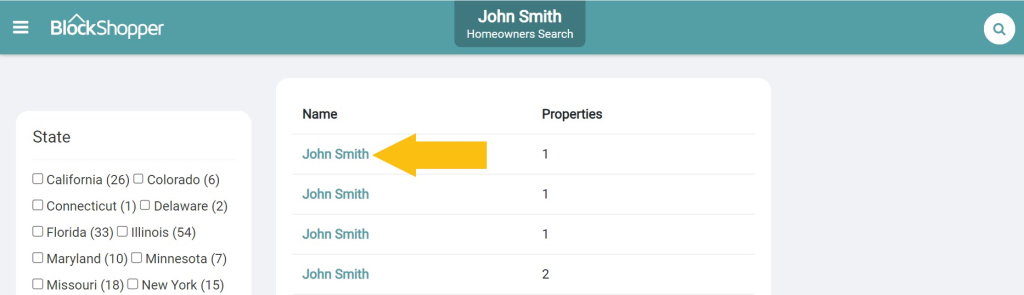
Step 2: Find a matching listing
Find your record in the search results and open it. If you looked up your name in step 1, use the state filter to narrow the results down.
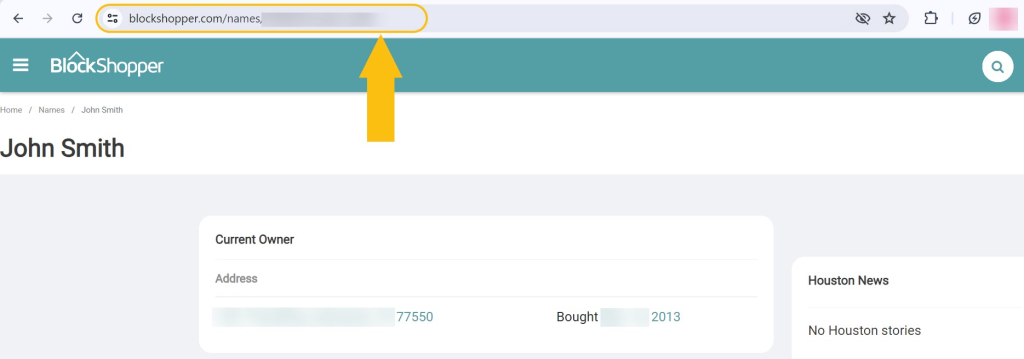
Step 3: Copy the URL of your listing
Highlight the record URL and copy it. You will paste it into the opt-out request email next.
Step 4: Send the opt-out request via email or mail
Email your opt-out request to [email protected]. Include the URL of your listing and the reason why you wish to have your information removed from BlockShopper.com. Attach the supporting documentation (proof of employment for government officials, police report, etc). Alternatively, you can mail your request to 27 N. Wacker Drive, Suite 428, Chicago, IL 60606.
BlockShopper.com typically takes up to 48 hours to process your online request and reply.
How to contact BlockShopper directly
In case you have any questions or issues you want to contact BlockShopper.com about, send an email to [email protected].
BlockShopper quick links
Your data is still exposed on other brokers
Numerous other data broker websites expose your private data. We recommend that you remove yourself from these five next:
- How to remove yourself from PeekYou.com
- How to remove yourself from FastPeopleSearch.com
- How to remove yourself from Whitepages.com
- How to remove yourself from SmartBackgroundChecks.com
- How to remove yourself from Radaris.com
Go through this list and send opt-out requests manually to each data broker, or subscribe to Onerep to remove records automatically from 317 sites with just a few clicks.
About BlockShopper
- Founded: 2006
- Headquarters: Chicago, Illinois
- Website URL: blockshopper.com
- Contact email: [email protected]
FAQs
How do I remove myself from BlockShopper?
BlockShopper.com removes your information only if you are a government or law enforcement official, a public safety worker, an individual under court protection orders, an individual with officially documented stalkers, or under other threats. If you fall under any of these categories, access BlockShopper.com, find your listing, and copy its URL. Then write an email to [email protected], paste the listing URL, attach the supporting documentation, and request to have your information removed.
Is BlockShopper legit?
BlockShopper.com is a legitimate website that publishes real estate information. The site gets its data from open government sources. Notably, BlockShopper has a lot of complaints on BBB.org due to its policy of not removing personal listings from the website.
Dimitri is a tech entrepreneur and founder of Onerep, the first fully automated data removal service. Top cybersecurity CEO of 2021 by The Software Report.