 Published October 30, 2025
  read
read
Google warning Gmail users: is your account at risk?
After a wave of public reports about Google issuing security warnings to Gmail users in July–August 2025, many people began wondering whether their accounts were at risk of being hacked or exposed.
The short answer is no, there hasn’t been a verified Google Gmail data breach in 2025. But yes, it’s smart to stay alert and make sure your accounts are well-protected. Phishing and credential theft campaigns have become increasingly sophisticated, and Gmail users are frequent targets.
While multiple major outlets linked these “recent Gmail warnings” to Google’s June 2025 data breach, that connection appears misleading. Google hasn’t confirmed the breach but encouraged users to strengthen their accounts through passkeys and follow security steps to identity and report phishing attacks.
Let’s see where the news about Google Gmail warnings came from, whether there’s anything you should worry about, and how to protect your Gmail account from current cyber threats even if your password hasn’t been breached (yet).
What was the latest Gmail security alert?
The Google Gmail warnings allegedly issued in July-August 2025 have since been denied by Google, which called the reports of the Google password data breach “inaccurate.”
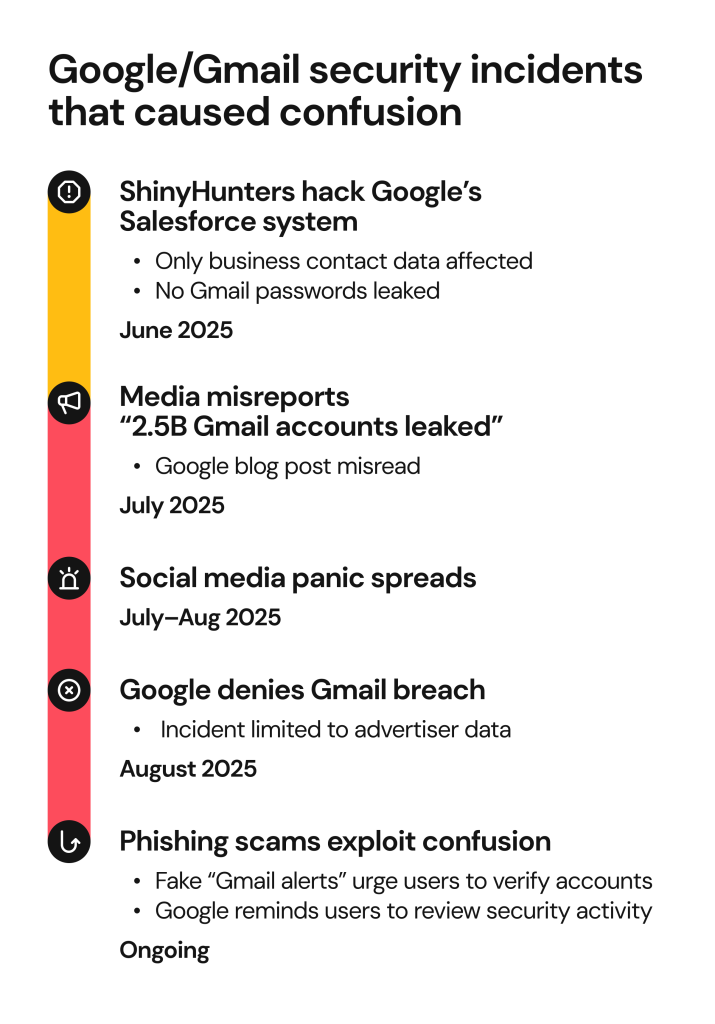
It looks like Google’s original article introducing account security enhancements has been misinterpreted as a confirmation that Gmail accounts are successfully targeted in phishing and credential theft attacks. This article has since been cited by Forbes, The Sun, Mashable, and PCWorld, with claims that more than 2.5 billion Gmail accounts have been exposed in a data breach by the ShinyHunters hacking gang.
Apparently, the Google data breach did happen but it’s unrelated to phishing attempts and hasn’t led to exposing billions of Gmail account passwords.
In June 2025, ShinyHunters reportedly accessed one of Google’s corporate Salesforce instances and managed to retrieve data before the access was cut off. In a comment to PCWorld, Google confirmed that the data breach only affected a limited set of business contact information used to communicate with potential advertisers and thus has nothing to do with regular Gmail users’ accounts. After analyzing the incident impact, Google has sent out email notifications to those affected.
Why is Google telling you to change your password?
What was misunderstood as a security warning for Gmail users to change their passwords was in fact Google’s announcement of its advanced security features such as passkeys, Device Bound Session Credentials (DBSC), and Shared Signals Framework (SSF).
So should you change your Gmail password? A more correct way to put it is that Google advises you to replace your password with a device-specific passkey that makes it much harder for hackers to break into your account.
A passkey is a passwordless method of signing into your Gmail account, such as a PIN, a fingerprint, or a face ID you use to unlock your device. Passkeys are unique and tied to your device, so they can’t be hacked, stolen, or misused like passwords. Passkeys also address the problem of passwords being reused across accounts, which puts these accounts at risk of credential stuffing.
What are the types of Google Gmail security warnings
Google Gmail has multiple built-in security controls that keep spam and scam emails from reaching your inbox. In addition, Google closely monitors for any suspicious activity in their users’ accounts and sends automatic notifications when a suspicious or unsafe action is detected.
You’re likely to see the following security warnings or alerts from Google:
- Suspicious sign-in attempt detected, when someone tries to log in from an unknown device, location, or IP address.
- Suspicious sign-in attempt prevented, when Google blocks a login attempt because they were not sure it was you.
- New device sign-in, when your Google account was accessed from a new device.
- Account recovery attempt, when there’s been an attempt to recover your Google account (reset the password).
- Password changed, when your Google account password has been changed successfully.
What to do if you received a security alert from Google
If you received a security warning from Google about a login attempt or another account activity you don’t recognize, it means someone may be trying to break into your Google account.
- If it wasn’t you, don’t authorize the activity. Click No, secure account in the alert.
- Change your Google password and set up two-factor authentication.
- Consider enabling a passwordless passkey.
- Review security events in your Google account and see if there are more activities you don’t recognize.
- If you reused your Google password anywhere, change it for all the affected accounts.
How to check for suspicious activity in your Google account
Here’s how to review all security events in your Google account:
- Go to Security > Recent security events > Review Security Events
There, you can browse all security events, such as logins from various locations and devices, for signs of anything you don’t recognize. If you detect an unknown login, you should go to Secure your account on the top of the page and change your password.
Has your Google password been leaked?
Even though there’s been no Google password leak lately due to any known data breach, it doesn’t mean your Gmail credentials are secured.
According to the FBI’s 2024 Internet Crime Report, phishing and spoofing remain the top cyber crime category by complaint count, at 193,000+ complaints reported in the U.S. With the rising tide of social engineering scams and corporate data leaks, every user of a digital service is potentially at risk of exposing their sensitive information and credentials to cybercriminals.
Here’s how to check if your Gmail and/or password has ever been leaked in a known data breach:
- Use Onerep’s new data breach monitoring feature: in addition to automatically removing your personal data from 230+ data brokers and people-search websites, Onerep continuously scans user emails for data surfacing in data breaches. Alternatively, you can use Have I Been Pwned and see if your email has ever been leaked as part of known security incidents.
- Use dark web monitoring software to scan for your personal records on the dark web. While you won’t be able to remove your data from there, it will help you take prompt action to secure your accounts.
How to protect your Gmail account going forward
Protecting your account is a combination of both technical savviness and smart digital habits. Here’s how you can strengthen your account security:
- Use a strong, unique password and change it regularly to minimize its potential exposure.
- Enable two-factor authentication. Even if someone steals your password, they won’t be able to access your account without verifying the access on your device.
- Alternatively, set up a passkey to use instead of your password, which is a safer authentication method. Find the instructions here.
- Update your recovery options. Make sure your recovery phone number and email address are updated so you can retain access to your account even if it’s locked or compromised.
- Check third-party access. Visit your Google account’s Security > Third-party access to review which apps have access to your Google account and remove any if needed.
- Use Google’s Security Checkup tool to analyze your account security and take action, if necessary.
- Use only protected private networks to sign into your Google account. Never use public Wi-Fi for this purpose.
- Educate yourself on phishing scams and watch out for suspicious emails and messages.
How Onerep safeguards your email address and other personal data
Onerep protects your privacy by scanning and removing your personal data from data brokers and people-search websites that expose your information without your consent or knowledge—such as name, date of birth, address, phone number, income, and more. Once your information is deleted from the privacy-breaching websites, it also disappears from Google, keeping you off the radar.
Here’s how Onerep can help you maintain your Google account—and identity—more secured:
- Automatic data removal from 317+ data brokers and public people-search websites.
- Continuous monitoring for personal data exposure and post-removal data reappearance.
- Data breach monitoring for traces of your personal details leaked in known data breaches.
- Reduced phishing and identity theft risks through minimizing your attack surface and making it harder for scammers to identify you.
Frequently asked questions
What is the warning on Gmail emails?
Gmail displays security banners when it detects suspicious activity, an email, or a sender of a potentially harmful message. In addition, Google sends security alerts when there’s a suspicious login or account recovery attempt.
How do I know if a Google security alert is real?
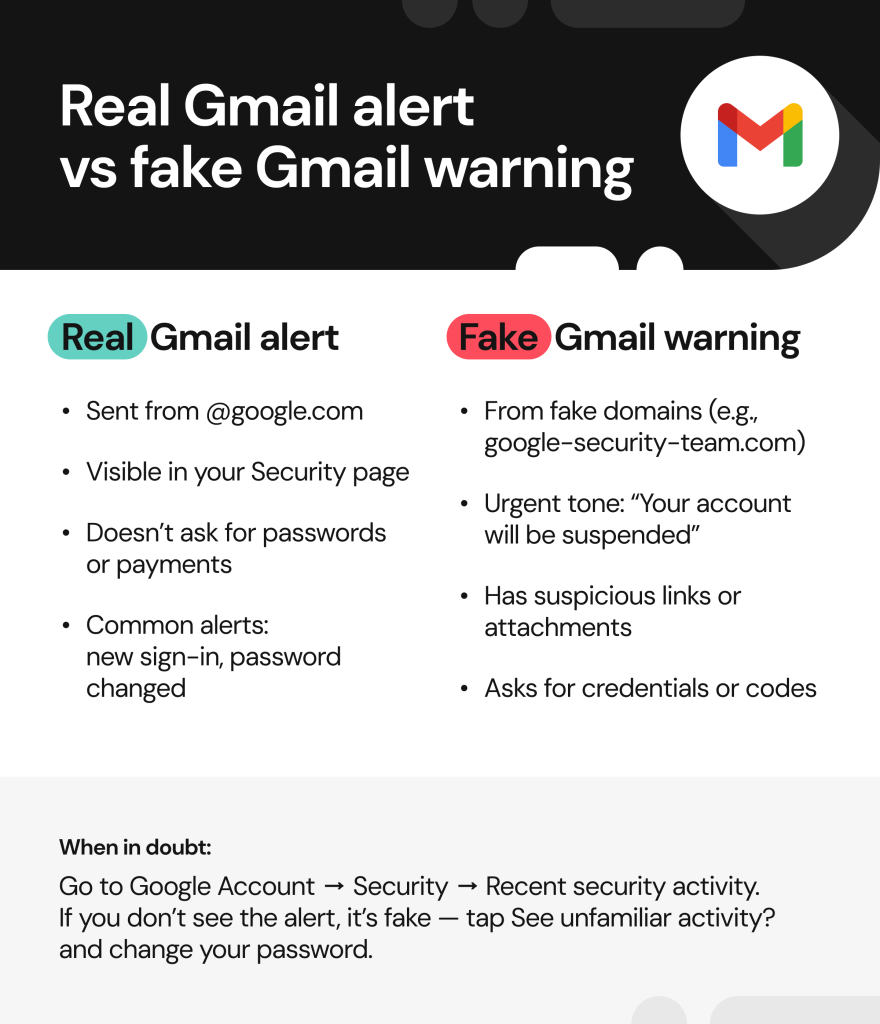
Real Google alerts are only sent from the official google.com domain, can also be found in your account’s Security Center, and never ask for your passwords or payments.
What are signs of a compromised Gmail?
If your Google account is compromised, you might start seeing unfamiliar messages in “Sent,” new logins from unfamiliar devices and locations, account recovery settings changed without your knowledge, and complaints from contacts who get suspicious messages from your email.
Can someone hack my Gmail with my password?
Yes, it’s possible to hack your account with only a password if there’s no two-step verification or passkey enabled.
What should I do if my Gmail was part of a data breach?
Change your password, enable two-step verification or add a device-specific passkey, review your account activity for suspicious logins, and use personal data removal services like Onerep to delete your email address from public online sources.


Mikalai is a Chief Technical Officer at Onerep. With a degree in Computer Science, he headed the developer team that automated the previously manual process of removing personal information from data brokers, making Onerep the industry’s first fully automated tool to bulk-remove unauthorized profiles from the internet.