 Published December 18, 2025
  read
read
How to call private: step-by-step guide to hiding your number and protecting your privacy

Databases leak or get breached regularly, which makes it smart to limit how widely your personal information circulates. Your phone number is often one of the easiest details to collect and reuse, so it helps to be selective about who gets it.
At the same time, you still need to make calls like contacting your doctor’s office, or register a number to sign up for a dating app. How do you do that without handing out a key part of your digital identity? One option is to hide your caller ID.
In this guide, you’ll learn how to call private on iPhone, Android, and landlines, what to do when private calling doesn’t work, and how to protect your phone number long term by reducing where it’s exposed online.
What “calling private” really means (and what it doesn’t)
Have you ever received a call from a hidden number? If you see the labels “No caller ID” or “Private”, it’s because the person is intentionally hiding their number. Sometimes “Unknown” means the number can’t be found on the network, which may or may not be intended. If the caller shows up as “Blocked”, your phone might be set to automatically block hidden numbers.
Either way, hiding a phone number doesn’t grant complete anonymity and protection. The call can still be tracked back to the caller by network providers and the authorities.
You may be one of the people who simply don’t like to answer private calls. If so, you can use spam filters or apps (such as Truecaller ID) to disable private calling. Calls from hidden numbers can be automatically directed to voicemail.
Remember that private calling is not meant to be used for unwanted contact, scams, or harassment. It’s a measure of privacy: protecting your personal number from businesses or returning a missed call safely.
Quick ways to call private for a single call
Are you looking to make just one private call? Here is how to hide your number when calling, in just a few steps.
Dial a star code before the number
If you are in the US or Canada, there is a hassle-free way to hide your caller ID. Simply dial *67 + area code + number. In most cases, the person you are calling will see the label “Private” or “No caller ID”.
UK citizens can use 141, and #31# works in some regions. How to hide the caller ID will depend on your location. So, it’s best to check with your mobile carrier.
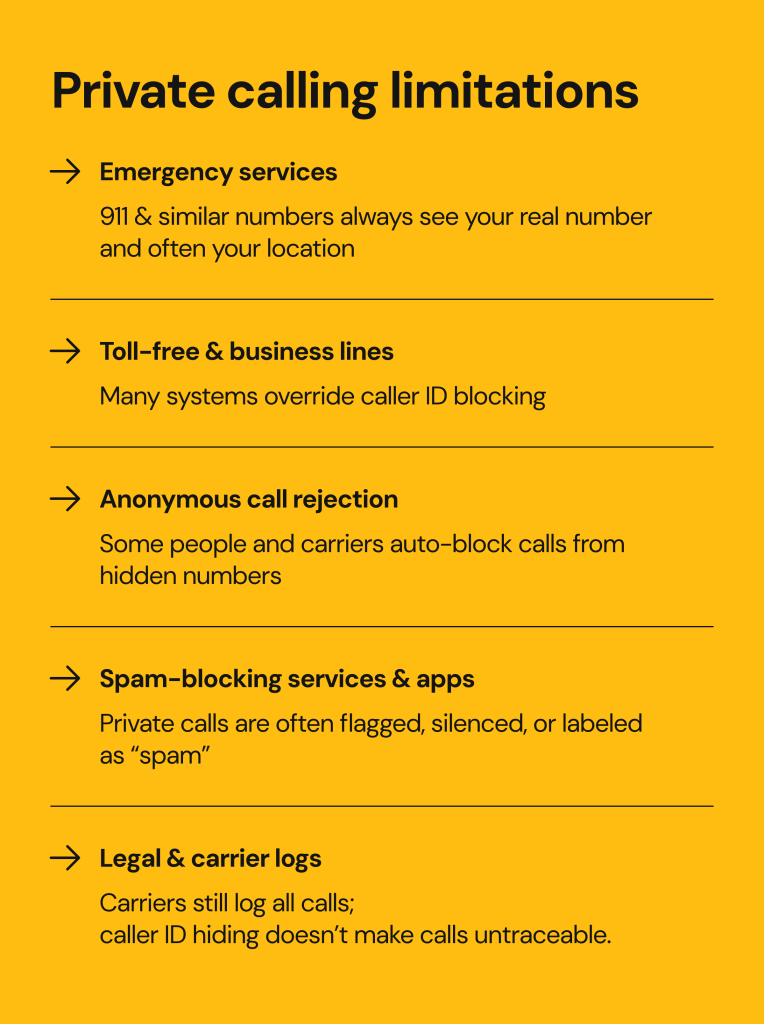
This method isn’t foolproof, however. In most cases, it won’t work for toll-free numbers, emergency lines, or some business and government services. Moreover, some people and businesses will block or just ignore private calls.
Use a “hide number” prefix saved as a contact shortcut
Say that you often make private calls. You might need to call your doctor’s office, a real estate agent, or a delivery service, and you don’t want to reveal your personal number.
The trick to hiding your number with specific people or services is to create a contact with the star code already included. For example, save a new contact as *67 + clinic number. With this shortcut, you won’t have to type the code manually each time.
How to call private on iPhone, Android, and landline
How to call private by default? You can set up your device to always work this way. Of course, the exact method depends on the type of device you are using.
How to hide your number on iPhone (default caller ID block)
Your iPhone has a built-in option for private calling.
- Go to “Settings”.
- Tap on “Phone”.
- Find “Show my caller ID” option.
- Toggle it off.
Once you do this, your number will always be hidden, even from friends and family members. People will always see “No caller ID” or “Unknown”.In rare scenarios, the “Show My Caller ID” option won’t be there. This happens when it’s disabled by your carrier, and you might need to reach out to them to activate it.
Watch video instructions on how to hide your number when making a call here.
How to hide caller ID on Android
How to call someone private from an Android device? The exact method will depend on the brand (for example, Samsung or Xiaomi may work differently). However, the process is generally structured this way:
- Go to “Settings”.
- Look for “Calls”.
- Look for “Additional settings”.
- Find the “Caller ID” option.
- Tap on “Hide number”.
If the menu looks different, use the Settings search bar to look up “Caller ID”. As with Apple devices, your mobile carrier has the final say. Some providers don’t support caller ID blocking, so this option may not be visible.
How to dial private from a landline
Using an old-school, traditional home or office phone? No problem, hiding your caller ID is still possible. Most US landlines support the *67 code, so dial it before the actual number. Of course, you’ll have to do this each time you want to make a private call.
You may want to contact your landline provider for specific star codes for hiding (or showing) called ID, or to see if hiding your number permanently might be an option.
If you have the permanent caller ID block set up on a landline, there is a way to call people showing your actual number. Just dial *82 before the number to temporarily reveal your number in a call.
Other ways to hide your phone number (when settings aren’t enough)
To tell the truth, using start codes and switching your settings on and off might be a hassle. If you use private calling often and want more protection out of it, it’s time to explore other options.
Ask your carrier to block your caller ID at the account level
Carrier-level ID blocking will mask all your outgoing calls by default. This is a great option for users whose phone doesn’t show the option to “Hide caller ID”.
You can request this change only if you are the account owner, and some mobile carriers may charge you a small monthly fee for it. If you enable it, you can still show your number for specific calls by using the *82 code.
Use a second number or burner app
Hiding your phone number using codes, settings, and services can only go so far. Sometimes it won’t work, people won’t answer, and it can still be traced back to you. Getting a second number is way more effective than hiding your main one.
You can use this other number to separate work and personal matters, or keep your main number away from services such as dating apps, one-off transactions, or listings. And, it works for both calls and texts, whereas start codes can only be used for calls.
So, how do you get a second number? Nowadays, you don’t need a burner phone. You can get a disposable number from a burner app, such as Google Voice, Burner, or Hushed.
Make truly private calls with encrypted apps
Instead of wondering how to dial private, consider not doing so in the first place. You could use apps that don’t need your number to make calls and get enhanced call protection in the process.
VoIP (Voice over Internet Protocol) apps like Signal or Telegram use the internet to make calls and send messages, instead of relying on traditional mobile networks. They often hide your real number or separate it from your caller ID. For example, you could connect with someone by dialing their caller ID, and never see their true number.
These apps are often end-to-end encrypted, so the contents of the call are private as well. They may still collect some metadata, like who you called and when, depending on the app.
When hiding your caller ID doesn’t work
Hiding your caller ID is useful, but it isn’t foolproof. Even if you follow all the right steps, there are situations where your number still isn’t truly hidden or your call doesn’t go through. Emergency services, toll-free numbers, carrier rules, and spam-filtering tools can override or block private calls entirely.
Why your phone number is so sensitive in the first place
We are so used to sharing our phone numbers with people and businesses. But a phone number qualifies as sensitive personal information and is easy to misuse.
A number of things can happen if your phone number ends up with scammers and fraudsters:
- You might start receiving targeted scam texts (smishing) and calls (vishing). These are sometimes automatically flagged as spam risk calls.
- You might notice an increase in password resets and account recovery attempts, as you will receive codes to your phone number.
- Your phone number may even be hijacked as part of SIM swapping and other social engineering attacks.
Your phone number is also tied to two-factor authentication apps, bank, email, and social accounts. Should it be misused, you could lose access to these services and suffer ID theft or financial fraud.
Some people already have their phone numbers exposed without knowing. It may be listed on data broker sites, as well as on old online accounts, public profiles, and forums.
So, hiding your caller ID is only a part of the privacy puzzle. Cybersecurity is all about the big picture and reducing your phone number’s visibility online.
How to protect your phone number from exposure (beyond calling private)
Limit where you share your main number
The goal is to bring your phone number exposure down to a minimum. And yet, so many platforms will ask for it. Here is how you start:
- Use a secondary or burner number for online marketplaces, dating apps, job listings, and resumes posted publicly.
- Don’t post your main number on public social media sites or websites.
Use built-in spam filters and blocking tools
Both iPhone and Android come with built-in features that limit who can reach you.
- On iPhone, go to Settings, then Calls, and turn on Silence Unknown Callers. Unknown callers will go straight to voicemail. You can also manually block specific numbers.
- On Android, many phones have Caller ID and spam protection that flags spam risk calls, and lets you block them. Go to the Phone App, find Settings, and look for Spam call and screening to turn it on.
You can also use apps like Truecaller, which filter suspicious and unknown callers. These services may ask you to share your phone number and contact data, so consider if you are comfortable with that.
Remove your number from data broker and people-search sites
Data brokers and people-search websites collect and sell personal information, including phone numbers. They pull it from online accounts, apps, marketing databases, and public records. Although not entirely ethical, data brokerage is legal, and it’s how your sensitive information winds up with scammers.
The good news is: you can opt out of these platforms and have your personal information taken down. One way to do it is to go to each of the sites and opt out manually. This process takes time, but it’s worth it, as long as your data doesn’t reappear after some time.
How Onerep helps protect your privacy and phone number
Onerep helps you stay private online:
- We scan 317 people-search and data broker sites for your personal information.
- We submit opt-out requests on your behalf and make sure they go through.
- Even when your information is taken down, we keep monitoring these privacy-breaching platforms. Personal information often reappears after some time, and we repeat the removal process if that happens.
Even if you know how to call private and hide your caller ID, your privacy could still be at risk if your number is already exposed online. Onerep reduces the chances of scammers getting your number in the first place.
FAQs about calling private and hiding your number
Does *67 still work for private calls?
Yes, you can still make one-time private calls by dialing *67 + area code + phone number. This works with both phones and landlines, and the recipient will see “No caller ID” or “Unknown”.
What is *67 vs *69?
Although these two codes are easy to confuse because of how similar they are, they have entirely different purposes. The star code *67 is used for private calling, and the *69 code is used for calling the most recent incoming number. In reality, *69 is only used for returning calls when using landlines.
Does *67 work on iPhone?
Yes, *67 + area code + phone number is a private calling trick that works on both iPhones and Androids, for users in Canada and the US.
Can a *67 number be traced?
Yes, it can be. Hiding your number using a star code won’t work on toll-free services, government lines, some businesses, and emergency services. Even if you successfully use it to call someone, mobile carriers and authorities can still trace it back to you.
How can I call without my number showing?
You can use a star code (such as *67, depending on your location), or enable Caller ID blocking in your phone settings. Some phones may not have this option enabled because the carrier is blocking it. In that case, you ought to contact your carrier. You can also use VoIP apps like Signal to call other users without showing your personal phone number.


Mikalai is a Chief Technical Officer at Onerep. With a degree in Computer Science, he headed the developer team that automated the previously manual process of removing personal information from data brokers, making Onerep the industry’s first fully automated tool to bulk-remove unauthorized profiles from the internet.