 Published December 29, 2025
  read
read
How to delete a Lyft account: a simple step-by-step guide

Lyft is a popular ridesharing app that competes with Uber as a convenient and flexible option for both drivers and passengers. It operates primarily in the U.S. and Canada, recently expanding into European markets through its acquisition of the Freenow service, and now boasts close to 25 million riders per quarter.
Still, there can be plenty of reasons to delete your Lyft account. You may be concerned about your data privacy, switching to another ridesharing app, or simply moving out of a location that supports Lyft services. Whatever the reason, you should be able to delete your account along with your personal information via the Lyft app or directly through their website.
You’ll find everything you need to know before, during, and after deactivation in this guide on how to delete a Lyft account below.
Why you might choose to delete your Lyft account
Wanting to delete a Lyft account is a logical next step when you want to minimize your digital footprint once the app is no longer in active use. It can also be part of your digital hygiene, especially if you are concerned about how much of your sensitive personal information is used and stored. Overall, there are multiple potential reasons for deleting your Lyft account, including:
Privacy concerns
Mobile apps require access to personal data linked to your identity in order to function properly, including your name, phone number, email address, payment details, and location. Lyft notes that while they do not sell your personal information, they still collect and share it with third-party services and partners to enable app functionality.
It’s normal to have data privacy concerns about how responsibly businesses use your data. Lyft hasn’t had a public data breach so far, but there’s been news about Uber and Lyft unintentionally leaking their drivers’ personally identifiable information, such as Social Security numbers, to social media companies, including TikTok and Meta.
Even if you no longer use the app but keep your account active, Lyft will still retain your data on file. So if you’re concerned about Lyft’s privacy policy and want to minimize your digital footprint, parting with your Lyft account can be a good way to go.
Switching to another transportation service
Lyft might have few competitors but there are still options when it comes to choosing an on-demand ride-hailing service. You might want to switch to a different transportation option altogether, for example, public transport or your own car.
In these cases, keeping your Lyft account active will serve little purpose. You can simplify your digital life and, instead of maintaining several similar accounts, stick to the one(s) you use most. This will also help minimize oversharing your personal information online, especially when it comes to stored payment card details and location tracking.
Moving to a different location
Currently, Lyft operates in the US and Canada only, with some incursions into the UK and the EU through the acquisition of the Freenow mobility-as-a-service platform.
If you move countries, Lyft might not be available in your new location. If you don’t intend to travel back often or at all, deactivating your Lyft account is a logical decision to clean up unused apps and reduce your personal information exposure.
Cleaning up old accounts
Over time, it’s easy to accumulate dozens of apps that sit unused on your phone screen. You might have kept your Lyft account for years without opening the app once, and now it’s time to delete it. Such a practice of cleaning up old accounts you no longer need contributes to healthier digital habits, makes your account management easier, and minimizes the risk of personal data leaks due to weak or compromised passwords.
Payment method security
Having your bank card linked to a Lyft account is necessary for the app to function, but you may worry about the security of your banking information, especially if you rarely check the app. If your phone number changes, your email account becomes inaccessible, or you reuse your Lyft password elsewhere, this creates an increased risk of your payment data being exposed and exploited. If you have an inactive Lyft account, it’s better to delete it altogether rather than just unlinking your payment card.
What to consider before you delete your Lyft account
Before you submit your Lyft account deletion request, consider the following:
1. Active rides or balances
In order to delete your Lyft account, you must not have any rides in progress. You will also lose any remaining ride credits, gift cards, or promo balances after deleting your account, so make sure you use them all up before deletion.
2. Active Lyft Pink memberships
If you’ve subscribed to the Lyft Pink membership, you should cancel this subscription to avoid getting charged after you delete your account. Though this is unlikely, you can still take this step as a precaution.
3. Payment methods
The same applies to your stored payment methods. Even though you’re unlikely to get charged after your Lyft account is deactivated, it’s still safer to delete any linked payment cards first and only then proceed to delete your Lyft account.
4. Rider and driver accounts
When you delete your Lyft account, both rider and driver accounts get deleted. You should consider this if you want to retain any of that functionality. For example, if you earn money as a Lyft driver but want to stop using the app as a rider, you’ll have to keep both accounts active.
5. Data retention
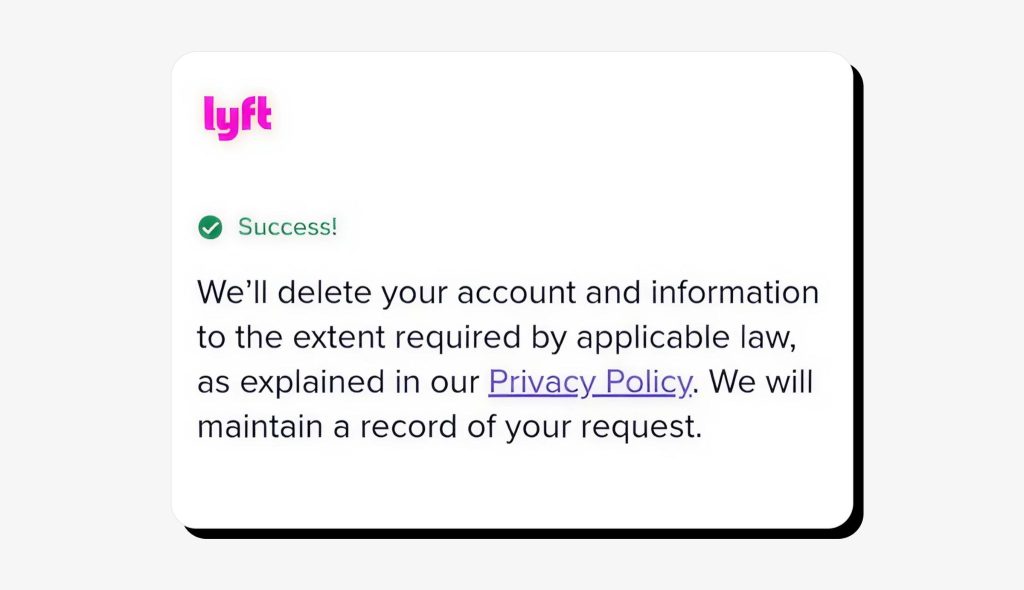
Lyft states that after you request your account deletion, they will delete your personal information to the extent required by applicable law. This means that, theoretically, some portion of your data may be retained for legal and security purposes.
6. Data export
You will be able to download a copy of your personal data collected and stored by Lyft before deleting your account. This information will include details like your ride history, the personal data collected by Lyft and its sources, categories of third party services that Lyft shares your data with, and the business and commercial purposes of data collection. This step is available only before you send your account deletion request.
7. Account deletion timeline
Lyft takes up to 45 days to process your account deletion request. In some cases, this may take longer, but Lyft promises to notify you of such delays in writing.
8. Rejecting your account deletion
In some rare cases, Lyft may be unable to delete your account if there’s a safety-, fraud-, or trust-related issue associated with your account.
9. Permanent deletion
Once processed, your Lyft account deletion is permanent and final. You won’t be able to restore your old Lyft account using the same credentials and will need to create a completely new one to begin using the app again.
How to delete your Lyft account in the app
If you’ve never navigated Lyft’s privacy settings before, the process of closing your Lyft account may seem confusing. Just follow the steps below in the Lyft mobile app to delete your account quickly and safely.
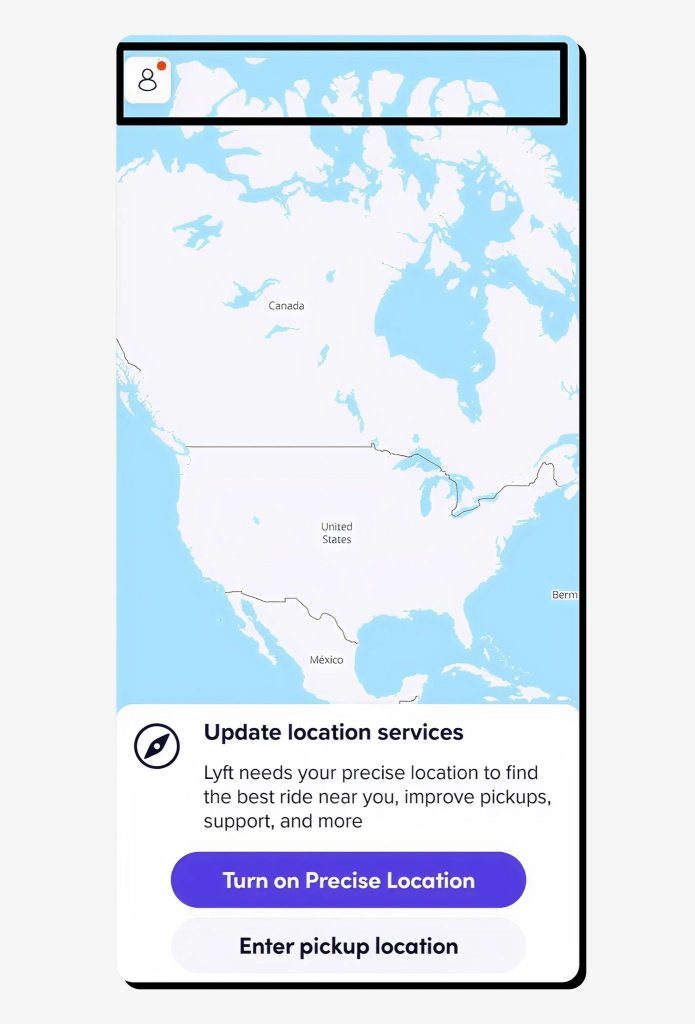
1. Open the Lyft app on Android or iOS and navigate to your profile by clicking the icon in the upper-left corner of the app.
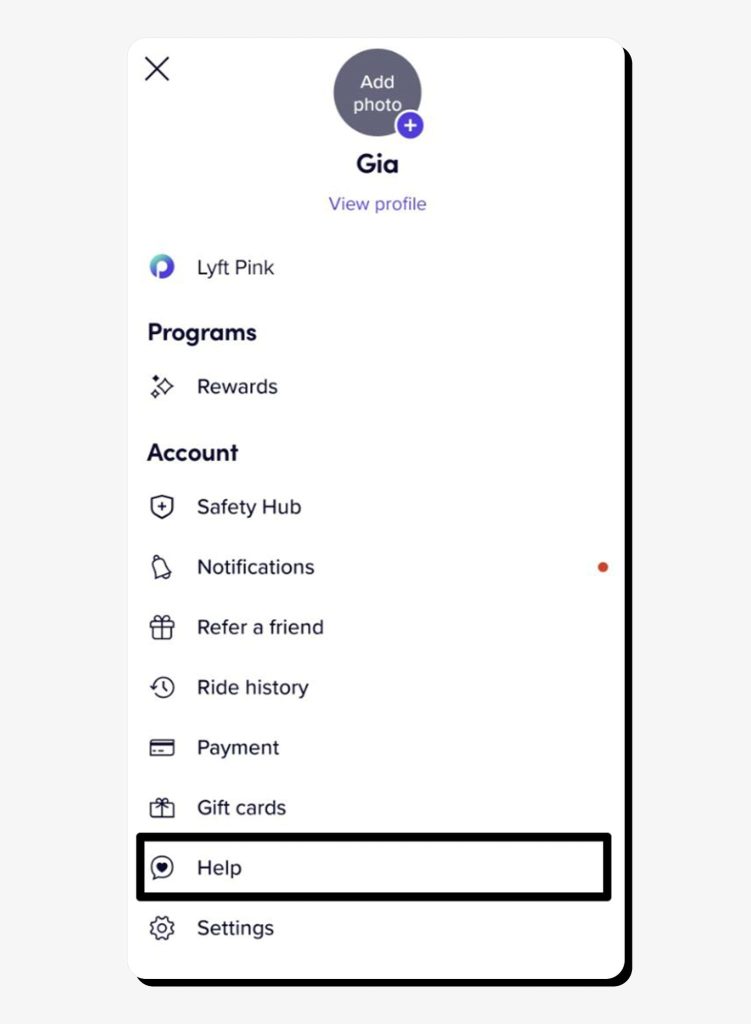
2. Tap Help (or Support, depending on your version).
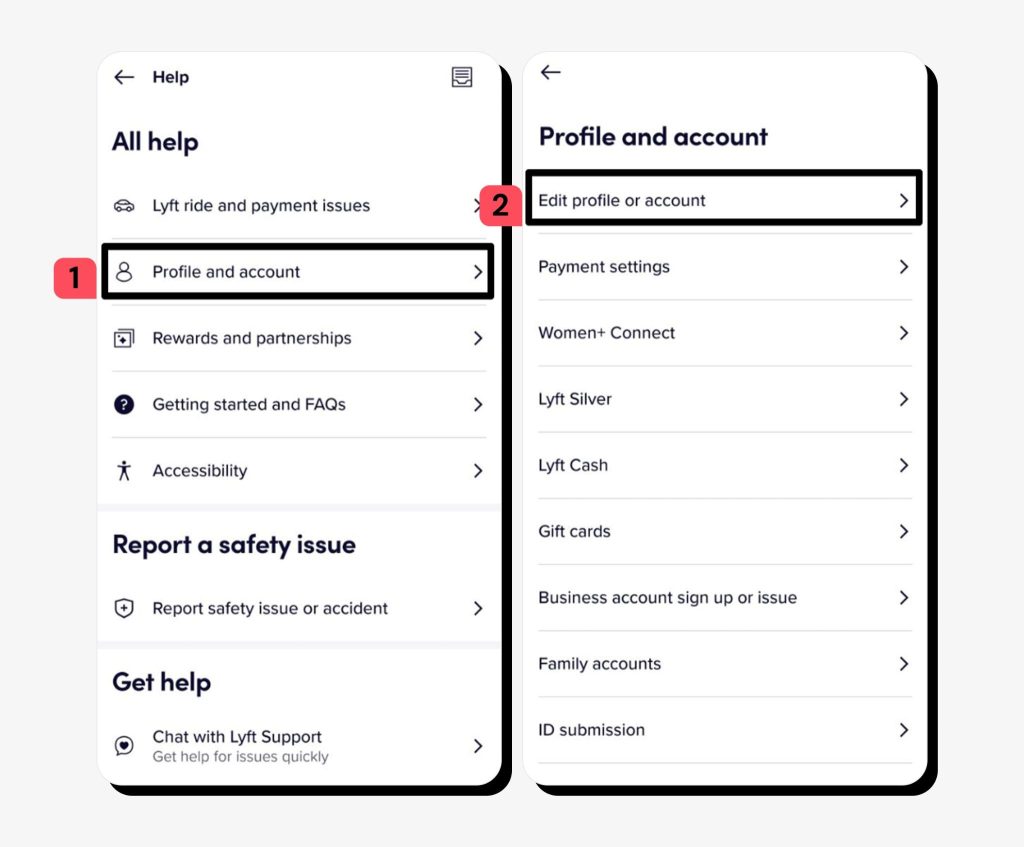
3. Tap Profile and account > Edit profile or account.
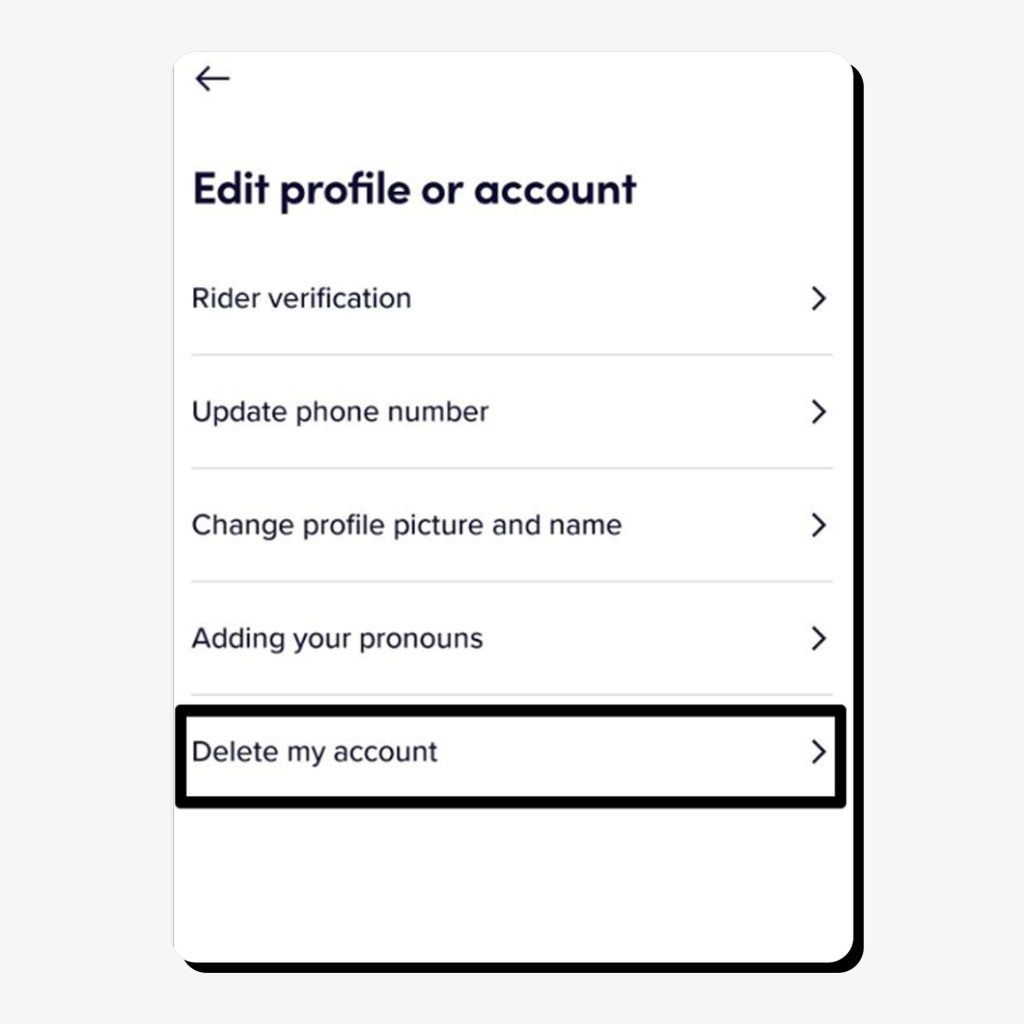
4. Tap Delete my account.
5. You’ll see a list of options with instructions, including how to download your account data. This step is optional, but you may want to export your Lyft account data as a ZIP file before proceeding.
6. Once you’re ready to delete your account, tap How to delete your Lyft account.
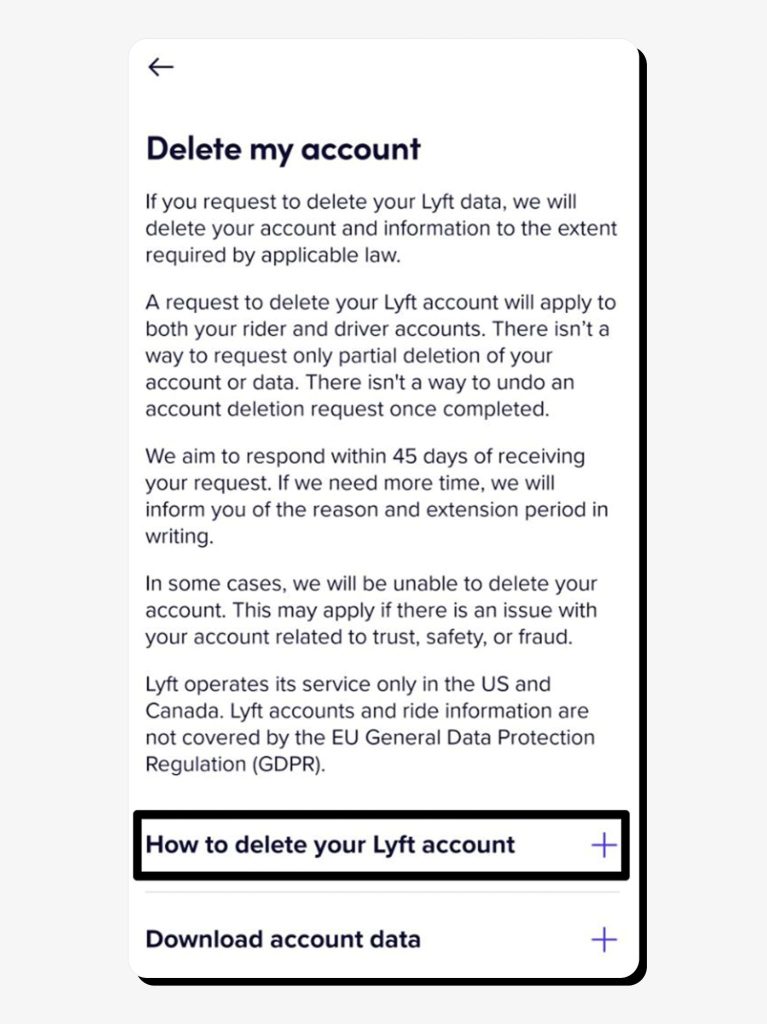
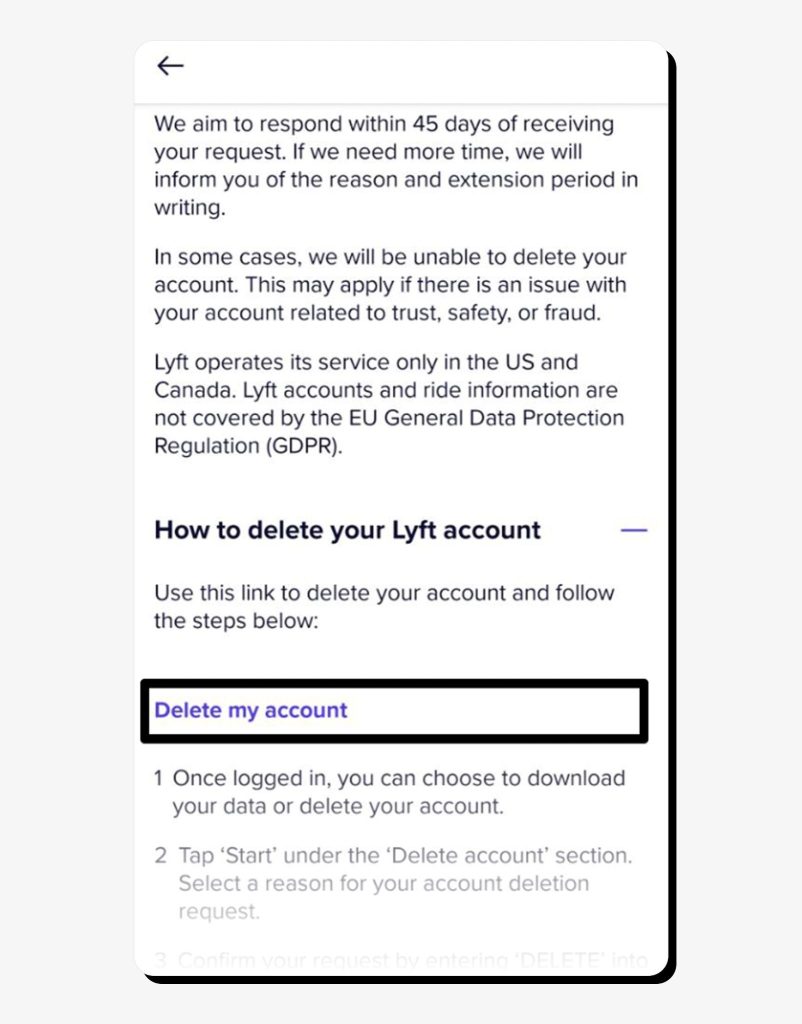
7. You’ll be presented with the instructions. To start the process, tap Delete my account.
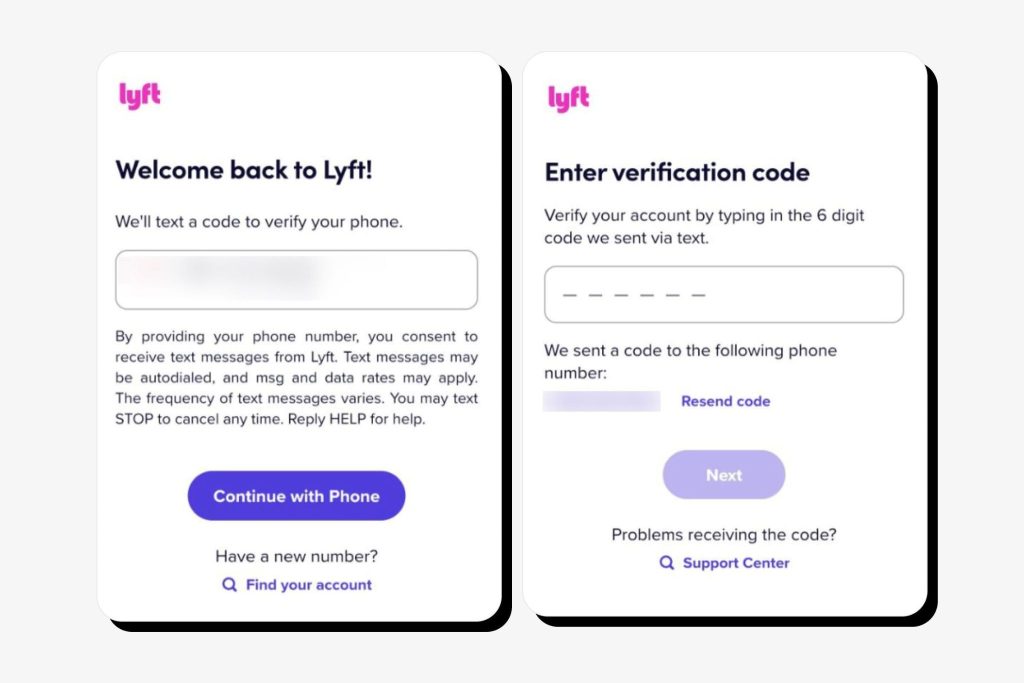
8. Next, verify your identity by entering the phone number associated with your Lyft account. Wait for the verification code to proceed with the deletion process.
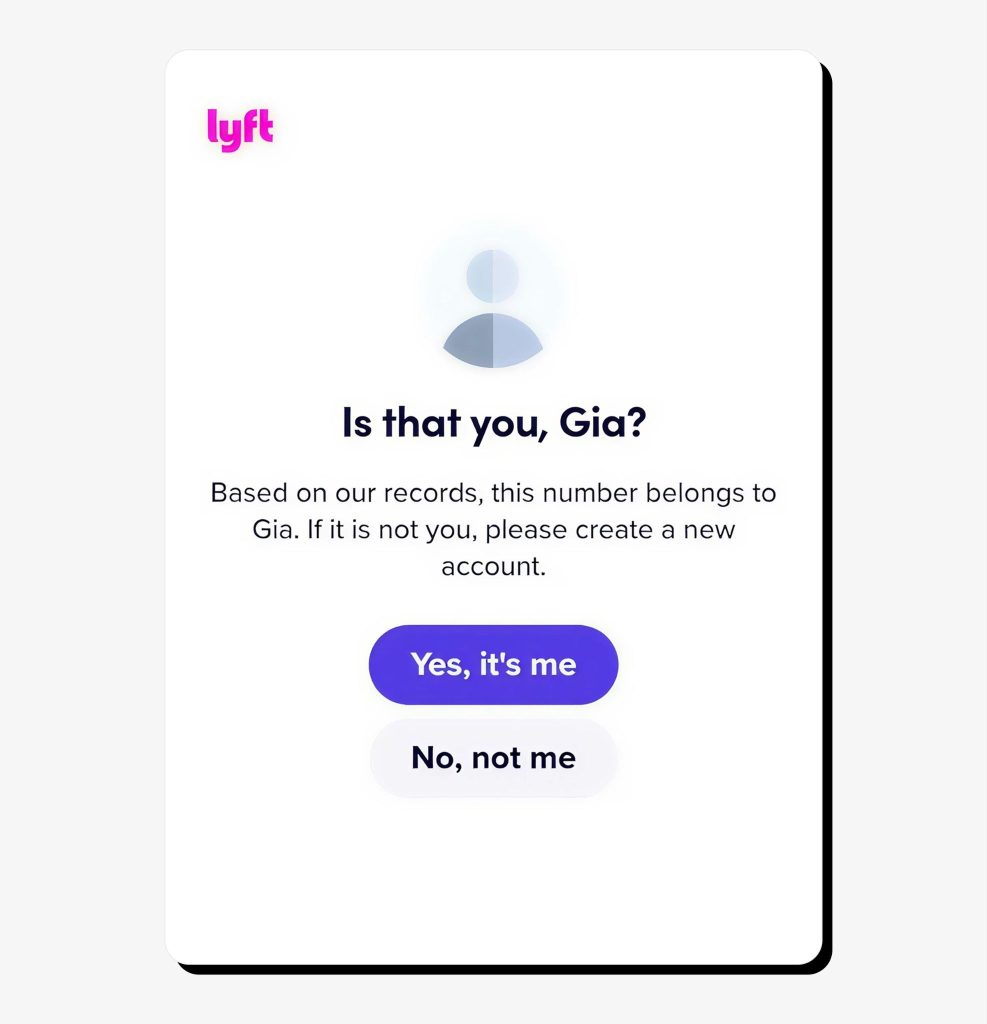
9. Confirm it’s you by tapping the “Yes, it’s me” button.
10. Verify your identity by submitting your email.
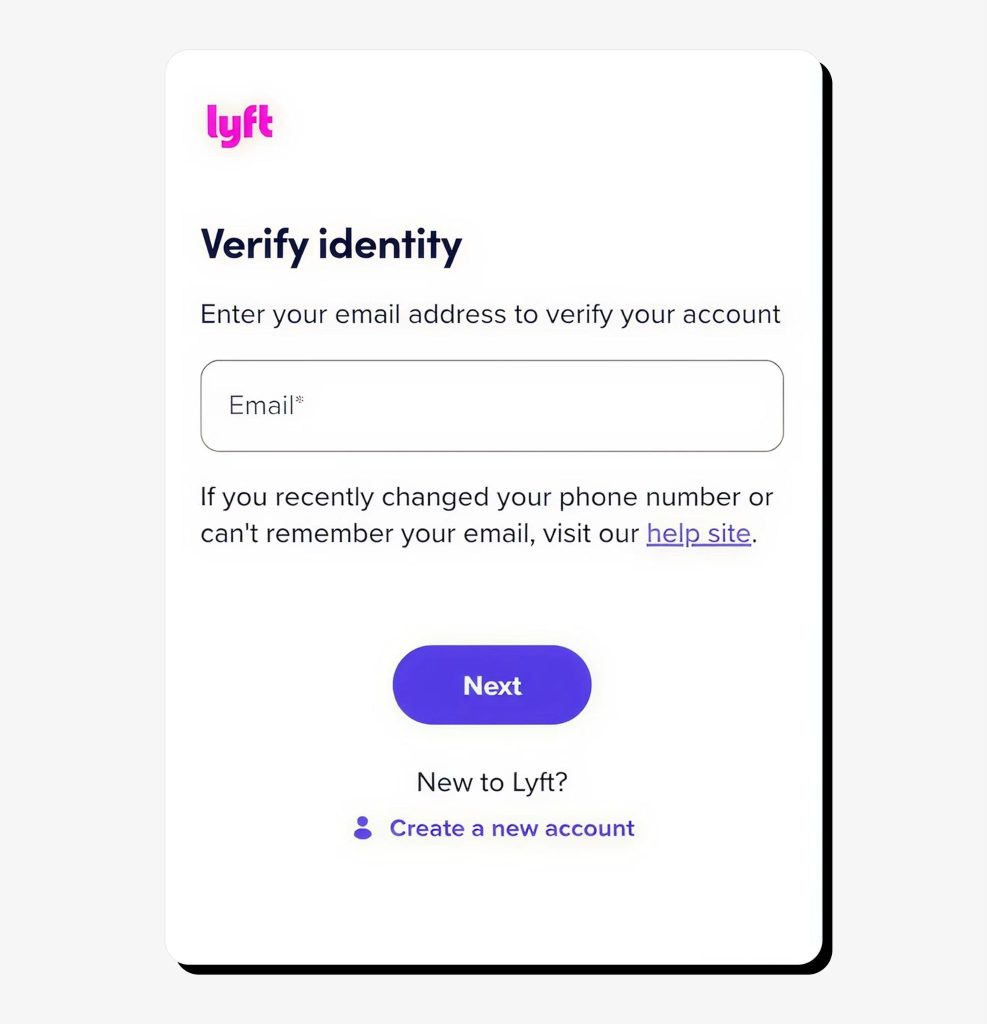
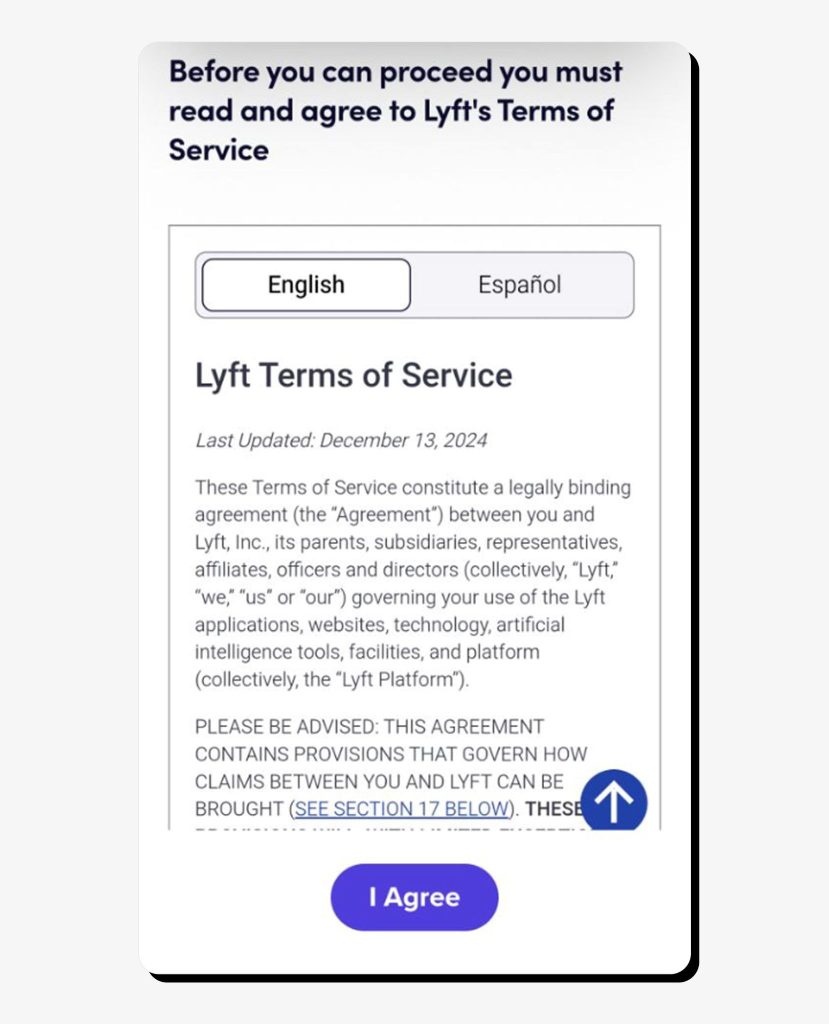
11. Tap the “I Agree” button to agree to the Terms of Service.
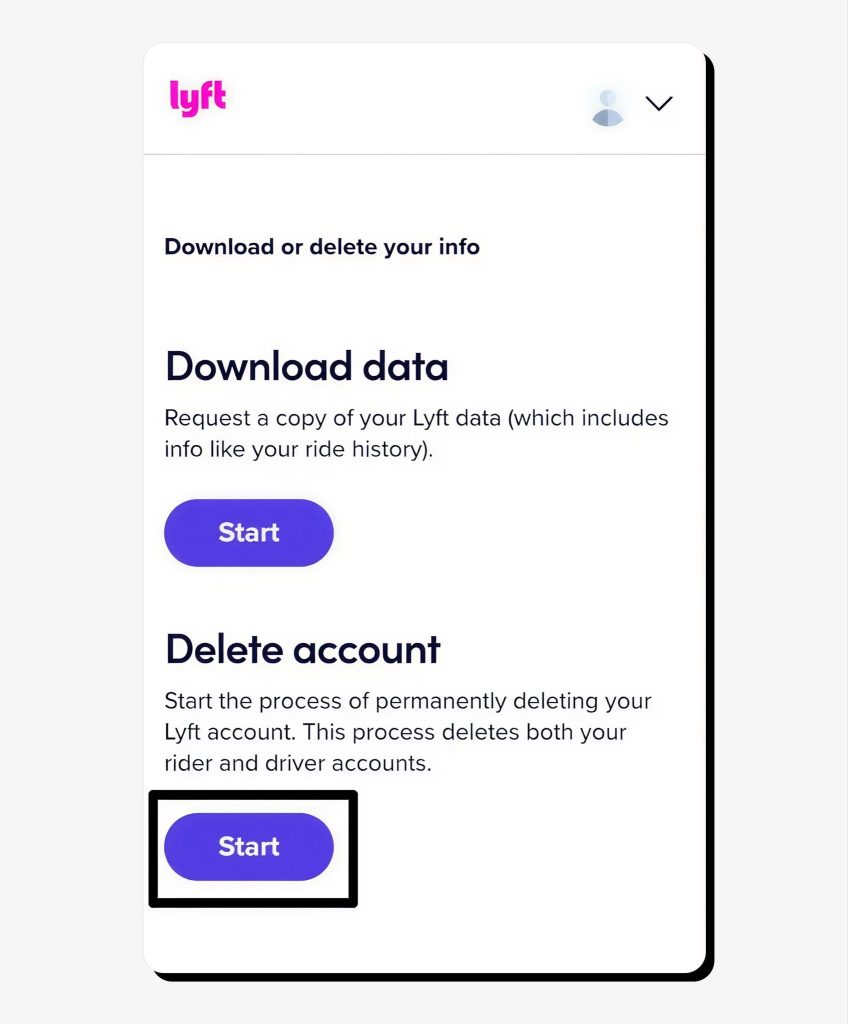
12. Tap the “Start” button under “Delete account.”
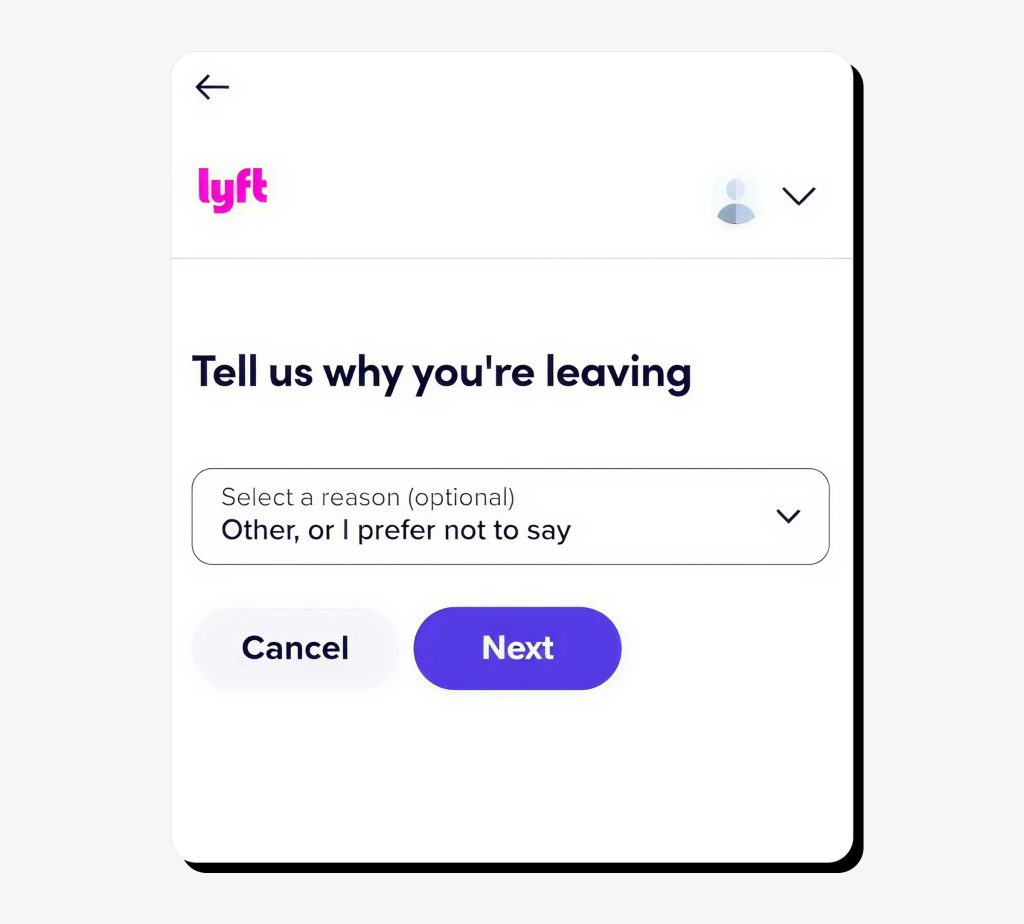
13. Choose the reason for deleting your account at the next step (optional).
14. Type DELETE in the box and confirm by clicking Delete account.
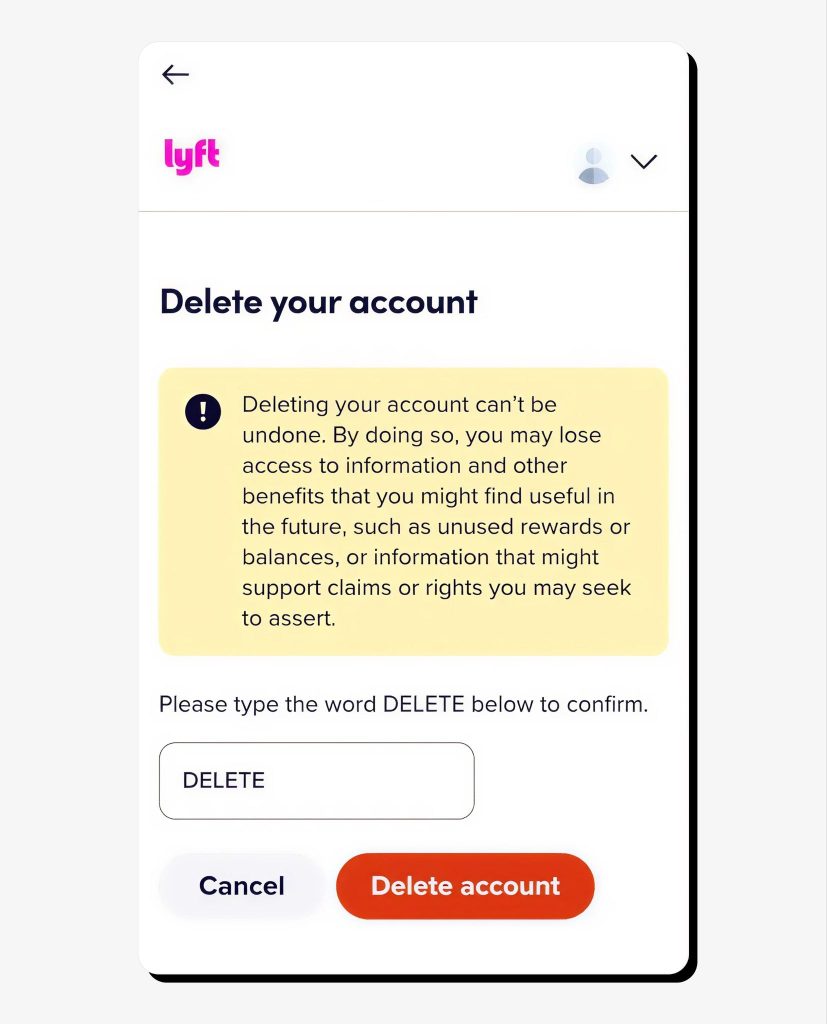
That’s it! Your Lyft account deletion request has now been sent, and Lyft has up to 45 days to process it (sometimes longer, as noted above).
How to delete your Lyft account in a browser
Deleting your Lyft account in a browser is a simple process with just a few steps. Here’s how to deactivate a Lyft account via the website:
- Instead of navigating to your profile and the Help menu, go straight to Lyft’s data privacy page and log in using your credentials.
- Under the Delete account section, click Start.
- Select a reason for deleting your Lyft account.
- Enter DELETE in the text box and confirm by clicking Delete account.
Your account deletion request has now been sent, and your account should be deleted within 45 days.
What happens when you delete your Lyft account
After you send your account deletion request to Lyft, here’s what you can expect:
- Your account will be deactivated shortly after you confirm its deletion. At this point, your account becomes inaccessible. You won’t be able to use Lyft, including for booking rides, accessing your trip history, using saved payment methods, or redeeming old credits. You also won’t be able to log in using your old credentials.
- Lyft will begin deleting your personal data, but the process may take up to 45 days. In some cases, certain personal information may be retained for fraud prevention, safety investigations, or legal or regulatory requirements. This happens when Lyft is required to keep some of users’ personal information on file in accordance with applicable law. This data is typically anonymized, limited, and restricted from public view.
- Marketing communications from Lyft should usually stop soon after the deactivation, but you may still receive transactional emails related to your account deletion request.
Can you reactivate a deleted Lyft account?
Generally, no—once you delete your Lyft account, you won’t be able to reactivate it.
In short, deleting your Lyft account is a straightforward but irrevocable process. It takes just a few quick steps to submit your account deletion request and a bit longer for it to be processed, but once it’s accepted, you can only resume using Lyft by creating a completely new account.
If you’re wondering how to close a Lyft account but intend to come back later (for example, if your circumstances change or you move back to a location that supports Lyft services), you can proceed with deletion, but in this case, you’ll lose access to all your riding or driving history and ratings.
Another option is to keep your Lyft account even if you’re not actively using it, making sure to cancel any active subscriptions and remove attached payment methods for security reasons.
FAQs
Can I delete my Lyft account without the app?
Yes, you can delete your Lyft account via a browser. Go to Lyft’s data privacy page, navigate to the Delete account section, and click Start. You can specify a reason for deletion or skip this step. Lastly, type DELETE in the text box and confirm your account deletion.
Does deleting the Lyft app delete my account?
No, uninstalling the Lyft app from your phone doesn’t delete your Lyft account. Unless you submit a formal account deletion request by following the steps outlined in this guide (or on Lyft’s official support page), your account will remain active along with the personal information collected and stored by Lyft.
How long does it take to delete a Lyft account?
According to Lyft’s official guidance, it may take up to 45 days to process your account deletion request. However, once you submit it, your account will become inaccessible, meaning you won’t be able to log in using your old credentials. During this 45-day window, Lyft will begin deleting your personal information as required by applicable law.




Dimitri is a tech entrepreneur and founder of Onerep, the first fully automated data removal service. Top cybersecurity CEO of 2021 by The Software Report.