 May 8, 2024
 read
PeopleSearchNow opt out
- By Dimitri Shelest Founder and CEO at Onerep

Dimitri is a tech entrepreneur and founder of Onerep, the first fully automated data removal service. Top cybersecurity CEO of 2021 by The Software Report.
Read more - Checked by Alena Shymanskaya Content Manager at Onerep

Alena is an experienced content writer with a specialized focus on data brokers and the intricacies of personal data management.
Read more
- Removal difficulty: Low
 Why trust this guide

We know all the ins and outs of the data broker removal:
Founded in 2015, we pioneered automated removal from people-search sites. Our service uses precise opt-out algorithms tailored for each website. When a site changes its algorithm, we detect the change immediately, and our team updates the process. These updates are promptly reflected in the Onerep DIY data broker removal guides. With 16 million records already removed from hundreds of sites for our customers, you are accessing the expertise of the #1 team in the industry with this guide.
PeopleSearchNow.com is a data broker site that aims to provide a free way to help you find people. That implies that they collect and post a lot of private information, including age, phone numbers, current and past addresses, important dates (like date of birth), and relatives and possible associates. The site provides three ways to search for someone: name lookup, reverse phone lookup, and reverse address lookup.
PeopleSearchNow.com is not a consumer reporting agency, so it can’t be used for tenant, employment, credit, or other screenings that require FCRA compliance. However, the website can’t actually find out why someone is looking you up. Considering the fact that it shares a lot of detailed personal information for free, the chances are high that someone will use PeopleSearchNow to conduct background checks on you. And since PeopleSearchNow.com doesn’t verify the accuracy of its information and doesn’t change it even if requested, your reports may contain false charges or legal actions that will cost you a job or an approved loan.
To protect your privacy and control who has access to your personal details, we highly recommend removing your information from People Search Now. To do that, you need to submit a request on their website and confirm it via email.
How to opt out of PeopleSearchNow?
Quick summary:
- Access People Search Now’s opt-out page peoplesearchnow.com/opt-out
- Agree to the terms, enter your email address, complete the CAPTCHA, and click ‘Opt Out My Info’
- Search for your record using your name, phone number or address
- Find your record among the results and click ‘View All Info’
- Click the ‘Remove Record’ button
- Follow the confirmation link in your email to verify your request
Step 1: Access the PeopleSearchNow site
To start the opt out process, navigate to the PeopleSearchNow website.

Step 2: Follow the ‘Do Not Sell My Personal Information’ link
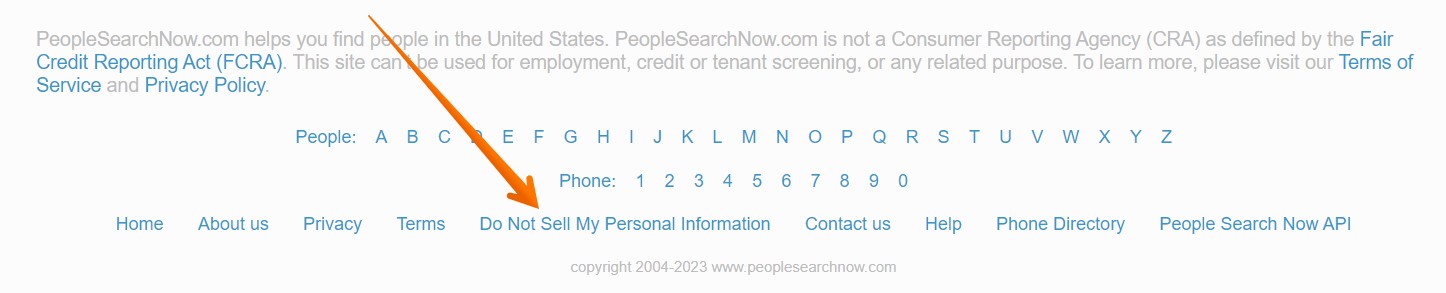
Scroll the page all the way down to the bottom, find the ‘Do Not Sell My Personal Information’ link and click on it.
Step 3: Agree to the Terms and Conditions, enter your email address, perform the CAPTCHA, and press ‘Opt Out My Info’
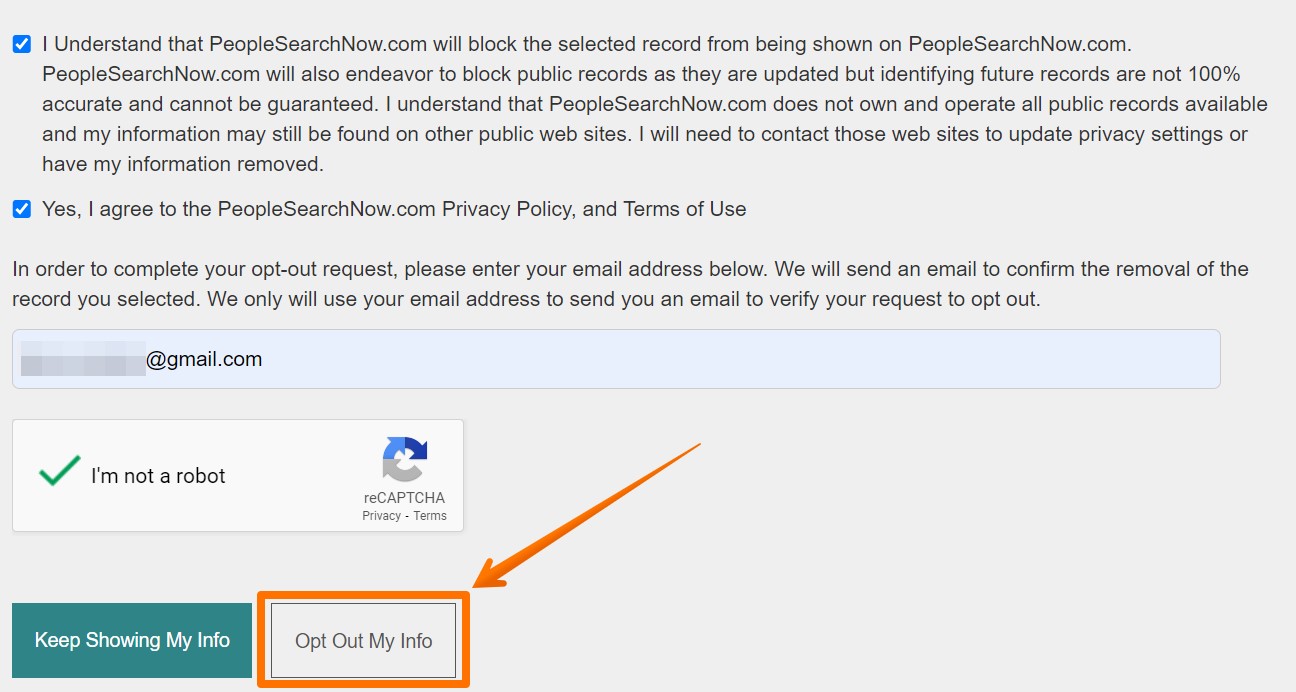
The appearing page provides the record removal instructions. Under them, check the Terms boxes, type a valid email address, complete the security CAPTCHA challenge, and click the opt-out button.
We highly recommend creating a separate email account for opting out of data brokers. This action will prevent these sites from collecting and possibly displaying later the email address you use for personal and business purposes. You can use a disposable email address as well. However, make sure to finish the opt-out process before your email account automatically disappears.
Step 4: Search for your record
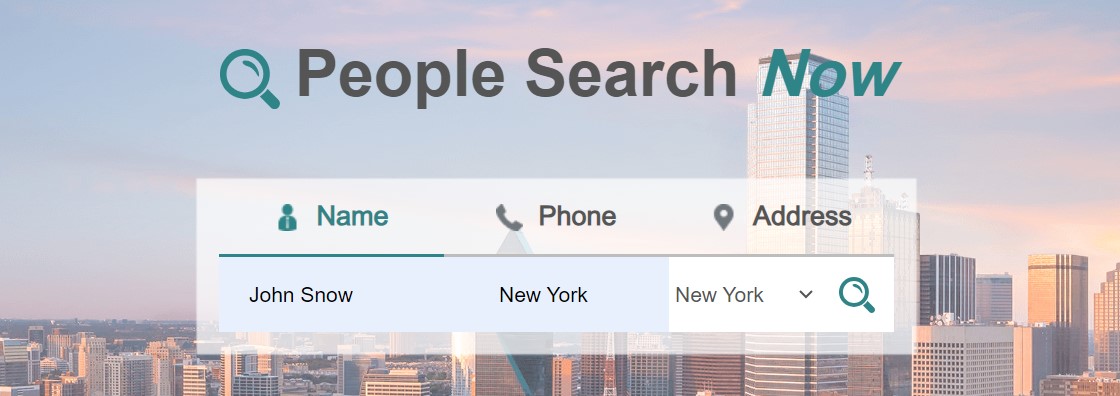
Enter your first and last name and your city, then select your state from the drop-down menu. After that, click the search icon. Alternatively, search for your record using your phone number or address in the corresponding tabs.
Step 5: Open your record
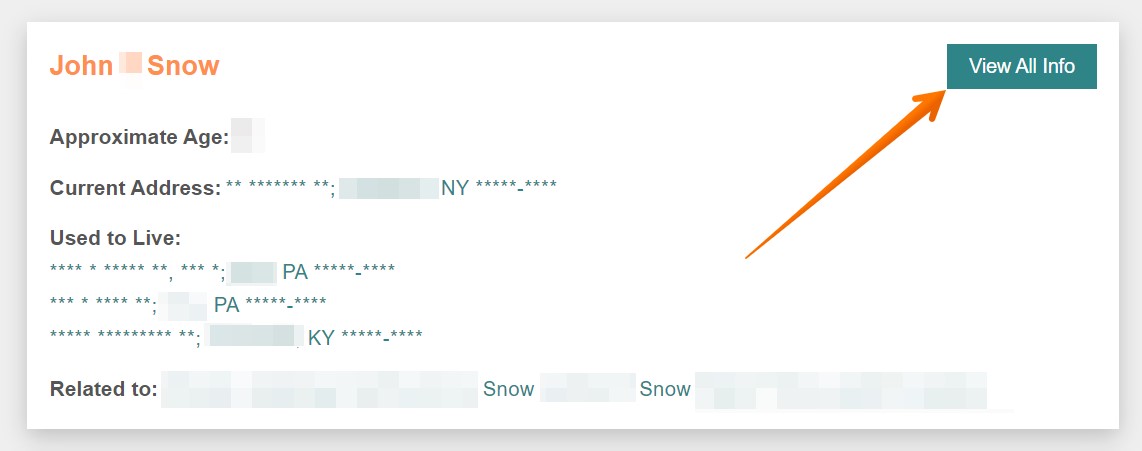
Once on the search results page, find your profile and click ‘View All Info’. In case you need to decrease the number of results, use the age and city filters on the left. Please note that profiles with the ‘View Details’ button are advertisements, so don’t open them. Instead, use the pagination under the ad section to go to the next page of search results.
Step 6: Click the ‘Remove Record’ button
Hit the red ‘Remove Record’ button at the top of the profile.
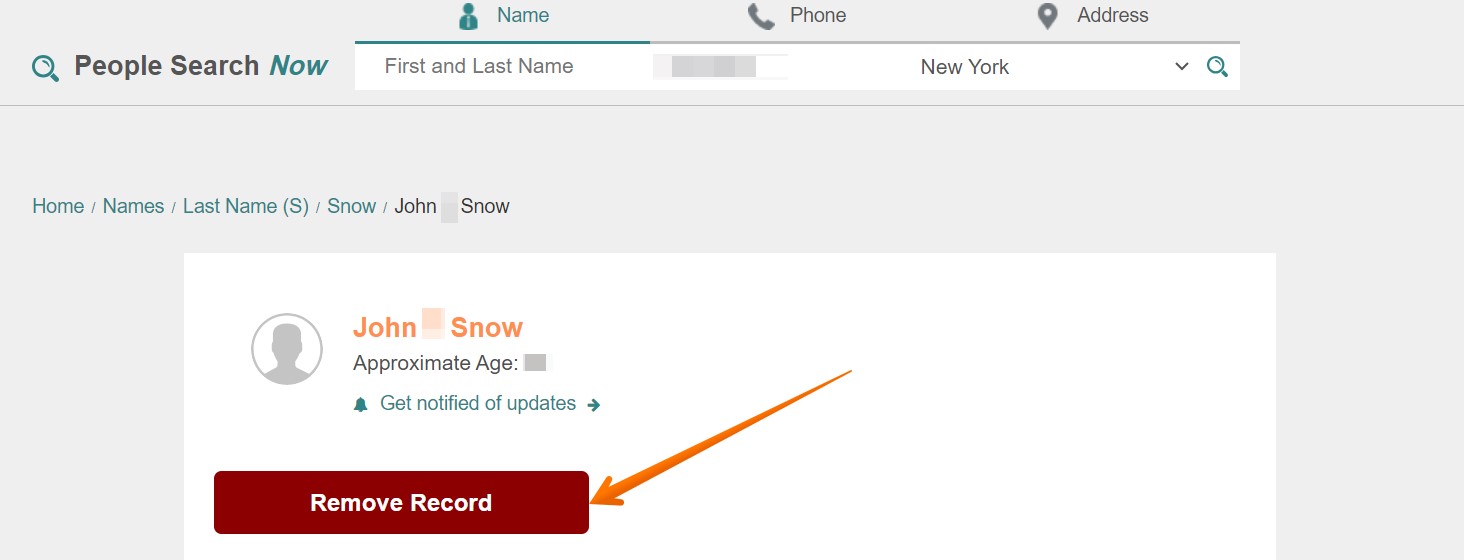
Step 7: Follow the confirmation link in your email
Finally, you need to follow the verification link sent to the email you provided earlier. Note that the email may take a few hours to arrive. Click the blue button to confirm your request and complete the opt out process. Once you do, you’ll be taken to the record removal confirmation page in a new window.
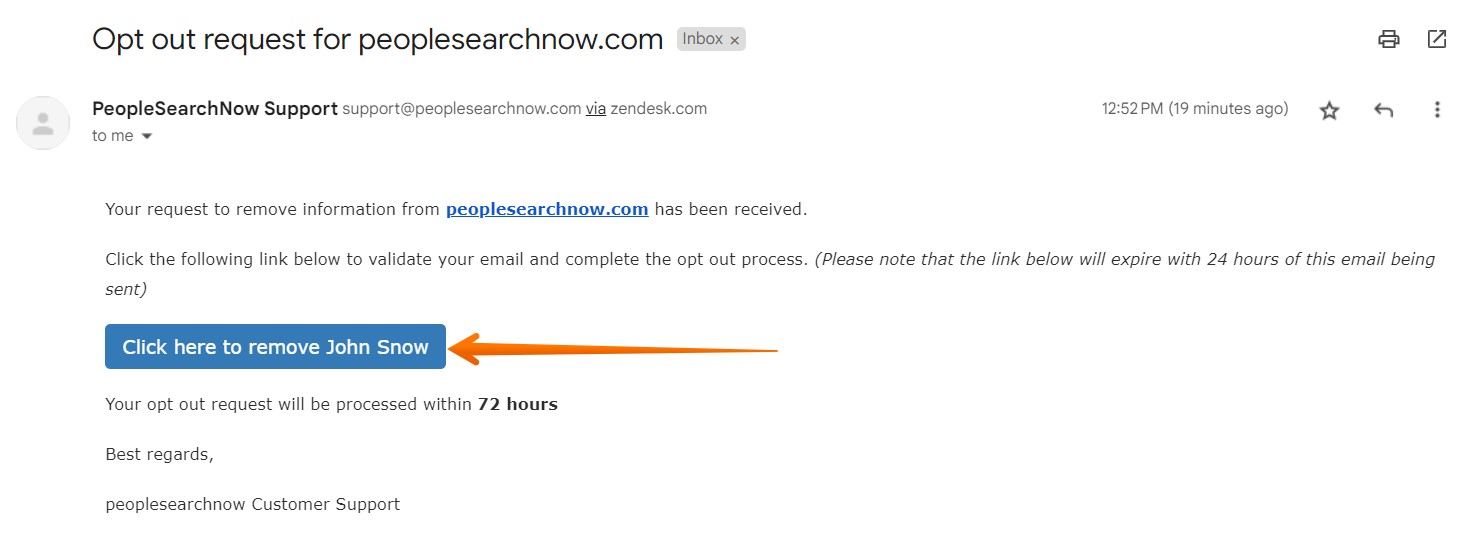
You have completed all the steps and your opt-out request has been confirmed. Your record should be removed within 72 hours. We recommend going back after the stated time period and checking if your information has been taken down. In case it hasn’t, reach out to PeopleSearchNow’s customer care directly.
Note that removing your record from People Search Now does not remove your information from other data brokers, public records, and government databases.
Moreover, it takes time for Google to update its indexes and your record might still be present in the search results even after opting out. The record page might already be removed and show the 410 error upon clicking on it but the preview will be visible on Google. If that happens, send a request via Google’s outdated content removal tool.
How to correct information in a People Search Now record?
PeopleSearchNow.com doesn’t modify any information it displays even upon request. The website fully relies on public records it gathers data from and doesn’t check it for accuracy. If you find information in your listing that is incorrect and you want to have updated, People Search Now advises you to contact the relevant authority that could’ve issued the original public records.
How to contact People Search Now
If you want to reach out to a People Search Now’s customer care representative, use the online form on their website. Alternatively, contact them via phone at (313) 484-4789 or via the following mailing address: PO Box 441130, PMB 29296, Detroit, Michigan 48244-1130 US.
California Consumer Privacy Act
PeopleSearchNow.com claims to not share personal information with third parties for their direct marketing purposes. Still, California residents have the right to request certain data regarding PeopleSearchNow’s disclosure of personal information to third parties for their direct marketing purposes. To do that, use PeopleSearchNow’s contact form.
Your data is still exposed on other brokers
Numerous other data broker websites expose your private data. We recommend that you remove yourself from these five next:
- How to remove yourself from MyLife.com
- How to remove yourself from FamilyTreeNow.com
- How to remove yourself from FastPeopleSearch.com
- How to remove yourself from Spokeo.com
- How to remove yourself from Radaris.com
Go through this list and send opt-out requests manually to each data broker, or subscribe to Onerep to remove records automatically from 318 sites with just a few clicks.
About People Search Now
Founded in: 2017
Approximate number of monthly visitors: 200K
Reports contain: full names, age, current address and location history, phone numbers, relatives and friends, neighbors, criminal records, marriage licenses, death certificates, court documents, and much more.
Frequently asked questions about People Search Now
How to opt out of PeopleSearchNow.com?
To protect your privacy and remove your information from People Search Now, go to their opt-out page, check the Terms boxes, enter a valid email address, solve the CAPTCHA, and click the ‘Opt Out My Info’ button. Then look yourself up, find the record containing your information, and open it. After that, click on the ‘Remove Record’ button, and complete the opt out process by following the verification link in the confirmation email from PeopleSearchNow.
Where does PeopleSearchNow.com get my information?
PeopleSearchNow aggregates information from a diverse number of publicly available sources and public records, including census records, phone directories, property records, birth and death records, magazine subscriptions, court records, and voter registration cards.
More opt-out guides
- NeighborWho opt out
- SignalHire opt out
- DNB opt out
- ContactOut opt out
- BackgroundCheck.run opt out
- UniCourt opt out
- PeopleLookup opt out
- InfoTracer opt out
- StateRecords.org opt out
- Acxiom opt out
- PrivateReports opt out
- CheckSecrets opt out
- InstantPeopleFinder opt out
- AnyWho opt out
- 411.com opt out
- AbsolutePeopleSearch opt out
- ZoomInfo opt out
- OpenGovUS opt out
- RealtyHop opt out
- NDB opt out