 Published December 29, 2025
  read
read
Should I accept cookies? A clear guide to understanding website tracking

Have you ever accepted cookies blindly just to get rid of intrusive website pop-ups? If yes, you’re not alone. However, you should know that you can both accept and reject cookies, as well as have more granular control over your cookie preferences for maximum data privacy.
This guide explains how cookies work, whether you should accept cookies, what happens when you accept or reject them, and outlines best practices for managing cookie settings in your browser.
Types of cookies and how they work
What are cookies, essentially? Cookies are small text files sent to your computer or another device you use (phone, tablet) when you’re browsing, typically with your permission. Each time your browser connects to the website, it sends the stored cookies back, helping exchange information about you as a user and remember it between page loads and visits.
Cookies do not contain passwords, your full name, or private content you exchange with the website, such as emails or documents, provided the website is encrypted and doesn’t leak data due to a cyberattack. Cookies themselves are not programs and cannot run code; they can’t read files on your device either.
Here’s how they work:
- You visit a website.
- The website asks your permission to start sending cookies to your browser.
- You have options to accept all, deny all, or manage your preferences. If you deny all, the website might not be able to render its content properly.
- If you accept, your browser will store the cookies.
- On your next request to the website, your browser sends the cookies back to that website.
- The website uses the cookies to recognize you as a user and remember your preferences.
In theory, not all websites need cookies. Some very simple informational websites (like fully static pages or blogs that only present content without analytics or personalization) can function without them. In practice, however, even simple websites usually use cookies today, and cookie-free setups are rare. More complex interactive websites, such as social media platforms, online stores, and digital media outlets, rely on at least essential cookies to function properly.
The most common reasons for using cookies on a website are the following:
- To keep you logged in as you go from page to page or between sessions.
- To remember your user preferences, if any (such as language, region, currency, etc.).
- To measure how visitors use the website (for analytics).
- To enable advertising banners and personalize their display for different categories of users.
For these reasons, there are different types of cookies depending on their purpose and the way they function.
First-party cookies
First-party cookies are set by the website you’re visiting, and only that website can read them. The website creates a cookie with an ID, and as you move between pages, the website uses this ID to know it’s still you.
Typical uses for this type of cookie include login session tracking, storing user preferences, and enabling web analytics.
Third-party cookies
These cookies are created by third parties (partners) integrated with the website, such as advertising, social media, and analytics platforms, and are therefore read by these third parties rather than the website you’re using. Their typical uses include cross-site tracking, advertising, and supporting social media widgets. They can store unique advertising identifiers and ad interaction history.
Many modern browsers can block third-party cookies automatically, but if they’re enabled, third parties will be able to track you across websites where their services are integrated.
Session cookies
Session cookies store your session ID and temporary security tokens and exist only during your website session. Their key purpose is to maintain the website’s memory of you as a user during your visit. Once you close the browser, session cookies are deleted.
Persistent cookies
Unlike session cookies, persistent cookies are stored until a set expiration date (months or even years after your visit). Their purpose is to remember you from one visit to another by storing “remember me” login tokens (which are not the same as your login credentials), saved preferences, and analytics identifiers. Your browser will keep these cookies until their expiration date unless you delete them sooner.
Essential (strictly necessary) cookies
Essential cookies are, as the name suggests, essential for website operation and sometimes do not require your explicit consent (depending on applicable law and region). They enable core features such as security, authentication, and load balancing.
They store login and session tokens, security tokens, and shopping cart contents. For example, without essential cookies, an online store wouldn’t be able to keep your cart items between page loads.
Analytics cookies
Analytics cookies measure and improve site performance, but they’re not required for the website to function. They assign an ID to your browser and measure metrics such as page views, time on page, scroll depth, button clicks, etc. They store user IDs, page visit timestamps, and site referrer information, but not your name, email, or information you type into website forms.
Advertising cookies
Advertising, or tracking, cookies personalize ads and measure their performance. They store advertising identifiers, interest categories, and how often ads are shown to you. They can track your interactions across multiple websites, build a profile of your interests, and select relevant ads based on that profile.
Why do websites ask for cookies consent?
Many websites are required to show cookie consent banners due to privacy laws and user rights. Key regulations such as GDPR (General Data Protection Regulation) in the EU and CCPA/CPRA in California, U.S., require websites to explicitly ask users for consent to cookies, explain their purpose, and allow users to reject non-essential cookies such as those used for analytics, advertising, or behavioral profiling.
A generic template with all the essential components of a compliant cookie banner looks like this.
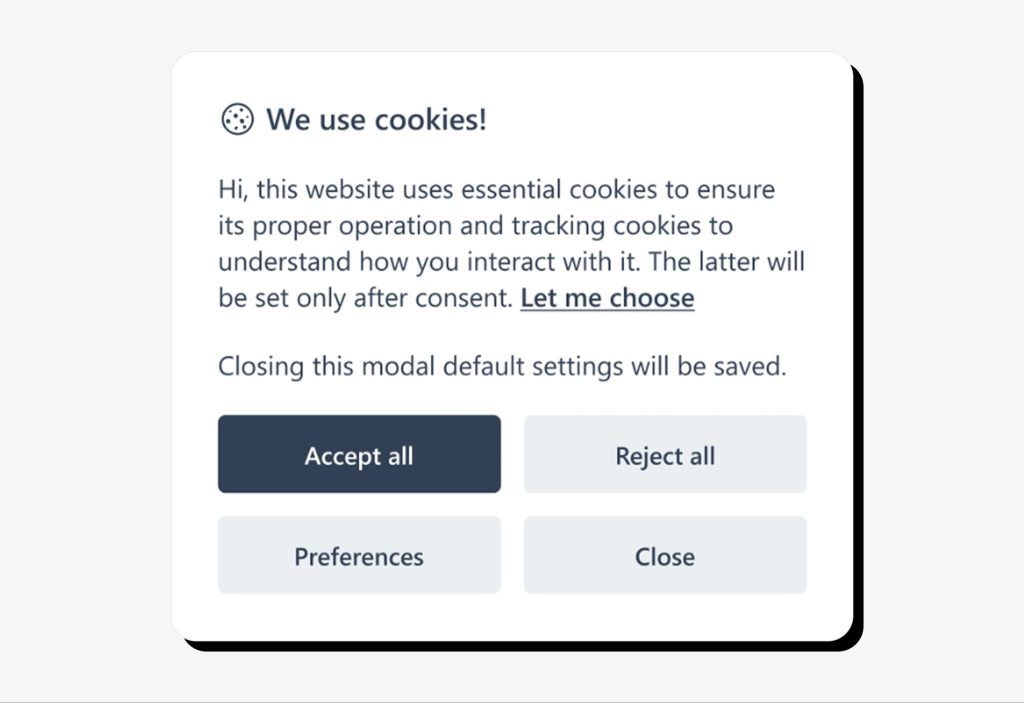
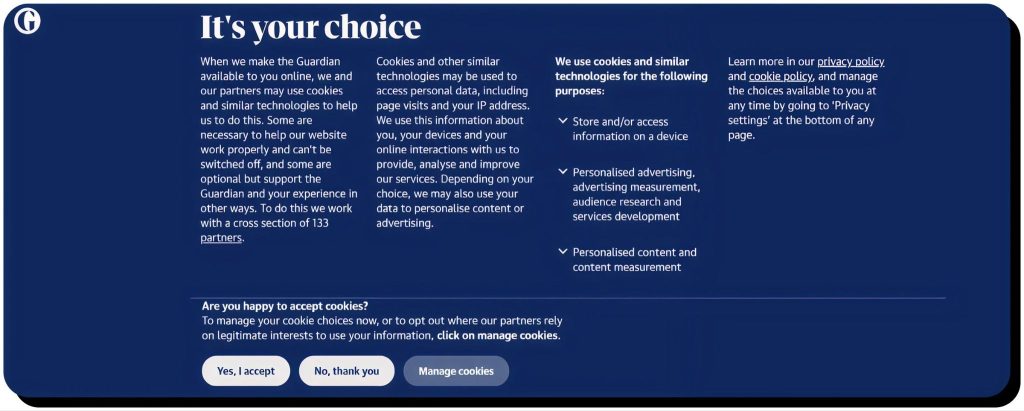
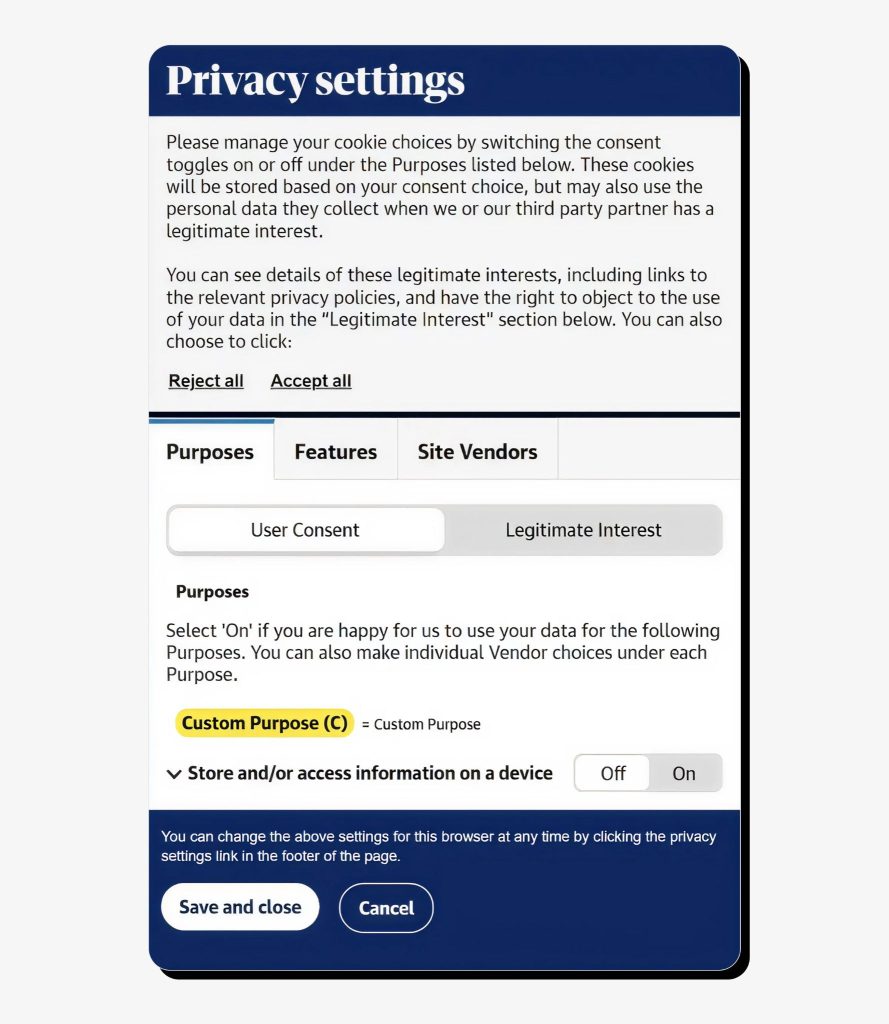
In practice, companies have many options for customizing their cookie consent banners and privacy settings, but the key elements must remain the same to comply with applicable regulations. Here’s an example of cookie banners used by The Guardian, a major UK-based media outlet.
What happens when you accept cookies
What does accepting cookies mean? When you accept cookies, you give permission to a website to store its cookies in your browser. Accepting cookies generally improves user experience, but it also increases the amount of data websites store about you until you delete those cookies manually.
Here’s how accepting cookies impacts your website experience:
- Smoother browsing. Cookies remember your progress on the website and help it load faster, keep items in your shopping cart, and resume videos where you left off.
- Saved preferences. You won’t need to customize the website during your next visit, as cookies retain your preferences such as cookie consent choices, language, region, currency, font size, or theme.
- Login persistence. Accepting cookies allows you to stay logged in between pages and sessions, “remembering” you when you return later.
- Personalized recommendations. Cookies help websites show personalized content (articles, suggested products, preferred genres, saved watch lists) typical for ecommerce and streaming platforms.
- Targeted ads. Advertising cookies manage the relevance and frequency of ads based on your interests and demographics, making ads feel more personalized.
- Data sharing with partners. Some website services are available only when third-party cookies are accepted, which makes the user experience more complete but allows tracking of your browsing behavior across websites.
Why accept cookies? The benefits of doing this include convenience, personalization, improved website performance, and more relevant advertising. At the same time, the downsides include intrusive ads, privacy impact, behavioral profiling, data sharing with third parties (if enabled), and potential security risks.
What happens if you don’t accept cookies
When you reject cookies, it tells the website not to store certain data in your browser. While this protects your privacy, it can also reduce your ability to use website features.
- If you reject essential cookies, this may prevent the website from working properly. However, many websites enable essential cookies automatically, as they’re not required by law to ask for your consent in this case.
- Rejecting non-essential cookies (for analytics or advertising) won’t affect website performance but will disable certain features that are not critical for your browsing experience.
In general, not accepting cookies will result in:
- Limited functionality, as some features may break if the site can’t “remember” you.
- The need to repeat your login process each time you visit the website.
- Blocked content (such as on ecommerce, subscription, and banking sites) that relies on cookies to identify you.
- No personalization, with only default settings available.
- Less targeted ads that might not feel relevant to you.
At the same time, these downsides are countered by certain benefits of rejecting cookies. These include stronger privacy protection, as websites will collect far less information about your browsing behavior, no data sharing with third parties, which won’t use this data to build your behavioral profile, and less tracking overall.
When you should and shouldn’t accept cookies
Should you accept cookies from websites? It depends on multiple factors.
Weigh all the pros and cons and accept cookies when:
- You trust the website and use it frequently. For example, your online banking provider, a favourite e-commerce store, a streaming platform, or an email service. Essential cookies will keep you logged in and transactions secure.
- The website requires login or purchases. Rejecting cookies may break features like shopping carts and checkout pages.
- You want personalization in the form of suggested content tailored to your past activity on the website, such as recommended videos, books, and custom dashboards.
- The site only requires essential cookies. In this case there’s little to no privacy risks for you.
You shouldn’t accept cookies when:
- The website is suspicious or unfamiliar. There’s no HTTPS protocol displayed in the URL, meaning it doesn’t encrypt the data you exchange with it, the appearance looks spammy, and there’s no privacy or cookie policy in sight. There’s a risks the website may sell or misuse tracking data.
- You use shared or public computers. If you accept persistent cookies on a school library or shared work computer, your login session may remain active for the next user.
- The website demands more permissions than needed. If you feel the website requires excessive permissions to track your behavior, you have the right to reject them.
- You want to avoid targeted ads. If you don’t feel at ease with advertisers knowing too much about your interests and past browsing history, you may reject non-essential cookies to stop this tracking.
- You research sensitive topics, like medical conditions. Rejecting cookies will prevent these websites from storing behavioral data linked to those topics.
So, is it safe to accept cookies? In short, yes, but only when it’s justified. Accept cookies when you want the website to work properly and trust it to handle your data responsibly. Feel free to reject cookies when a website requires excessive permissions or doesn’t look reliable enough.
How to manage and delete cookies
Since cookies are stored in your browser, you can view, manage, and delete them manually at any time.
The exact process depends on your browser, but typically you can manage cookies in the browser settings under sections related to privacy, security, or site permissions. There, you can:
- See which cookies are stored
- Delete specific cookies
- Block all cookies or only third-party ones
- Set default settings for future cookies
- Whitelist trusted websites to accept their cookies automatically
You can also delete cookies in your browser’s privacy & confidentiality settings, either in bulk for all visited websites within a specific timeframe (for example, the past 24 hours) or individually for particular websites.
An alternative to managing cookies via your browser is to use a cookie management browser extension that allows granular control over cookies, such as blocking and deleting them, as well as managing site exceptions.
You should also know that when you browse in private or incognito mode, all cookies are stored temporarily and will be deleted when your incognito session ends. This prevents long-term tracking, but some websites may not function properly.
Protecting your privacy beyond cookies
Cookies are just one piece of online data tracking. Even if you manage cookies carefully, your personal data may still be collected in other ways, such as through public records, social media, data brokers, and data breach dumps on the dark web.
Onerep is a privacy-focused tool that removes your personal information from hundreds of data brokers, reduces your digital footprint across websites, monitors data breaches featuring your personal records, and works continuously by checking for data reappearance.
Managing cookies is a good start to healthy digital habits. Onerep offers the next step by helping ensure your personal data remains private across the web.
FAQs
Can cookies track my personal information?
No, cookies don’t track personal information such as names, passwords, or credit card data. However, they do store unique identifiers, browsing behavior, and preferences and may, in some cases, transmit this information to third parties like advertisers.
Are all cookies the same?
No. There are multiple cookie types that differ by purpose and source, including first-party and third-party cookies, essential and non-essential cookies, and cookies used for analytics, advertising, and behavioral profiling.
Can I browse the web without accepting cookies?
Yes, you can browse most websites without accepting non-essential cookies. However, some websites won’t function correctly if you reject essential cookies, such as those necessary for shopping cart management or user authentication.
How often should I delete my cookies?
You can delete cookies as often as needed, but be ready to enter your credentials anew on websites that require login. A good practice is to delete cookies monthly for digital hygiene purposes, though you can do it more often for maximum privacy.
Are third-party cookies more risky than first-party cookies?
Generally, yes. Third-party cookies are used by advertisers and analytics companies, in cooperation with the website you visit, to track your behavior across websites and build a detailed profile. First-party cookies privarilly store session data and preferences to enable proper website functionality.


Mikalai is a Chief Technical Officer at Onerep. With a degree in Computer Science, he headed the developer team that automated the previously manual process of removing personal information from data brokers, making Onerep the industry’s first fully automated tool to bulk-remove unauthorized profiles from the internet.