 Published February 10, 2026
  read
read
Docusign scam emails: how to spot fake messages and stay safe
Docusign is considered one of the premier eSignature software platforms in the world. With over a billion users, it has expanded into intelligent agreement management, powering electronic document signing across more than 180 countries.
This popularity doesn’t escape scammers, who exploit the well-known brand name to impersonate it and launch phishing attacks against unsuspecting users. The legitimate software’s extensive use in business settings makes such scams all the more dangerous, potentially affecting high-profile organizations and compromising their corporate systems.
In the guide below, you’ll learn why Docusign is a convenient target for impersonators, how to recognize Docusign scam emails, and what to do if you unknowingly clicked a phishing link.
What is a Docusign scam email?
A Docusign scam email is a type of phishing email that masquerades as legitimate communication from Docusign, an electronic agreement management platform. Such Docusign phishing emails trick recipients into clicking malicious links, downloading files, or entering their credentials to steal information, infect devices with spyware, or compromise banking and corporate systems.
Docusign scam emails come in many forms, mimicking official Docusign notifications but containing spoofed links, fake customer support phone numbers, and malicious attachments. Below are some of the email variations you may encounter:
- An email with a subject line like “You have a document to sign,” asking you to click a link to review and sign a document in your name. The link takes you to a fake Docusign website that can steal your credentials and/or install malware on your device.
- An urgent or expiring document you need to sign. Similar to the scam above, but designed to make you rush without verifying the sender or the email subject.
- A fake invoice or payment request. One of the most common variations of Docusign phishing emails, often impersonating other well-known brands and claiming they are about to charge your account for a certain product or service.
- An employment or contract scam email containing a link or attachment with a fake job offer, employment contract, or another agreement. Even though it’s unsolicited, many users may still click the malicious link out of curiosity or by accident.
- A shared document notification scam, often sent to business email addresses and capable of compromising entire corporate systems if even a single employee clicks the link or downloads the attachment.
- A fake Docusign account alert stating there’s a problem with your account and requiring you to click a link to “verify” or “restore” your Docusign credentials.
Why scammers use Docusign emails
Scammers impersonate Docusign for the same reasons they target many other well-known brands, such as in Apple support impersonation or Xfinity scams.
By hiding behind a famous company name, bad actors automatically gain trust, exploiting the legitimate brand’s reputation among users who rely on brand communications and see nothing suspicious about them. In the case of Docusign, its user base reaches a billion people across 180+ countries, making it a vast attack surface for perpetrators.
The urgency around document signing or associated pending charges is another reason scammers impersonate Docusign. Dealing with contracts, forms, and approvals is often time-sensitive, and users tend to drop their guard when faced with urgent alerts. Scammers create additional pressure by titling their fake emails “To sign immediately” or “Document expires today” to rush users’ decisions.
The simplicity of signing a document in Docusign is another feature exploited by scammers. It takes just one click, which is easy to replicate in spoofed emails without raising suspicion.
Lastly, Docusign is a household name in many business organizations that use the platform as their tool of choice for remote agreement management. Knowing this, scammers often target business professionals to break into digital corporate ecosystems.
How Docusign phishing emails work
Like many other social engineering scams, fake Docusign emails follow a predictable pattern that takes advantage of human behavior and emotions rather than technology. This is how a Docusign phishing scam typically unfolds:
- You receive an unexpected email from Docusign that says you need to review, approve, and sign a document. The sender’s email domain contains a variation of docusign.com or docusign.net but with extra characters. If you’re familiar with the tool, this email might not look suspicious to you.
- The subject line creates a sense of urgency or importance, containing phrases like “Action required: sign now” or, more vaguely, “Payment info.” Either way, you’re prompted to click the link to find out more, and this is where scammers get you.
- There’s a big button asking you to review and sign the document, which takes you to a spoofed Docusign website resembling the legitimate one but containing a virus or designed to steal the login credentials you enter. In some cases, there may also be an attached file you’re asked to download.
- Whether you visit a fake Docusign page or download a malicious attachment, scammers steal the information you enter and may install spyware on your device that logs sensitive data for financial gain or identity fraud.
- Scammers then exploit the stolen information to break into other accounts, send more phishing emails to your contacts, or commit identity or financial fraud.
Common signs of a fake Docusign email
How can you tell a fake Docusign email? As with many other phishing schemes, there are telltale signs that an email is not a legitimate Docusign message:
- A suspicious sender domain and links that lead to websites other than docusign.com or docusign.net. For example, [email protected]. That said, docusign.net spam is a common misconception, as many people are wary of associating this domain with Docusign. However, docusign.net is a legitimate Docusign domain and can be used to send automated document notifications.
- A subject line that creates urgency without providing specific details. For example, “URGENT – Sign now.”
- Impersonal greetings such as “Dear Customer” or “Hi User” instead of addressing you by name.
- Unusual formatting and grammar mistakes that you wouldn’t expect from a reputable brand.
- Outdated Docusign branding, including old colors and logos. Docusign underwent a rebranding campaign in 2024, and scammers may be slow to adopt the new visual style.
- Short security codes provided as an alternative signing method. Legitimate Docusign security codes are typically 33 characters long.
- QR codes provided as an alternative way to access the document. However, legitimate Docusign emails don’t contain QR codes, so this may indicate a QR code scam.
Docusign scam email examples
There are many varieties of Docusign phishing email examples that disguise fake invoices, urgent documents to sign, contracts to review, or shared agreements.
One of the latest Docusign email scams started spreading early in January 2026. The new type of Docusign phishing attack targets Windows devices through fake Docusign email notifications that take users to a spoofed Docusign page and start a malware download disguised as a PDF or zipped document file.
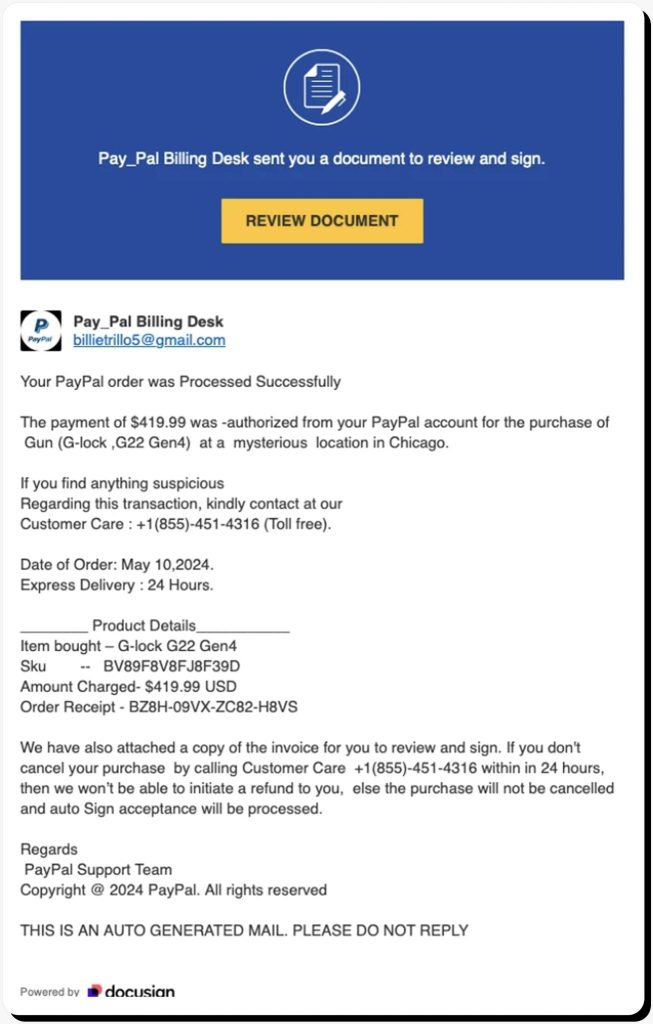
Some of Docusign phishing emails double as other types of scams, such as the example below, which is actually a PayPal refund scam—a scheme that’s also commonly encountered in Norton LifeLock scam emails or fake BestBuy’s Geek Squad emails.
In this fake email sent from the generic gmail.com domain, the perpetrators hope to get the victim on the phone so they can social-engineer the caller into giving away sensitive personal details and banking login information. The spoofed Docusign link here is an additional way to harvest personal data via a data-stealing website.
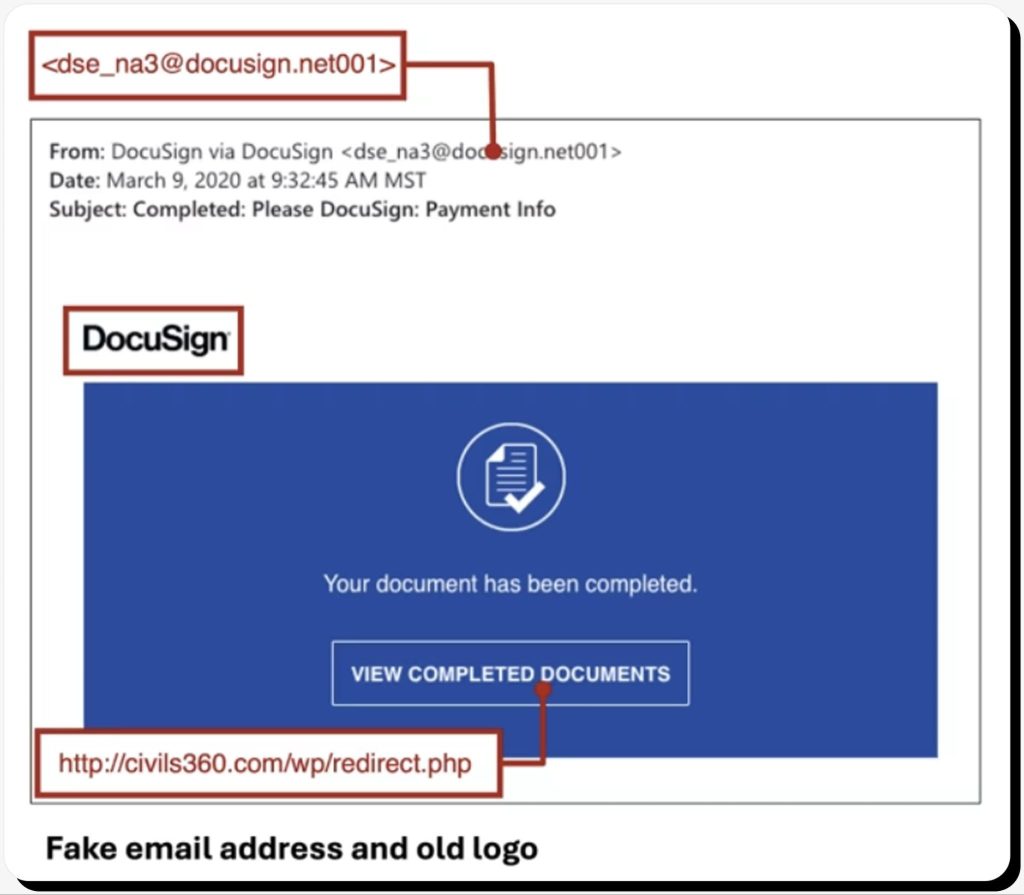
The next Docusign phishing email example features a suspicious email domain that copies the legitimate one but contains extra characters (@docusign.net001), outdated Docusign branding that’s no longer in use, and a website link that leads to a third-party resource likely acting as a phishing trap.
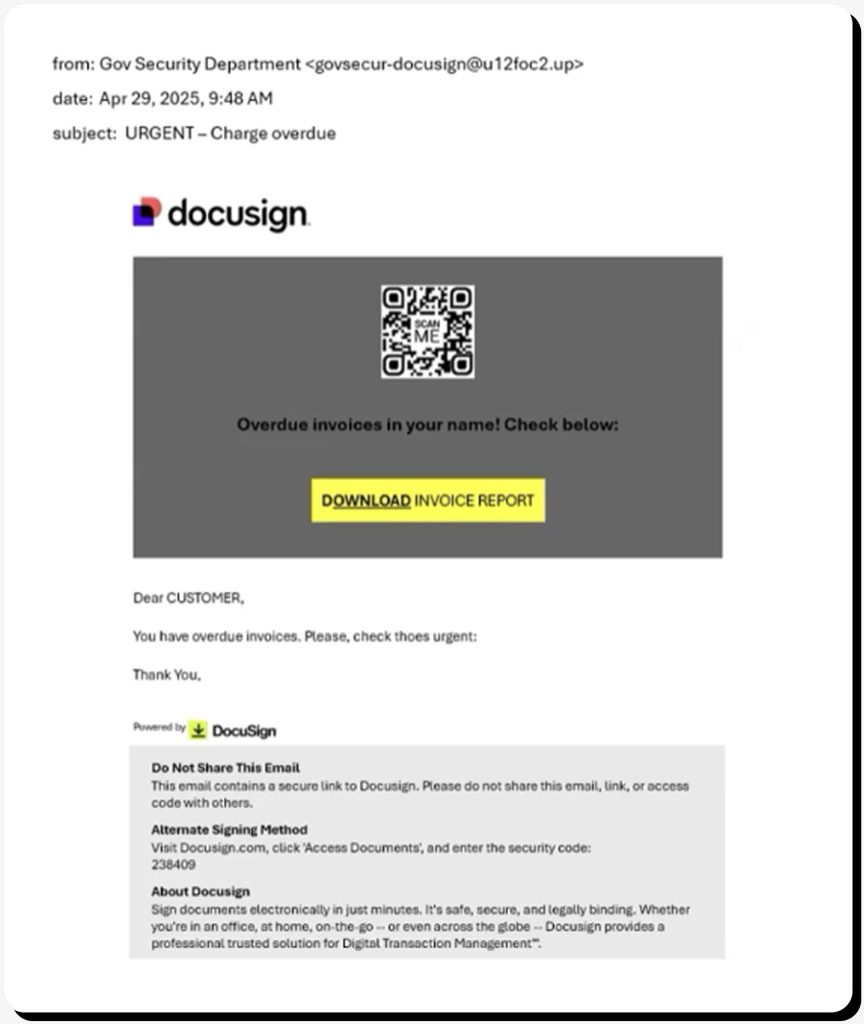
Finally, this example of a Docusign scam email shows many common phishing signs, from an incorrect sender domain and vague subject line to inconsistent use of Docusign branding, weird formatting, poor grammar, a QR code, and a security code that’s too short to be legitimate.
How to verify a Docusign email is legit
How do you know if a Docusign email is legit? There are proven ways to verify that a Docusign email you’ve received is legitimate and that its links are safe to click:
- Make sure the email is solicited. You should at least have an active Docusign account and be aware that a document is coming your way.
- Go directly to docusign.com and check for a pending document in your account. It should be available via Access Documents in the website menu. You’ll need to enter the designated security code to access the document.
- Check the sender’s email address and the document link by hovering over the button without clicking it. Both should contain the docusign.com or docusign.net domain with no extra characters. The website link should also start with HTTPS, not HTTP.
- Legitimate Docusign emails contain security stamps, such as a TLS security seal, confirming the email was sent from the @docusign.net domain.
- There should be no QR codes or attached documents. Docusign never asks you to scan a QR code or download a document to sign. Instead, it directs you to its official website to review and sign the document in your account.
- There should be a 33-character security code under the Alternate Signing Method in the additional information section. If there’s no code or it’s too short, the email is not legitimate.
What to do if you clicked a fake Docusign email
Phishing emails are designed to deceive, and it’s easy to overlook warning signs, especially if your organization uses Docusign as a common agreement-signing method. f you accidentally clicked a link in a Docusign phishing email, make sure to protect your data and devices from being accessed by scammers.
By default, simply clicking a phishing link can do you little harm if you don’t enter any personal information and ensure that no malware download starts automatically. However, you should still take the following precautionary steps:
- Run a full-scale antivirus scan on your device to make sure there’s no spyware installed that could steal your private data.
- Change your Docusign and email passwords and enable two-factor authentication as an extra security layer.
- Report the phishing email to your company’s IT security team (if applicable), and forward it as an attachment to the Docusign Safety Center at [email protected], then delete the email.
- If possible, enable Sender Policy Framework (SPF) lookup and Domain-based Message Authentication, Reporting & Conformance (DMARC) functionality to help flag and block malware spam attacks on your mail servers.
- Monitor your work and personal accounts for unusual activity.
How to protect yourself from Docusign email scams
The key rule to keep yourself protected from fake Docusign emails and other types of phishing attacks is to stay alert and question every unsolicited message you receive. In case of doubt, always check pending documents in your own Docusign account to verify incoming document-signing requests.
Healthy digital habits also include using a secure password manager instead of saving credentials in web browsers, enabling two-factor authentication, and reducing your online exposure. The latter means both avoiding oversharing your personal data online and performing routine checks for your personal details published openly on the web and available via data brokers, search engines, and data breach dumps. For this, use Onerep.
Our tool automatically scans 300+ websites and takes down your personal information so scammers can’t identify you as a convenient phishing target.
FAQs
What is a Docusign scam email?
A Docusign scam email is a phishing attack that involves a fake Docusign email notification asking you to review and sign a document. Such emails feature phishing links that lead to spoofed Docusign login pages designed to steal your credentials and personal information.
How can I tell if a Docusign email is fake?
Top warning signs of a fake Docusign email include a suspicious sender email domain, email links other than docusign.com and docusign.net, outdated or inconsistent branding, poor formatting and grammar, any document files sent as attachments, QR codes offered for scanning, and secure access codes that are shorter than 33 characters.
Are Docusign emails safe to open?
Yes, if you can confirm that the Docusign email is legitimate. Check that it is sent from the official docusign.net domain, is solicited on your part, has a clear subject line that describes the contents, and contains a link to a document you can also find in your Docusign account.
What happens if I click a fake Docusign email link?
In the worst case scenario, clicking a phishing link in a Docusign scam email allows scammers to steal any information you enter on their website, including your Docusign credentials, install spyware on your device to harvest additional personal information, and target you and your networkwith further phishing attacks.



Dimitri is a tech entrepreneur and founder of Onerep, the first fully automated data removal service. Top cybersecurity CEO of 2021 by The Software Report.