 July 31, 2024
 read
How to opt-out of MichiganResidentDatabase.com [2024]
- By Dimitri Shelest Founder and CEO at Onerep

Dimitri is a tech entrepreneur and founder of Onerep, the first fully automated data removal service. Top cybersecurity CEO of 2021 by The Software Report.
Read more - Checked by Alena Shymanskaya Content Manager at Onerep

Alena is an experienced content writer with a specialized focus on data brokers and the intricacies of personal data management.
Read more
- Removal difficulty: Medium
- Profile is removed within: 4 weeks
- Manual submission: around 15 min
- Removal requirements: email account
 Why trust this guide

We know all the ins and outs of the data broker removal:
Founded in 2015, we pioneered automated removal from people-search sites. Our service uses precise opt-out algorithms tailored for each website. When a site changes its algorithm, we detect the change immediately, and our team updates the process. These updates are promptly reflected in the Onerep DIY data broker removal guides. With 16 million records already removed from hundreds of sites for our customers, you are accessing the expertise of the #1 team in the industry with this guide.
What is MichiganResidentDatabase.com?
MichiganResidentDatabase.com is a data broker that posts personal information online. It uses the data provided by the Michigan Secretary of State. To remove your information from MichiganResidentDatabase.com, fill out an opt-out request on their website.
How to remove your information from MichiganResidentDatabase.com?
In short:
- Find your profile on MichiganResidentDatabase.com
- Copy the URL of your profile
- Open MichiganResidentDatabase.com’s opt-out page michiganresidentdatabase.com/opt-out
- Submit the copied URL
- Submit the opt-out form
Step 1
Go to MichiganResidentDatabase.com.
Step 2
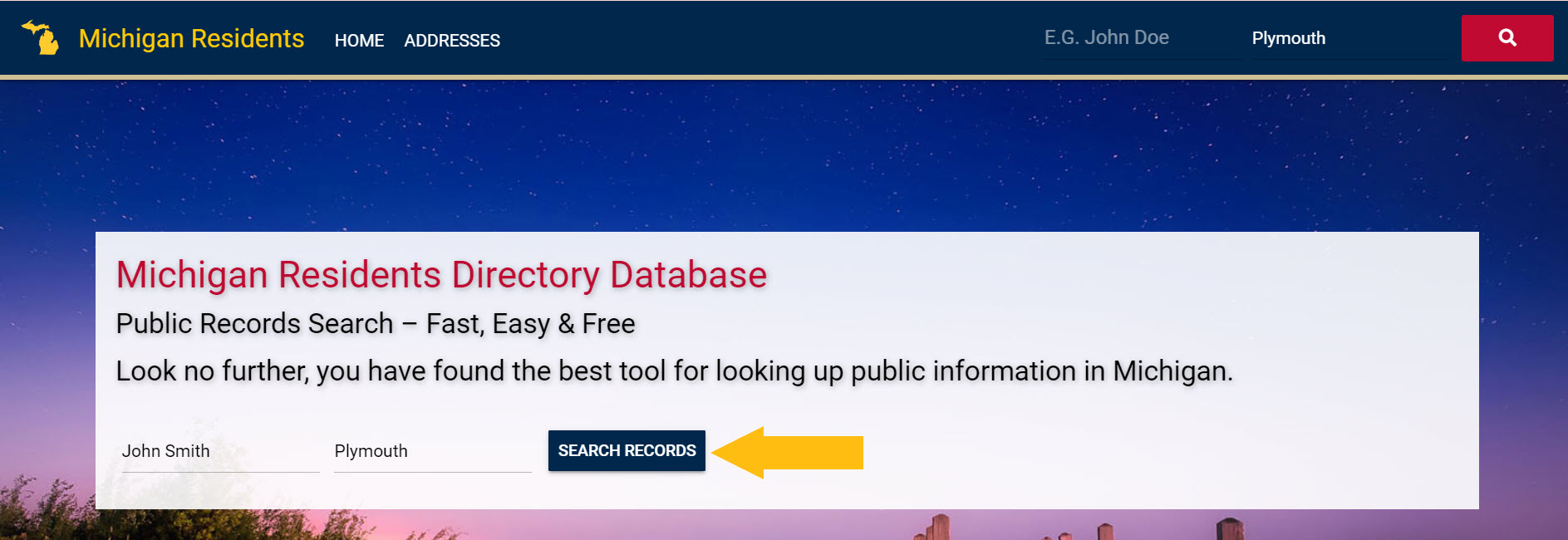
Enter your first and last name, specify your city, and click on the “Search Records” button.
Step 3
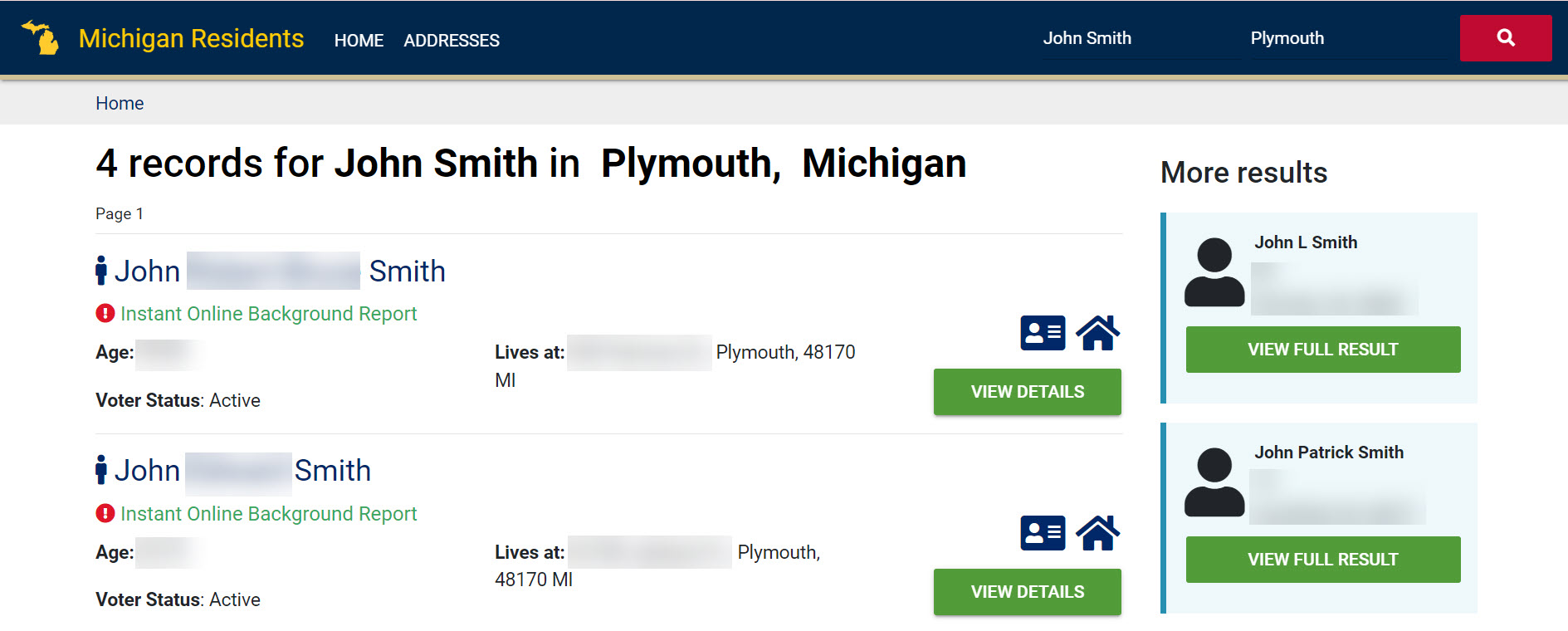
Find a matching result and click on your name.
Step 4
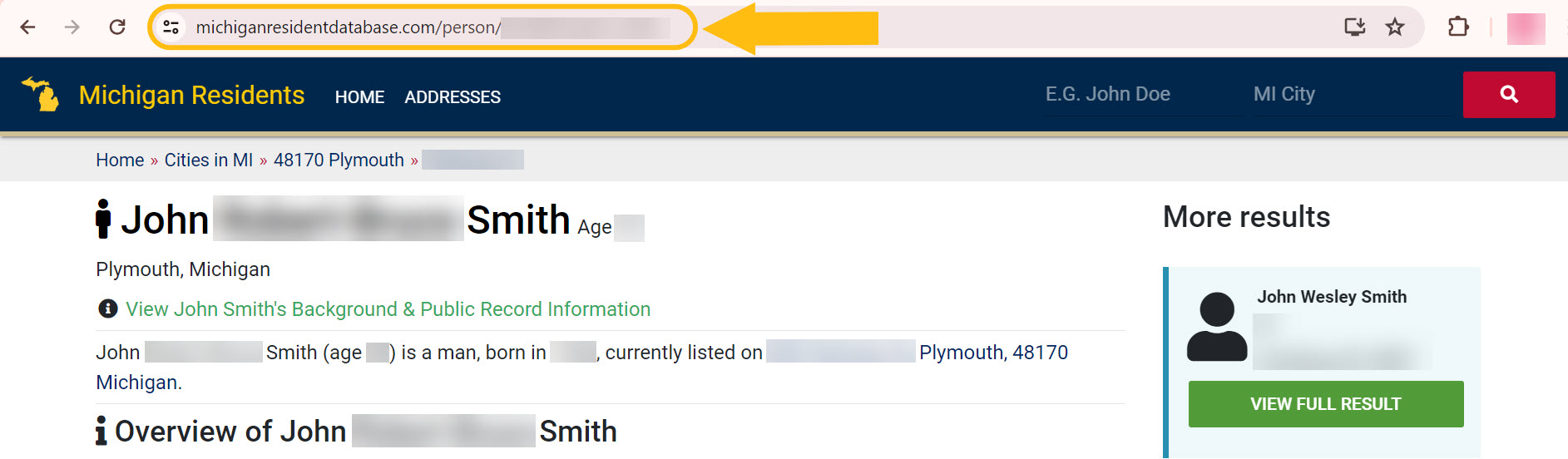
Copy the URL of your profile.
Step 5
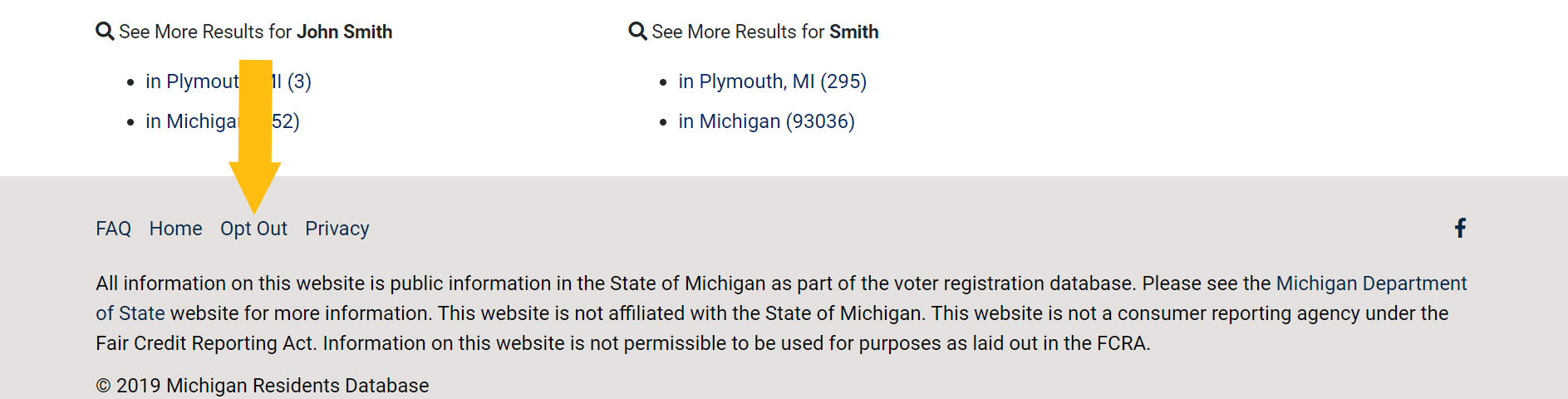
Scroll down the page and click on the “Opt-Out” link.
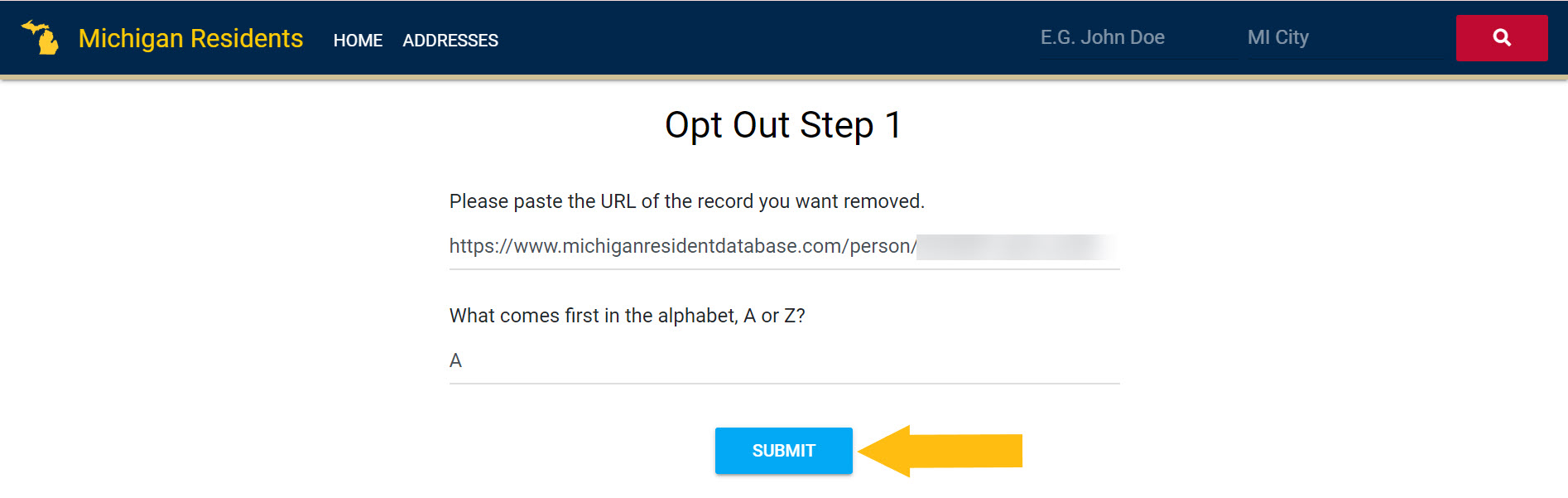
Step 6
Paste your URL, answer the security question, and click “Submit.”
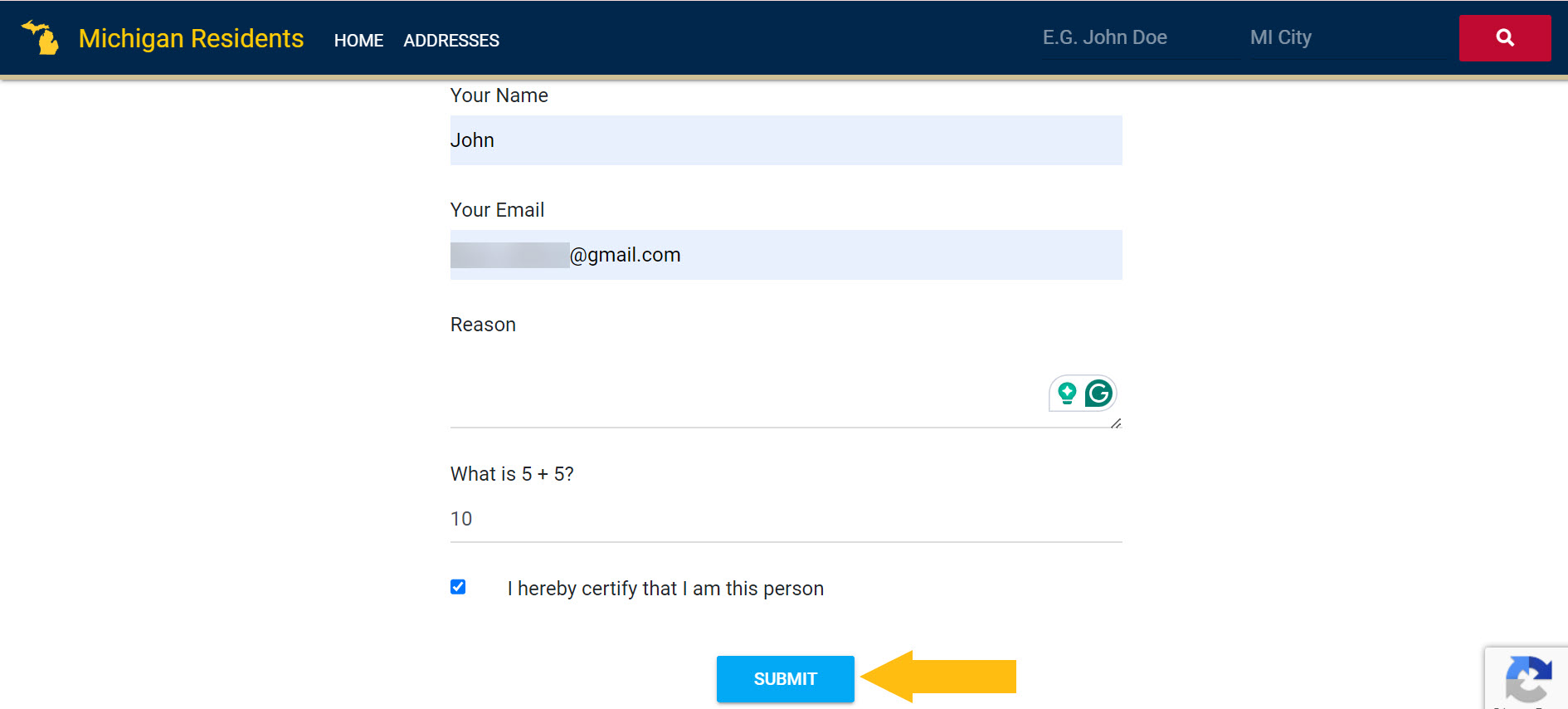
Step 7
Submit your removal request by filling out the opt-out form. Enter your full name and email address, specify the reason for removal, answer the security question, check the box stating you’re the person in the record, and click “Submit”.
Your removal request has been submitted. Allow it 24-48 hours for the data to be completely removed.
Your data is still exposed on other brokers
Although you have completed the MichiganResidentDatabase.com opt-out, other people-search websites expose your data. We recommend that you remove yourself from these five next:
- How to remove yourself from MichiganCourtRecords.us
- How to remove yourself from Whitepages.com
- How to remove yourself from BeenVerified.com
- How to remove yourself from MyLife.com
- How to remove yourself from FastPeopleSearch.com
Go through this list and send opt-out requests manually to each data broker, or subscribe to Onerep to remove records automatically from 320 sites with just a few clicks.
Why remove yourself from MichiganResidentDatabase.com
Here’s why it’s recommended that you remove yourself from MichiganResidentDatabase.com:
- Site visits: over 400K people look others up on MichiganResidentDatabase.com each month.(1)
- Massive database: MichiganResidentDatabase.com claims to have the records of more than 7,300,000 individuals.
- Exposure on Google: Google has already indexed over 700K MichiganResidentDatabase.com profiles making your data easier to find through its search.(2)
- Depth of exposure: MichiganResidentDatabase.com exposes full names, age, birth years, voter IDs, home addresses, income, net worth, and other sensitive data points completely for free.
Sources:
1 – Silmilarweb MichiganResidentDatabase.com report
2 – Google
Who sees your data on MichiganResidentDatabase.com
Sources: Similarweb MichiganResidentDatabase.com report
More opt-out guides
- NeighborWho opt out
- SignalHire opt out
- DNB opt out
- ContactOut opt out
- BackgroundCheck.run opt out
- UniCourt opt out
- PeopleLookup opt out
- InfoTracer opt out
- StateRecords.org opt out
- Acxiom opt out
- PrivateReports opt out
- CheckSecrets opt out
- InstantPeopleFinder opt out
- AnyWho opt out
- 411.com opt out
- AbsolutePeopleSearch opt out
- ZoomInfo opt out
- OpenGovUS opt out
- RealtyHop opt out
- NDB opt out