 May 8, 2024
 read
PublicDataCheck opt out
- By Dimitri Shelest Founder and CEO at Onerep

Dimitri is a tech entrepreneur and founder of Onerep, the first fully automated data removal service. Top cybersecurity CEO of 2021 by The Software Report.
Read more - Checked by Alena Shymanskaya Content Manager at Onerep

Alena is an experienced content writer with a specialized focus on data brokers and the intricacies of personal data management.
Read more
- Removal difficulty: Medium
- Profile is removed within: 4 weeks
- Manual submission: around 15 min
- Removal requirements: email, CAPTCHA
 Why trust this guide

We know all the ins and outs of the data broker removal:
Founded in 2015, we pioneered automated removal from people-search sites. Our service uses precise opt-out algorithms tailored for each website. When a site changes its algorithm, we detect the change immediately, and our team updates the process. These updates are promptly reflected in the Onerep DIY data broker removal guides. With 16 million records already removed from hundreds of sites for our customers, you are accessing the expertise of the #1 team in the industry with this guide.
What is Public Data Check?
PublicDataCheck.com is a public records search database that provides access to people lookup, phone number lookup, property lookup, and background checks. Like many other data broker companies that post and sell your private data, PublicDataCheck.com shares such information as your location, date of birth, criminal charges, bankruptcies, and other important details. However, Public Data Check is not a consumer reporting agency as defined by FCRA, so it can’t be used for tenant, employment, credit, and insurance screenings. To remove your data and complete PublicDataCheck opt out, you are required to fill out an online form and confirm your identity via email. Removing your listing shouldn’t take more than 20 minutes.
How to opt out and delete data from Public Data Check?
In short:
- Open PublicDataCheck’s opt-out page publicdatacheck.com/help-center/search-for-your-data
- Look up your record
- Click the “Remove” button
- Submit your email
- Follow the verification link sent by email
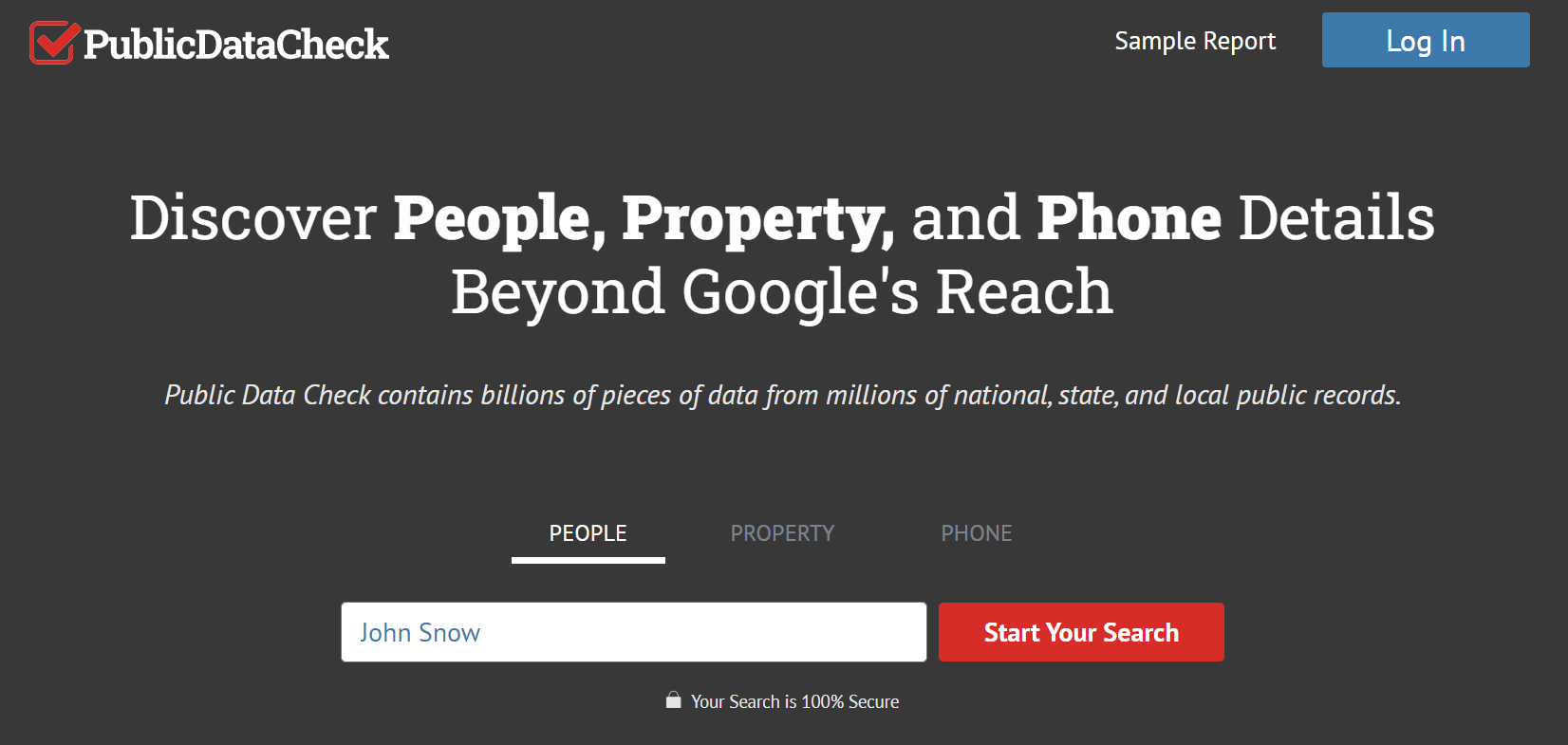
Step 1: Go to PublicDataCheck.com
Access PublicDataCheck.
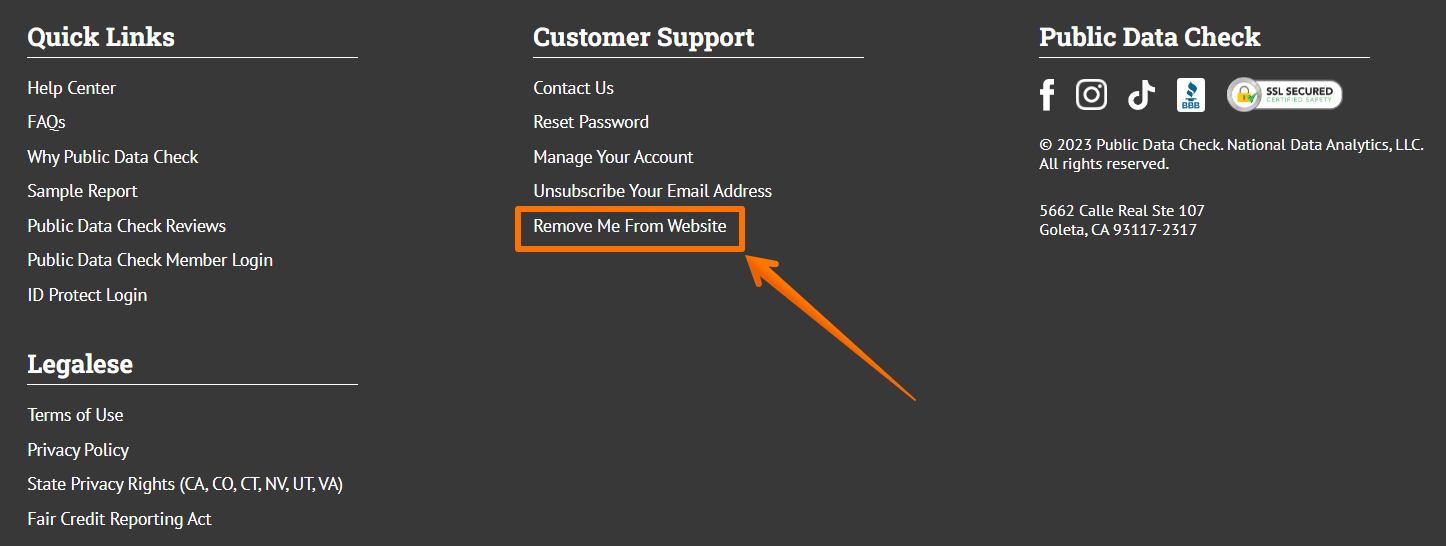
Step 2: Click on ‘Remove Me From Website’
Follow the ‘Remove Me From Website’ link in the footer.
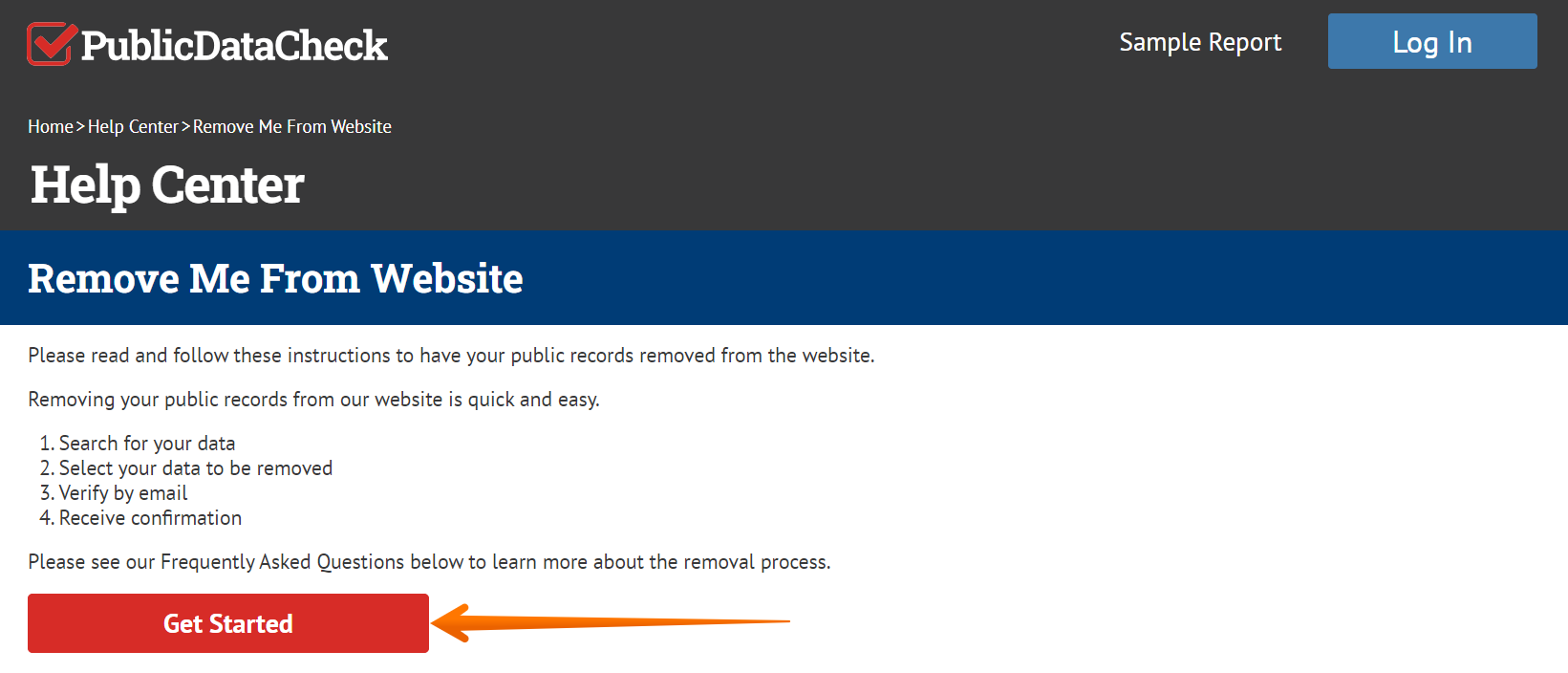
Step 3: Click ‘Get Started’
The appearing webpage describes the steps to be taken to opt out of PublicDataCheck.com. Read them and then press ‘Get Started’.
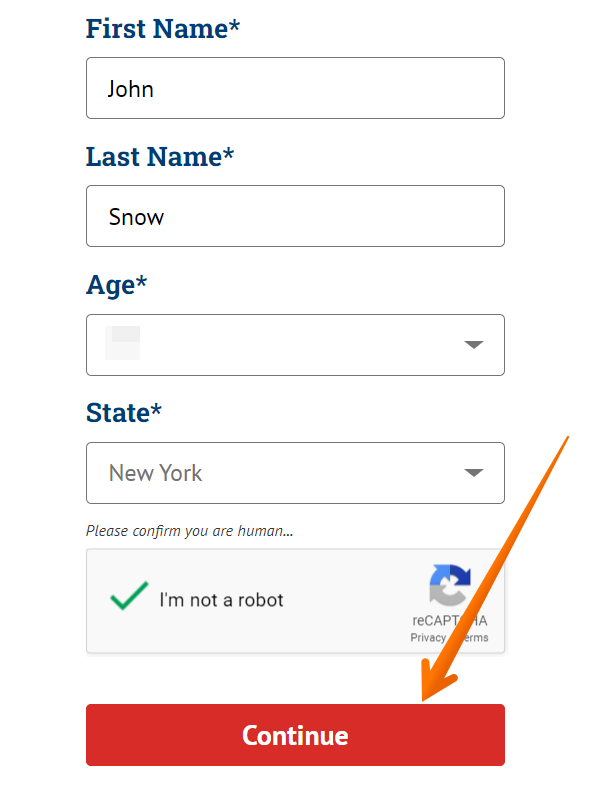
Step 4: Look yourself up
Enter your first and last name and select your age and state. Then solve the CAPTCHA and press the ‘Continue’ button.
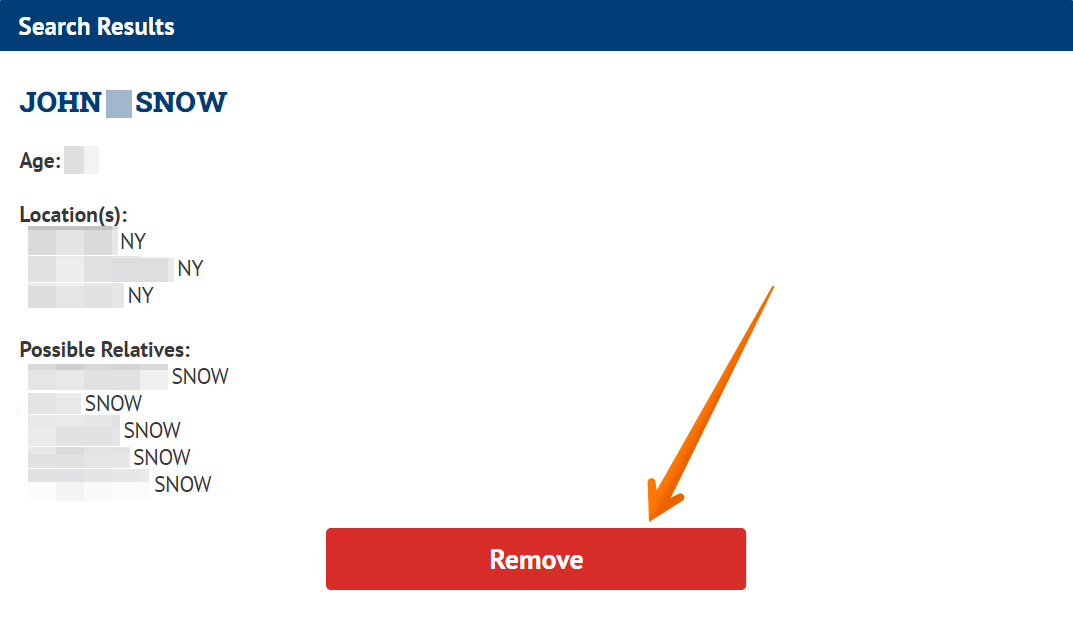
Step 5: Find your profile and press ‘Remove’
Scroll through the list to locate a result with your info. When you locate a match, press the ‘Remove’ button.
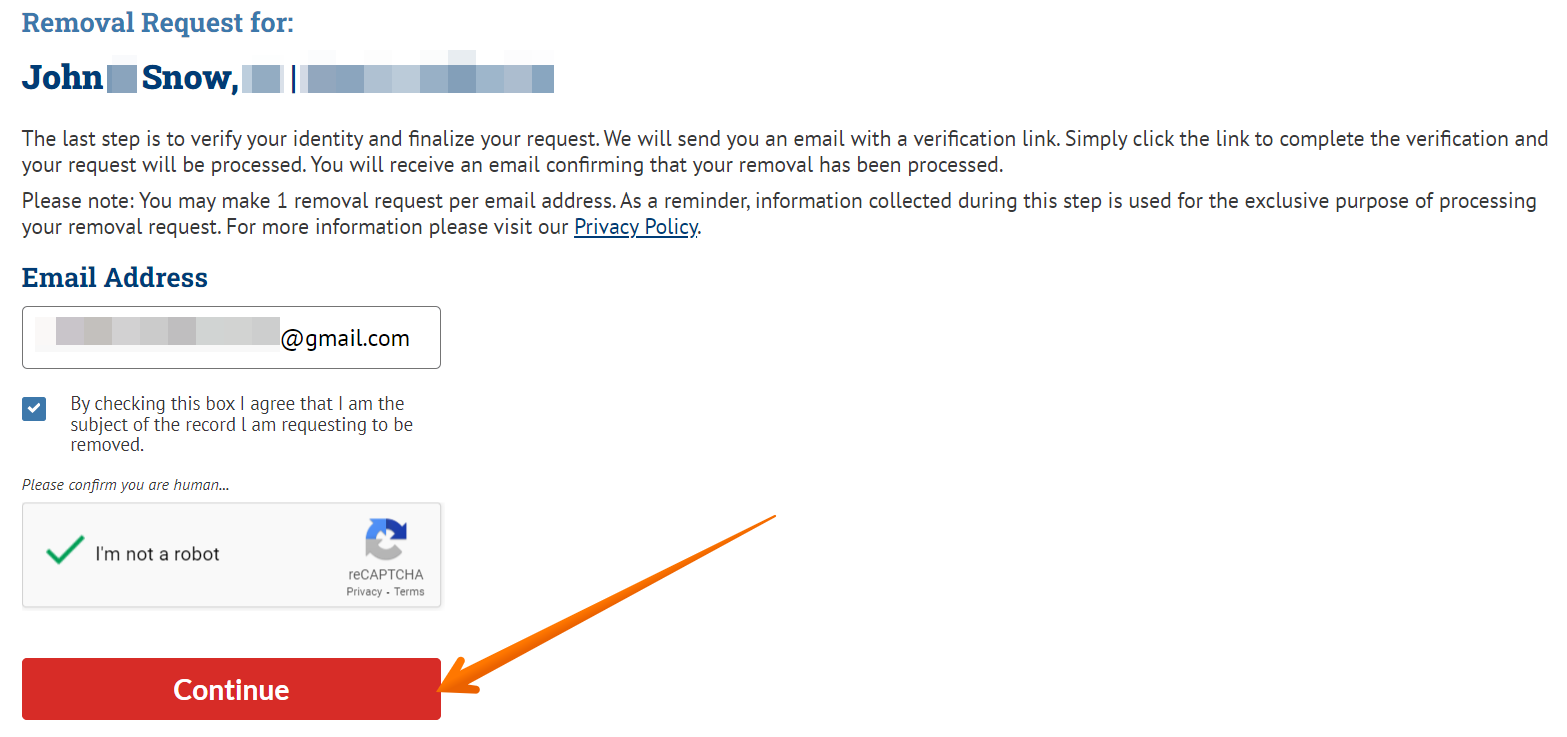
Step 6: Submit your email
Type a valid e-mail address, tick the box stating you are the subject of the record to be removed, perform the CAPTCHA, and click the Continue button.
Pro tip: we recommend using an e-mail account created specifically to opt out of people-search sites. Doing this will prevent them from collecting and possibly later displaying your personal or business account. You may also use a disposable email address.
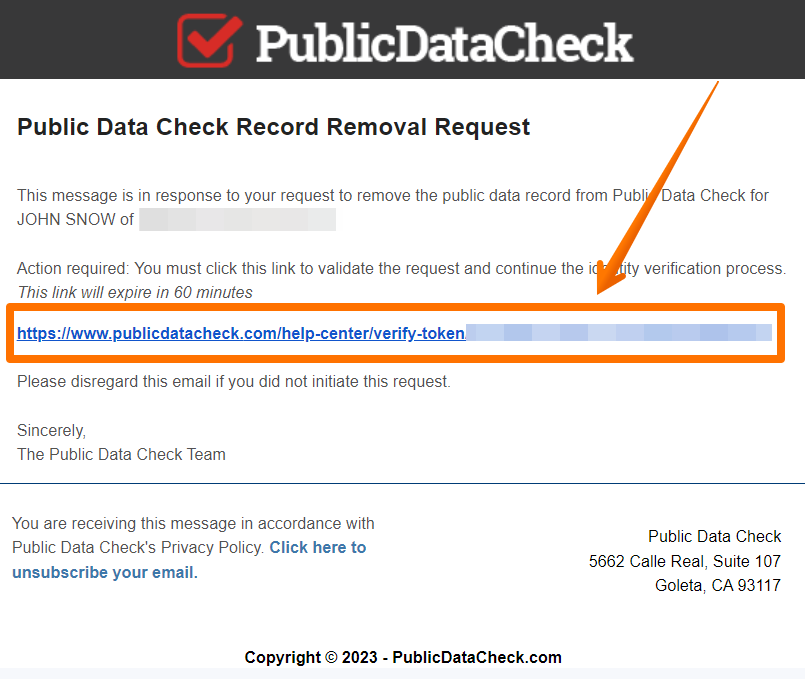
Step 7: Click on the verification link in your email
Go to your inbox and open an email from Public Data Check. Click on the confirmation link to verify your identity and complete the process. If the provided link doesn’t work, simply copy it and paste into a new tab. Please note that the letter from PublicDataCheck.com may fall into spam, so check there as well.
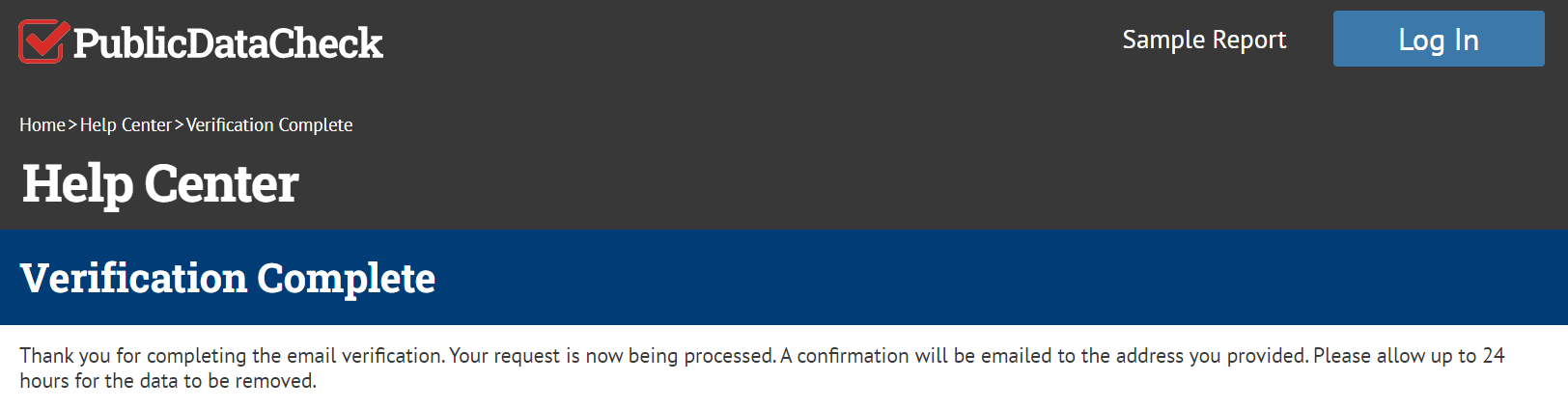
Your PublicDataCheck opt out process is complete. It may take up to 4 weeks for them to respond and have your listing removed. Note that PublicDataCheck.com keeps its database updated and adds new data occasionally, so your information might reappear later.
How to reach out to PublicDataCheck.com directly
You can reach out to PublicDataCheck.com’s support team via the online form or via phone at 1-800-950-0953. Alternatively, send mail to 5662 Calle Real, Suite 107, Goleta, CA 93117, USA. You can also email your questions to [email protected].
Your data is still exposed on other brokers
Although you have completed the PublicDataCheck opt-out, it isn’t enough to keep your information private. Numerous other people-search sites expose your data.
We recommend that you do these five next:
- How to remove yourself from Radaris.com
- How to remove yourself from TruePeopleSearch.com
- How to remove yourself from FastPeopleSearch.com
- How to remove yourself from Whitepages.com
- How to remove yourself from ClustrMaps.com
Go through this list and send opt-out requests manually to each data broker, or subscribe to Onerep to remove records automatically from 318 sites with just a few clicks.
Why remove yourself from PublicDataCheck
Remove yourself from PublicDataCheck.com as your data’s visibility is high on this site:
- Site visits: around 800 thousand research others on PublicDataCheck each month.(1)
- Massive database: PublicDataCheck has a huge database of 350 million people records, 160 million property records, 500 million phone records.
- Depth of exposure: PublicDataCheck shares phone numbers, current and previous address, property records, financial history, criminal records, and more.
Sources:
1 – Silmilarweb PublicDataCheck report
Who sees your data on PublicDataCheck
Sources:
Similarweb PublicDataCheck report
About PublicDataCheck.com
- Founded: 2017
- Headquarters: 5662 Calle Real, Suite 107, Goleta, CA
- Website URL: publicdatacheck.com
- Phone number: 800-950-0953, 800-349-9043, 800-550-3840
Frequently asked questions about Public Data Check
What is Public Data Check?
PublicDataCheck.com is a people-search site. Though they claim to provide background check services, PublicDataCheck.com isn’t a consumer reporting agency as defined by FCRA. They have an online example report that shows what information users with membership can get.
How do I remove my information from Public Data Check?
The removal of personal information from PublicDataCheck.com is similar to most data brokers. To opt out, go to their opt-out page. You will need to find your profile, leave an email address to validate your identity, and click on the link sent via email to have your identity verified. Usually, PublicDataCheck.com removes information within 24 hours.
Is Public Data Check legit?
PublicDataCheck.com is a legitimate website that provides people, phone, and property search services. Even though data brokers share people’s personal details, their operations are within US laws. However, many accuse this company of breaching their privacy. In case you don’t want your personal information exposed on PublicDataCheck.com, the site allows you to opt out.
How do I remove my name from public search engines?
To delete your name from data broker sites, go to each one that posts your personal information, find the opt-out page, and submit your opt out request. Note that there are hundreds of people-search sites, so submitting your requests might take a while. Alternatively, get a service that will do it on your behalf. Note that some data brokers may require payment or a copy of your ID to delete your info. To erase your name or sensitive information from any public record, reach out to the establishment that issued and released the document.
More opt-out guides
- NeighborWho opt out
- SignalHire opt out
- DNB opt out
- ContactOut opt out
- BackgroundCheck.run opt out
- UniCourt opt out
- PeopleLookup opt out
- InfoTracer opt out
- StateRecords.org opt out
- Acxiom opt out
- PrivateReports opt out
- CheckSecrets opt out
- InstantPeopleFinder opt out
- AnyWho opt out
- 411.com opt out
- AbsolutePeopleSearch opt out
- ZoomInfo opt out
- OpenGovUS opt out
- RealtyHop opt out
- NDB opt out