 Published November 20, 2025
  read
read
What is angler phishing and how to avoid falling victim
Angler phishing is an incredibly common customer support impersonation scam on social media. Among other types of phishing scams, it’s also one of the most effective, as scammers reach out to potential victims at the moment of their frustration with a bad customer experience, actively looking for a resolution to their issue.
Learn how to stay away from fake social media accounts impersonating famous brands’ customer support in the article below, along with some notable scam examples and remediation tips if you do fall for this phishing trap.
What is angler phishing?
The angler phishing definition comes from the anglerfish—a deep-sea predator that hunts other fish. Similarly, angler phishing scammers set up fake customer support accounts on social media to “fish” for victims’ personal information and payment card data, pretending to be helpful in resolving their concerns.
Unlike common phishing scams that mostly happen via email, texts (known as smishing), or phone calls (known as vishing), angler phishing targets social media platforms specifically. Angler phishers exploit customers’ public complaints about their poor experiences with brands and then lure them to malicious websites to reveal sensitive information or enter credit card data. As a result of such brand impersonation, victims may face account takeover, identity theft, and financial fraud.
For example, a disappointed customer takes to X.com to vent their frustration about an Amazon order that never arrived. A scammer pretending to be an Amazon customer support representative promptly replies with an “account verification” link that takes the user to a malicious website designed to steal their Amazon account credentials.
How angler phishing works
Angler phishing starts with the scammer setting up fake customer support pages impersonating famous or well-known brands and organizations, complete with their logos, brand colors, contact details, and social media handles that appear as close to the original as possible. Commonly impersonated brands include Amazon, PayPal, Apple, airline companies, commercial banks, payment service providers, and online retailers.
Next, scammers monitor social media mentions of these brands where customers publicly share their frustration or ask for help. Then they reply to these frustrated customers via DMs or a quick comment, offering help and a prompt issue resolution.
At some point during the conversation, the fake customer support rep drops a link that requires action from the customer, such as logging in or verifying their account and entering their personal details. The link typically leads to a malicious website, such as a spoofed login page that steals account credentials, or a form that asks for sensitive personal information, which is also stolen once entered. In some cases, clicking such a link will start downloading malware to the user’s device automatically.
Once the scammer gets hold of the victim’s personal information, they may exploit it by taking over their accounts, committing identity theft, stealing funds, or using the hijacked accounts to target others.
How to spot angler phishing scams
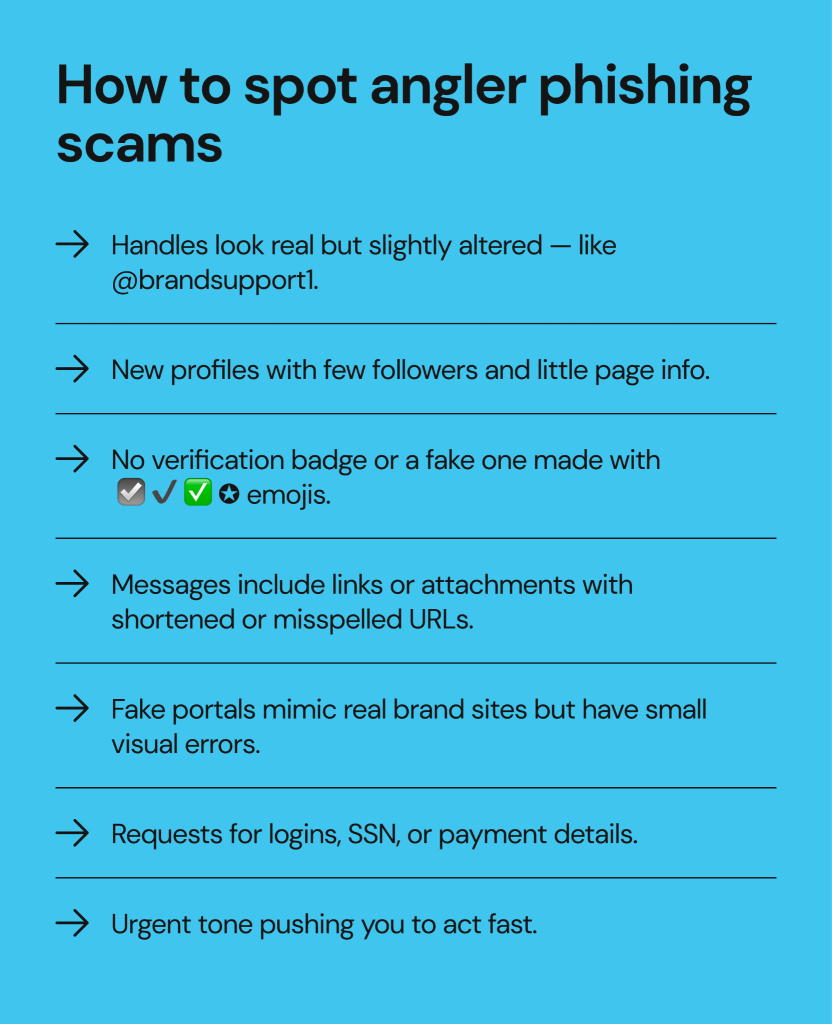
The telltale signs of angler phishing scams are similar to those of impersonation scams on Instagram and Facebook: accounts that only pose as legitimate often share the same characteristic traits:
- Social media handles resemble legitimate brands but are slightly off. For example, it’s @brandsupport1 instead of @brandsupport.
- The profile is new, with few followers and minimal information on the page. You’d assume that the brand’s support line should have been established long ago, but the fake account only appears to have been launched a few weeks back.
- The page claims to be “an official support channel,” but there’s no verification badge, or the badge is imitated with a checkmark emoji like ☑️.
- When the fake customer support page reaches out, their messages will always contain a link to click or an attachment to download. These links are usually disguised with a link shortener or contain a misspelled or slightly altered version of the brand’s legitimate support portal URL.
- The fake customer support portal appears as a spoofed version of the legitimate one, with similar branding, colors, and page layout, but with visible discrepancies.
- The website requests that you enter your account credentials, personal information such as your full name, SSN, home address, etc., or your payment card details.
- The tone is often urgent, and you may feel rushed to act. Scammers often use pressure tactics to push their victims while they’re in communication.
Remember that social media are a hotbed for impostors and scammers who can hide their true identities behind anonymous profiles. In all cases, try to resolve your complaint via the brand’s official channels listed on their website, as businesses typically maintain their social media pages for PR purposes only.
Examples of angler phishing attacks
Angler phishing scammers often take advantage of brands with customer support lines that are notoriously hard to reach, especially those that have no public phone number to call in case of an issue. This makes many frustrated customers take to social media as their last resort, and this is exactly where angler phishers set their traps.
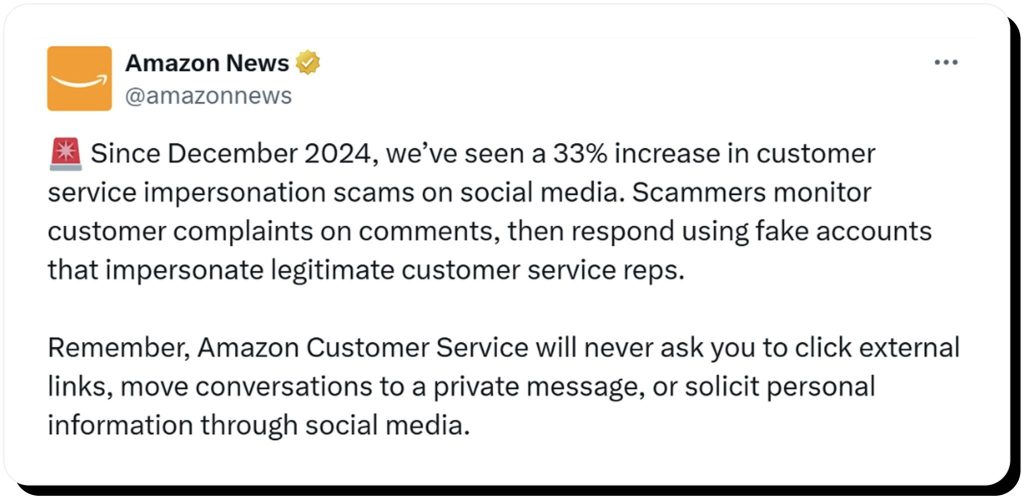
Amazon is one such example, reporting a 33% increase in customer service impersonation on social media since 2024.
In another example, Publishers Clearing House impersonators take advantage of people longing to win in a PCH giveaway and contact them on social media, posing as the famous sweepstakes company’s Prize Patrol, only to steal money from the victims.
Airlines are another common type of impersonated companies, especially during peak travel seasons. For example, there are multiple fake Wizz Air customer support accounts on X.com, taking advantage of customers’ requests for help to slide into their DMs and steal personal information.
How to protect yourself from angler phishing
The number one rule of avoiding angler phishing is to never use social media for customer complaint resolution. In case you run into an issue with a brand, use their official customer support channel, even if you’re constantly put on hold. It can be frustrating, but at least you’re protected by the company’s policies and avoid the risk of being defrauded by impersonators.
More ways to stay protected from angler phishers include the following:
- Avoid sharing your personal information publicly. Even if you share an innocent story of a bad shopping experience, scammers can take advantage of it and social-engineer you into giving away valuable personal details or even money.
- Always double-check the legitimacy of a profile before responding. Remember that official brand accounts should have a verification mark next to their names.
- Never click links shared in DMs or comments by unknown accounts. These can be phishing links that lead to malicious data-harvesting websites or trigger malware downloads.
- Report fake accounts to social media platforms. Each platform has a mechanism to report and take down bogus accounts, helping to protect other users from potential scams.
- Use two-factor authentication so that even if your credentials are stolen, scammers won’t be able to use them to access your accounts.
What to do if you’ve been targeted by angler phishing
If you do fall for an angler phishing trap, act as you would in all other types of phishing attacks: stop communication, check your device security, report the scammer, and try to recover your stolen funds if applicable.
- After you stop engaging with the scammer, run a full antivirus scan on your device and change passwords for all the potentially affected accounts.
- If you shared financial information with the scammers, contact your bank immediately and place fraud alerts to monitor for suspicious activity.
- Report the fake account to the social media platform where the scam started, in addition to reporting the scam to your local anti-fraud authority, such as the Federal Trade Commission in the U.S.
- Finally, share your experience with others so they know what to avoid.
FAQs about angler phishing
Can angler phishing lead to identity theft?
Yes, angler phishing can lead to identity theft if scammers access your personally identifiable information. This can happen via phishing links that collect and steal victims’ sensitive data.
How common is angler phishing?
Angler phishing is a growing cyber threat on social media platforms. While it’s not as common as email-based phishing, there are more and more brand impersonators taking advantage of frustrated customers and using their complaints as a pretext for harvesting sensitive information.
What makes angler phishing different from regular phishing?
Angler phishing happens exclusively on social media via fake customer support accounts, while phishing is a much broader category of online scams covering all possible communication channels and tactics.
How can I verify if a support account is legitimate?
Check if the company’s website links to the account as its official one, look for a verification badge next to the page’s name, double-check the handle, and confirm that the account is mature and has a decent amount of followers. In all cases, never share your personal information with any customer support reps on social media.



Dimitri is a tech entrepreneur and founder of Onerep, the first fully automated data removal service. Top cybersecurity CEO of 2021 by The Software Report.