 Published November 20, 2025
  read
read
No caller ID number: What it means, who’s behind it, and how to protect yourself
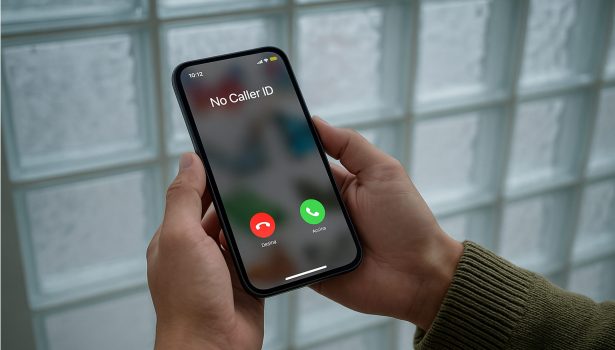
Phone calls happen every day, but anonymous calls spark curiosity and nervousness. When you see a “No Caller ID number” on your smartphone screen, you’re in the dark, wondering who’s calling and why. Like most people, you’ve probably ignored anonymous calls.
You wouldn’t be alone either, as a recent study found that 80% of Americans won’t answer calls from an unknown number. People do this for many reasons, but many ignore these calls, thinking they’re spam. No Caller ID means someone intentionally hid their identity and blocked their number from showing up.
These calls may come from hospitals or government offices, but scammers and telemarketers use them to hide their activities. In this article, we’ll explain what No Caller ID means, how it’s different from an Unknown Caller, who uses it, and provide simple steps for handling these calls.
What does “No caller ID” mean?
Chances are, you’ve received a call from an anonymous person before. If you’re wondering about the No Caller ID meaning, it isn’t a phone glitch. When a No Caller ID number appears, the caller is purposefully hiding their phone number from the recipient. It may sound nefarious, but in general, it’s harmless.
Technically, it’s a feature that callers can activate through privacy settings or by dialing *67 before the number. When callers do this, it blocks their information from transmitting through the network. Instead of seeing a number, the phone would display:
- No Caller ID
- Private Number
- Anonymous
- Hidden Number
- Caller ID Blocked
The exact phrasing usually depends on your device, phone carrier, or where you live.
So, what does “No Caller ID” mean in practice? If you see one of those phrases, it means your phone didn’t receive the Caller ID header, which normally shows up when someone calls.
These callers differ from “blocked callers” because they can still reach you, whereas the latter are filtered out entirely by your carrier. Both people and organizations use this feature for various reasons; most are legitimate, but some may be dishonest or abusive.
What does “Unknown Caller” mean?
While “No Caller ID” is an intentional choice callers make to stay anonymous, an “Unknown Caller” happens due to technical issues. According to Asurion, the label appears when a network or carrier fails to transmit the caller’s ID to your phone. Fortunately, most of the reasons technical issues like this occur are harmless.
They can include:
- VoIP and internet calls: Sometimes, apps or business systems that use internet calling strip caller ID information when transmitting the data.
- International calls: Networks overseas may still use systems that aren’t compatible with U.S. caller ID standards. The incompatibility leads to the network transmitting “Unknown Caller” instead of a contact number.
- Carrier or signal issues: Technology is subject to errors, including weak connections, outdated network routing, or temporary technical faults that interrupt caller ID transmissions.
- Forwarded or masked numbers: Calls may also be routed through third-party systems, such as customer support teams, which accidentally omit this information.
Now, if someone asks you what does “Unknown Caller” mean, you can confidently tell them. Remember, your phone never received the data, so it can’t display it. Still, threat actors use anonymous calls in social engineering scams, so it’s best to stay cautious.
No Caller ID vs. Unknown Caller: what’s the difference?
If you’ve confused these labels in the past, you aren’t alone. They both hide the caller’s identity, but here’s our side-by-side comparison that lists the key differences.
| Call Details | No Caller ID | Unknown Caller |
|---|---|---|
| What does the label mean? | The caller is hiding their contact information. | Your phone can’t identify the caller because the network couldn’t transmit the caller ID data. |
| How it works | A caller uses privacy settings or dials a prefix (e.g.,*67) to block their number. | Caller ID information doesn’t reach your phone because of network issues, VoIP glitches, etc. |
| Who could be calling you? | Doctors, government offices or scammers and telemarketers concealing their identities. | An overseas contact, business call centers, or automated systems using VoIP. |
| Typical risk level | Moderate to high, as it includes both legitimate and malicious callers. | Risk levels are low, often happens due to technical issues. |
Who calls with No Caller ID?
Because of bad actors, it’s always better to know who calls with No Caller ID. It’s a situation that involves classifying callers into two categories: legitimate and suspicious callers.
Legitimate callers
Not every hidden number is suspicious, as many professionals use caller ID blocking to protect sensitive information. These types of callers include:
- Healthcare providers, therapists, and nurses who may mask their numbers to safeguard patient confidentiality.
- Industry recruiters and HR departments often call from private numbers to avoid callbacks before scheduling interviews.
- Legal firms and government offices could use restricted numbers to protect the integrity of investigations.
- Customer support teams or delivery callbacks frequently run on automated systems. These calls may appear as “No Caller ID” when sending updates or forwarding confirmations.
Suspicious callers
Suspicious and malicious callers are out there, ready to exploit the anonymity of a No Caller ID number. Most often, these malicious callers are:
- Scammers and robocallers who use hidden numbers to seem legitimate or avoid detection by spam filters.
- Harassers and pranksters who annoy or intimidate their targets without fear of consequences.
- Debt collectors or tech-support impostors wanting to disguise their identity and trick victims into sharing sensitive data.
- Data verifiers testing “active” numbers will use robocalls to contact large batches of phone numbers from call lists. After confirming a batch of numbers, bad actors typically sell them to telemarketers or use them in future scams.
What are the risks of anonymous or No Caller ID calls?
Not every anonymous call is malicious, but a No Caller ID number creates ideal conditions for phone-based scams. Here are some of the most common risks and what they mean for you:
- Vishing and smishing attempts: Threat actors often hide their phone numbers when posing as legitimate businesses or government agencies. These vishing scams and smishing attacks exploit trust and anonymity to collect your personal data or payment information.
- Identity theft schemes: The abundance of AI tools allows scammers to record your responses during calls, especially when they’re seeking simple confirmations like “yes.” Bad actors can then edit the recording to authorize fraudulent transactions and carry out other forms of identity theft.
- Harassment or stalking: Many agree that anonymous calls are a nuisance, but sometimes bad actors escalate them to intimidation. They may not directly threaten their targets, but these types of calls can violate privacy and lead to higher emotional stress.
- Financial impersonation: Scammers may attempt to pressure their targets into handing over their financial account credentials or sending money using fear and urgency. These schemes usually involve bad actors impersonating representatives of trusted institutions and result in account takeovers which may take years to recover from.
Does No Caller ID mean they are in your contacts?
You’ve likely heard the common misconception that No Caller ID is someone in your contacts. That’s not how caller identification works. It means the caller hid their number using privacy settings or by dialing *67 before the phone number.
When a number is hidden, your phone can’t match it with your saved contacts. There are rare occasions when someone calls from a workplace number, secondary line, or phone system configured to block caller information. Your device can’t identify the caller without caller data, so they will still appear as “No Caller ID” or “Private Number.”
While the intent is to protect privacy, it also opens the door for scams. Remaining cautious is essential when handling calls from unfamiliar or hidden numbers.
Can you find out who called you with No Caller ID?
Yes, while you can track down a hidden caller, it’s not always straightforward. There are a few ways to uncover or document anonymous calls, but the options depend on the carrier and the tools available to you.
Carrier codes
- *69 (Last-Call Return): Some carriers allow users to dial *69 immediately after missing an anonymous call. The system will either redial the number or reveal the last number that called you. Verizon and AT&T admit that it doesn’t work for calls to hidden or spoofed numbers.
- *57 (Call Trace): This code logs critical details about your last anonymous call. The trace doesn’t reveal direct information about the caller, but it can still serve another purpose. If you’re dealing with threatening calls, the records can bolster a police report. Please note that many carriers charge a small fee for using this service.
Carrier spam and caller-ID services
- AT&T Active Armor, Verizon Call Filter, and T-Mobile Scam Shield are carrier-specific tools that identify and block spam and robocalls.
- Active Armor works for both iOS and Android devices and costs $4 a month for the advanced tier plan.
- Verizon Call Filter works automatically for Android phones and is available in the App Store for iPhone users.
- T-Mobile Scam Shield’s free version includes complete caller ID, scam reporting, and scam blocking. The app is available to download on Google Play and the App Store.
- Active Armor works for both iOS and Android devices and costs $4 a month for the advanced tier plan.
- You can pay for a higher-tier plan that enhances identification filters and labels suspected scammers. Each of these carrier servers blocks spam numbers using national databases.
Third-party caller-ID apps
- Truecaller ID uses a global, crowdsourced database to match and block suspected spam or telemarketing calls.
- Hiya is an app built into many Samsung and Android smartphones. It’s best used to detect spam calls and search suspected spam numbers.
- TrapCall is a subscription-as-a-service (SaaS) that reveals private or No Caller ID numbers by rerouting them through its system and returning any details about them.
The law enforcement route
Generally, individuals choose this route when anonymous calls escalate into threats, stalking, or when bad actors attempt fraud, a scenario similar to what many experience after any type of identity theft. Carriers will cooperate with law enforcement on your behalf via a case number. Having substantial evidence will also strengthen the report; submit captured call traces using *57, voicemail logs, or screenshots.
The Reality: Use Spoofing and VoIP tools
No single method will work all the time. Like many cybersecurity scams, threat actors are constantly changing their tactics to catch their targets off guard. Scammers will use caller-ID spoofing technology to disguise their numbers and make it appear local or familiar.
They also use internet-based calling tools or VoIP systems which are harder to anticipate because they can generate disposable numbers.
How to deal with No Caller ID calls safely
An anonymous caller may trigger your curiosity, but the safest response is to avoid engaging with them. Only speak with anonymous callers once you’ve verified their identity. When handling No Caller ID calls, here’s how you maintain your privacy:
Never answer unknown calls – it tells them your number is active
Answering an unknown call, even briefly, confirms that your number is active. Once that happens, it can lead to more scam attempts and robocalls. Letting the call ring prevents the automated system from verifying your number.
Legitimate callers leave voicemails
When you let the call go to your voicemail, the caller will leave a message or follow up using an identifiable number or email address. Scammers rarely leave voicemails because it compromises their anonymity.
Use Live Voicemail (iPhone) or Google Call Screen (Android) to preview
Both iPhone and Android devices have helpful tools to screen unknown calls. Here’s how they work:
- iPhone’s Live Voicemail transcribes the voice message into words so you can decide how to handle their next call.
- Google Call Screen offers greater convenience by routing suspected spam calls through an automated assistant that transcribes a response.
Record the call if you’re being harassed
As mentioned earlier, document any calls that are repeatedly threatening. Write down the date, time, and what was said – create a note, Google Document, or Word file of all key details in the call. Also, save voicemails and screenshots of call logs, as every detail can assist with ongoing investigations.
If you must answer, don’t share any personal details or say “yes”
AI voice tools, though useful, allow scammers to record your voice and fabricate fake consent for authorizations. Be cautious if you have to answer an anonymous call and use neutral responses like “Who’s calling?” or “What is the reason for your call?” End the call if the conversation doesn’t feel right.
Report harassment to your carrier and the proper authorities
Most major cellphone carriers offer convenient ways to report scams or threatening calls. Fortunately, carriers can also trace and flag repeat offenders. This is especially helpful if bad actors continue harassing you or the calls devolve into violence. If that happens, first, file a report with your carrier so they can assist the local police.
Then, take it one step further by contacting the FTC and reporting the incident in one of two ways:
- Visit the FTC’s Report Fraud page online and follow the instructions to submit a report.
- Call 1-877-382-4357
When you report your calls to the FTC, they can investigate and, if warranted, prosecute those responsible. If nothing else, the agency gains a broader perspective on identifying patterns in criminal behavior and strengthening consumer protections.
How to block No Caller ID calls
Most major cellphone companies include built-in features in their devices that can silence, filter, and even block unwanted calls from a No Caller ID number. Both Android and iPhone users can use their devices’ standard features to reduce interruptions from scammers and anonymous callers without downloading an app.
Calls on iPhone
Apple devices include a free feature called Silence Unknown Callers, which automatically mutes calls from unrecognized numbers, recent anonymous callers, or Siri suggestions.
Here’s how to start using it:
- Open your Settings.
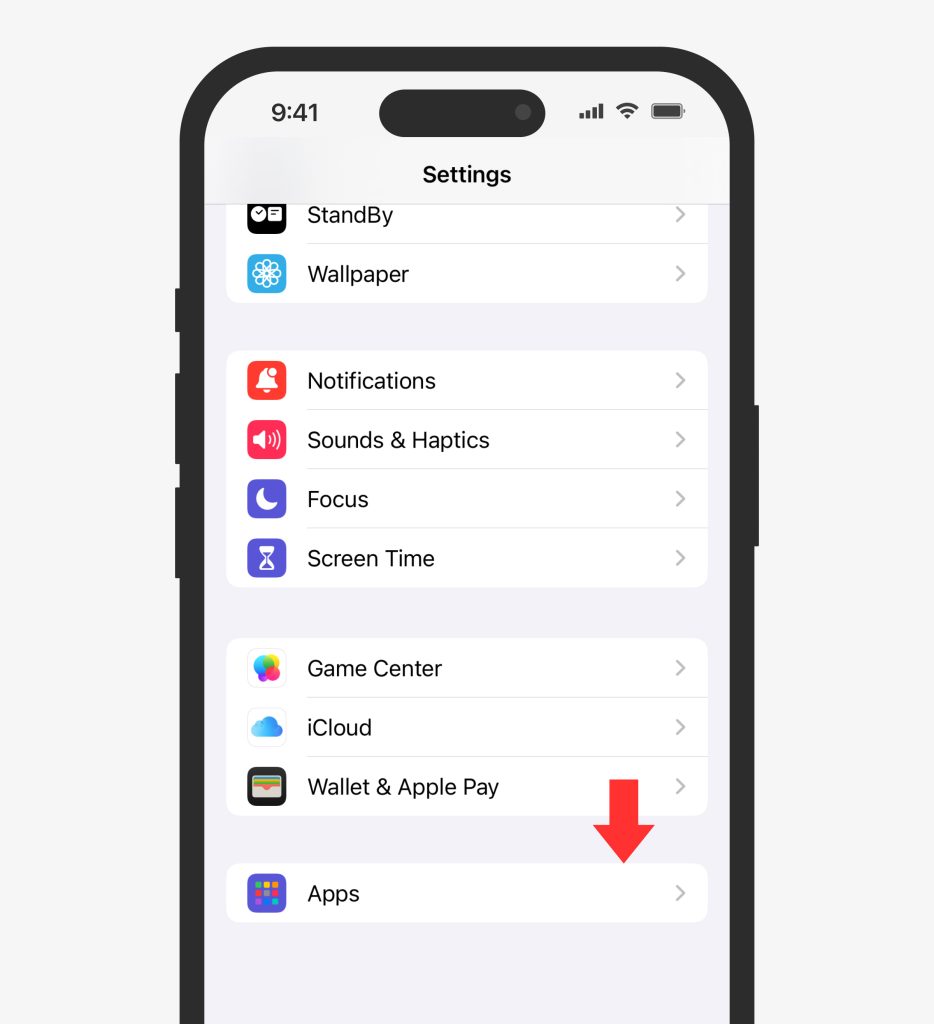
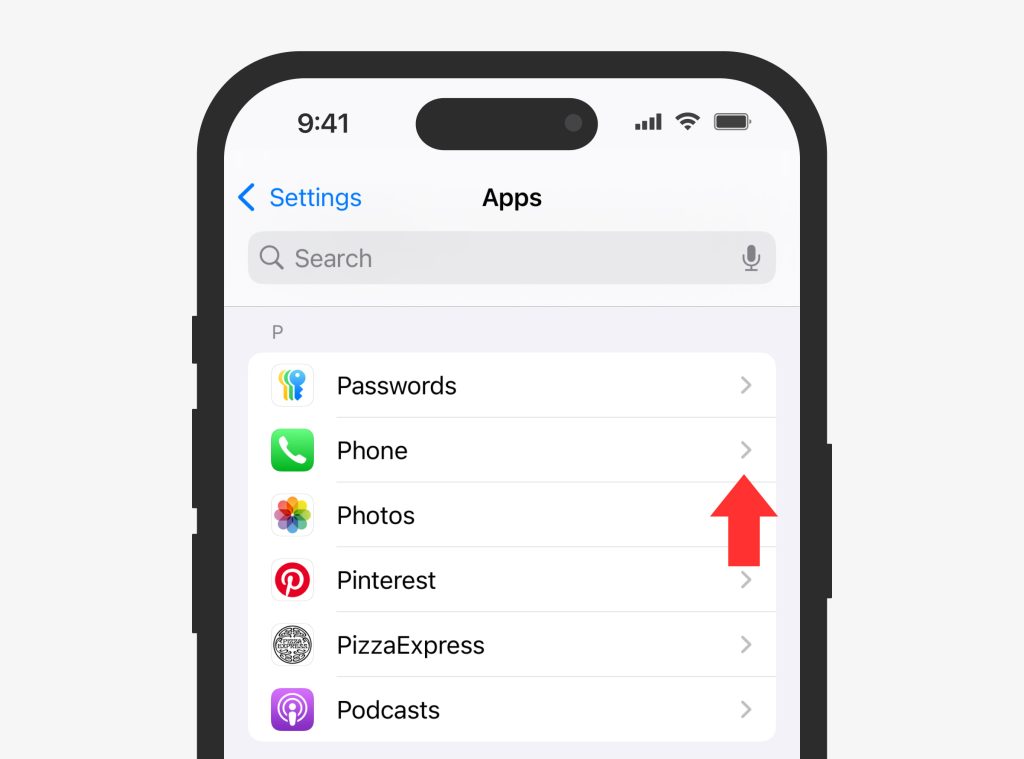
2. Tap iPhone > Silence Unknown Callers.
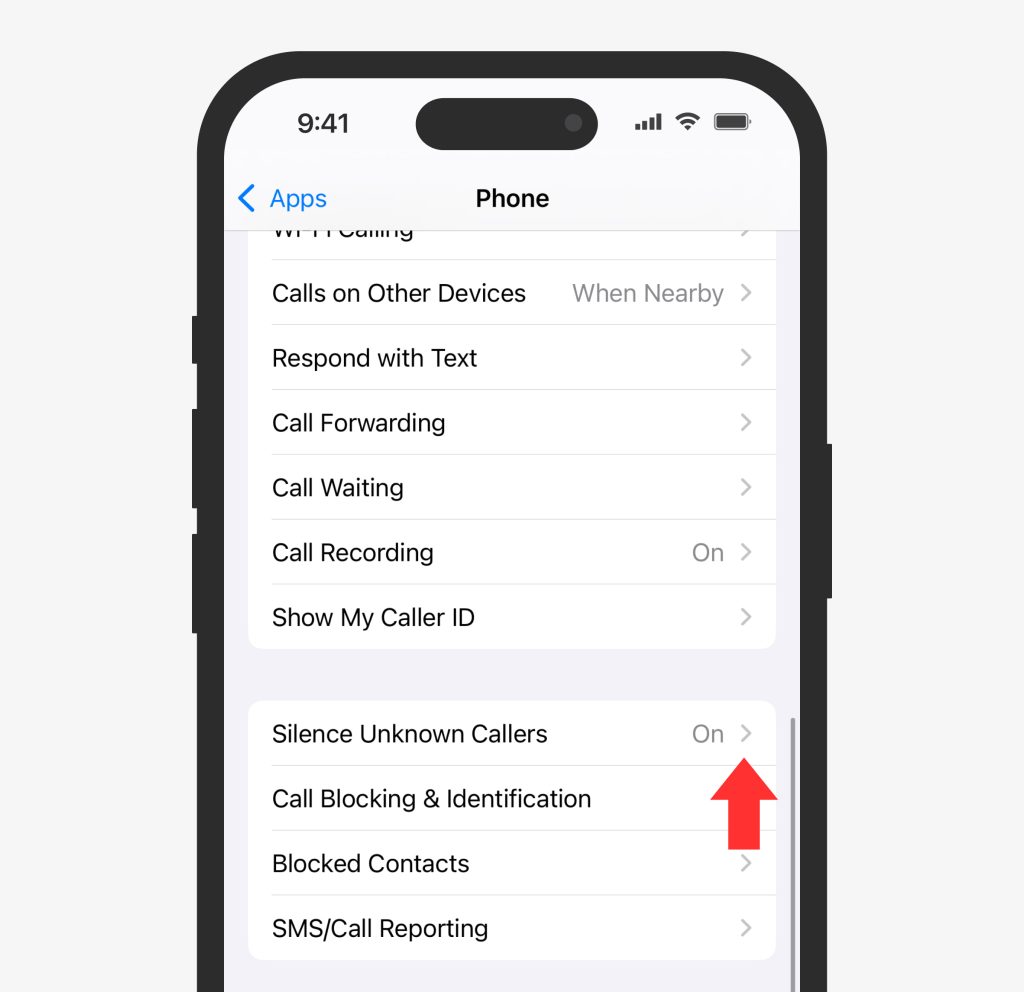
4. Freely toggle the switch on and off.
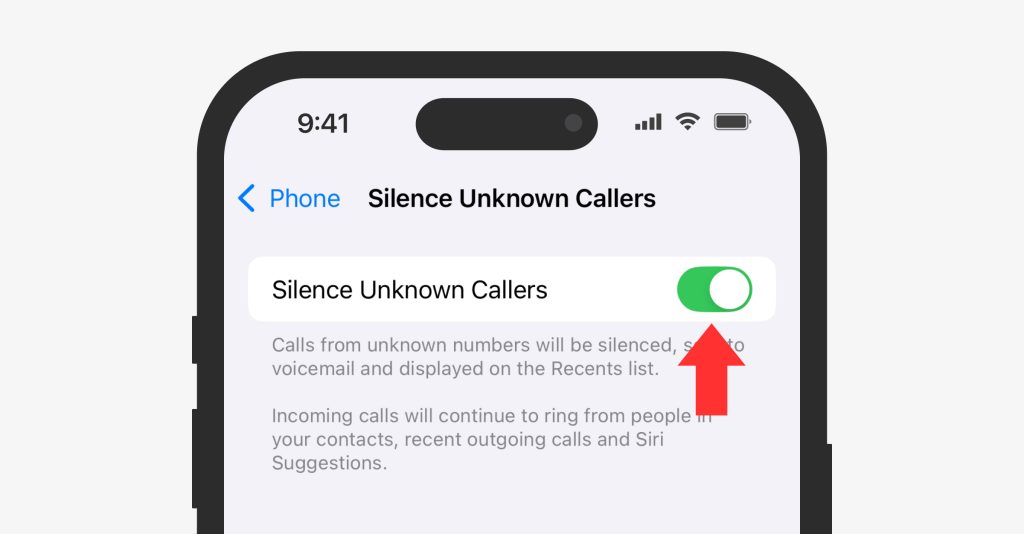
Once the feature is active, anonymous calls will go to your voicemail. You’ll still see them in your Recents list, and if they leave a voicemail, it will automatically be transcribed for you to review.
Calls on Android
Android has a feature similar to Apple devices known as Filter Spam Calls. It silences or blocks spam and anonymous calls. Here’s how to start using it:
- Open the Phone app.
- Tap the three dots icon > Settings.
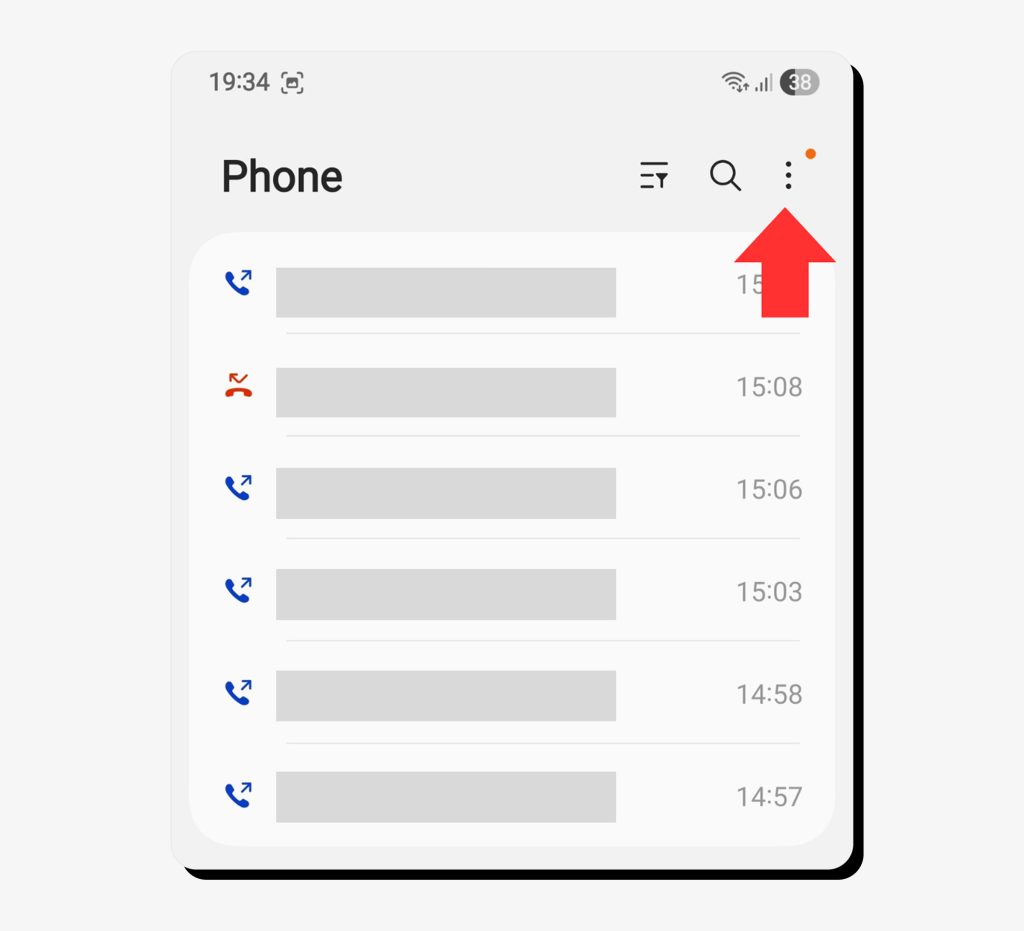
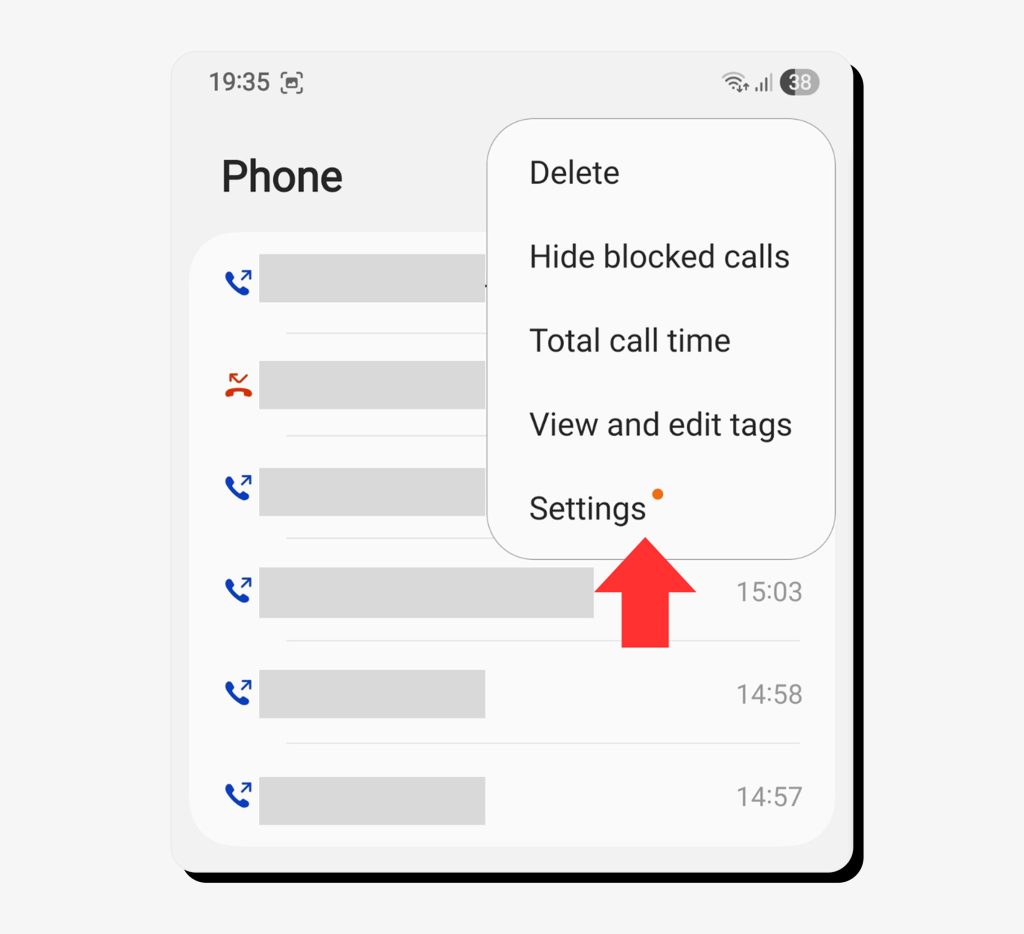
3. Toggle Caller ID & spam protection.
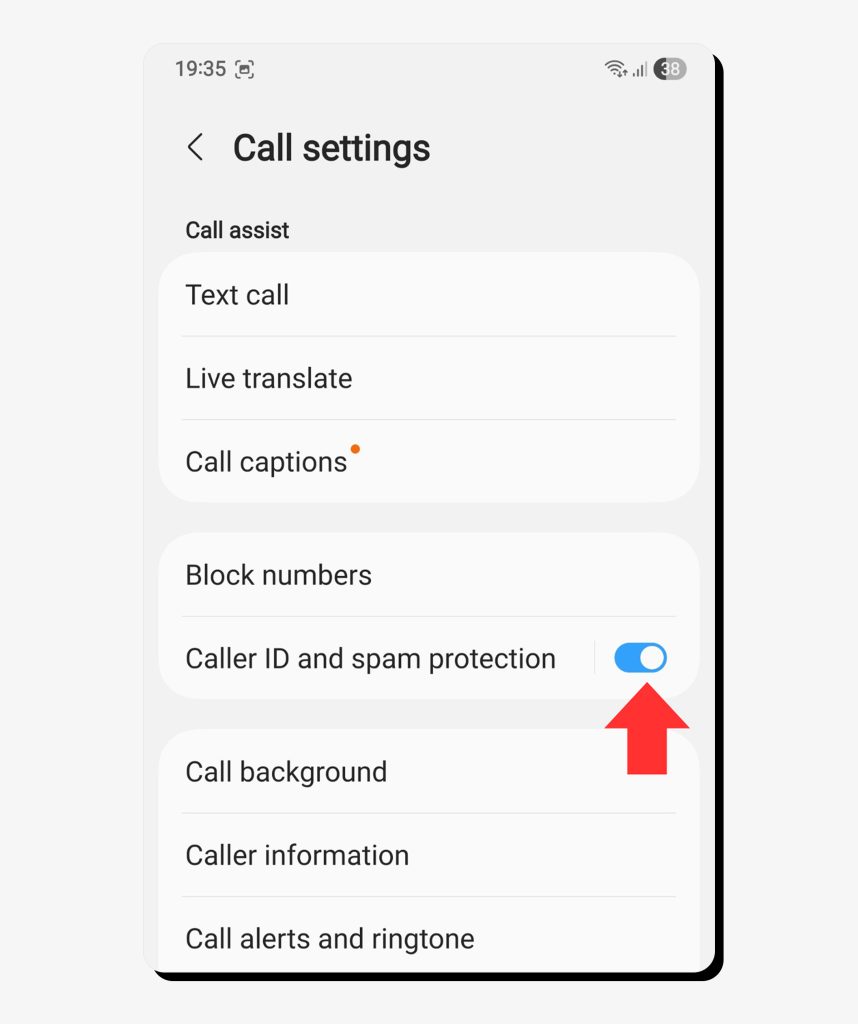
4. Tap Block numbers > Block calls from unknown numbers.
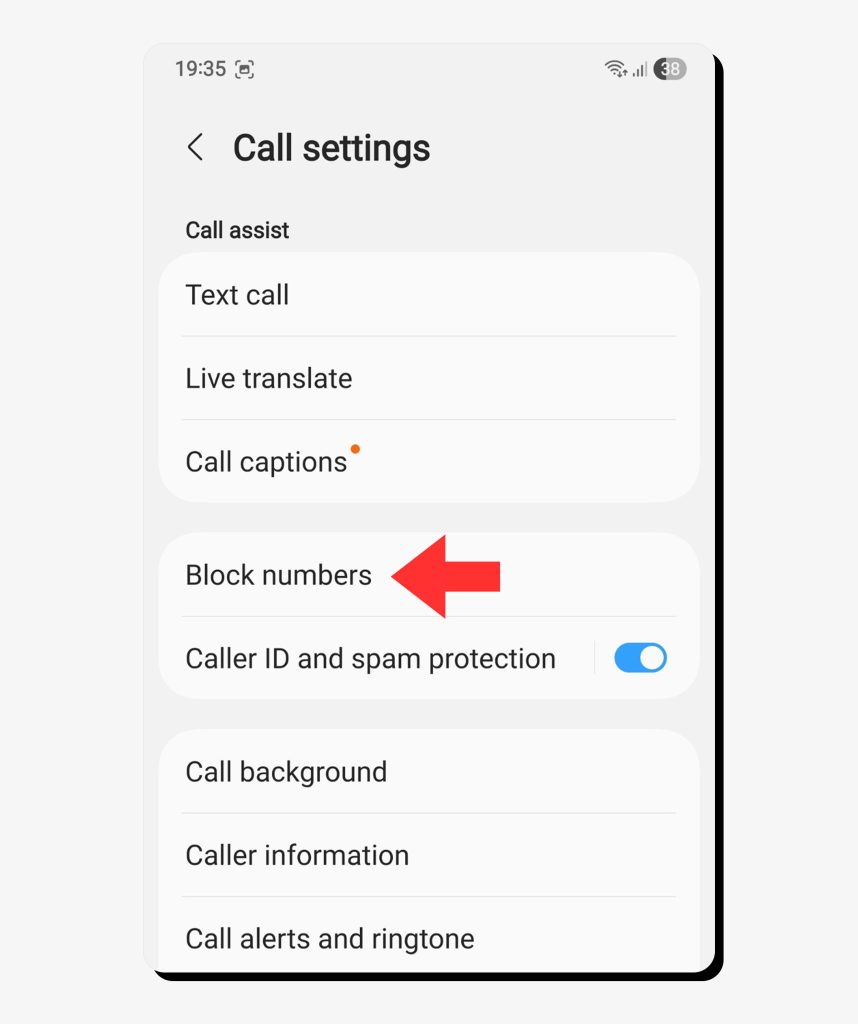
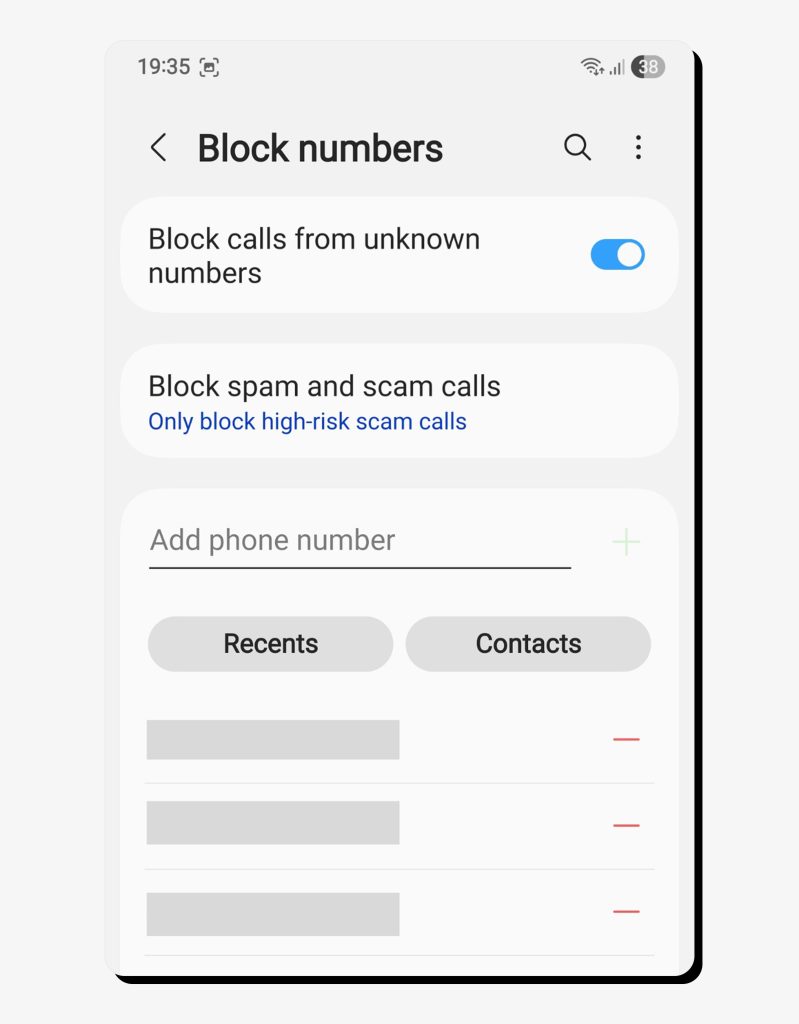
Some Android devices also support blocklists, allowing individuals to add anonymous numbers manually. Many Android devices, including Samsung and Google Pixel, use these same settings with slight name variations.
How to prevent future anonymous calls
We’ve discussed using smartphone tools and carrier filters to block unwanted calls, but they’re just one layer of defense. You can manage how and where your phone number is shared using proactive privacy protection habits. Use these good habits to significantly limit your exposure to anonymous or spam:
Add your phone number to the National Do Not Call Registry
When you register at donotcall.gov, it adds your number to the National Do Not Call list, which stops telemarketers from contacting you. While it doesn’t block scammers, since they often ignore regulations, it can reduce the volume of unwanted calls you receive, allowing you to focus on uncovering actual suspicious activity.
Don’t give away your number or personal information
Your internet activity matters. When you fill out online forms or publish social media profiles with your personal information, you risk it being collected by data brokers and telemarketers. You should stop filling in the optional fields in online forms and only share your phone number if necessary.
Also, opt out of public directories that list your contact details. Eventually, this disciplined response will limit the reach of scam databases and shady marketers alike.
Use a burner phone or secondary number for non-essential signups
It’s easy to be swayed by free trials and the convenience of online services and marketplaces. If you frequently use these sites, it may be best to use a temporary number or VoIP app. If you prefer, Google Voice or other privacy-focused services can hide your real number.
This approach limits spam and can help prevent data leaks involving your primary line by handling your calls and texts separately.
Limit the contact details you share on social media
Social media profiles offer more personal information than users realize. At any time, automated bots can scrape sensitive data from your page. You can stop this by enabling stricter privacy settings, removing your phone numbers from all “About Me” sections on your profiles, and limiting who can look you up using your number.
With these simple adjustments, you can regain your privacy while making it harder for bad actors to connect your identity across multiple platforms.
How Onerep limits the exposure of your personal information online
People-search and data broker websites create the ideal conditions for spam calls and scams by publishing your data online. These sites publicly list names, addresses, and phone numbers, making it easier for bad actors, telemarketers, and data verifiers to target you.
Onerep can help you close this privacy gap. Our platform automatically scans 240+ data broker sites to find where your personal information is exposed and files automated removal requests on your behalf. It also monitors each site and repeats the removal process if data brokers relist your information keeping your data out of the reach of spammers and scammers.
FAQs
How to find out a No Caller ID number?
You can use carrier features or third-party services to trace anonymous calls.
- Dial *69 immediately after a missed call to attempt a last-call return. The availability of these features varies by carrier.
- Use *57 to trace the call, which logs the details for law enforcement.
- Some apps, like TrapCall, unmask blocked numbers by re-routing them through a database, but it requires a paid plan.
No method is foolproof, as Spoofing and VoIP tools can disguise phone numbers from tracing systems.
Is *67 No Caller ID?
Yes, callers can dial this prefix before the phone number to hide their identity from the recipient. “No Caller ID” or “Private Number” will appear on the screen.
Is *69 No Caller ID?
No, *69 is a call-return code that lets you redial the last caller. Depending on the carrier, it may reveal or connect you to the previous caller.
What do No Caller ID numbers mean?
A No Caller ID number means that a caller intentionally blocked their number using privacy settings or by dialing *67. While your carrier received the caller’s identification information, it was withheld from you based on the caller’s request.
No Caller ID is someone in your contacts, right?
No, this is a common misconception. Even if someone from your contacts hid their number, their ID still wouldn’t appear. Your phone didn’t receive a caller ID, so it can’t match it to the contact’s saved information.



Mikalai is a Chief Technical Officer at Onerep. With a degree in Computer Science, he headed the developer team that automated the previously manual process of removing personal information from data brokers, making Onerep the industry’s first fully automated tool to bulk-remove unauthorized profiles from the internet.