 July 26, 2024
 read
Opt out of NumberGuru.com
- By Dimitri Shelest Founder and CEO at Onerep

Dimitri is a tech entrepreneur and founder of Onerep, the first fully automated data removal service. Top cybersecurity CEO of 2021 by The Software Report.
Read more - Checked by Alena Shymanskaya Content Manager at Onerep

Alena is an experienced content writer with a specialized focus on data brokers and the intricacies of personal data management.
Read more
- Removal difficulty: Medium
- Profile is removed within: 4 weeks
- Manual submission: around 15 min
- Removal requirements: email, CAPTCHA
 Why trust this guide

We know all the ins and outs of the data broker removal:
Founded in 2015, we pioneered automated removal from people-search sites. Our service uses precise opt-out algorithms tailored for each website. When a site changes its algorithm, we detect the change immediately, and our team updates the process. These updates are promptly reflected in the Onerep DIY data broker removal guides. With 16 million records already removed from hundreds of sites for our customers, you are accessing the expertise of the #1 team in the industry with this guide.
What is NumberGuru?
NumberGuru.com is a reverse phone directory, which uncovers cell phone & landline numbers in the US. It provides reports that share the name and location of the caller, the phone carrier, and more. NumberGuru is also associated with BeenVerified – one of the biggest information brokers in the industry. Removing your information from BeenVerified.com will remove your data from NumberGuru.com.
How to opt out and remove your information from NumberGuru?
Quick summary:
- Open BeenVerified’s opt-out page beenverified.com/app/optout/search
- Look up your record
- Click the ‘Proceed to Opt Out’ button on your record
- Submit your email address
- Verify your request via email
Step 1: Navigate to NumberGuru.com
Access NumberGuru to begin your opt-out process.
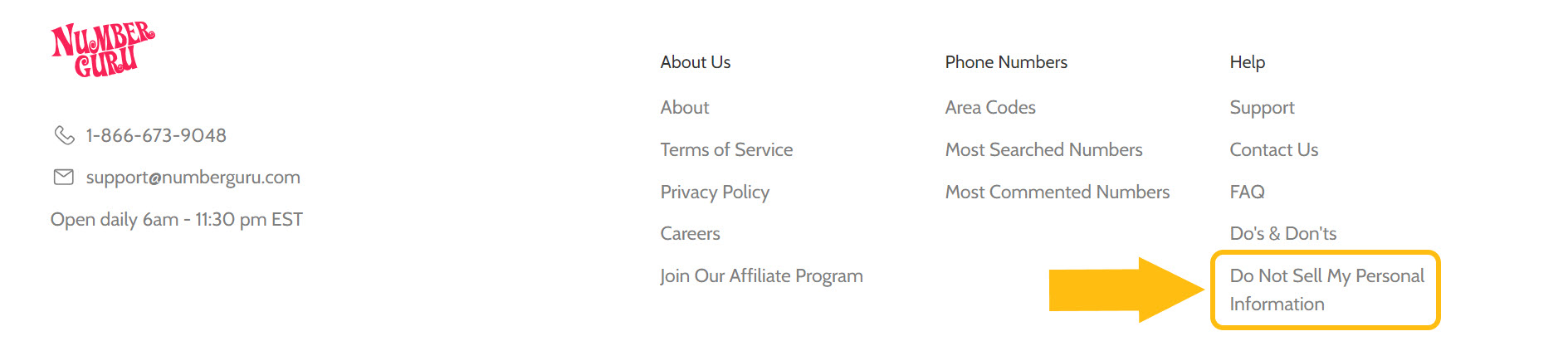
Step 2: Click on ‘Do Not Sell My Personal Information’
Scroll down the page to the bottom and click on the ‘Do Not Sell My Personal Information’ link.
Step 3: Click on ‘Do Not Sell My Info’
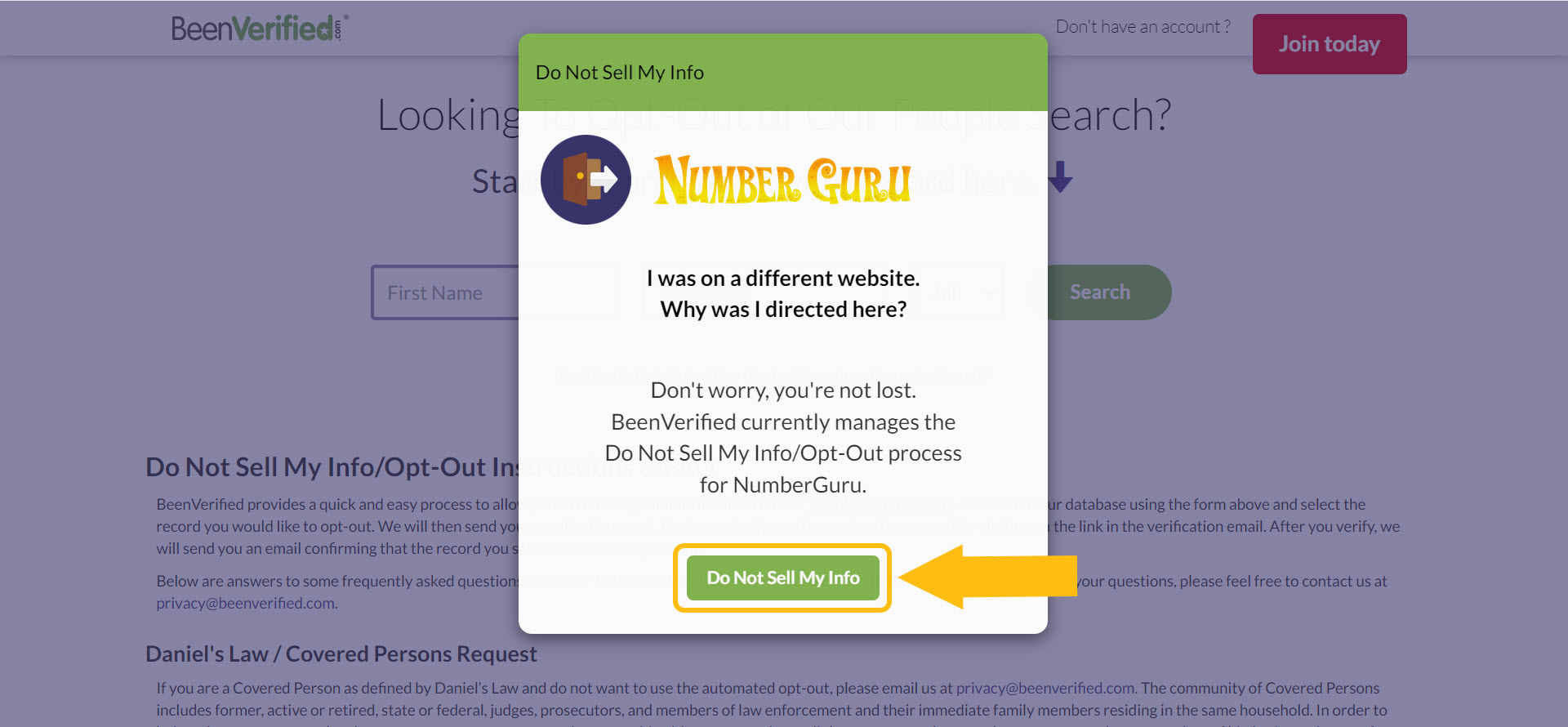
At this point, you will be redirected to BeenVerified because it manages opt-out requests for NumberGuru. Click on the ‘Do Not Sell My Info’ button to proceed.
Step 4: Look yourself up
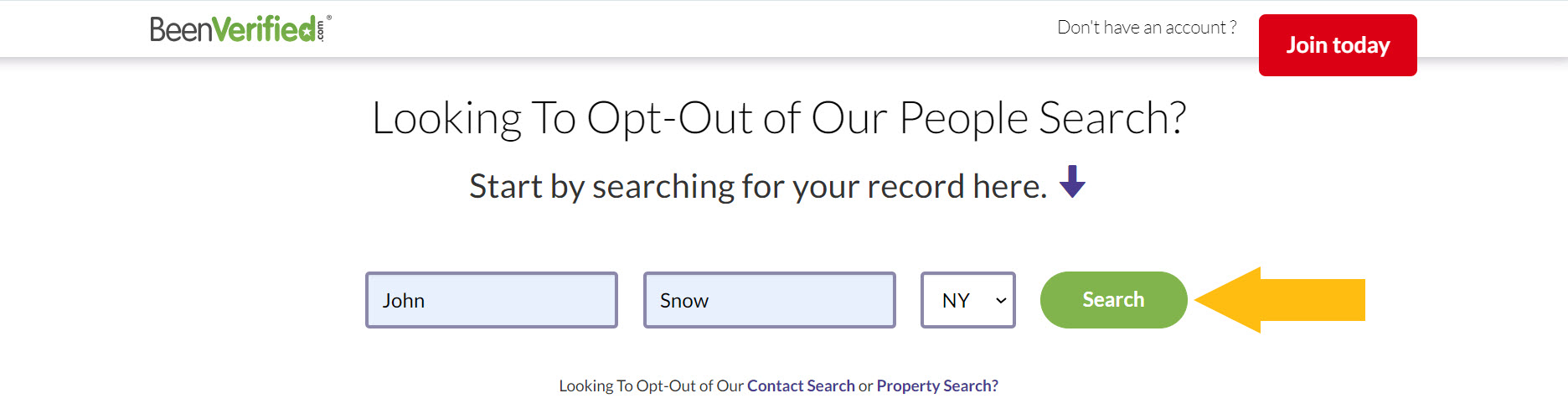
Enter your first and last name, specify your state and click the ‘Search’ button.
Please note that if you select California as your state, an additional form might appear. You may either complete it to get to the search results, or you may select a different state initially and change it to California during step 5.
Step 5: Find your record and click on ‘Proceed to Opt Out’
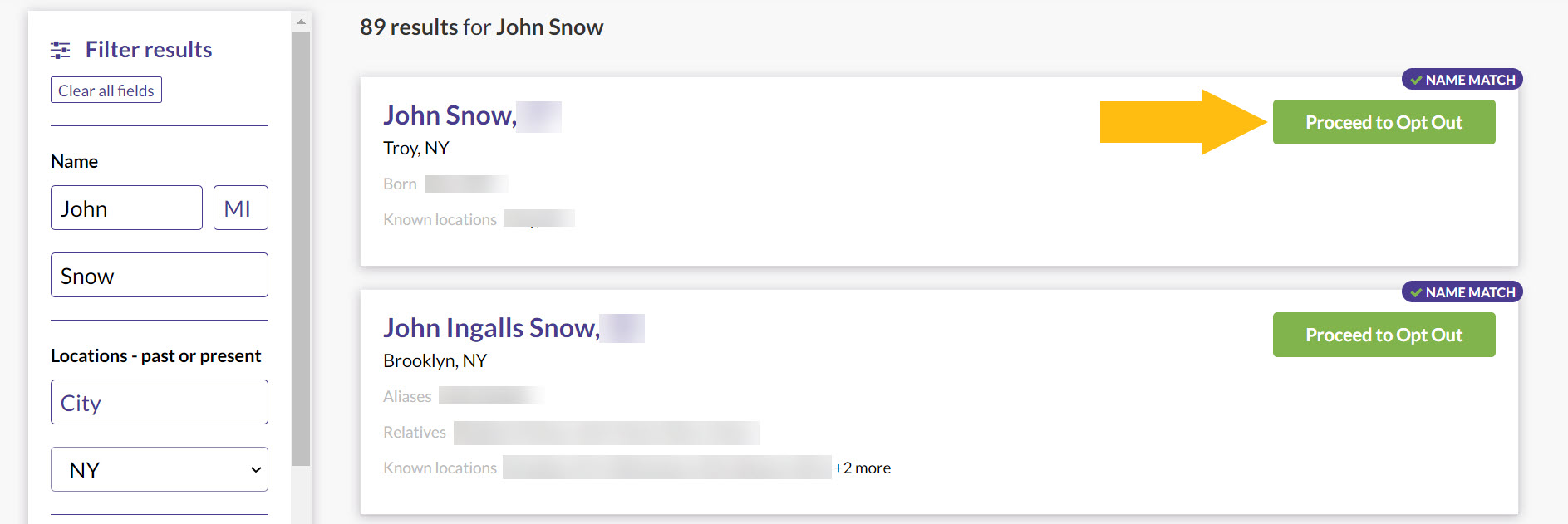
Look through the results to locate your listing. You may use the filter on the left to narrow down your search. When you locate the record you’d like to have removed, click on ‘Proceed to Opt Out’.
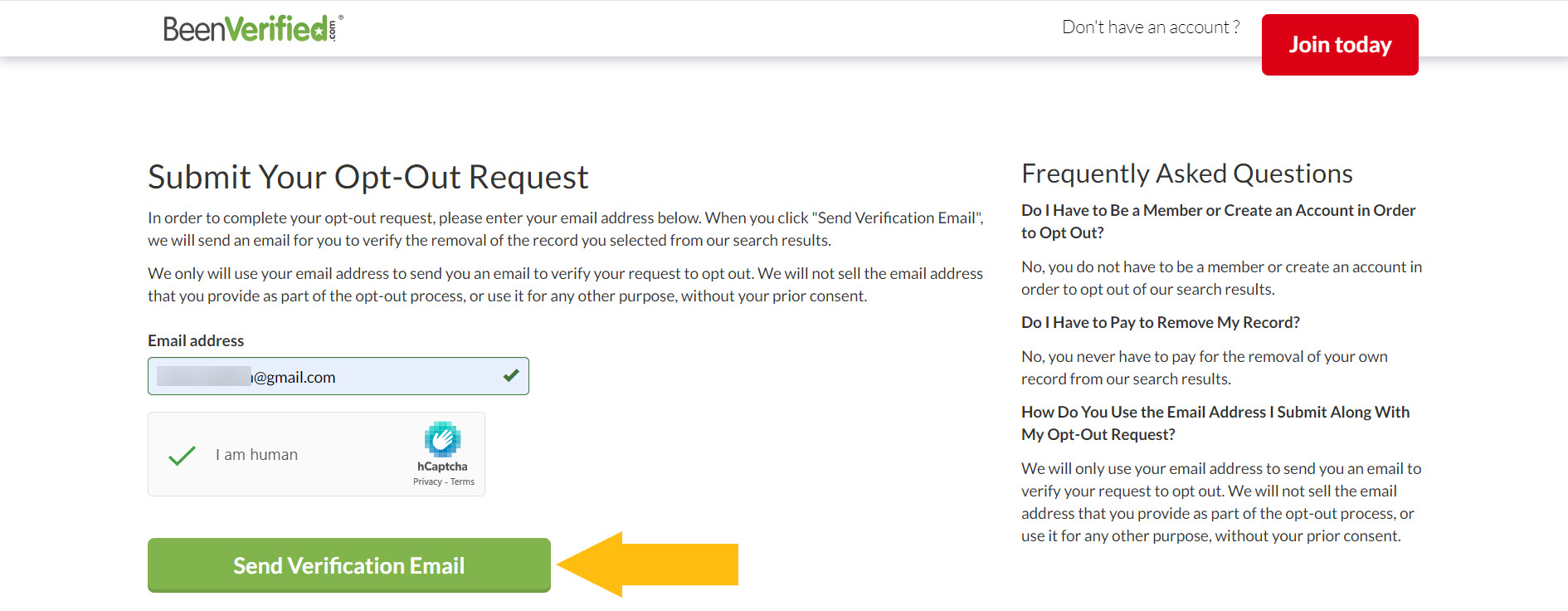
Step 6: Enter your email address, solve the CAPTCHA and click on ‘Send Verification Email
Type your email address, solve the CAPTCHA, and click on the ‘Send Verification Email’ button to submit your removal request.
Pro tip: We recommend using a separate email address created specifically for submitting opt-out requests for NumberGuru and other data brokers. This action helps ensure that the personally identifiable information associated with your personal or business email won’t be displayed or shared on these sites.
Step 7: Verify your request via email
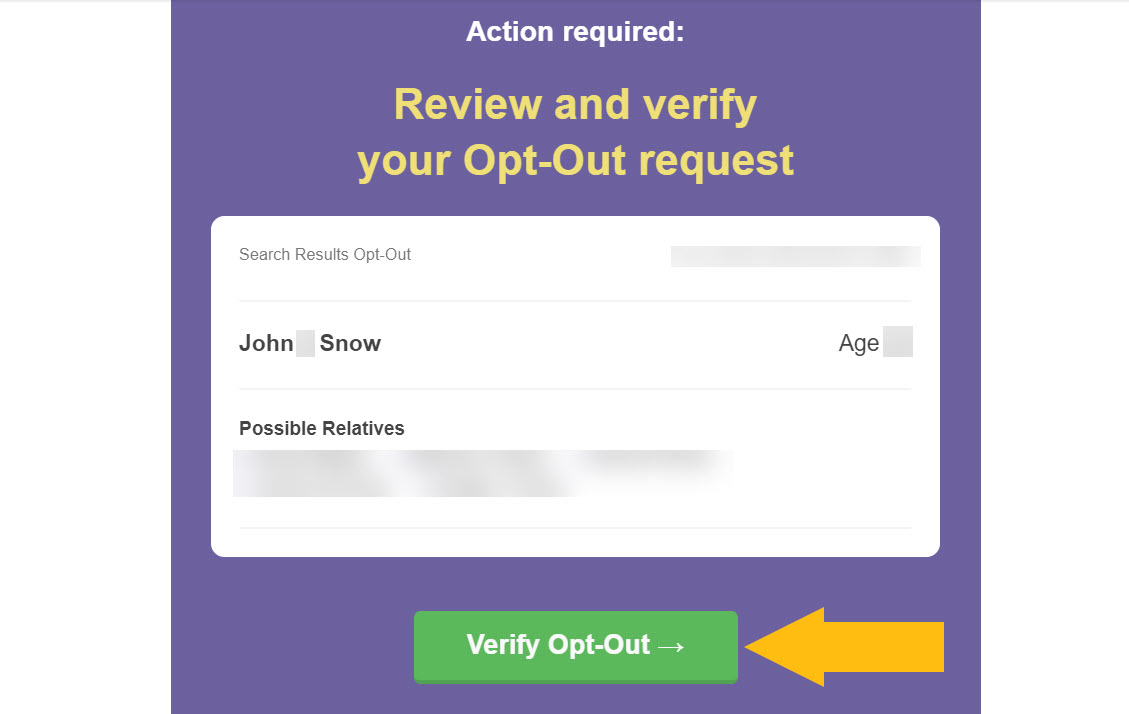
Check your inbox to find the email from [email protected]. Open it, then click on the ‘Verify Opt-Out’ button.
Your opt-out request is confirmed.
If you find several records under your name, you need to contact BeenVerified at [email protected] and request their removal. In accordance with their policies, BeenVerified.com doesn’t allow you to remove several profiles through their opt-out form.
How to contact NumberGuru directly
In case you want to reach out to NumberGuru.com with any questions you have directly, you may do so by writing an email to [email protected], using the contact form on their website, or calling 1-866-673-9048 daily 6 am – 11:30 pm EST. Alternatively, you can send a letter to P.O. Box 105168, MSC 784064, Atlanta, GA 30348-5168.
Your data is still exposed on other brokers
Besides NumberGuru and BeenVerified, there are many other people-search sites exposing your data.
We recommend that you opt out of these five next:
- How to remove yourself from Radaris.com
- How to remove yourself from ClustrMaps.com
- How to remove yourself from Spokeo.com
- How to remove yourself from SmartBackgroundChecks.com
- How to remove yourself from Nuwber.com
Go through this list and send opt-out requests manually to each data broker, or subscribe to Onerep to remove records automatically from 320 sites with just a few clicks.
Why remove yourself from NumberGuru
Here’s why we recommend you remove yourself from NumberGuru.com:
- Site visits: over 600 thousand people look up phone nymbers on NumberGuru each month.(1)
- Exposure on Google: Google has indexed over 100 thousand NumberGuru pages making your data easier to find through its search.(2)
- Depth of exposure: NumberGuru exposes full names, address history, phone carrier, social media profiles, and other details. Additionally, it allows commenting on phone numbers and doesn’t verify or review any comments left.
Sources:
1 – Silmilarweb NumberGuru report
2 – Google
Who sees your data on NumberGuru
Sources: Similarweb NumberGuru report
About NumberGuru
- Founded: 2011
- Headquarters: New York, NY
- Number of employees: 10-50
- Website URL: numberguru.com
- Contact email: [email protected]
- Phone number: 866-673-9048
Frequently asked questions about NumberGuru
How do I remove information from NumberGuru?
To remove your info from NumberGuru.com, open their website and click on ‘Do Not Sell My Personal Information’ in the footer. You will be redirected to BeenVerified.com as it manages NumberGuru’s opt-outs. Look up your record, request its removal by clicking on the ‘Proceed to Opt Out’ button, and confirm the request via email.
What is NumberGuru?
NumberGuru is a data broker providing reverse phone and text lookup. It shares such details as the full name and location of the caller, their social media links, age, complaints about the phone number, and more.
More opt-out guides
- NeighborWho opt out
- SignalHire opt out
- DNB opt out
- ContactOut opt out
- BackgroundCheck.run opt out
- UniCourt opt out
- PeopleLookup opt out
- InfoTracer opt out
- StateRecords.org opt out
- Acxiom opt out
- PrivateReports opt out
- CheckSecrets opt out
- InstantPeopleFinder opt out
- AnyWho opt out
- 411.com opt out
- AbsolutePeopleSearch opt out
- ZoomInfo opt out
- OpenGovUS opt out
- RealtyHop opt out
- NDB opt out