 Published December 2, 2025
  read
read
Spam Risk calls explained: what they mean, why you get them, and how to stop them
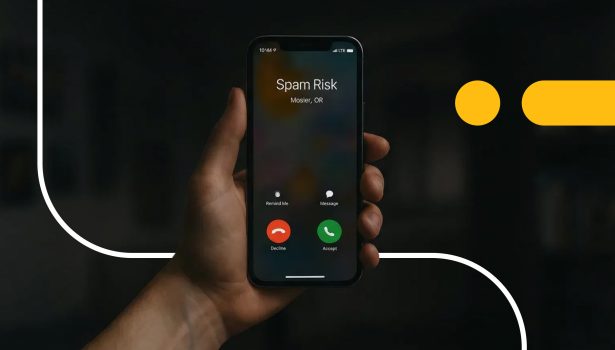
You’re enjoying a peaceful day when your phone rings, but instead of a name or number, the screen flashes ‘Spam Risk’. Most people hesitate, unsure if they should ignore or answer the call. While this caller ID label warns users about potential scams, not all spam calls are fraudulent.
Sometimes, legitimate businesses and healthcare providers are flagged as spam. Still, when you receive a spam risk call, many of them are linked to vishing scams, identity theft, or data leaks that expose your information. But you can limit your risk for spam calls.
Keep reading as we explain what spam risk calls mean, why they keep calling you, how to handle them safely, and how to stop them at the source.
What does Spam Risk mean?
What does Spam Risk mean when you see it on your phone?
The simple answer: it’s a label cellphone carriers use to inform you about unwanted or fraudulent calls. Spam Risk is what mobile carriers like AT&T and T-Mobile use to flag suspicious numbers from scammers, telemarketers, or robocalls.
All major carriers use slight variations of this warning, including “Scam Likely” or “Potential Spam.” But what is Spam Risk, and how do carriers know to flag calls? Carriers use robocall detection systems that analyze calls to identify patterns that indicate whether they’re legitimate or spam.
These systems look for:
- A high number of short calls at once.
- An above-average call volume from the same number.
- User reports confirming a number as spam or scam-related.
Carriers automatically feed the call data into reputational databases, comparing calls against known spam patterns. If a phone number scores poorly, it receives the Spam Risk call label. Yet, threat actors are constantly improving their tactics, prompting them to adopt a carrier authentication framework called STIR/SHAKEN.
STIR or Secure Telephone Identity Revisited and SHAKEN, Signature-based Handling of Asserted information using toKENs, digitally “sign off” on a caller’s identity as it travels through the network. It gives consumers greater confidence that calls are authentic, and helps carriers identify ‘spoofed’ numbers faster, but overseas or spoofed calls can slip through.
The Spam Risk label is your carrier’s way of saying, “Be cautious, this call could be dangerous.”
How carriers and apps detect Spam Risk calls
Spam calls are a daily nuisance, and Americans receive nearly 100 scam calls per month. Threat actors target all demographics, and less than 25% are confident they can tell scams from legitimate calls. Fortunately, carriers and call-blocking apps rely on a complex network of data analysis, AI-driven scoring, and public databases to track suspicious activity.
These tools look for the same warning signals. Here’s how carriers and apps detect Spam Risk calls:
1. Monitoring detection signals
- Very short or high-volume calls are signs of robocalling
- Caller ID spoofing or mismatched sources
- Local-looking numbers used in “neighbor spoofing”
Carriers combine these red flags with user reports to assign a reputation score. Low-score numbers are labeled as “Spam Risk.”
2. AI and reputation scoring
New phone numbers start with a low trust score as they have no call history. Machine learning models track call frequency, duration, and user feedback to shape the number’s ongoing reputation. If any suspicious behavior or crowdsourced reports occur, they also lower the number’s trust score.
3. Shared spam databases
Call-blocking apps share data from millions of reports and pattern analyses.
AI and audio fingerprinting also detect recurring spam behavior.
4. Why it’s not perfect
Sometimes, legitimate businesses or healthcare providers use automated dialing systems to send appointment reminders or delivery updates. They’re flagged as spam because their behavior is similar to a robocaller’s high call volume and short calls.
Sometimes they also use ‘No Caller ID’ that makes them look suspicious too.
Why do you keep getting Spam Risk calls?
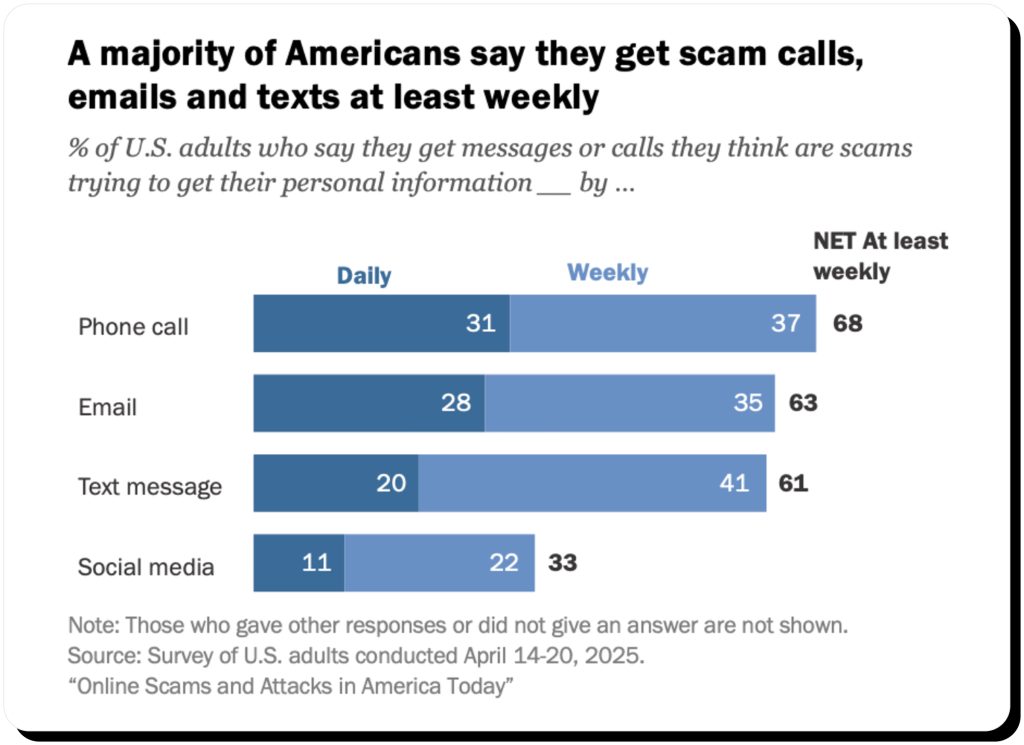
73% of U.S. adults have experienced some kind of online scam or attack, and these are common across age groups. Most get scam calls, texts and emails at least weekly.
Like many others, you’re probably wondering, Why does Spam Risk keep calling me? Here are some common ways Spam risk numbers are getting your information:
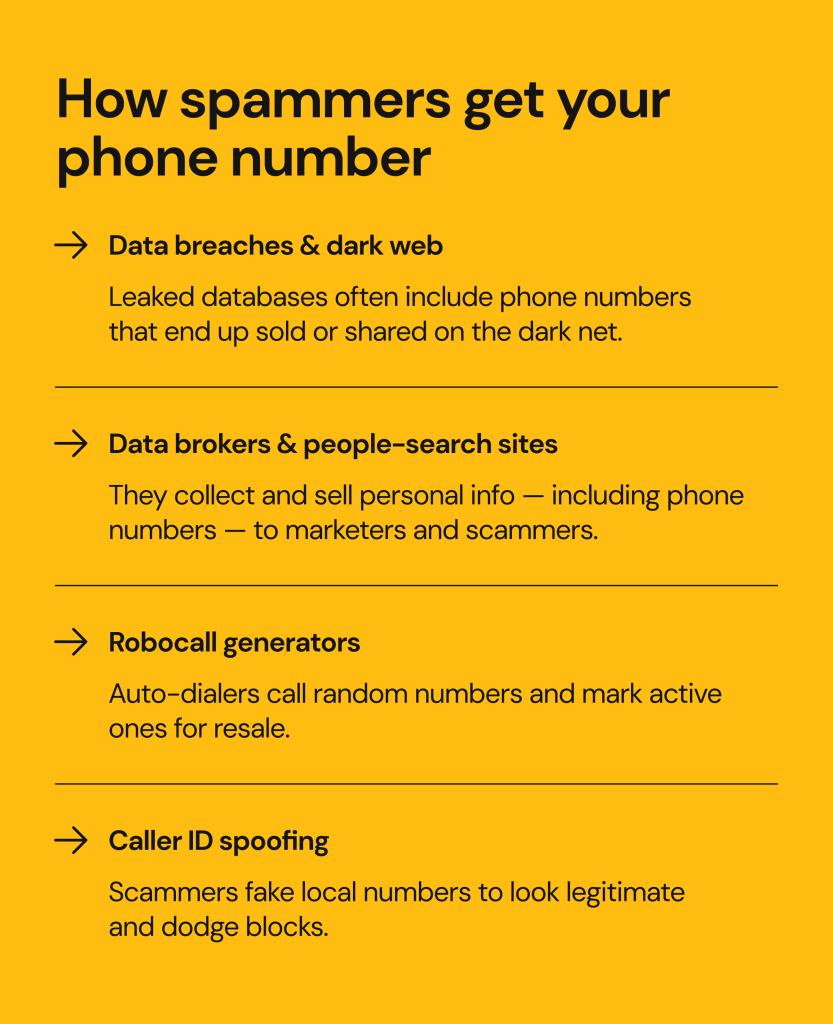
- Bad actors leaked your phone number. Data breaches occur when organizations store valuable user data. Cybercriminals buy and trade your data, including phone numbers and email addresses, on underground forums.
- Data brokers and people-search sites published your number. Some of the top data brokers and people-search sites relentlessly publish your information without consent. Once listed, it’s easy for robocallers and scammers to misuse it.
- Robocallers and auto-dialers test generated numbers. Bad actors use automated dialing systems to test thousands of numbers. If you answer a spam call, they add your number to a live list to sell later.
- Social media profiles can expose your information. Bots scrape your phone number from social media platforms and online business directories. Your private accounts aren’t safe either, as linked pages could reveal your number.
Are Spam Risk calls dangerous?
Yes, we can link Spam Risk caller ID alerts to real-world scams that trick individuals into sharing sensitive information. The most common risks are:
- Voice phishing scams use urgent language, stolen data, and rehearsed scripts to make their attempts more legitimate and pressure you into revealing financial information. Scammers could impersonate your bank’s fraud department while asking you to verify your identity with a credit card number or PIN.
- Social engineering scams heavily exploit trust in brands and agencies like Amazon or the IRS. Scammers claim there was a suspicious charge, a missed delivery, or an order issue to convince you to click a malicious link. Amazon scams are possible because criminals weaponize real customer data circulating in public databases.
- Voice recording scams: Cutting-edge AI technology is a powerful tool threat actors use to emotionally manipulate their targets. Scammers try to capture your voice with AI cloning technology. With a clear recording of you saying ‘yes,’ they can authorize fraudulent transactions or mimic your responses during verification calls.
Even if their pitch doesn’t fool you, some Redditors suggest that declining a Spam Risk call can be as bad as answering it, since it still confirms your number is active. Let spam calls go to voicemail. If a caller is legitimate, they’ll leave a message.
What happens if you answer a Spam Risk call?
You’ve probably thought about picking up a Spam call, but what happens if you do? Some people panic, thinking they’ve been infected with malware or opened the door for hackers to steal their information. Interacting with spam triggers a range of consequences that vary from mild to serious:
- Bad actors tag your number as active. When you answer the call, an automated system confirms that a human answered. It registers your number as “live” and adds it to a list for telemarketers and scammers.
- Your number is added to more spam lists. With your verified number, scammers freely sell or share it with other databases. This is why blocking spam numbers rarely stops the calls.
- You’re tricked into sharing sensitive data. A scammer’s goal is to extract as much information from you by any means necessary, even resorting to tricks. Usually, these callers are after your name, address, or banking information.
- Scammers record your voice for fake verification attempts. Some spam operations will record you using AI voice cloning tools. With your voice recordings, they can manipulate voice verification systems or impersonate you to authorize fraudulent transactions.
Answering a Spam Risk call doesn’t infect your device. Engagement is what bad actors want, and even accidental engagement makes you a target. The safest move is to avoid interacting with spam calls.
If you’re concerned that your phone is compromised, learn how to know if your phone is hacked.
Can Spam Risk calls be legitimate?
Yes, not every Spam Risk alert means the call is dangerous. There are legitimate organizations, like hospitals, banks, delivery companies, and service providers, whose calls are flagged due to their calling habits. A delivery service might use an automated system to call customers about incoming packages or failed deliveries.
These companies make bulk calls that often go to voicemail. Telecom providers frequently share updates about maintenance, upcoming service changes, or billing notices. Answering these calls could provide information about service upgrades, payment issues, or service outages.
If you’re expecting updates about a flight, job offer, or doctor’s appointment, it’s worth letting the call go to voicemail to confirm. If you’re unsure who’s calling you, ignore it and find a callback number through official channels. Typically, you can find official contact information on:
- The back of your bank card
- Your healthcare provider’s app or website
- A website listing official customer service numbers
Why the problem won’t go away anytime soon
For now, Spam Risk calls will continue. The global system is broken, fragmented, and easy for scammers to exploit. Here’s why:
VoIP spoofing from overseas
Many spam operations are taking advantage of new, useful privacy-enhancing tools, like VoIP, to place millions of calls at low rates with non-identifiable numbers. They can also spoof caller IDs to fool their targets more easily by making their numbers look like local businesses or sharing the same area code. Spammers know that international VoIP networks aren’t bound by the same rules, and even with STIR/SHAKEN authentication, spam still slips through thanks to massive security gaps.
Inconsistent global enforcement
Inconsistent enforcement is the most obvious example of why regulating spam risk calls is failing. Sometimes regulatory organizations successfully identify bad actors, but enforcement rarely extends past national borders. This is why countries with weak oversight or minimal cooperation agreements with the FCC are the ideal place for spam operations to originate.
The FCC could issue fines or demand shutdowns, but inconsistent enforcement rarely leads to impactful improvements. Recently, the FCC proposed $300 million in penalties against auto-warranty robocalls that inspired dozens of memes, but the reality isn’t funny. The FCC issues fines often, but is rarely able to collect them.
The Do Not Call List has limited reach
In the past, many individuals put their trust in the National Do Not Call Registry. They believed its job was to protect them from robocall harassment. It does limit legitimate telemarketing calls, as these agencies are required to comply, but criminals often gnore it entirely. Spammers don’t care about their reputations or receiving penalties for their activities.
Weak consequences and financial incentives
There’s an economic system to spam calling that still favors threat actors. VoIP services cost pennies per call, which means only a handful of successful phishing attempts can offer enormous profits. Since fines are rarely enforced, there’s very few consequences to deter offenders.
Sometimes, spam operations will cycle through disposable phone numbers and shell carriers to stay ahead of regulators. There’s also the real threat of AI-generated voices in scams, or deepfakes that sound like customer service agents, relatives, or trusted representatives. The FCC warns that AI voice clones can make spam operations harder to detect, especially when criminals combine them with spoofed caller IDs.
Nothing will change until the industry and international regulations evolve enough with technology to close the gaps.
How to block Spam Risk calls
Stopping every unwanted call is impossible, but you can effectively reduce or block them. Here’s how to regain control of your privacy on different devices and networks.
On iPhone
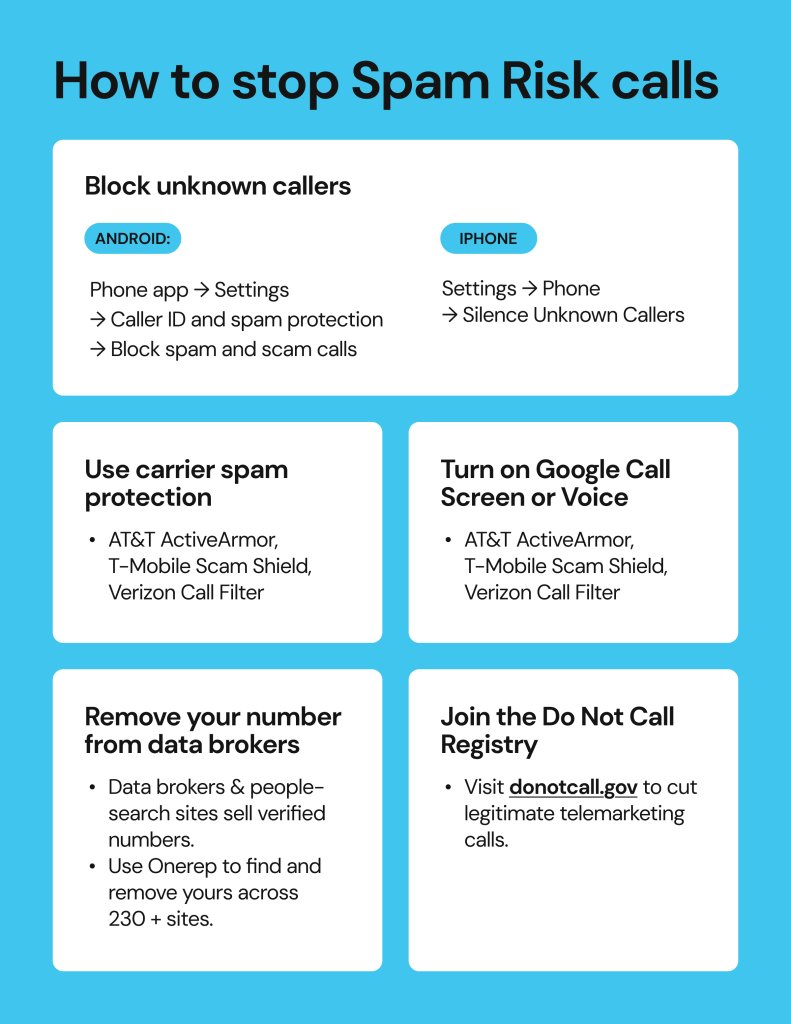
- Open Settings > Phone > Silence Unknown Callers: This setting sends calls from unknown contact numbers to your voicemail.
- You can block specific numbers by opening the Call Menu > Recents > (i) next to the call > Block this Caller.
- If you want broader protection, install verified call-filtering apps like Hiya, then activate them under Settings > Phone > Call Blocking & Identification.
On Android
- Open the Phone app > Recents > tap and hold the number > Block/report spam.
- You can automatically screen unknown numbers. Go to Settings > Caller ID & Spam Protection and turn on both options.
- Some Android devices offer Call Screen, a feature that uses Google Assistant to screen unknown numbers and display transcribed responses.
On landlines
- Register your number with the National Do Not Call Registry.
- Use your provider’s blocking codes:
- AT&T: Dial *60 to turn on call blocking.
- Verizon: Dial *77 to block anonymous calls.
- Ask your provider about VoIP call-blocking tools, or use physical call blockers that connect to your phone and use a constantly updating list of known spam numbers.
Through mobile carriers
- AT&T ActiveArmor: A free app offering network-level protection to block known spam numbers while labeling other suspected spam as needed.
- Verizon Call Filter: A service that detects and blocks high-risk calls; users can upgrade to add more detailed caller ID information and spam lookup.
- T-Mobile Scam Shield: Is a built-in network of protection for its customers. Dial #662# to activate scam blocking or download the Scam Shield app for better controls.
Third-party apps
Some community-based spam-blocking apps are well-known and may offer additional protection:
- Truecaller – Uses a massive, crowdsourced database to identify and label spam callers in real-time.
- Hiya – An app that’s incorporated into AT&T, Samsung, and other devices to detect and block fraudulent calls before they reach you.
- RoboKiller – A well-known app that blocks known spam numbers and uses AI “answer bots” to engage scammers to prevent repetitive calls.
How to reduce spam calls long-term
Blocking spam calls may help, but if lasting relief is what you’re after, then it will take limiting how easily bad actors can find your number, sell your information, or reuse it in other scams. Anyone can start proactively defending their privacy by:
- Keeping your numbers private online, as threat actors can use your phone to link your digital identity across other platforms. Don’t post it on websites, social media, or online marketplaces.
- Using a secondary number for sign-ups to keep your primary number out of circulation. Many spam lists are created from online forms, free trials, and app registrations that actively sell user data. Consider using a burner phone for less important sign-ups, contests, or newsletters.
- Reporting Spam Risk calls to regulators. File a complaint with the FCC for robocalls or spoofing. Reporting these incidents helps regulators track large-scale spam operations and identity carrier loopholes.
- Checking your social media privacy settings, as each platform is another source of exposure. Check which contact information is visible on your Facebook, Instagram, LinkedIn, and TikTok accounts. Disable settings that let other users search your number or make it visible to people you don’t know.
- Learning where your number publicly appears online. Regularly check whether your phone number is listed on data broker and people-search sites. One way to do this is by manually searching your name + city/state on Google and reviewing results. This method works, but it can take time to check each listing.
How Onerep helps reduce your exposure to future spam calls
Countless Spam Risk calls often come from spammers and bad actors who buy your sensitive information from data brokers and people-search sites. These companies collect personal information, like names, addresses, phone numbers, and social profiles from public sources, then sell it to marketers and other not-so-innocent parties.
Once your number appears in these databases, it’s exploited and resold over and over, fueling more spam lists and robocall campaigns. To learn more about how this data ecosystem works, see this article on What is a Data Broker?
Onerep can interrupt this cycle by reducing your potential for exposure with a three-step process that:
- Scans 240+ data broker sites to find your number and other sensitive data where it appears.
- Sends automatic removal requests to each site on your behalf, handling this time-consuming process for you.
- Monitors and rechecks those same sites to see if data brokers relist your information again.
Removing your number from public databases significantly reduces the likelihood that bad actors can access and exploit your info. With fewer public listings, there’s less opportunity to target you, which limits Spam Risk calls at the source.
FAQs
Why does my phone say Spam Risk?
Your phone shows “Spam Risk” if your carrier flags a potentially unwanted or fraudulent number. Carriers like AT&T and Verizon use analytics, user reports, and call pattern data to detect suspicious numbers.
Should you answer Spam calls?
No, you shouldn’t answer them. Picking up confirms your number is active, leading to more calls in the future. Let it go to voicemail and block it afterward.
Are Spam Risk calls always spam?
No. Some spam calls are false positives and likely come from healthcare providers, government organizations, or delivery services using automated calling systems.
Can you get hacked by answering a Spam Risk call?
No, answering it won’t install malware or hack your phone. The risk comes from sharing personal information or responding to prompts.
Why do Spam calls always have local area codes?
Neighbor spoofing is a tactic many scammers use to disguise their numbers. This makes calls appear to be from local organizations, increasing the odds that you’ll answer them.
Why am I still getting spam risk calls after blocking them?
Blocking a spam number rarely stops the calls, as scammers can easily spoof new ones and generate new identities.

Mikalai is a Chief Technical Officer at Onerep. With a degree in Computer Science, he headed the developer team that automated the previously manual process of removing personal information from data brokers, making Onerep the industry’s first fully automated tool to bulk-remove unauthorized profiles from the internet.