 Published January 5, 2026
  read
read
Can someone track my phone? Here’s how to find out
Can anyone track your phone location, especially without you knowing? That’s a scary prospect for many people, considering the vast amount of personal data tracked about us, with or without our permission.
If you’re wondering how someone can know your location via your phone when you didn’t share it with them, and whether it’s possible at all, read this guide for a complete list of ways and signs your phone location can be tracked, including protective measures to prevent or stop this tracking.
How can someone track your phone location?
There are several everyday technologies that can track your phone in legitimate ways, with your consent. There are also ways for malevolent actors like hackers, spies, and stalkers to track your phone illegally via malware secretly installed on your device. Let’s look at whether and how anyone can track your phone location.
GPS permissions for apps
Many modern apps for iOS and Android connect to GPS satellites to identify your location and enable their features with your permission. Examples include online maps, navigators, weather forecast services, rideshare apps, and social media platforms, all of which require GPS access to function. When installing these apps, they typically ask for your permission to use your device’s location—a setting you can later manage or disable in your phone’s app permission settings.
Built-in location sharing services
Some app and device features, such as Apple’s Find My, Google’s location sharing, WhatsApp Live Location, or Snapchat’s Snap Map allow you to share your location with trusted contacts like friends and family. These features are completely voluntary, and you remain in control of location-sharing settings and duration.
Public Wi-Fi and Bluetooth signals
Your phone can be constantly “broadcasting” its location even with GPS tracking turned off when Wi-Fi or Bluetooth is enabled. Local stores, public spaces, and nearby devices can track your phone’s signals and estimate its location. This information typically remains anonymous unless the Wi-Fi network is compromised by cybercriminals.
Cell tower triangulation
To make calls and send texts, your phone needs to connect to nearby cell towers. Carriers use this information to roughly calculate your location. Some carriers and networks also offer family plans that allow parents to monitor their children using this functionality.
Spyware and stalkerware apps
Spyware and stalkerware represent illicit location-tracking methods that can allow someone to track your phone even if your location is turned off. Spyware is also the reason you may receive a security alert from Apple warning that your phone has been targeted in an international spyware attack, though such cases are extremely rare.
Once secretly installed on your device, these programs can track your GPS location, access your microphone and phone camera, and forward media, calls, and messages. These installations often happen as a result of social engineering scams, when victims are tricked into clicking malicious links that trigger a download in the background.
Compromised Apple or Google accounts
If someone gains access to your Apple ID or Google account, they can remotely view your location history and current device location via built-in cloud services such as Find My iPhone or Find My Device, without physically accessing your phone.
SIM swapping
A type of phone hack, SIM swapping happens when criminals trick your carrier into transferring your mobile number to their SIM card. This lets them gain access to phone-number-connected accounts, two-factor authentication codes, and location tied to calls and texts.
Cell-site simulators (Stingrays)
Cell-site simulators are cellular surveillance tools typically used by law enforcement under a warrant. They mimic cell towers to gather approximate location data and are not stalking tools for precise phone tracking.
Can someone track your location with just your phone number?
The short answer is both no and yes. A regular person who knows your phone number can’t track your location, as the number doesn’t provide access to your GPS information, live movement, or precise address. However, law enforcement agencies and mobile carriers can, under specific legal conditions, track your location using network data supplied by cell towers.
As your phone constantly connects to nearby cell towers to make calls, send texts, or use data, mobile carriers can estimate your phone location based on which towers it connects to, signal strength and timing, and movement patterns. When data from multiple towers in your area is located, this is called cell tower triangulation, which allows narrowing down your location, often within tens or hundreds of meters.
Cell tower triangulation is less precise than GPS tracking but can still be informative for investigative purposes. Law enforcement can request and access this data from a mobile carrier if they have legal authorization, such as a warrant, subpoena, or court order.
In emergency situations, mobile carriers can also provide real-time or near-real-time location data to help locate missing people or individuals in danger.
Signs your phone may be tracked
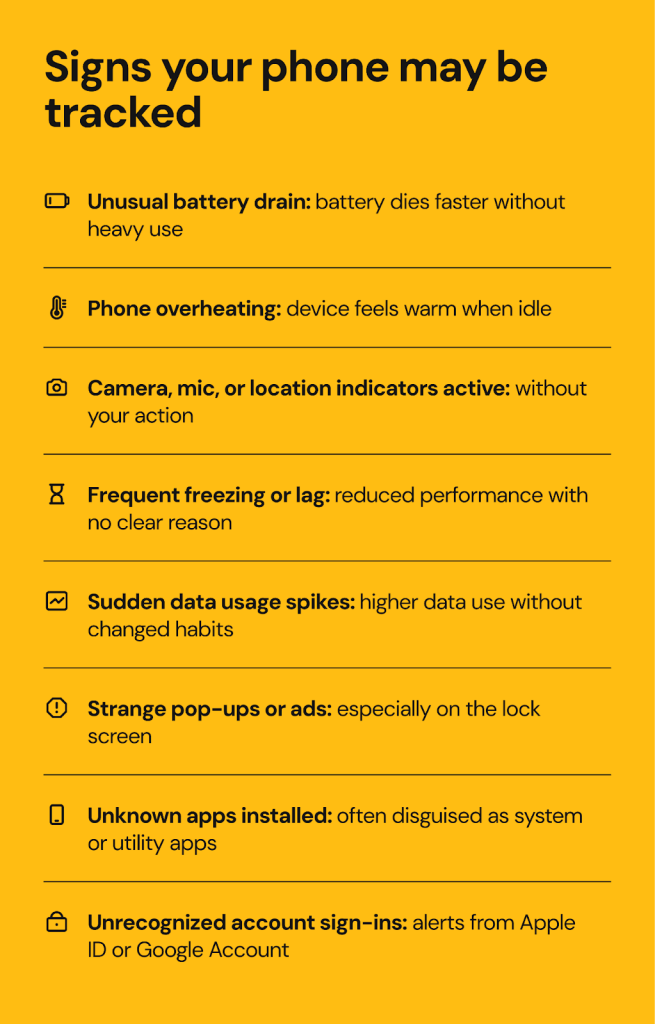
Can someone really track your phone without you knowing? In most cases, you’re bound to notice something unusual happening to your device, much like in the case of phone tapping. However, a single sign rarely proves anything, so look for a combination of the following suspicious symptoms that may indicate your phone is being tampered with:
- Unusual battery drain. You may notice unusual patterns of battery use, such as sudden drops in battery life when you’re not doing anything resource-intensive. If malicious apps are running in the background, they can consume a lot of your device’s energy.
- Overheating. This is a common sign of phone tampering, including cases where your phone location is being tracked without your knowledge. If your phone gets noticeably warm when you’re not actively using it, something may be operating in the background, such as GPS tracking or data transmission.
- Phone indicators are on. You may notice green or orange dots on your phone’s screen, indicating that the camera or microphone are active at the moment. The same applies to a location-tracking icon appearing in the upper screen bar. Watch for these signs, especially if you didn’t enable these features yourself.
- Frequent phone freezing. Constant background tracking may reduce your phone’s processing power, increase memory consumption, and slow down performance.
- Data usage spikes. If you notice a sharp increase in data usage while your browsing habits haven’t changed, there may be spyware sending collected data to remote servers in the background.
- Strange pop-ups and ads. If you see excessive pop-ups or ads on your lock screen, it can be a sign of malware installed on your device.
- Suspicious apps you don’t recognize. You may notice unknown apps on your device while browsing your list of installed apps. Stalkerware is often disguised as “system” or “utility” apps.
- New sign-ins to your Apple ID or Google Account. If location tracking stems from a compromised cloud account, you may receive alerts about new sign-ins that aren’t yours.
Be aware that these symptoms may also result from factors such as an aging battery, an outdated device or operating system, weak signal areas, or legitimate app updates. That’s why it’s important to pay attention to multiple signs appearing together, especially if you believe you’ve fallen victim to identity theft or account takeover.
What to do if your phone is being tracked
If multiple signs point to the probability of your phone location being tracked, there are several ways you can stop this from happening. You should act systematically to fix the problem and collect evidence if phone tracking is confirmed.
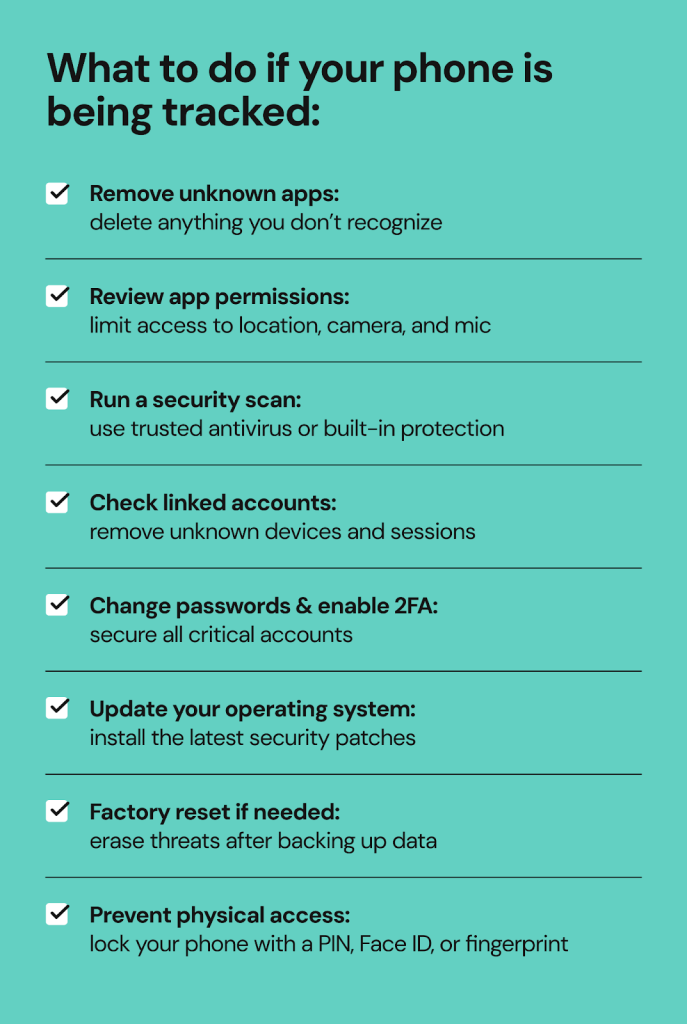
1. Monitor and delete unknown or suspicious apps
Go to your phone’s apps section and remove any app you don’t remember installing or whose source you can’t recognize. Some malicious apps, such as spyware or keyloggers, are disguised as system or utility apps. After uninstalling them, restart your phone.
2. Review app permissions
Go to your phone’s privacy and security center and review your app permissions. Look carefully at which apps have access to your location, camera, microphone, contacts, and accessibility services, as well as those that autostart when you turn on your phone and stay active in the background. You can remove these permissions manually.
3. Run a full-on security scan
If there’s malware running on your device without your knowledge, run a security scan using a trusted antivirus or mobile security tool to detect malicious programs or configuration profiles. On Android, you can also use the free Google Play Protect service. On iPhone, rely on authorized software updates and profile checks.
4. Check for linked accounts
Open your Apple ID or iCloud dashboard (on iPhone) or your Google Account settings and look for unknown devices, unfamiliar login sessions, or strange data backups. Remove these and sign out of any sessions you don’t recognize. Change your account password and ensure two-factor authentication is enabled, preferably using a passcode or authentication app rather than your phone number.
5. Change passwords and enable 2FA for all critical accounts
If your phone is being tracked, chances are your private accounts have been compromised as well. To prevent malicious actors from taking over your accounts and exploiting your data, update passwords for your Apple or Google accounts, as well as your email, social media, and online banking accounts, and enable two-factor authentication wherever possible to prevent unauthorized access.
6. Update your operating system
Keeping your OS patched is a fundamental mobile security practice. Make sure your phone’s operating system updates regularly, as updates can fix security gaps and add an extra layer of protection.
7. Consider a factory reset
To make sure you get rid of all unwanted settings, potentially malicious programs, and suspicious behavior of your device, perform a full factory reset. Before doing this, make sure to back up your critical information and essential personal files stored on your phone. Afterward, reinstall the apps you use slowly and intentionally to prevent malware from creeping back in.
8. Stay alert to physical access
If someone has physical access to your phone, they can tamper with it manually. To prevent this, lock your screen with a PIN and enable fingerprint or Face ID authentication for added security of your device.
When to contact law enforcement
Illegal tracking is a crime, and you have the right to contact and engage your local law enforcement agency if:
- Someone is tracking you without your consent.
- You’re being stalked and/or threatened.
- You have evidence of being harassed.
- You’re in immediate danger.
In these situations, law enforcement can help document evidence and issue protective orders if necessary.
If you’re unsure about your situation and are not in immediate danger, speaking with a lawyer or a victim support organization can help you understand your options.
How to reduce the chances of someone tracking your phone
Preventing unauthorized tracking of your phone location comes down to developing smart digital habits that help prevent any kind of cybercrime potentially targeting you. Such smart habits include the following simple steps:
- Audit your installed apps and their permissions regularly. Review which apps have access to your location, phone camera, microphone, and storage. Turn off unnecessary permissions and uninstall suspicious apps as needed.
- Set location settings to “while using the app” only. Avoid allowing apps to access your location at all times, as this is highly insecure and can potentially aid stalkers.
- Disable location sharing. Whenever possible, turn off constant GPS sharing unless required. After use, disable Wi-Fi, cellular data, Bluetooth, and nearby device discovery.
- Avoid unsafe downloads. Install mobile apps only from authorized app stores or trusted sources. During installation, avoid granting excessive permissions. Stay away from direct APK downloads, apps from unknown developers, and files sent as attachments via texts or emails.
- Don’t click suspicious links from unverified contacts. Be wary of phishing attacks disguised as legitimate messages that include links, even if they appear urgent or relevant. Cybercriminals may impersonate trusted brands, your known contacts, or love interests to lure you to malicious websites that can install malware and transmit your location.
- Review device management settings. Check “Find My” and location-sharing lists, device admin rights (on Android), and configuration profiles (on iPhone) regularly, and remove anything that looks suspicious or unrecognizable.
- Protect your SIM card and phone number by asking your carrier for SIM-lock or port-out protection to prevent SIM swap fraud.
- Use strong authentication. From your phone’s screen lock to biometric authentication, secure and unique passwords, and MFA, make sure your device and critical personal accounts have all available security features enabled to prevent unauthorized access and exploitation.
- Minimize what you share publicly. Avoid posting your real-time location online, checking in on social media, and enabling photo geotagging to reduce the amount of personal information available online. In cases where heightened privacy is required (without illegal intent), you may want to use a burner phone, though this practice has its limitations and requires you to reveal your identity when buying one.
- Consider deleting your digital footprint. The less information there is about your identity, place of residence, contact details, and interests, the harder it is for cybercriminals to fabricate a fake persona and socially engineer you into revealing sensitive data or unknowingly downloading spyware. Consider services like Onerep to remove your publicly available information from hundreds of websites automatically.
Legal considerations of phone tracking
Phone tracking is a highly sensitive matter, and your consent is a key factor in whether it’s considered legal. In most regions of the world, tracking someone’s phone without their knowledge is considered a violation of privacy laws.
When tracking is legally allowed:
- When parents or guardians monitor a minor’s phone to oversee their safety.
- When employers track company-owned devices, with a clear workplace policy explaining what data is collected and why.
- When there are mutually consensual arrangements, for example between friends or family members who use location-sharing services via specialized apps, messengers, or Google Location Sharing. In this case, you know exactly who can track your phone and can turn it off at any time.
- When law enforcement uses proper warrants to track someone’s location under strict legal oversight for investigative purposes.
When phone tracking is illegal:
- When an adult’s phone is secretly monitored without consent, including by partners, strangers, and hackers. Hidden GPS apps and stalkerware are illegal in many regions.
- When someone breaks into your Apple or Google account without permission, which is generally considered a cybercrime.
- When your location tracking information is used to harass, stalk, or intimidate you, even if your permission was obtained prior to that.
To reiterate, you have strong legal rights over who can access your location, for what purposes, and for how long. If your location information or the tracking process is abused, you can seek legal assistance, including contacting law enforcement if necessary.
FAQs
Can someone track my location with just my number?
Generally, people cannot track you using only your phone number, as it doesn’t reveal GPS information. However, law enforcement agencies can request this information from your mobile carrier based on cell tower data analysis under legally authorized circumstances to aid an investigation.
What app can tell me if I’m being tracked?
There’s no single app that can definitively reveal this, but you can use Google Play Protect, mobile security tools, and your device’s built-in account security features to check for suspicious apps, excessive permissions, or compromised accounts on your device.
Can I block someone from tracking my phone?
Not directly, but you can enable your phone’s security features and clean up apps and permissions to reduce the risk of being tracked. If necessary, you can also perform a factory reset to remove potentially harmful programs.
Does turning off data or Wi-Fi stop tracking?
It may block certain types of tracking, but your location can still be estimated via GPS, Bluetooth, and cellular signals exchanged with cell towers. For maximum privacy, consider disabling these features as well.




Mikalai is a Chief Technical Officer at Onerep. With a degree in Computer Science, he headed the developer team that automated the previously manual process of removing personal information from data brokers, making Onerep the industry’s first fully automated tool to bulk-remove unauthorized profiles from the internet.