 Published February 24, 2026
  read
read
How to tell if someone blocked your number: through text, call, and app
Wondering if someone blocked your number is often a nerve-wracking experience. Unfortunately, most apps don’t display any sort of official notification that someone doesn’t want to be reached.
There are, however, some signs that could indicate blocking, especially when the same issues keep happening, rather than being caused by a one-time technical problem.
This article breaks down how to tell if someone blocked your number through text on different devices, presenting both a quick checklist of what to look for and an in-depth explanation. We’ll also cover how to block someone yourself and how to protect your privacy long-term.
There’s no single way of saying that someone has blocked your number. However, when several indicators appear together and persist over days or weeks, blocking becomes more likely.
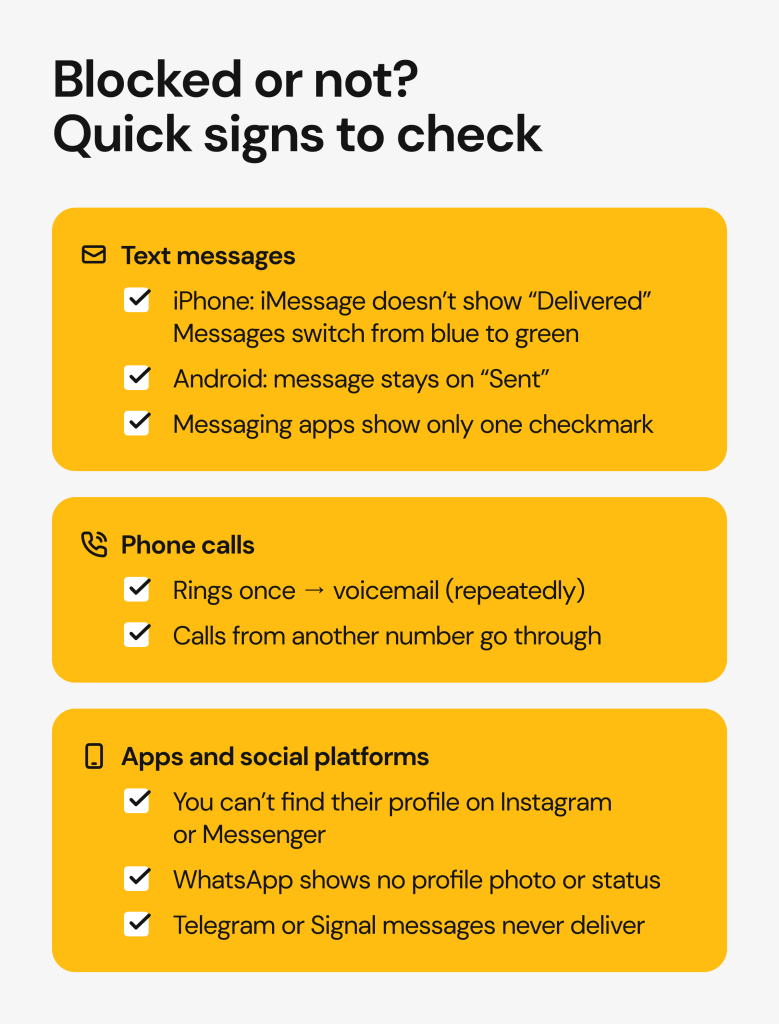
- Calls consistently ring once or not at all, and go straight to voicemail.
- On iPhone, iMessages switch to green and stop showing “Delivered,” while FaceTime calls fail.
- On Android, messages remain marked as “Sent” but never “Delivered”.
- You’re blocked on social media or messaging apps as well.
Here are the signs to watch for:
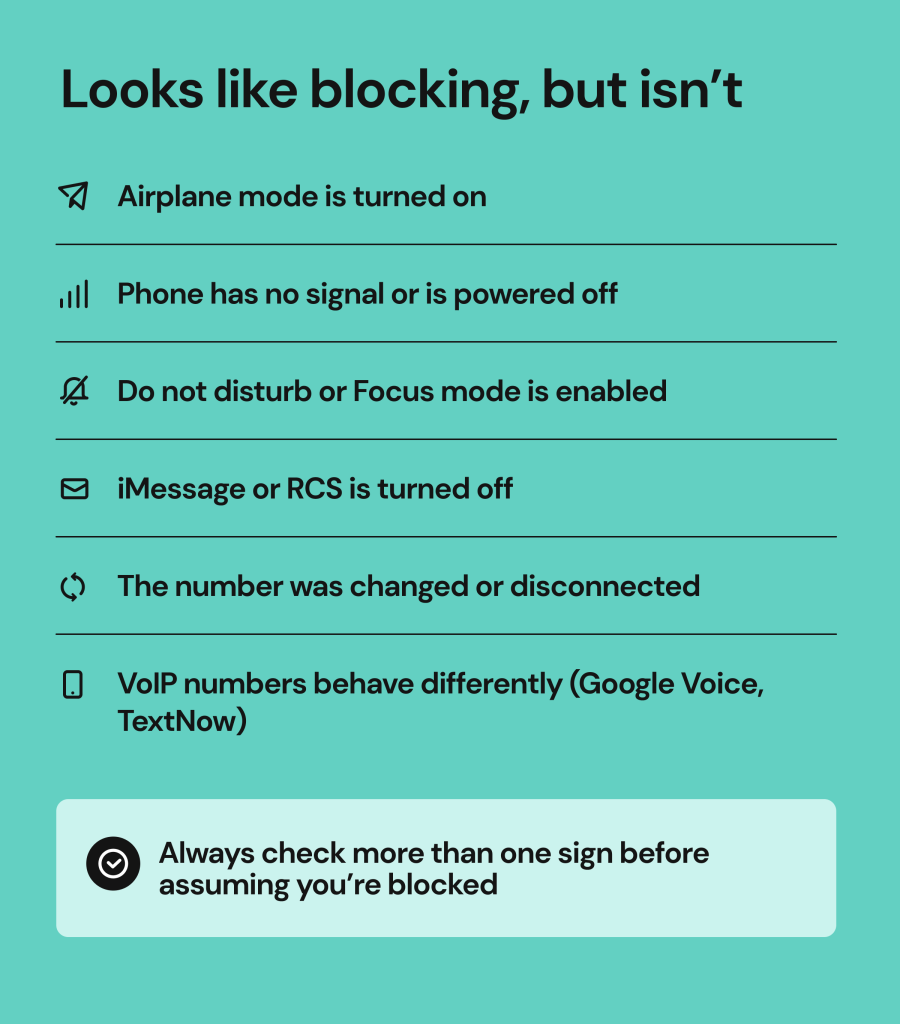
Before you assume you’re blocked, rule out common lookalikes
A few technical issues can make it look like you’ve been blocked, even when that’s not the case. Let’s look at those possibilities first.
Some phone settings can mimic blocking
Regular phone settings can block your calls and messages from going through.
- Do not disturb/Focus modes on iPhone. These are normally meant to reduce interruptions when a person is unavailable, working, or studying.
- Airplane mode. Could they be on a flight? If so, they might have turned on airplane mode and are temporarily out of service.
- Silence unknown callers. Some people’s phones automatically block unknown or hidden callers. Are you sure that they have your number? If not, that could be your answer.
Read more:
How to call private: step-by-step guide to hiding your number and protecting your privacy
Spam Risk calls explained: what they mean, why you get them, and how to stop them
No caller ID number: What it means, who’s behind it, and how to protect yourself
Network and account issues can stop texts
Technical problems are often overlooked.
- No service, dead battery, or carrier outage. Poor reception or a dead phone could be the reason for calls not going through. Sometimes carrier issues delay the delivery of messages.
- A change of number of a disconnected line. Has this person perhaps changed their number or cancelled their phone plan? This can result in messages not being delivered, or an automated message when calling.
- VoIP numbers behave differently. Numbers from apps like Google Voice, TextNow, or other internet-based services don’t always follow standard SMS rules. For example, delivery receipts and error messages may not be displayed.
iMessage vs RCV vs SMS confusion
You are wondering how to tell if someone blocked your number through text, but what type of text?
The good old SMS is barely in use, and messaging systems like iMessage (iPhone) and RCS (Android) have taken over.
Modern messaging systems need both the internet and cellular SMS networks to provide all the features we are so used to: delivered status, read receipts, typing indicators, and more.
When an iMessage turns from blue to green, it has been sent as an SMS instead of an iMessage. This doesn’t automatically mean the recipient blocked you; they might be out of internet connection, turned off iMessages, or switched devices.
On Android, not seeing the “Delivered” indicator could mean they are out of internet or changed their device settings. It could also be a sync bug or an issue with connecting to the server, so give it some time before jumping to conclusions.
How to tell if someone blocked your number through text on iPhone
If you are looking for answers on how to tell if your texts are blocked, your iPhone can offer a few clues.
Sign 1: iMessage no longer shows “Delivered” or “Read”
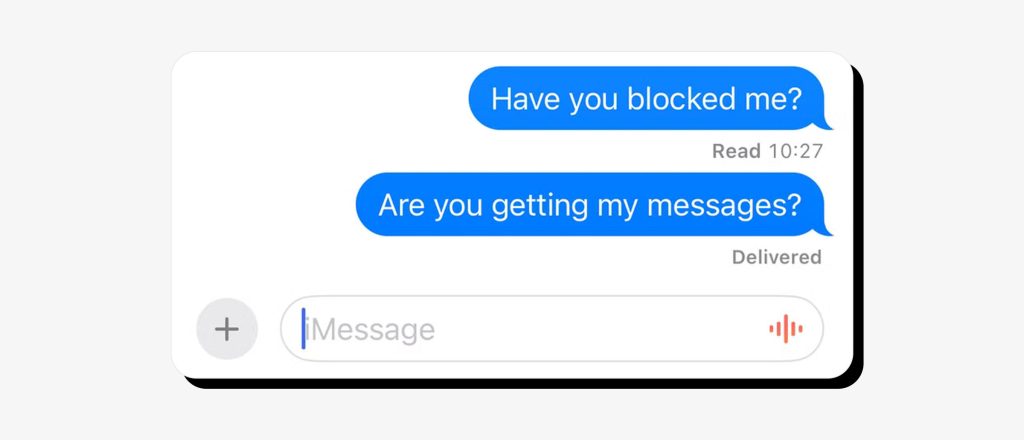
Normally, iMessage shows “Delivered” when the message reaches the recipient’s device. If read receipts are enabled, you may also see “Read.” So, how to know if someone blocked you on messages?
If “Delivered” or “Read” indicators suddenly disappear and don’t come back over the course of several days, it’s possible that the person blocked your number.
Remember that iMessage changes could also be due to an internet data outage or changed settings. Confirm this sign in the context of other cues.
Sign 2: iMessage changes from blue to green
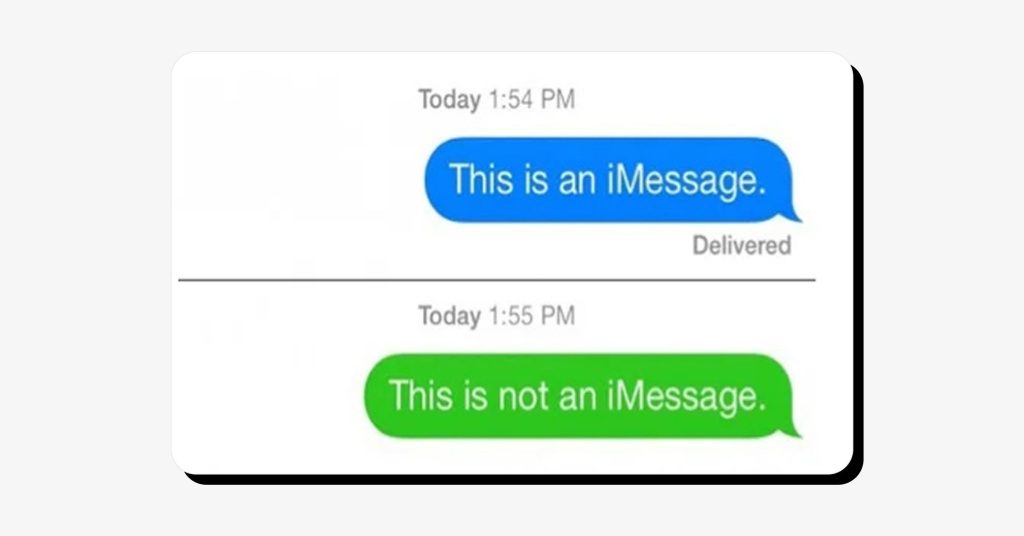
What does it look like when someone blocks you? iMessages go from blue to green.
iMessages sent via the internet data are displayed as blue bubbles. Green bubbles indicate that the text was sent as an SMS instead of iMessage. This can happen due to a variety of reasons, but if the problem persists, it could also be a sign of a blocked number.
Sign 3: Your message fails with an error
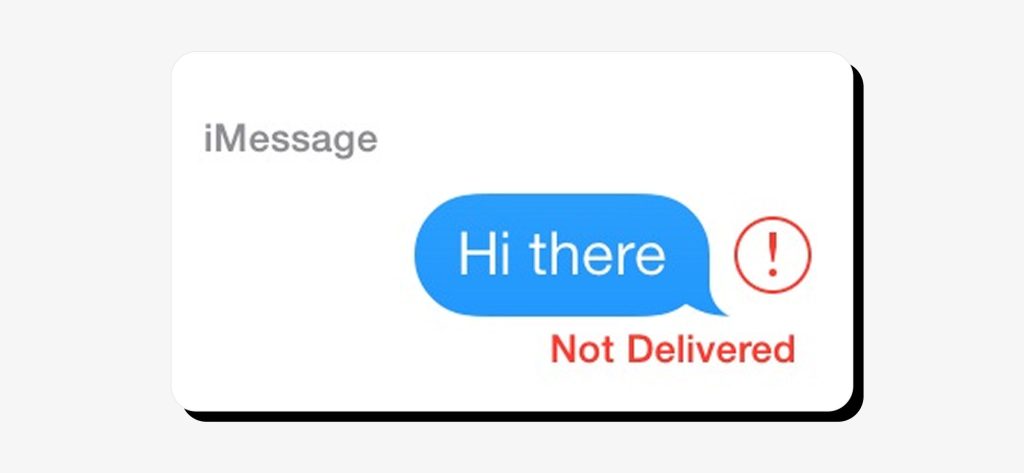
Sometimes the message will show a red exclamation mark and display “Not Delivered”.
This means it failed to send, which can happen due to a variety of reasons. The recipient might be having issues with their carrier or be temporarily out of service. The issue could also be on your end if your signal is poor.
An error message is more often caused by technical issues than a blocked number. Sometimes, though, if it keeps happening, it could signal a block.
Sign 4: FaceTime signals
If somebody blocked you, FaceTime calls won’t go through. They may ring once on your end only or fail immediately.
That said, FaceTime call issues can arise due to other reasons, such as poor internet or the recipient’s phone settings.
How to tell if someone blocked your number through text on Android
Android users might have a harder time telling whether someone blocked their number. Different phones, apps, and carriers handle texts differently, so blocking cues are less consistent than with iPhones.
Sign 1: No delivery indicators (or indicators that don’t change)
What does it say when someone blocks you on Android?
This is tricky territory. Android messaging apps are notoriously inconsistent. Some don’t show status at all, some show “sent” but never update, some show delivery cues only for certain carriers or message types.
If you are using Google Messages with RCS, you should see all the delivery indicators, but even those can fail for many reasons.
So, if your favorite messaging app suddenly starts behaving differently and the problem persists for a longer time, that could be a sign someone may not want to hear from you.
Sign 2: You get a carrier message like “message blocking active”
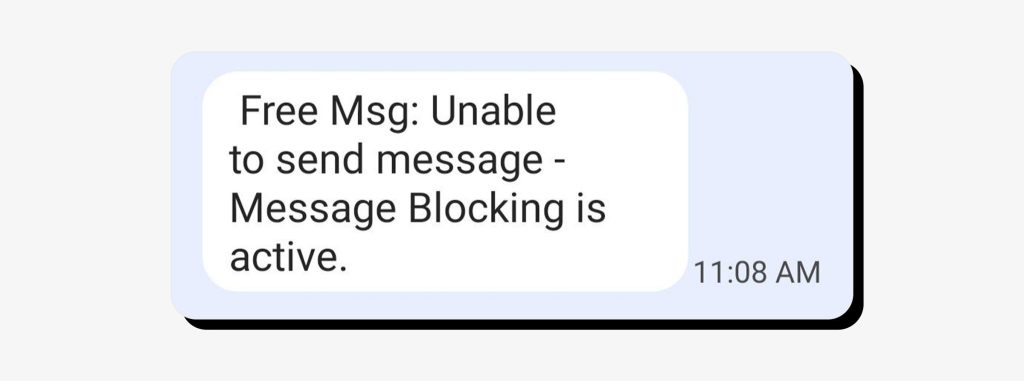
Have you received an automated carrier response such as “Message Blocking is Active” or “Unable to send message”?
This can be a sign that somebody blocked your number. It can also mean other things:
- Your carrier plan reached its messaging restriction
- The recipient has spam filtering on, so their carrier is blocking messages
- There’s a temporary network or routing problem
- The recipient’s number is inactive or disconnected
Remember that these are automatic messages sent by the carrier, not the person you’re trying to text.
Sign 3: Messaging behavior changes when you switch between RCS and SMS
RCS is the Android equivalent of iMessage. So, if the messages suddenly start falling back to SMS, there could be an issue. Ask yourself:
- Is “Delivered” being displayed? You may see “Sent” instead, which only means the message was sent from your phone, not that it actually reached its destination.
- Are you seeing “Read” receipts? If not, your number could have been blocked.
- Are attachments sending properly? If there is an error, that’s another sign.
- Are you getting a response? How long has this been going on? Time is perhaps the most reliable cue that someone is actively avoiding your texts.
Sign 4: The “suggested contact” trick
Here’s an Android-specific cue that’s very famous but not rooted in any real evidence.
It goes like this: you delete their contact and start typing their number to send a new message. If you don’t get a suggestion, it’s supposed to indicate a block.
There are a few issues with this approach: while it may have worked for some people, it doesn’t mean it’s always applicable. The suggestion might disappear for many reasons, such as your phone reindexing contacts, the app updating, Google services sync lag, and more.
Tests that help confirm blocking without guessing
If you’ve ruled out technical issues, the following tests may strongly indicate that your number has been blocked.
None of these should be used to pressure or bypass someone’s boundaries. If somebody has really blocked you, respect their need for distance.
Test 1: Call pattern test
Contemplate if there is a pattern of failed calls over time:
- Do you hear one brief ring, then voicemail?
- Are calls consistently failing or going to voicemail?
- Has this been going on for several days?
Test 2: Try a different channel
Instead of endless texting, try a different way to reach them:
- Send a brief, neutral text via another social network or app (like Facebook or Telegram)
- Send a brief, neutral email
- If possible, ask a mutual contact to check in with them
- If possible, ask them directly and respectfully what’s going on
If they do respond to alternative channels of communication, this could be a confirmation that your number is blocked. There could also be technical issues, depending on the answer.
If they don’t respond anywhere, that also tells you something important, and perhaps you should stop pursuing them.
Test 3: Try another number or device, with caution
This test can give you a more definitive answer, but it shouldn’t be misused for repeated checking or harassment.
Use someone else’s number or device to call the person in question, but only to be sure whether your number is blocked, not to disturb them further.
If another number goes through and yours doesn’t, that’s a strong sign of blocking.
Can you tell if you’re blocked without texting or calling?
Short answer: no. Apps will never tell you that you’ve been blocked to protect the privacy of the other person. There’s no single sign that you’ve been blocked, or a mistake-proof test.
Third-party “block detector” apps may claim to provide definitive answers, but that’s a red flag. Remember that they also rely on guesswork.
How to tell if you’re blocked on popular messaging apps
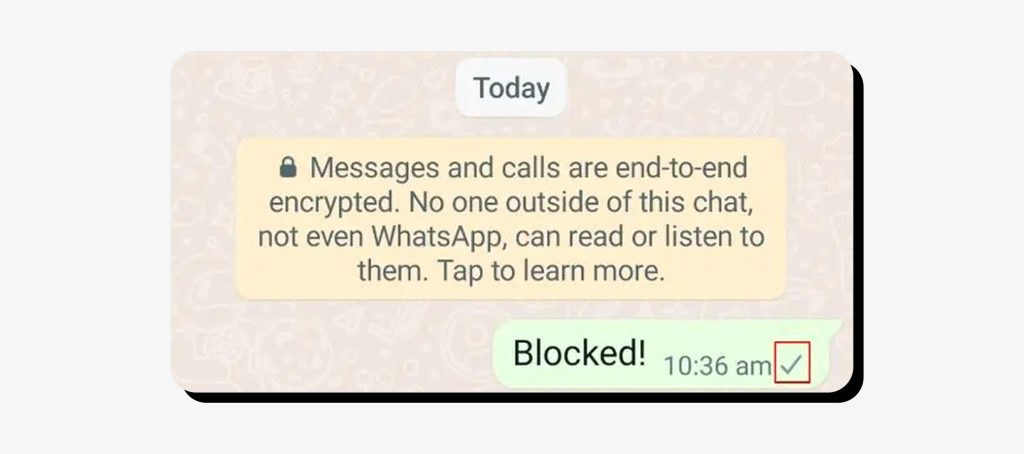
You might be wondering: how can you tell if someone blocked you on other messaging apps or social networks? Signs can vary.
On WhatsApp, one gray check means the message was sent but not delivered, while two gray checks mean it was delivered. Blue checks (read receipts) only appear if both of you have them enabled, so not seeing them isn’t proof of anything.
If messages stay stuck on one check, the recipient’s phone might be off or without internet. If it stays like that for a long time, or forever, you could have been blocked.
Signal
Similarly, Signal shows a single hollow check when a message is sent and two solid checks when it’s delivered. If you’re blocked, messages will stay “Sent” and never show as delivered. This can also happen with connectivity issues or the app being uninstalled.
Telegram
Telegram uses one checkmark for sent and two checkmarks for read. There’s no “Delivered” since people might be using the app on multiple devices. If you’re blocked, messages may still show as “Sent” but never “Read”.
Telegram may also stop displaying the person’s profile photo and last seen status if you’ve been blocked. That can happen if they’ve changed their profile settings, too.
Facebook Messenger
If you’re blocked on Messenger, you can usually still find the person in search, but your messages may fail to send or never display “Delivered”.
What does it say when someone blocks you on Instagram?
Seeing “User not found” when searching for that person can mean you’re blocked, but it can also mean the account was deactivated or deleted. You’ll likely be able to see past messages in both cases, but not open their profile.
If the account looks normal when viewed from another account, that’s a strong indicator of being blocked.
Snapchat
If you’re blocked on Snapchat, that person will disappear from your friends list, messages will show “Pending”, and their profile will be missing.
“Pending” alone can also mean they just removed you from their followers’ list, so look for a mix of these signs.
TikTok, X, LinkedIn
Platforms like X, TikTok, and LinkedIn are more straightforward. You may see messages like “You’re blocked by this user” or “You can’t view this profile”, which takes the guessing out of the equation.
What to do if you think you’ve been blocked
Being blocked by someone you want to reach can be upsetting. It’s natural to feel impatient and want to talk things out or change their mind. However, blocking a phone number is usually a clear way of setting a boundary.
The person may need distance and may not be ready to communicate right now. Give them time and space, and avoid reaching out through multiple channels.
In rare cases, someone might block a number by accident. If you believe that’s possible, a few low-pressure options include:
- Waiting and reaching out again later
- Using a neutral channel like email
- Asking a mutual contact to check in, without applying pressure
How to block someone on iPhone
Blocking someone on iPhone applies to calls, iMessages, and FaceTime.
Block a number from the Phone app
- Open the Phone app
- Go to Recents (or Contacts)
- Tap the ⓘ (info) icon next to the number
- Scroll down and tap Block this Caller
- Confirm Block Contact
Block a number from Messages
- Open the Messages app
- Open the conversation
- Tap the person’s name or number at the top
- Tap ⓘ (info)
- Select Block this Caller and confirm
Block from FaceTime
- Open the FaceTime app
- Find the call in Recents
- Tap the ⓘ (info) icon
- Tap Block this Caller
How to unblock someone on iPhone
If you’ve changed your mind about talking with someone, you can easily unblock them.
- Go to Settings
- Tap Phone, Messages, or FaceTime
- Select Blocked Contacts
- Swipe left on the number or tap Edit, and Unblock
How to block someone on Android
The process of blocking a number on Android can vary slightly depending on phone brand and app, but the steps below work for most devices, especially those using Google Messages.
Block in Google Messages
- Open Google Messages
- Open the conversation
- Tap the three dots (top right)
- Select Block
- Confirm (you may see options to block and/or report)
Block spam and report in Google Messages
- Open the conversation
- Tap three dots
- Choose Block & report spam
- Confirm
Block calls on Android
Most Android phones allow call blocking directly from the Phone app:
- Open the Phone app
- Go to Recents or Call history
- Tap the number or contact
- Select Block or Block/report spam
How to unblock on Android
You can usually find a list of people you blocked in two locations:
- Messages app → Settings → Blocked numbers
- Phone app → Settings → Blocked numbers or Call blocking
Just find the specific number and unblock it.
Privacy and safety tips if unwanted texts are the real problem
Blocking unknown senders or callers is a quick fix, but the real issue might be just how exposed your number is in the first place.
Lock down your number and accounts
Start with local, built-in protections.
- Turn on spam filtering and scam detection. This feature is available on both iPhone and Android. It will automatically block suspicious calls and messages.
- Secure your Apple ID or Google account. Set up a strong, unique password and enable two-factor authentication (2FA).
- Review app permissions and connected devices. Which apps have access to your contacts, phone number, or messages? Check your logged-in devices as well and remove anything you don’t trust or use.
Reduce how easily strangers can find your phone number online
Unwanted texts may not be the product of random guessing. In many cases, strangers can find phone numbers through public records or listings on data brokers people-search websites.
When that happens, your phone number may be used for spam, social engineering scams, or harassment. Data brokers and people-search sites often collect and publish phone numbers alongside home and email addresses, dates of birth, and other personal details.
It may feel illegal to have your personal information exposed on the internet for everyone to see, but it actually isn’t. The good news is that most of these websites allow you to opt out and request that your information be removed. While doing this manually can be time-consuming, it’s often worth the effort if you want to reduce privacy risks. To make the process easier, we’ve created DIY removal guides for many of these websites.
Onerep automates the opt-out process by removing personal information from [data_broker_count] data broker and people-search websites. We verify each removal and continue monitoring the web for data reappearances, helping keep your phone number and other personal details out of easy reach.
FAQs
Can you tell if someone blocked your texts?
You can suspect, but you can’t tell for sure. The most common signs include missing delivery receipts, no replies, or the messaging app behaving differently than usual. The same signs can also be caused by settings or issues with the service.
Will a text be delivered if blocked?
Most often, no. When you’re blocked, texts typically don’t show as delivered and won’t reach the other person.
How do you know if your number is blocked on iPhone?
Due to privacy reasons, iPhone won’t tell you that somebody blocked your number. But, there are signs such as iMessages no longer showing “Delivered,” messages turning green, and FaceTime failing.
How do you know if your number is blocked on Android?
Android doesn’t provide a clear signal, either. Stuck delivery statuses, carrier messages, or RCS falling back to SMS may suggest blocking, but this varies by phone and app.
How to tell if your texts are blocked, but calls go through?
The messaging app signs will be similar. This can happen if the person blocked your texts but not calls, or if the messaging app is bugging. It’s also common with network issues or changed settings.
How to know if someone blocked you on messages vs do not disturb?
Do Not Disturb silences notifications but still delivers messages. If somebody blocked you, the messages won’t be delivered at all.
What does it look like when someone blocks you?
Messages may be sent without delivery confirmation, calls may go straight to voicemail, and you may not be able to view their profile on some platforms.
What does it say when someone blocks you?
Most often, nothing. The majority of apps won’t tell you that you’ve been blocked to protect the privacy of the other person. Some social platforms, like TikTok and X, do display explicit notices.
How to check if someone blocked your number without calling them?
Unfortunately, there’s no reliable method. Phones and messaging apps offer some unreliable cues. Apps claiming to detect blocking are usually just guessing.



Mikalai is a Chief Technical Officer at Onerep. With a degree in Computer Science, he headed the developer team that automated the previously manual process of removing personal information from data brokers, making Onerep the industry’s first fully automated tool to bulk-remove unauthorized profiles from the internet.